Synco P1T / P1L - Wireless Microphone Manual and Video Review
Caring For Your SYNCO Product
- Please keep the product in a dry, clean, dust-free environment.
- Keep corrosive chemicals, liquids and heat source away from the product to prevent mechanics damage.
- Use only a soft and dry cloth for cleaning the product.
- Malfunction may be caused by dropping, impact of external force.
- Do not attempt to disassemble the product. Doing so voids warranty.
- Please have the product checked or repaired by authorised technicians if any malfunctions happened.
- Failure to follow all the instructions may result in mechanics damage.
- Warranty does not apply to human errors.
Package List

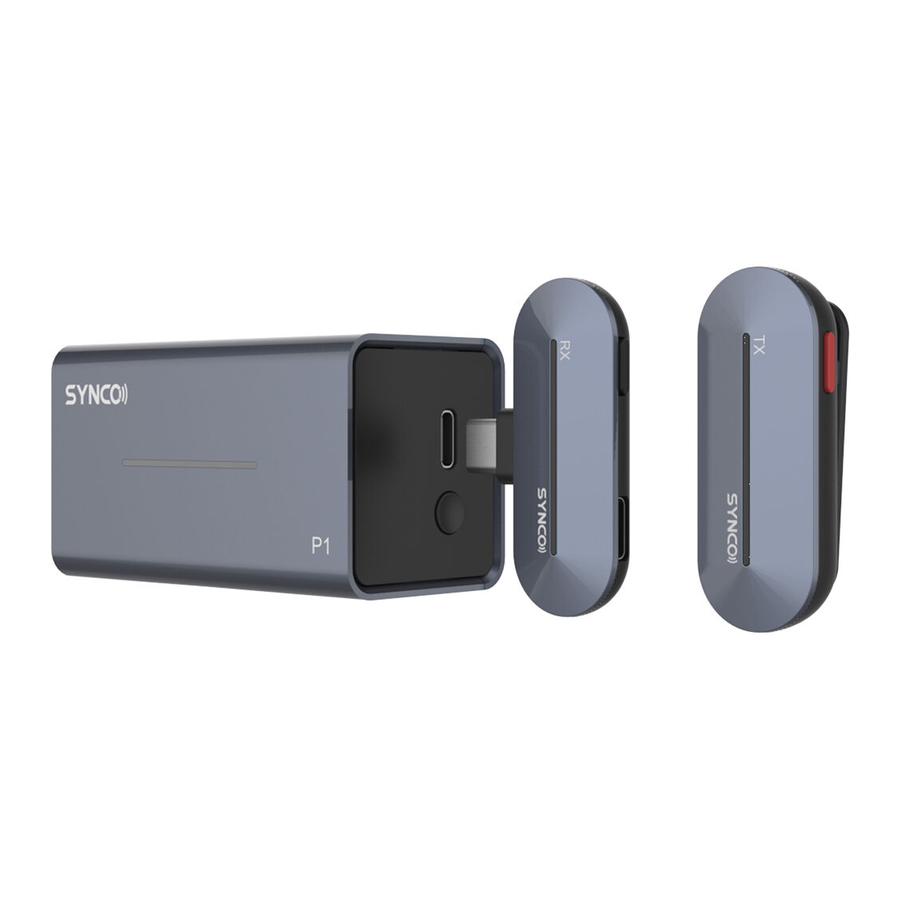
TX Transmitter x1
RX Receiver (Type-C or Lightning Connector) x1
Wireless Charging Case x1
Charging Cable x1
Type-C to 3.5mm Adapter x1
Product Instruction
TX Transmitter

- Power
- Working Indicators
- Built-in Mic
- Contacts
- Pocket Clip
RX Receiver

- Vocal Effects
- Type-C Port
- Working Indicators
- Connector
- Contacts
Wireless Charging Case

- Pairing/ Power Prompt
- Type-C Port
- Working Indicators
- Contacts
Indicator — Transmitter (Double press the Power button to turn off light effect)
| Working Indicators (White Light) | |
Flash concurrently | System unpaired |
Single light flashes | Low battery |
Illuminate sequentially (Light effect on) | System paired, normal working |
Single light keeps on (Light effect off) | System paired, normal working |
| Working Indicators (Red Light) | |
Single light keeps on (In the case) | Charging, and then turns off when fully charge |
Indicator — Receiver
| Working Indicators (White Light) | |
Flash concurrently | System unpaired |
Illuminate sequentially | System paired |
Single light keeps on & Illuminate sequentially | Original sound |
| Single light flashes twice & Illuminate sequentially | Vocal effects on |
Indicator — Wireless Charging Case
| Working Indicators (White Light) | |
Illuminate sequentially | Pairing |
Operations
Usage
- Tap on the right side of charging case to pop out the drawer
![]()
- Take the TX and RX out
- TX should boot automatically as it leaved the case, and switch itself off automatically when returning to the case.
(Forcible switch: Long press the Power button on TX for 3 seconds) - RX should boot automatically as it is plugged into smartphone

Manual Pairing
- Place the TX and RX in the case with their contacts are connected with the case's
- Long press the Pairing button on the case for 3 seconds with the drawer open
![]()
- The indicators on the TX and RX should light up and illuminate sequentially when pairing is successful

Note: The transmitter will automatically switch off if it is unpaired or disconnected for 5 minutes
Charging
Charge the TX: Place the TX in the case with contacts connected with the case's.
Charge the case: Connect the case with power supply via the charging cable.
Check the power
TX: Short press the Power button, the indicators will light up according to remain power for 5 seconds
Charging Case: Short press the Power Prompt button, the indicators will light up according to remain power for 5 seconds
Use vocal effects
Short press the Vocal Effects button on the receiver to switch sound effects: Original >> Studio FX >> KTV FX >> Voice Amplification >> EDM (Electronic Dance Music) >> Baby FX >> Male to Female >> Female to Male >> Monster FX.
Default effect: Original
Charging phone device
Plug your phone charging cable into the Type-C Port on the receiver.
In-Ear monitoring
Plug the included Type-C to 3.5mm Adapter into the Type-C Port on the receiver. Then plug in your headphones to real-time monitor mic recording and device's backgrounding.
Note: The included Type-C to 3.5mm Adapter is exclusive, not available for other devices.
Specifications
TX Transmitter
| Wireless Transmission | Digital 2.4GHz |
| RF Frequency Band | 2400-2483.5MHz |
| Frequency Response | 20Hz-20KHz |
| Working Distance | 492ft/150m(LOS area); 164ft/50m(NLOS area) |
| Sampling Rate | 48KHz |
| Bit Depth | 16Bit |
| Sensitivity | -26dB |
| SNR | >75dB |
| RF Output Power | 10dB |
| Battery Type | Built-in Lithium Battery, 120mAh |
| Battery Charging Time | 1.5H |
| Battery Life | 5H |
| Dimensions | 49x19x19 (mm) |
| Material | ABS |
| Weight | 10g |
RX Receiver
| Wireless Transmission | Digital 2.4GHz |
| RF Frequency Band | 2400-2483.5MHz |
| Working Distance | 492ft/150m(LOS area); 164ft/50m(NLOS area) |
| Sampling Rate | 48KHz |
| Bit Depth | 16Bit |
| Antenna | Built-in |
| Monitoring | 3.5mm In-Ear Monitoring |
| Connector | Type-C or Lightning Output |
| Power Input | Type-C |
| Dimensions | 49x30x9 (mm) |
| Material | ABS |
| Weight | 5g |
Wireless Charging Case
| Battery Type | Built-in Lithium Battery, 300mAh |
| Battery Charging Time | 1.5H |
| Charging Port | Type-C Port |
| Power Requirements | 5V 2A |
| Dimensions | 70x43x37 (mm) |
| Weight | 58g |
Warranty
- Customers are entitled to free replacement or repair service in case of quality defect(s) found in the product under normal use within 30 days upon receipt of the product.
- The warranty period begins on the date of purchase of brand new, unused products by the first end-user. Original SYNCO products are entitled to 12-month limited warranty service.
- If failure or any problem occurs to your product after purchase, please contact a local agent for assistance, or you can always contact SYNCO's customer service through email at support@syncoaudio.com.
Guangzhou Zhiying Technology Co., Ltd
 Block 15th, No.200 Fangcun Avenue East, Liwan District, Guangzhou, China, 510000
 support@syncoaudio.com
 www.syncoaudio.com
 https://www.facebook.com/syncomicrophones

Download manual
Here you can download full pdf version of manual, it may contain additional safety instructions, warranty information, FCC rules, etc.
Download Synco P1T / P1L - Wireless Microphone Manual and Video Review


