Nedis HPRF010BK - RF Headphones Manual
Intended use
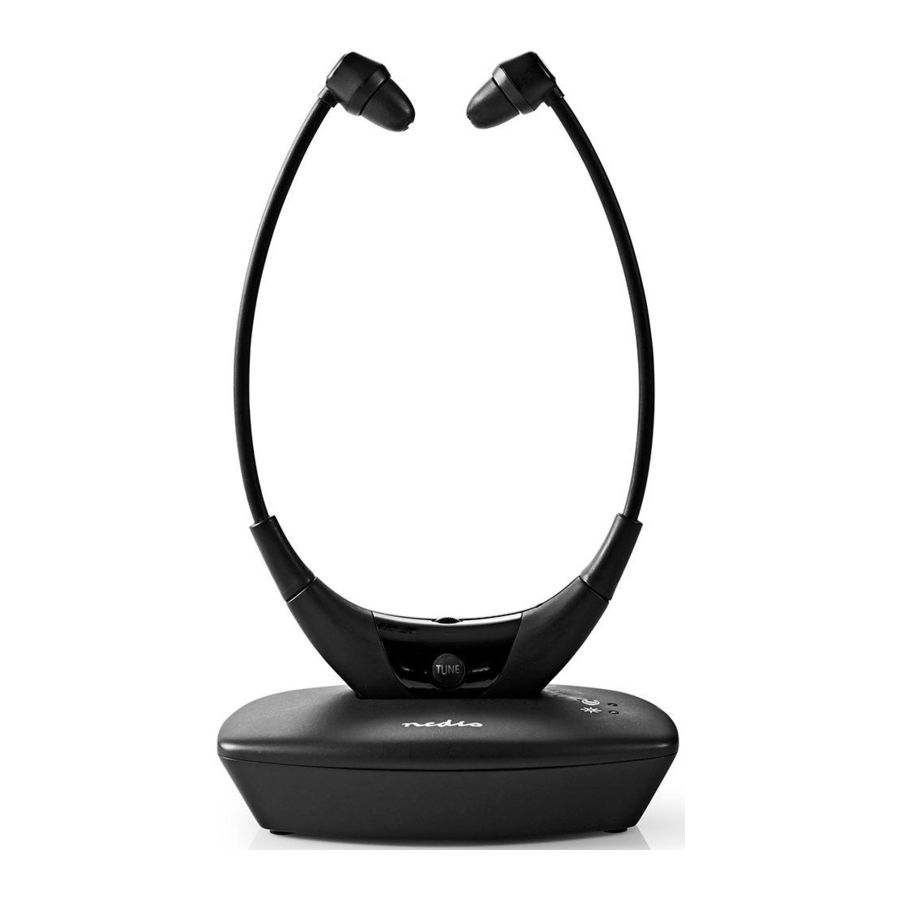
The Nedis HPRF010BK is an RF wireless headphone that offers high quality analogue sound.
Due to the design it is suitable for people with hearing difficulties.
It connects with different kinds of audio systems, such as a TV set, smartphone, DVD player, CD player, Hi-Fi system etc.
The transmitter also functions as the charger for the headphones.
Multiple receivers can be paired with one transmitter.
Any modification of the product may have consequences for safety, warranty and proper functioning.
Main parts
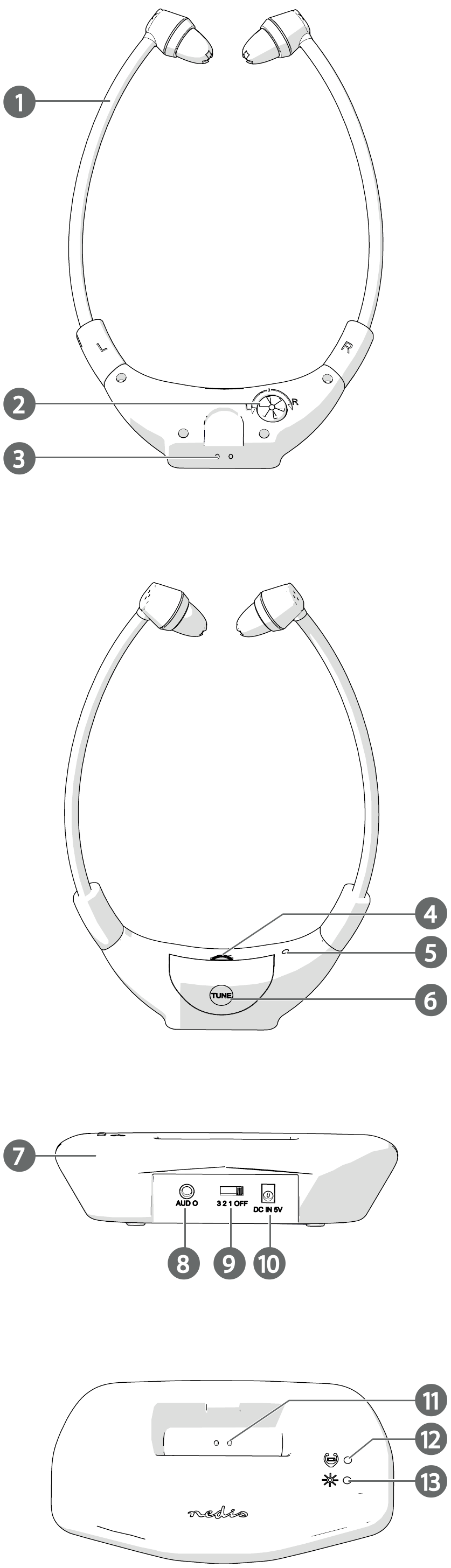
- Headphones
- Sound balance wheel
- Charging contacts
- Volume wheel
- Receiving signal indicator LED
- Tuning button
- Transmitter
- 3.5 mm audio port
- Frequency switch
- Power supply port
- Charging pins
- Charging indicator LED
- Transmitting signal indicator LED
- USB power cable
- Adapter
- 3.5 mm audio cable
Safety instructions

- Only use the product as described in this manual.
- Do not expose the product to water or moisture.
Connecting the transmitter
- Plug the provided USB power cable A
![]() into the adapter A
into the adapter A![]() .
. - Plug the other end of A
![]() into the power supply port A
into the power supply port A![]() .
. - Plug the adapter A
![]() into a power outlet.
into a power outlet. - Plug the provided 3.5 mm audio cable A
![]() into A
into A![]() .
. - Plug the other end of A
![]() into your audio source.
into your audio source.
 into the adapter A
 .
. .
. into A
 .
.Switching on the transmitter
- Switch on the transmitter A
![]() by sliding A
by sliding A![]() to the required position with the corresponding frequency: "1" (863.3 MHz) / "2" (863.9 MHz) / "3" (864.5 MHz).
to the required position with the corresponding frequency: "1" (863.3 MHz) / "2" (863.9 MHz) / "3" (864.5 MHz).
 by sliding A
 to the required position with the corresponding frequency: "1" (863.3 MHz) / "2" (863.9 MHz) / "3" (864.5 MHz).
A lights up green when the product is switched on.
A lights up green when the product is transmitting a signal or audio playback is on.
A turns off after 40 seconds without transmission.
Charging the headphones
Follow these steps to charge the battery of the headphones.
- Place the headphones A
![]() onto the transmitter A
onto the transmitter A![]()
 onto the transmitter A
 Make sure that the charging contacts A
 touch the charging pins A
 .
.
A lights up red to indicate that the headphones are charging.
A turns off when the battery is fully charged.
Pairing the headphones to the transmitter
- Switch on A
![]() .
.
A![]() switches on automatically.
switches on automatically.
A![]() is blinking.
is blinking. - Press A
![]() to adjust the frequency of the headphones to match the transmitter.
to adjust the frequency of the headphones to match the transmitter. - Check A
![]() is receiving audio.
is receiving audio.
![information]() If A
If A![]() is not receiving audio, switch to a different frequency with A
is not receiving audio, switch to a different frequency with A![]() and press A
and press A![]() .
.
A![]() lights up red to indicate the headphones receive signal from the transmitter.
lights up red to indicate the headphones receive signal from the transmitter.
A![]() lights up blue when pairing is successful.
lights up blue when pairing is successful.
 switches on automatically.
 is blinking.
 to adjust the frequency of the headphones to match the transmitter.
Controlling the volume
- Rotate A4
![]() to adjust the volume.
to adjust the volume.
 to adjust the volume.
Adjusting the sound balance
- Rotate A
![]() to adjust the volume balance between the left and the right earbud.
to adjust the volume balance between the left and the right earbud.
 to adjust the volume balance between the left and the right earbud.
Specifications
| Headphone Type | In-ear headphones |
| Article number | HPRF010BK |
| Frequency Range | 863 - 865 MHz |
| Wireless Transmission effective distance | Up to 35 metres |
| Maximum Playback Time | Up to 4.5 hours |
| Maximum Standby Time | Up to 5.5 hours |
| Maximum Charging time | Up to 1.5 hours |
| Frequency Response | 30 Hz - 16 KHz |
| Maximum transmission power | 8 mW |
| Battery capacity | 200 mAh |
| Power Adapter Input | 100 - 240 V ~ 50 / 60 Hz |
| Power Adapter Output | 5 V - 550 mA |

Download manual
Here you can download full pdf version of manual, it may contain additional safety instructions, warranty information, FCC rules, etc.
Download Nedis HPRF010BK - RF Headphones Manual

