Sage the Oracle Touch SES990 - Automatic Espresso Machine 2400W Manual
- 1 Components
- 2 Device Features
- 3 Assembly
-
4
Functions
- 4.1 FIRST USE
- 4.2 GRINDING OPERATION
- 4.3 DRINK SELECTION
- 4.4 DRINK SCREEN
- 4.5 SELECTING GRIND SIZE
- 4.6 SELECTING YOUR FILTER BASKET
- 4.7 AUTO GRIND DOSE & TAMP
- 4.8 ESPRESSO EXTRACTION
- 4.9 MANUAL OVERRIDE
- 4.10 TEXTURING MILK
- 4.11 MANUAL MILK TEXTURING
- 4.12 LONG BLACK
- 4.13 HOT WATER
- 4.14 ADDING NEW DRINK
- 4.15 SETTINGS
- 4.16 TRANSPORTING AND STORING
- 4.17 ADJUSTING CONICAL BURRS
- 5 Tips
-
6
Care & Cleaning
- 6.1 COLOUR TOUCH SCREEN DISPLAY
- 6.2 CLEANING CYCLE
- 6.3 INSTALLING THE WATER FILTER
- 6.4 CLEANING CONICAL BURRS
- 6.5 CLEANING THE STEAM WAND
- 6.6 CLEANING THE FILTER BASKET AND PORTAFILTER
- 6.7 CLEAR WATER BACKFLUSH
- 6.8 CLEANING THE SHOWER SCREEN
- 6.9 CLEANING THE DRIP TRAY & STORAGE TRAY
- 6.10 CLEANING THE OUTER HOUSING & CUP WARMING TRAY
- 6.11 DESCALE
- 7 Troubleshooting
- 8 References
- 9 Download manual
- 10 In Other Languages
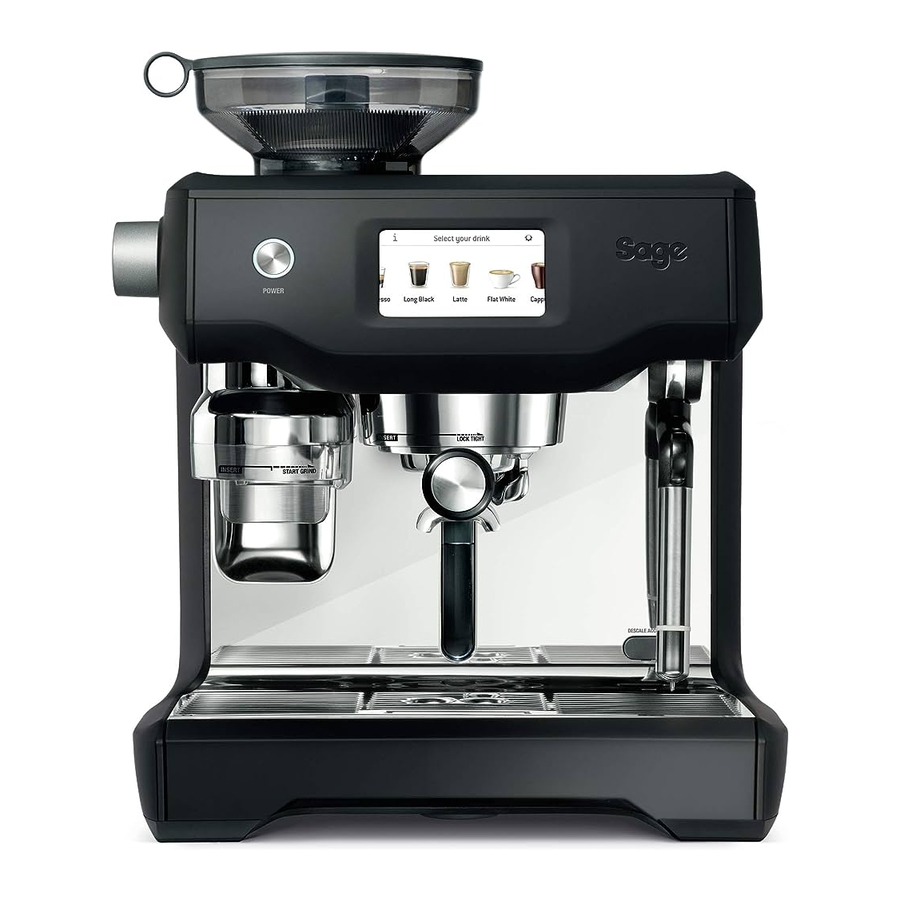
Components

- Integrated conical burr grinder
With removable 280g bean hopper. - Top-fill 2.5L removable water tank
With integrated water filter and backlit level indicator. - Grind size dial
Adjust grind size to suit your coffee beans. - Touch screen control panel
Displays current settings and provides touch interface. - Grind outlet
With auto grind, dose & tamp function. - Heated 58mm group head with embedded element
- 58mm full stainless steel portafilter
- Drop down swivel foot
Lifts the machine upwards for easy manoeuvrability. - Heated cup warming tray
- Cool touch steam wand
With integrated temperature sensor. - Dedicated hot water outlet
Delivers hot water for Long Black and pre-heating cups. - Descale access point
- Tool storage tray
Houses accessories when not in use. - Removable drip tray
With Empty Me! indicator.
ACCESSORIES

- Stainless steel milk jug
- 2 cup filter basket
- 1 cup filter basket
- Water filter holder with filter
- Cleaning disc
- Mini grinds bin
- Grinder burr brush
- Grind outlet brush & tamp removal magnet
- Cleaning tool for steam wand tip
- Two allen keys
- Steam wand cleaning powder
- Water hardness test strip
- Espresso cleaning tablets
Device Features
COLOUR TOUCH SCREEN CONTROL PANEL
Swipe & Select from the drinks menu. Adjust your coffee strength, milk texture or milk temperature, then save it as your personal favourite.
HANDS FREE AUTOMATIC GRIND, DOSE & TAMP
Automatically grinds, doses and tamps the required amount of coffee, mess free.
GRIND SIZE DIAL
Adjustable grind settings from fine to coarse for optimal espresso extraction.
STAINLESS STEEL CONICAL BURRS
Maximise ground coffee surface area for a full espresso flavour.
AUTOMATIC HANDS FREE MILK TEXTURING
Automatically textures milk to the selected temperature and style from silky smooth latté to creamy cappuccino. Automatic purge removes residual milk from the steam wand when returned to the downward position.
SIMULTANEOUS COFFEE & STEAM
Dedicated stainless steel espresso and steam boilers for simultaneous milk texturing and espresso extraction.
PRECISION CONTROL
Electronic PID Temperature Control
Electronic temperature control delivers precise water temperature for optimum espresso flavour.
Actively Heated Group Head
Commercial size 58mm group head with embedded element for thermal stability during extraction.
Regulated Extraction Pressure
Over pressure valve (OPV) limits maximum pressure for optimal espresso flavour.
Low Pressure Pre-Infusion
Gradually increases water pressure to gently expand grinds for an even extraction.
Dual Pumps
Dedicated Italian made espresso and steam boiler pumps.
Programmable Shot Temperature
Adjust water temperature to achieve optimal espresso flavour depending on coffee origin and degree of roast.
ADDITIONAL FEATURES
Auto Start
Switches machine on at a specified time.
Auto Off
Switches machine off after 30 minutes.
Assembly
BEFORE FIRST USE
Machine Preparation
Remove and discard all labels and packaging materials attached to your espresso machine. Ensure you have removed all parts and accessories before discarding the packaging.
Remove the packaging and the plastics bags containing the water filter and water filter holder. Clean parts and accessories (water tank, portafilter, filter basket, jug) using warm water and a gentle dish washing liquid. Rinse well then dry thoroughly.
 TIP
TIP
To easily manoeuvre your machine, use the drop down swivel foot located under the drip tray. When turned to UNLOCK, the swivel foot drops down & lifts the machine upwards, making it easier to access the removable water tank or reposition the machine to another location.
INSTALLING THE WATER FILTER
- Remove the water filter and water filter holder from the plastic bag.
- Soak the filter in cold water for 5 minutes.
![]()
- Wash the filter holder with cold water.
![]()
- Set the reminder for next month of replacement. We recommend to replace the filter after 3 months.
![]()
- Insert the filter into the two parts of the filter holder.

- To install the assembled filter holder into the water tank, align the base of the filter holder with the adapter inside the water tank. Push down to lock into place.
- Fill the water tank with cold water before sliding back into position at the back of the machine and locking into place.


NOTE
If you replace the filter every 3 months or 40 litre use, you don't have to descale the machine. For information on purchasing additional filters visit sageappliances.com.
NOTE
DO NOT use highly filtered, demineralised or distilled water in this machine. This may affect the taste of the coffee and how the machine operates.
Functions
FIRST USE
- Press POWER button to turn the machine on.
- Follow the instructions on screen to guide you through first use setup.
- After completing setup, the machine will tell that it is ready to use.

The machine is now in STANDBY mode. - Touch "Guide" and the machine will guide you step by step to make your first coffee. Touch the tick and go to the Drinks Menu or < to repeat the Setup. To repeat the Guide at any time, go to Settings Menu.

NOTE
If your water hardness is either 4 or 5 when tested, we strongly recommend you change to an alternate water source.
Filtered, bottled spring or mineral water will extend both the life of your built-in filter and descale intervals as well as superior taste.
Please ensure to test the water hardness of the alternative water source you've chosen and input into the machine accordingly. Avoid using overly filtered water, like RO water unless some mineral content is being added back to the final water. Never use distilled water, or water with no or low mineral content as this will affect both the taste and the functioning of your machine.
GRINDING OPERATION
Insert bean hopper into position on-top of the machine. Turn dial to lock into place. Fill hopper with fresh beans.

TIP
We recommend quality 100% Arabica beans with a 'Roasted On' date stamped on the bag, not a 'Best Before' or 'Use By' date. Coffee beans are best consumed between 5–20 days after the 'Roasted On' date. Stale coffee may pour too quickly from the portafilter spouts and taste bitter and watery.
DRINK SELECTION
To enter Drinks Menu screen, touch the Home icon  . Swipe & select your drink. Touch the 'Help & Tip' icon
  to see Oracle Touch Guide.

NOTE
Please keep the touch screen dry and clean to ensure that the machine functions properly.
DRINK SCREEN
In this screen, you can adjust your drink by touching the oval shaped buttons. You cannot adjust the Grind Size by touching the button, use the dial on the side of the machine.

Brew setting: touch this button to scroll
Espresso – single shot / double shot / custom extraction time
Long Black – small / medium / large
SELECTING GRIND SIZE
We recommend you start at No. 30 and adjust as required to control espresso flow rate.
There are 45 grind size settings (No.1 – finest, No. 45 – coarsest) to enable you to select the right grind size for your coffee beans and achieve the perfect espresso extraction.
To select grind size, rotate the grind size dial counter-clockwise to increase grind coarseness or clockwise to increase grind fineness.
SELECTING YOUR FILTER BASKET
Insert the correct Filter Basket into the Portafilter for the number of coffees or strength you are making.

Use the 1 Cup Filter Basket for making a single cup or a weaker tasting espresso.
Use the 2 Cup Filter Basket for making 2 cups or a stronger tasting espresso, usually for mugs or larger cups.
NOTE
When switching between the 1 Cup & 2 Cup Filter Baskets, you may need to adjust the grind size to fine tune your extraction.
AUTO GRIND DOSE & TAMP
Align portafilter handle with the INSERT position on the grind outlet. Lift to insert portafilter into the grind outlet and rotate to the centre position.

To start the auto grind, dose & tamp function, touch the Grind button on the display. Grinding will commence.

When the auto grind, dose & tamp function is complete, rotate the portafilter handle to the INSERT position and lower to remove.
ESPRESSO EXTRACTION
Align portafilter handle with the INSERT position on the group head. Lift to insert portafilter into the group head and rotate towards the LOCK TIGHT position until resistance is felt.
Touch the 'Brew' button on the display to start extraction. You can switch between single shot, double shot or Custom by touching the 'Single', 'Double' or Custom button. The duration times are preset, but can be customised.

MANUAL OVERRIDE
Press and hold the 'Brew' button (approx 2secs) to enter manual extraction mode. Touch the Brew button to start the extraction, touch the Brew button to stop the extraction.
TEXTURING MILK
Different brands and types of milk and milk alternatives will texture differently. You may need to adjust the froth level accordingly.
Start with fresh cold milk. Fill milk jug to below the spout position. Lift steam wand and insert into milk jug. Lower steam wand, ensuring it is fully down. The milk jug should rest on the drip tray and milk should cover the steam wand seal.

To start, touch the 'Milk' button (milk). The screen will display the temperature of the milk as it heats. Milk texturing will stop automatically when the selected milk temperature is reached. Lift steam wand to remove milk jug. Wipe the wand & tip with a clean damp cloth.
Lower steam wand to the down position and the wand will automatically purge.
NOTE
Prior to texturing milk, it is recommended to momentarily purge the steam wand by first touching the 'Milk' button (milk). Touching the button again will stop steam delivery.
MANUAL MILK TEXTURING
Auto milk texturing and auto shut-off are disabled during manual milk texturing mode.
Lift the steam wand. Press and hold the 'Milk' Button (milk) (approx 2secs) to enter manual mode.
Start frothing by touching the button.
When desired temperature is reached, touch the Milk Button (milk) to stop.
Wipe the wand & tip with a clean damp cloth.
Lower steam wand to the down position and the wand will automatically purge.

Pressurised steam can still be released, even after machine has been switched off.
Children must always be supervised.
LONG BLACK
There are 3 preset Long Black settings – small, medium and large.
Grind dose & tamp your porta-filter & insert into the group head. Position your cup underneath the porta-filter spouts & the hot water spout. Espresso will be extracted first, the hot water is delivered automatically after the espresso.

| PRESET CUP SIZE | AMOUNT BREWED |
| Small | Approx. 6oz / 180ml |
| Medium | Approx. 8oz / 240ml |
| Large | Approx. 12oz / 360ml |
The brewed amounts are approximate only. Actual amounts may vary due to the coffee bean roast, blend and freshness as well as the selected grind size. These factors affect extraction rate and shot volume.
HOT WATER
The HOT WATER function can be used to pre-heat cups or add hot water manually.
To start & stop hot water, touch 'Hot Water' (hot water) on the screen.
To ensure water is dispensed at the correct temperature, hot water will cease to dispense after approx. 30 seconds. Depending on the size of your cup, you may need to touch the 'Hot Water' (hot water) button to stop pouring.
NOTE
You cannot run hot water and extract espresso at the same time.
ADDING NEW DRINK
Touch 'Create New' in the menu screen to create a customised drink. You can adjust parameters based on a standard style and save your own.

Add New
Alternatively, after manually adjusting parameters touch the small icon  to save the current setting.
SETTINGS
To enter settings menu, touch the icon  on the upper right on the screen.
Quick Start Guide
Machine will guide you on screen, step by step to make an actual coffee.
Auto Start
Auto Start is optional. It allows you to program the specific time when the machine will automatically turn on.
Time and Date
Time and Date is optional. You can set time and date.
Clean Cycle
The Cleaning Cycle cleans the shower screen and back-flushes the group head. A pop-up message will let you know when it is time for cleaning.
Descale Cycle
Descaling prevents excess mineral and scale build-up. A pop-up message will let you know when it is time for descaling.
Brew Temperature
It allows you to adjust the recommended extraction temperature.
Default Milk Temperature
It allows you to adjust default temperature on all milk base drinks.
Water Hardness
It is to test water to set how often you need to descale the machine.
Screen Brightness
You can adjust brightness of your touch screen.
Work Light Brightness
You can adjust brightness of your work light.
Sound Volume
You can adjust volume for alerts and reminders.
Demo Mode
It is for on-screen Oracle demonstration sequence.
Factory Reset
Use this function to reset all programmable values back to the factory settings and delete all custom drinks.
TRANSPORTING AND STORING
We recommend draining both boilers completely before transporting the machine or storing for an extended period of time. Refer to the Descale section for the step by step instructions.
This procedure is also intended as an anti-freeze measure in the event the machine is exposed to extreme cold temperatures.
ADJUSTING CONICAL BURRS
Some types of coffee may require a wider grind range to achieve an ideal extraction or brew.
A feature of the built-in grinder is the ability to extend this range with an adjustable upper burr.
We recommend making only one adjustment at a time.

Tips
PRE-HEATING
Heating your cup or glass
A warm cup will help maintain the coffee's optimal temperature. Pre-heat your cup by rinsing with hot water from the hot water outlet and place on the cup warming tray.
Heating the portafilter and filter basket
A cold portafilter and filter basket can reduce the extraction temperature enough to significantly affect the quality of your espresso. Always ensure the portafilter and filter basket are pre-heated with hot water from the hot water outlet before initial use.
NOTE
Always wipe the filter basket and portafilter dry before dosing with ground coffee as moisture can encourage 'channelling' where water by-passes the ground coffee during extraction.
THE GRIND
When grinding coffee beans for espresso, the grind size should be fine but not too fine. The grind size will affect the rate at which the water flows through the ground coffee in the filter basket and the taste of the espresso.
If the grind is too fine (looks like powder and feels like flour when rubbed between fingers), the water will not flow through the coffee even when under pressure. The resulting espresso will be OVER-EXTRACTED, dark in colour and bitter in flavour.
If the grind is too coarse the water will flow through the ground coffee in the filter basket too quickly. The resulting espresso will be UNDER-EXTRACTED, lacking in colour and flavour.
AUTOMATIC GRINDING, DOSING & TAMPING
- Ensure hopper is filled with fresh coffee beans. Never put pre-ground coffee in the hopper.
- After automatic grinding, dosing & tamping, wipe any excess coffee from the rim of the filter basket to ensure a proper seal in the group head is achieved.
- To adjust tamping height, please use the allen key provided. Pull the tamping fan down from the grind outlet, and then loosen the fan coupling inside by rotating it counterclockwise. You can adjust the length of the coupling by loosening the fastener with the allen key and rotating the coupling to the desired length.
PURGING THE GROUP HEAD
Before placing the portafilter into the group head, run a short flow of water through the group head by touching the 'Brew' button (brew). Allow water to flow for 5 seconds, then touch the 'Brewing' button (brewing) again to stop the flow of water. This will purge any ground coffee residue from the group head and stabilise the water temperature prior to extraction.
EXTRACTING ESPRESSO
- As a guide, the espresso will start to flow within 8–12 seconds (this includes pre-infusion time) and should be the consistency of warm dripping honey.
- If the espresso starts to flow before 8 seconds, the grind is too coarse. This is an UNDER-EXTRACTED shot. Adjust the grind size slightly finer.
- If the espresso starts to flow after 12 seconds, then the grind is too fine. This is an OVER-EXTRACTED shot. Adjust the grind size slightly coarser.
A great espresso is about achieving the perfect balance between sweetness, acidity and bitterness.
The flavour of your coffee will depend on many factors, such as the type of coffee beans, degree of roast, freshness, coarseness or fineness of the grind.
Experiment by adjusting these factors just one at a time to achieve the taste of your preference.
EXTRACTION GUIDE
| EXTRACTION TYPES | GRIND | SHOT DURATION |
| OVER-EXTRACTED (bitter • astringent) | Too Fine | Over 40secs |
| BALANCED | Optimum | Between 25–35secs |
| UNDER-EXTRACTED (underdeveloped • sour) | Too Coarse | Less than 20secs |
HINTS & TIPS
If machine is run continuously for 30 minutes, allow machine to cool for 3 minutes before each use.
TEXTURING MILK
- Always start with fresh cold milk.
- Fill milk jug to below the spout position. At a minimum, there should be enough milk to cover the steam wand seal.
- To remove any condensed water from the system, ensure the steam wand is in the down position over the drip tray then touch the Milk button (milk), allow steam to flow for a few seconds, then touch the Milk button (milk) to stop.
- When texturing milk automatically, ensure the steam wand is fully down.
HINTS & TIPS
For optimum milk texturing performance it is critical that the holes around the steam tip are clear. Even partially blocked holes may affect the ability of the steam wand to produce sufficient foam.
Always wipe the wand and tip with a damp cloth BEFORE returning the wand to the down position. Wiping the wand will remove the majority of milk and allow the automatic purge feature to more effectively remove any residual milk.
After texturing is complete
- Tap the jug on the counter-top to collapse any bubbles.
- Swirl the jug to polish and re-integrate the texture.
- Pour milk directly into the espresso.
- The key is to work quickly, before the milk begins to separate.
For manual texturing,
- Lift the steam wand and insert the steam tip 1–2cm below the surface of the milk close to the right hand side of the jug at the 3 o'clock position. Enter manual frothing mode by pressing and holding the 'Milk' button (milk) (approx 2secs), and then start frothing by touching the button.
- Keep the tip just under the surface of the milk until the milk is spinning clockwise, producing a vortex (whirlpool effect).
- With the milk spinning, slowly lower the jug. This will bring the steam tip to the surface of the milk & start to introduce air into the milk. You may have to gently break the surface of the milk with the tip to get the milk spinning fast enough.
- Keep the tip at or slightly below the surface, continuing to maintain the vortex. Texture the milk until sufficient volume is obtained.
- Lift the handle of the jug to lower the tip beneath the surface, but keep the vortex of milk spinning. Use the touch screen to monitor the milk temperature. We recommend 55°C–65°C.
- Touch the Milk button (milk) to stop steaming BEFORE lowering the jug and taking the tip out of the milk.
COFFEE BEAN HINTS & TIPS
- Fresh, quality coffee beans will give you the best possible extraction.
- We recommend quality 100% Arabica beans with a 'Roasted On' date stamped on the bag, not a 'Best Before' or 'Use By' date.
- Coffee beans are best consumed between 5–20 days after the 'Roasted On' date. Ideally only grind directly before the extraction to maximise flavour.
- Buy coffee beans in small batches to reduce the storage time.
- Store coffee beans in a cool, dark and dry container. Vacuum seal if possible.
Care & Cleaning
COLOUR TOUCH SCREEN DISPLAY
Please keep the touch screen dry and clean to ensure that the machine functions properly.
CLEANING CYCLE
- A message for cleaning will be displayed to indicate when a cleaning cycle is required (approx. 200 shots). Or you can start cleaning cycle by choosing 'Clean Cycle' in 'Settings'. The cleaning cycle cleans the shower screen and back-flushes the group head.
- Follow the instruction on the touch screen.
INSTALLING THE WATER FILTER
- Discard the used water filter.
- Wash the filter holder with cold water.
- Insert the filter into the two parts of the filter holder.
- To install the assembled filter holder into the water tank, align the base of the filter holder with the adapter inside the water tank. Push down to lock into place.
- Fill the water tank with cold water before sliding back into position at the back of the machine and locking into place.
NOTE
For information on purchasing additional water filters visit sageappliances.com.
CLEANING CONICAL BURRS
Regular cleaning helps the burrs achieve consistent grinding results which is especially important when grinding for espresso.


CLEANING THE STEAM WAND

After every use, thoroughly wipe the steam wand and tip with a damp cloth & purge immediately. Failure to clean the steam wand may affect the milk texturing performance.
- If any of the holes in the tip of the steam wand become blocked, ensure the machine stopped steaming and unblock using the steam tip cleaning tool. Even partially blocked holes may affect the ability of the steam wand to produce sufficient foam volume.
- If steam wand remains blocked, remove the tip and soak together with steam wand using the provided steam wand cleaning powder (instructions below). Screw tip back onto the steam wand after rinsing.
![]()
- The steam wand can be left immersed in the milk jug filled with water when not in use to reduce the risk of blockages.

Steam Wand Cleaning Powder
- Add 1 packet into an empty milk jug.
- Add 1 cup (8oz/240ml) hot water into milk jug.
- Remove steam tip and place with steam wand into jug.
- Leave to soak for 20 minutes.
- Clean, rinse and replace steam tip. Place wand back into the jug and activate steam for 10 seconds.
- Allow to soak for 5 minutes.
- Activate steam several times to purge the steam wand, then rinse the wand thoroughly.
- Wipe the steam wand dry with a clean cloth.
- Discard solution & rinse jug thoroughly.
NOTE
If an alternative cleaning solution is used, please follow the instructions specified.
Please ensure the cleaning solution is food safe and suitable for stainless steel and silicon products.
Please ensure the steam wand tip is tightly fastened after cleaning to avoid temp sensing error.
CLEANING THE FILTER BASKET AND PORTAFILTER
- The filter basket and portafilter should be rinsed under hot water after each coffee making session to remove all residual coffee oils.
- If the holes in the filter basket become blocked, dissolve a cleaning tablet in hot water and soak filter basket and portafilter in solution for approx. 20 minutes.
Rinse thoroughly.
CLEAR WATER BACKFLUSH
- After each coffee making session we recommend doing a clear water backflush before you turn off the machine. Empty drip tray. Insert the cleaning disc into the filter basket then insert the portafilter into the group head. Touch the 'Brew' button (brew) and allow pressure to build for 20 seconds, then touch to stop & release pressure. Repeat this 5 times to purge any fine coffee grounds and residual coffee oils from the brew water paths.
CLEANING THE SHOWER SCREEN
- The group head interior and shower screen should be wiped with a damp cloth to remove any ground coffee particles.
- Periodically, run hot water through the group head with the filter basket and portafilter in place, but without ground coffee. This will remove any residual ground coffee particles from the shower screen.
- If there seems to be stubborn build up on the shower screen, use the allen key to undo the screw in the middle of the shower screen, making note of which side faces into the group head.
CLEANING THE DRIP TRAY & STORAGE TRAY
- The drip tray should be removed, emptied and cleaned after each use.
- Remove grill from the drip tray. Wash the drip tray in warm soapy water.
- The storage tray can be removed and cleaned with a soft, damp cloth (do not use abrasive cleansers, pads or cloths which can scratch the surface).
CLEANING THE OUTER HOUSING & CUP WARMING TRAY
- The outer housing and cup warming tray can be cleaned with a soft, damp cloth. Polish with a soft, dry cloth. Do not use abrasive cleansers, pads or cloths which can scratch the surface.
NOTE
Do not clean any of the parts or accessories in the dishwasher.
DESCALE
- Use this function to access the descale procedure when promoted on screen.
- The machine will enter descale mode if you choose to descale from the pop-up message or if you choose 'Settings' > 'Descale Cycle'. Follow the instruction on the touch screen.
- Please ensure you allow approximately 1.5 hour to complete the entire descale process and follow the step by step instructions. If you've just finished using your machine, please ensure to turn the machine off and allow to cool for at least 1 hour before starting your descale process.
NOTE
DO NOT attempt to descale your machine without using the Descale procedure in the Settings menu. Damage to your machine could occur.
Troubleshooting
| PROBLEM (problem) | POSSIBLE CAUSE (possible cause) | WHAT TO DO (what to do) |
| Grinder Motor starts but no ground coffee coming from grind outlet (Grinder motor starts but no ground coffee coming from grind outlet) |
|
|
| Grinder Motor starts but operates with a loud 'clicking' noise (Grinder motor starts but operates with a loud 'clicking' noise) |
|
|
| Unable to lock bean hopper into position (Unable to lock bean hopper into position) |
|
|
| Portafilter overfills (Portafilter overfills) |
|
|
| Grinder Emergency stop? (Grinder Emergency stop?) |
| |
| Grinder running continuously (Grinder running continuously) |
|
|
|
| |
| Espresso runs out around the edge of the portafilter (Espresso runs out around the edge of the portafilter) |
|
|
| and/or |
|
|
| Portafilter comes out of the group head during an extraction (Portafilter comes out of the group head during an extraction) |
|
|
| Issues with the Auto Start feature (Issues with the Auto Start feature) |
|
|
| Operation Error message on the touch screen (Operation Error message on the touch screen) |
|
|
| Pumps continue to operate / Steam is very wet / Hot water outlet leaks (Pumps continue to operate / Steam is very wet / Hot water outlet leaks) |
|
|
| Water does not flow from the group head (Water does not flow from the group head) |
|
|
|
| |
|
| |
| Display says "Water tank empty" but water tank is full (Display says "Water tank empty" but water tank is full) |
|
|
| No steam or hot water (No steam or hot water) |
|
|
| No hot water (No hot water) |
|
|
| No steam (No steam) |
|
|
| The machine is 'On' but won't operate (The machine is "On" but won't operate) |
| |
| Steam pouring out of group head (Steam pouring out of group head) |
| |
| Espresso only drips from the portafilter spouts, restricted flow (Espresso only drips from the portafilter spouts, restricted flow) |
|
|
| Espresso flows out too quickly (Espresso flows out too quickly) |
|
|
| Coffee not hot enough (Coffee not hot enough) |
|
|
|
| |
| No crema (No crema) |
|
|
| Not enough milk texture (Not enough milk texture) |
|
|
| ||
| Too much coffee extracted (Too much coffee extracted) |
|
|
| Not enough coffee extracted (Not enough coffee extracted) |
|
|
| Amount of coffee extracted has changed, but all settings are the same. (Amount of coffee extracted has changed, but all settings are the same.) |
|
|

References

Download manual
Here you can download full pdf version of manual, it may contain additional safety instructions, warranty information, FCC rules, etc.
Download Sage the Oracle Touch SES990 - Automatic Espresso Machine 2400W Manual


