Sign In
Manuals
Brands
Bose Manuals
Headphones
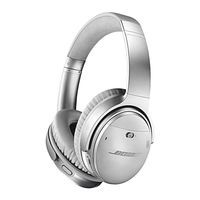
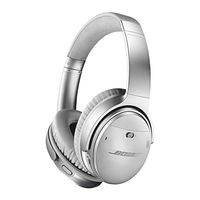
QUIETCOMFORT 35 II
Bose QUIETCOMFORT 35 II Manuals
Manuals and User Guides for Bose QUIETCOMFORT 35 II. We have
2
Bose QUIETCOMFORT 35 II manuals available for free Easy to read manuals to view: User Manual
Bose QUIETCOMFORT 35 II Maual
Brand:
Bose
| Category:
Headphones
| Size: 2 MB
Table of Contents
BOSE CONNECT APP
What can I do with the Bose Connect app?
WHAT'S IN THE CARTON
Contents
HEADPHONE CONTROLS
Power on
Power off
Headphone functions
Media playback and volume functions
Call functions
Action button functions
THE GOOGLE ASSISTANT
Set the Action button to your Google Assistant
Use your Google Assistant
NOISE CANCELLATION
Set the Action button to noise cancellation
Change the noise cancelling setting
ALTERNATIVE VOICE CONTROL
Access alternative voice control
Access your Google Assistant using the Multi-function button
BATTERY CHARGING
Charge the headphones
Charging time
Hear the battery level
STATUS INDICATORS
Bluetooth indicator
Battery indicator
VOICE PROMPTS
Voice prompts
Pre-installed languages
Change the language
Disable voice prompts
BLUETOOTH CONNECTIONS
Connect your mobile device using the Bose Connect app (recommended)
Choose an alternative connection method
Connect using the Bluetooth menu on your mobile device
Connect using NFC on your mobile device
What is NFC?
Disconnect a mobile device
Reconnect a mobile device
MULTIPLE BLUETOOTH CONNECTIONS
Connect another mobile device
Identify connected mobile devices
Switch between two connected mobile devices
Reconnect a previously connected device
Clear the headphone pairing list
CARE AND MAINTENANCE
Store your headphones
Clean the headphones
Replacement parts and accessories
Limited warranty
Serial number location
TROUBLESHOOTING
Common solutions
Headphones don't power on
Headphones don't connect with your mobile device
Headphones don't connect using NFC
No sound
Poor sound quality
No sound from a device connected by the back-up audio cable
Poor sound quality from a device connected by audio cable
Battery won't charge
Your Google Assistant not responding
Action button does not change the noise cancelling setting
Documents / Resources
References
Bose QuietComfort 35 II Manual
Brand:
Bose
| Category:
Headphones
| Size: 2 MB
Table of Contents
BOSE CONNECT APP
What can I do with the Bose Connect app?
WHAT'S IN THE CARTON
Contents
HEADPHONE CONTROLS
Power on
Standby timer
Power off
Headphone functions
Media playback and volume functions
Call functions
Action Button Functions
Noise Cancellation
Noise cancelling modes
Change the noise cancelling mode using the Action button
VOICE CONTROL
Access voice control
BATTERY CHARGING
Charge the headphones
Charging time
Hear the battery level
STATUS INDICATORS
Bluetooth indicator
Battery indicator
VOICE PROMPTS
Pre-installed languages
Change the language
Disable voice prompts
BLUETOOTH CONNECTIONS
Connect your mobile device using the Bose Connect app (recommended)
Choose an alternative connection method
Connect using the Bluetooth menu on your mobile device
Connect using NFC on your mobile device
Disconnect a mobile device
Reconnect a mobile device
MULTIPLE BLUETOOTH CONNECTIONS
Connect another mobile device
Identify connected mobile devices
Switch between two connected mobile devices
Reconnect a previously connected device
Clear the headphone pairing list
WIRED CONNECTIONS
Connect the audio cable
CONNECT BOSE PRODUCTS
Connect a Bose Home Speaker or Soundbar
Benefits
Compatible products
Connect using the Bose Music app
Reconnect to a Bose Home Speaker or Soundbar
CARE AND MAINTENANCE
Store your headphones
Clean the headphones
Replacement parts and accessories
Limited warranty
Serial number location
TROUBLESHOOTING
Common solutions
Headphones don't power on
Headphones don't connect with your mobile device
Headphones don't connect using NFC
No sound
Poor sound quality
No sound from a device connected by the back-up audio cable
Poor sound quality from a device connected by audio cable
Battery won't charge
Action button does not change the noise cancelling mode
Headphones don't connect with a Bose Home Speaker or Bose Soundbar
Headphones don't reconnect to a previously- connected Bose Home Speaker or Bose Soundbar
Delayed audio when connected to a Bose Home Speaker or Bose Soundbar
Documents / Resources
References
Related Products
Bose QuietComfort 35
Bose QuietComfort 20
Bose QuietComfort 25
Bose QuietComfort 15
Bose QuietComfort Ultra Headphones
Bose QuietComfort Ultra Earbuds
Bose QuietComfort Earbuds II
Bose QuietComfort 45
Bose SOUNDTOUCH 300
Bose 301 Series V
Bose Categories
Speakers
Headphones
Speaker systems
Stereo Systems
Home Theatre Systems
More Bose Manuals
Login
Sign In
OR
Sign in with Facebook
Sign in with Google
Upload manual
Upload from disk
Upload from URL