NIXON THE SUPERHERO - Manual del Reloj
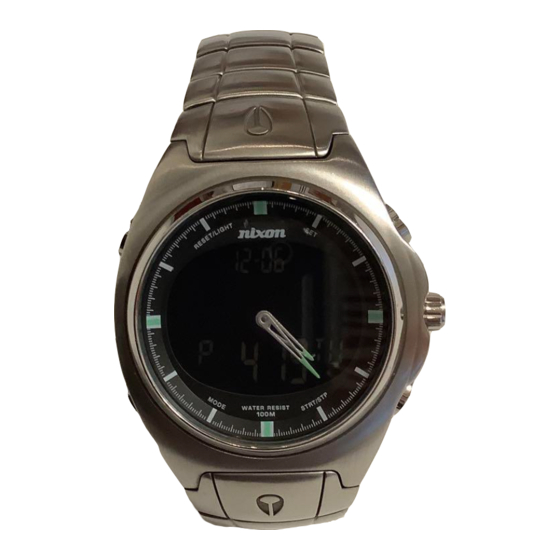
VISIÓN GENERAL

MODOS

DIGITAL
| DIGITAL | PANTALLA DE MATRIZ DE PUNTOS | |
| HORA NORMAL | (SOLO SE MUESTRA LA HORA Y LA FECHA) | |
| MAREA |  | |
| TEMPORIZADOR DE CUENTA REGRESIVA |  | |
| CRONÓGRAFO |  | |
| HORA DUAL |  | |
| ALARMA |  | |
| REPOSO | SLP | |
En cualquier modo digital, puedes mantener presionado LIGHT/RESET (LUZ/REINICIAR) durante 2 SEGUNDOS y entrarás automáticamente en el modo SLEEP (REPOSO), la pantalla digital desaparece, pero no se olvida. Si el cronómetro o el temporizador de cuenta regresiva o la alarma están activados, seguirán funcionando durante el modo de reposo. Para salir del modo de reposo, mantén presionado LIGHT/RESET (LUZ/REINICIAR) durante 2 SEGUNDOS y volverás a estar en vivo.
ANÁLOGO
AJUSTAR LA HORA

FIG. 1
TIRA de la corona hasta la posición 2.
GIRA la corona en cualquier dirección hasta la hora correcta.
EMPUJA la corona hasta la posición 1 (hasta el fondo).
NUNCA PULSES EL BOTÓN DE LUZ CUANDO TU RELOJ ESTÉ SUMERGIDO. NUNCA.
MODO DE HORA NORMAL

PARA AJUSTAR LA HORA
PULSA y MANTÉN PRESIONADO el botón SET (AJUSTAR) durante 2 SEGUNDOS
NOTA: El DÍA parpadeará.
PULSA el botón STRT/STP (INICIO/PARADA) para desplazarte al día correcto.
PULSA el botón MODE (MODO).
NOTA: Los MINUTOS parpadearán.
PULSA el botón STRT/STP (INICIO/PARADA) para llegar al minuto correcto.
PULSA el botón MODE (MODO).
NOTA: Las HORAS parpadearán.
YA conoces el truco: sigue el mismo procedimiento para ajustar el DÍA, el MES y el AÑO.
NOTA: Pulsa STRT/STP (INICIO/PARADA) para cambiar a la visualización de 24 horas
NOTA: Pulsa Set (Ajustar) para cambiar de la visualización de DÍA a SEGUNDO
MODO DE MAREA

PARA AJUSTAR LA PLEAMAR
PULSA y MANTÉN PRESIONADO durante 2 SEGUNDOS el botón SET (AJUSTAR).
NOTA: Los Minutos de la PLEAMAR DE LA PLAYA LOCAL parpadearán.
PULSA el botón STRT/STP (INICIO/PARADA) para llegar al MINUTO correcto
PULSA el botón MODE (MODO)
NOTA: Las HORAS de la PLEAMAR DE LA PLAYA LOCAL parpadearán.
PULSA el botón STRT/STP (INICIO/PARADA) para llegar a la HORA correcta
PULSA el botón MODE (MODO).
NOTA: los MINUTOS de la PLEAMAR DE LA PLAYA 1 parpadearán.
PULSA el botón STRT/STP (INICIO/PARADA) para llegar al MINUTO correcto
PULSA el botón MODE (MODO)
NOTA: Las HORAS de la PLEAMAR DE LA PLAYA 1 parpadearán.
PULSA el botón STRT/STP (INICIO/PARADA) para llegar a la HORA correcta.
REPITE para la PLAYA 2
PULSA el botón SET (AJUSTAR) en cualquier momento para salir del modo de ajuste de la marea.
PARA CAMBIAR DE LA PLAYA LOCAL A LA PLAYA 1 O LA PLAYA 2

PULSA STRT/STP (INICIO/PARADA) para cambiar a la PLAYA 1 en el modo de MAREA LOCAL normal
PULSA STRT/STP (INICIO/PARADA) para cambiar a la PLAYA 2 en el modo de MAREA DE LA PLAYA 1
PULSA STRT/STP (INICIO/PARADA) para cambiar a LOCAL en el modo de MAREA DE LA PLAYA 2
PARA VER EL TIEMPO DE CUENTA REGRESIVA DE LA MAREA
PULSA SET (AJUSTAR) para cambiar entre la visualización de la hora normal y el TIEMPO DE CUENTA REGRESIVA DE LA MAREA en cualquier modo de PLAYA (Local, Playa 1 o Playa 2)
¿SABÍAS QUE...?
La fase de la LUNA ya está programada y te indicará con precisión la fase lunar hasta que seas viejo y canoso. La MAREA debe ajustarse cada pocas semanas para garantizar la precisión. Si la fase lunar o la marea no muestran información precisa, comprueba que has ajustado correctamente la fecha de Super Hero.
MODO DE TEMPORIZADOR DE CUENTA REGRESIVA

NOTA: El temporizador de cuenta regresiva de Super Hero está inicialmente configurado en una cuenta regresiva de 20 minutos. Esta es la duración de una manga normal, pero puedes configurar el temporizador de cuenta regresiva a cualquier hora de 20 HORAS o menos. Si estás haciendo algo durante más de 20 HORAS seguidas, algo va mal.
PARA LA CUENTA REGRESIVA
PULSA STRT/STP (INICIO/PARADA) para iniciar la cuenta regresiva.
PULSA STRT/STP (INICIO/PARADA) para pausar o detener la cuenta regresiva.
PULSA LIGHT/RESET (LUZ/REINICIAR) para reiniciar el contador.
PARA AJUSTAR EL TEMPORIZADOR DE CUENTA REGRESIVA
PULSA y MANTÉN PRESIONADO durante 2 SEGUNDOS el botón SET (AJUSTAR).
NOTA: Los SEGUNDOS parpadearán.
PULSA el BOTÓN STRT/STP (INICIO/PARADA) para llegar al segundo correcto.
PULSA el botón MODE (MODO).
NOTA: Los MINUTOS parpadearán.
PULSA el BOTÓN STRT/STP (INICIO/PARADA) para llegar al minuto correcto.
PULSA el botón MODE (MODO)
NOTA: Las HORAS parpadearán.
PULSA el BOTÓN STRT/STP (INICIO/PARADA) para llegar a la hora correcta.
SUGERENCIA: Mantén pulsado el botón para que los números vayan más rápido.
DURANTE LA CUENTA REGRESIVA

TRES MINUTOS antes del tiempo cero, oirás UN pitido. UN MINUTO antes del tiempo cero, oirás TRES pitidos. En TIEMPO CERO, el pitido continuará durante 15 segundos.
PULSA cualquier botón para apagar el pitido.
MODO CRONO

PARA MEDIR EL TIEMPO DE ALGO
PULSA STRT/STP (INICIO/PARADA) para iniciar.
PULSA STRT/STP (INICIO/PARADA) para detener.
PULSA LIGHT/RESET (LUZ/REINICIAR) para reiniciar
PARA PARCIALES
PULSA el botón SET (AJUSTAR) mientras el CRONO está en funcionamiento (aparecerá la palabra SPLIT (PARCIAL))
PULSA STRT/STP (INICIO/PARADA) para detener el CRONO
PULSA SET (AJUSTAR) para recuperar el tiempo de SPLIT (PARCIAL)
PULSA LIGHT/RESET (LUZ/REINICIAR) para reiniciar.
MODO DE HORA DUAL

AJUSTAR LA HORA DUAL
PULSA y MANTÉN PRESIONADO durante 2 SEGUNDOS el Botón SET (AJUSTAR).
NOTA: El DÍA parpadeará.
PULSA STRT/STP (INICIO/PARADA) para seleccionar el DÍA correcto.
PULSA el botón MODE (MODO).
NOTA: Los MINUTOS parpadearán.
PULSA STRT/STP (INICIO/PARADA) para seleccionar el MINUTO correcto.
PULSA el botón MODE (MODO).
NOTA: Las HORAS parpadearán.
PULSA STRT/STP (INICIO/PARADA) para seleccionar la HORA correcta.
PULSA MODE (MODO) para salir del MODO DE AJUSTE DE HORA DUAL.
MODO DE ALARMA

PARA AJUSTAR LA ALARMA
PULSA y MANTÉN PRESIONADO durante 2 SEGUNDOS el botón SET (AJUSTAR).
NOTA: Los MINUTOS parpadearán.
PULSA STRT/STP (INICIO/PARADA) para seleccionar los MINUTOS correctos.
PULSA el botón MODE (MODO).
NOTA: Las HORAS parpadearán.
PULSA STRT/STP (INICIO/PARADA) para seleccionar la HORA correcta.
PULSA SET (AJUSTAR) para salir del MODO DE AJUSTE DE ALARMA.
PARA ACTIVAR LA ALARMA
En el MODO DE ALARMA (AL), pulsa el botón LIGHT (LUZ) para activar/desactivar la alarma.
PARA ACTIVAR EL AVISO HORARIO
En el MODO DE ALARMA (AL), pulsa el botón STRT/STP (INICIO/PARADA) para activar/desactivar el aviso.
CUANDO SUENA LA ALARMA
PULSA LIGHT/RESET (LUZ/REINICIAR) para entrar en el MODO DE REPOSO (SNOOZE).
PULSA CUALQUIER OTRO BOTÓN para apagar la alarma.
NOTA: El modo de reposo es un reposo de diez minutos y se repetirá seis veces. Cualquier cosa después de eso, estás por tu cuenta.

Descargar el manual
Aquí puede descargar la versión PDF completa del manual. Puede contener instrucciones de seguridad adicionales, información de garantía, reglas de la FCC, etc.
Descargar NIXON THE SUPERHERO - Manual del Reloj


