Motorola APX 4500 Manual
Contents
OVERVIEW
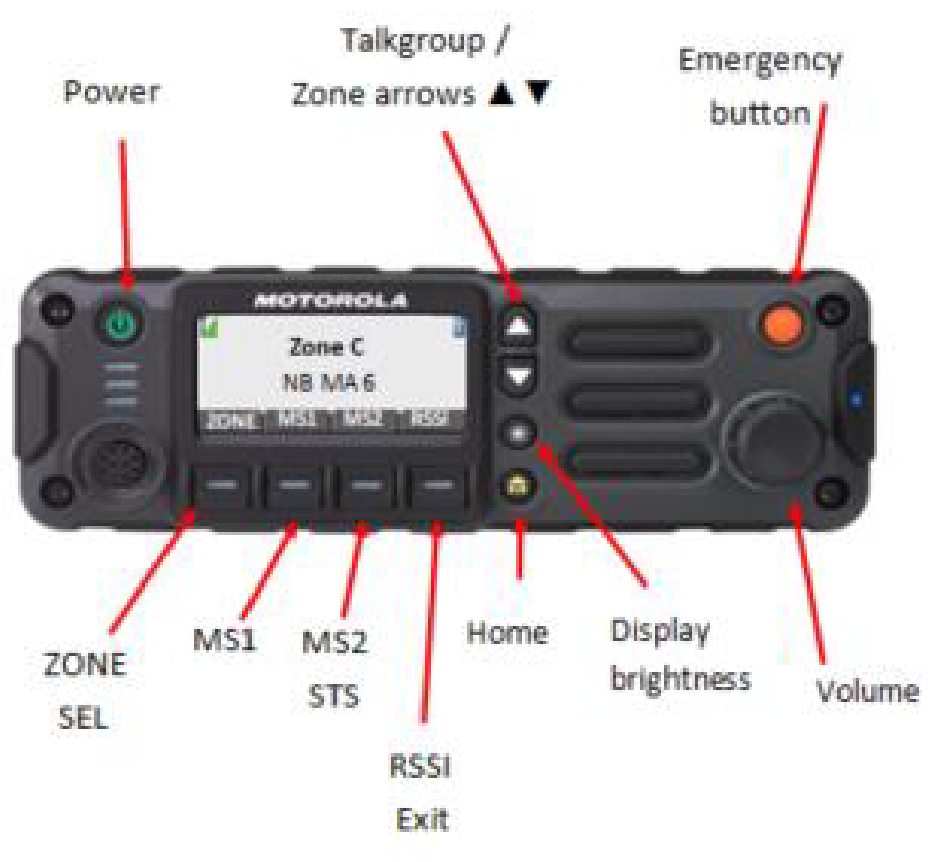

TO CHANGE ZONE
- Press "ZONE".
- Press the up or down arrows (
![]() ) to navigate in the zone menu.
) to navigate in the zone menu. - Once the desired zone is highlighted in blue, press "SEL".
- The desired zone will appear on the screen.
 ) to navigate in the zone menu.
TO CHANGE TALKGROUP
- Once on the desired zone (see above to select zone).
- Push the up and down arrows (
![]() ) until the desired talkgroup appears on the screen.
) until the desired talkgroup appears on the screen.
TO SET MS1 AND MS2
- Chose the desired talkgroup on the screen to be present (see above to select talkgroup).
- Press "MS1" or "MS2" for a few seconds until you hear a tone.
- Two different talkgroups can be preset in the radio by this method.
MUTUAL AID TALKGROUP
- You must request a mutual aid Talkgroup through your PSAP.
- PSAP will assign you a mutual aid Talkgroup.
- Advise PSAP when you are transferring to and from the Mutual aid Talkgroup
- Once finished, return to your operational Talkgroup
- If you are the one that requested the mutual aid Talkgroup, you must release it through your PSAP when finished
EMERGENCY ALERT
- Press and hold the "Emergency" button for 2.5 seconds to activate an emergency alert.
- After you hear the emergency alert tone, you will have an open mic for 20 seconds.
- Your message will be heard by your local PSAP and the talkgroup your radio is programmed on.
- After the 20 seconds, you must press "PTT" on the radio to communicate.
- When the emergency is terminated, you must reset the radio by pressing and holding the "Emergency" button again for 2.5 seconds.
For all NBTMR radio repairs, general questions, equipment orders, or requests for training...
Contact the Radio Communications Service Desk at:
1-800-752-7011
Or Email:
Radcom. Workplanner@gnb.ca
For more great information on RADCOM and the services we have to offer your department, check out our website at:
https://www2.gnb.ca/content/gnb/en/departments/dti/radcom.html
Or search "RADCOM NB" is your search engine browser and click the first link as shown below:

References

Download manual
Here you can download full pdf version of manual, it may contain additional safety instructions, warranty information, FCC rules, etc.
Download Motorola APX 4500 Manual

