Pioneer SPH-DA160DAB - Panduan Memulai Cepat Penerima RDS AV
Ikhtisar

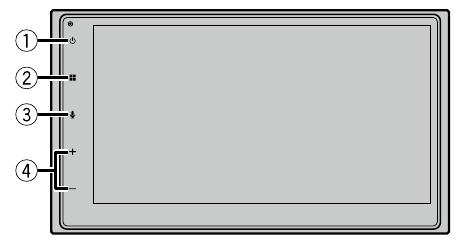
 |  |
|
 |  |
|
 |  |  Activate the voice recognition mode (Aktifkan mode pengenalan suara) Activate the voice recognition mode (Aktifkan mode pengenalan suara) |
 | VOL (+/-) | |
 Display off (Matikan tampilan)
 Power off (Matikan daya)
Memilih jam
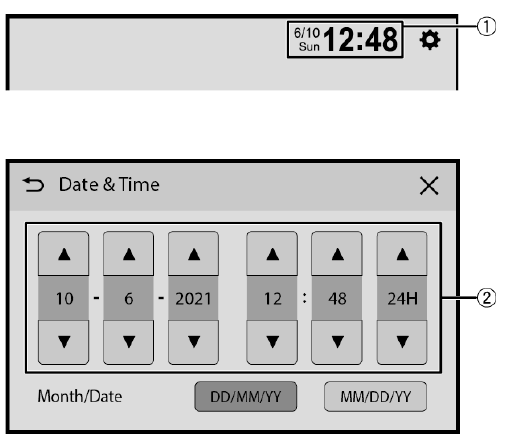
 |  Switch to clock adjustment display (Beralih ke tampilan penyesuaian jam) Switch to clock adjustment display (Beralih ke tampilan penyesuaian jam) |
 | Adjust the clock (Sesuaikan jam) |
Memilih sumber
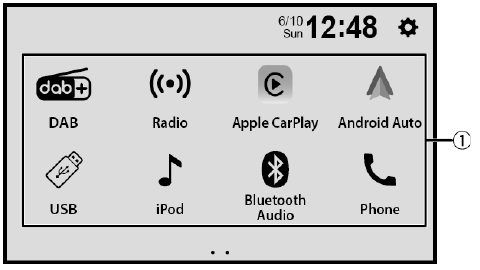
 | Select a source (Pilih sumber) |
Operasi tuner
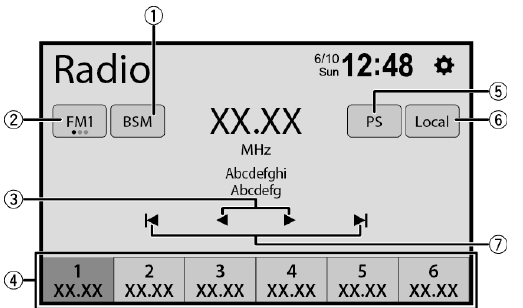
| |  Store the strongest broadcast frequencies (Simpan frekuensi siaran terkuat) Store the strongest broadcast frequencies (Simpan frekuensi siaran terkuat) |
 | Select a band (Pilih band) |
 | Tune into the next station (Cari stasiun berikutnya) |
 |
|
 | Displays a preset channel for 10 seconds and switches to the next channel automatically. (Menampilkan saluran prasetel selama 10 detik dan beralih ke saluran berikutnya secara otomatis.) |
 | Tune into only radio stations with sufficiently strong signals (Cari hanya stasiun radio dengan sinyal yang cukup kuat) |
 | Start seek turning (Mulai pencarian) |
 Store the current broadcast frequency to a key (Simpan frekuensi siaran saat ini ke tombol)
Operasi gambar bergerak
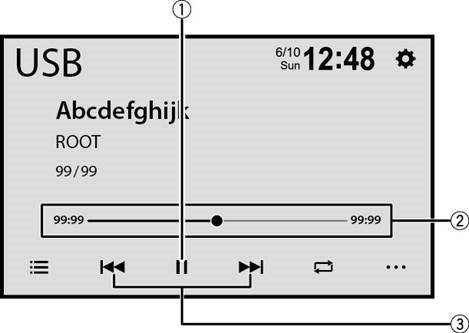
 | Pause and start playback (Jeda dan mulai pemutaran) |
 |  Change the playback point (Ubah titik pemutaran) Change the playback point (Ubah titik pemutaran) |
 |
|
 Performs fast forwards or fast reverse. Touch again to change the playback speed. (Melakukan maju cepat atau mundur cepat. Sentuh lagi untuk mengubah kecepatan pemutaran.)
Operasi audio
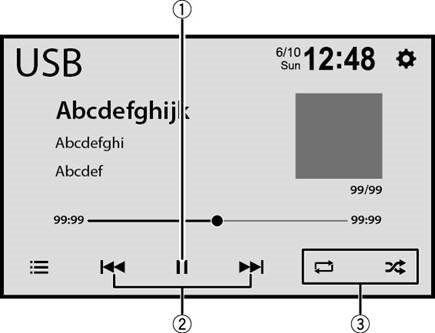
 | Pause and start playback (Jeda dan mulai pemutaran) |
 |
|
 | Set the function for playing audio (Atur fungsi untuk memutar audio) |
Operasi pencarian daftar
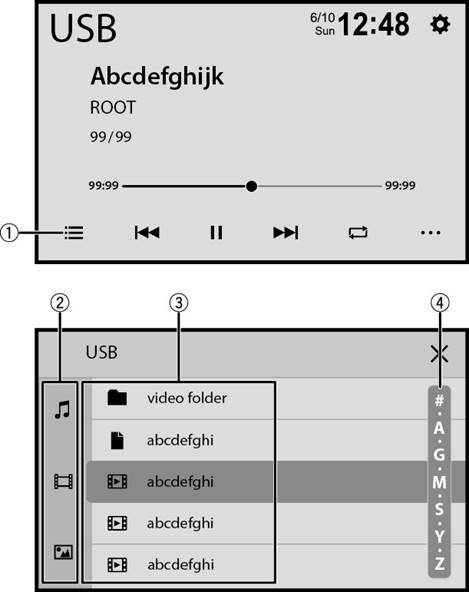
 | Display the playlist screen (Tampilkan layar daftar putar) |
 | Select the media file types (Pilih jenis file media) |
 | Select a list title or folder that you want to play (Pilih judul daftar atau folder yang ingin Anda putar) |
 |  Scroll the list (Gulir daftar) Scroll the list (Gulir daftar) |
Koneksi Bluetooth®
![]() Bluetooth Settings] (Pengaturan Bluetooth)
Bluetooth Settings] (Pengaturan Bluetooth) ![]() [Search] (Cari).
[Search] (Cari).![]() the Bluetooth device name. (nama perangkat Bluetooth.)
the Bluetooth device name. (nama perangkat Bluetooth.)
 Bluetooth Settings] (Pengaturan Bluetooth)
  [Search] (Cari).
CATATAN
Merek kata dan logo Bluetooth® adalah merek dagang terdaftar yang dimiliki oleh Bluetooth SIG, Inc. dan setiap penggunaan merek tersebut oleh Pioneer Corporation berada di bawah lisensi. Merek dagang dan nama dagang lainnya adalah milik pemiliknya masing-masing.
Operasi telepon Bluetooth
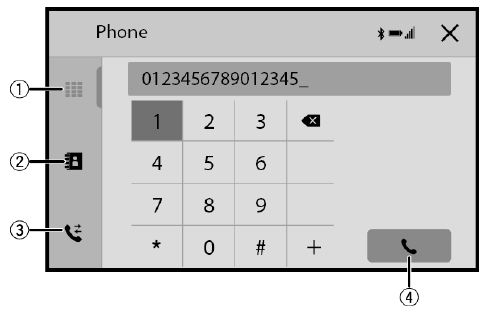
 | Enter the phone number directly (Masukkan nomor telepon secara langsung) |
 | Switch to the phone book mode (Beralih ke mode buku telepon) |
 | Switch to the call history list (Beralih ke daftar riwayat panggilan) |
 | Make an outgoing call (Lakukan panggilan keluar) |

Unduh manual
Di sini Anda dapat mengunduh versi pdf lengkap manual, mungkin berisi instruksi keselamatan tambahan, informasi garansi, aturan FCC, dll.
Unduh Pioneer SPH-DA160DAB - Panduan Memulai Cepat Penerima RDS AV


