Sign In
Manuals
Brands
Omron Manuals
Blood Pressure Monitor
BP4350
Omron BP4350 Manuals
Manuals and User Guides for Omron BP4350. We have
1
Omron BP4350 manual available for free Easy to read manuals to view: User Manual
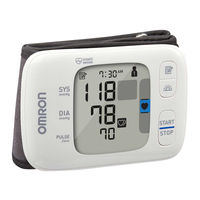
Omron BP4350 - Wrist Blood Pressure Monitor Manual
Brand:
Omron
| Category:
Blood Pressure Monitor
| Size: 4 MB
Table of Contents
Introduction
Safety Instructions
Intended Use
Receiving and Inspection
Symbols Glossary
Important Safety Information
Data Transmission
Battery Handling and Usage
Know Your Monitor
Contents
Monitor
Display
Display Symbols
Preparation
Installing Batteries
Setting the Date and Time
Blood Pressure Measurement Tips
Applying the Wrist Cuff
Sitting Correctly
Selecting a User ID
Using Your Monitor without a Smart Device
Taking a Measurement
Press the [START/STOP] button to turn your monitor off.
Using Your Monitor with a Smart Device
Pairing Your Monitor with a Smart Device
Taking a Measurement
Disabling/Enabling Bluetooth
Using Memory Function
Viewing the Readings Stored in Memory
Viewing the Average Reading
Viewing Morning Weekly Averages
Morning Weekly Average Calculation
Other Settings
Disabling/Enabling Heart Zone Indicator
Deleting All Readings Stored in Memory
Restoring Your Monitor to the Default Settings
Error Messages and Troubleshooting
Maintenance
Storage
Cleaning
Disposal
Specifications
Pictogram on the Product
Documents / Resources
References
Related Products
Omron BP742N
Omron BP7900
Omron BP7250
Omron EVOLV BP7000
Omron BP5250
Omron BP6350
Omron BP742
Omron BF306
Omron BodySCAN
Omron 10 Series
Omron Categories
Blood Pressure Monitor
Thermometer
Scales
Respiratory Product
Pedometer
More Omron Manuals
Login
Sign In
OR
Sign in with Facebook
Sign in with Google
Upload manual
Upload from disk
Upload from URL