Nedis TVRC2110BK - Mwongozo wa Haraka wa Kidhibiti cha Mbali cha Universal
Yaliyomo
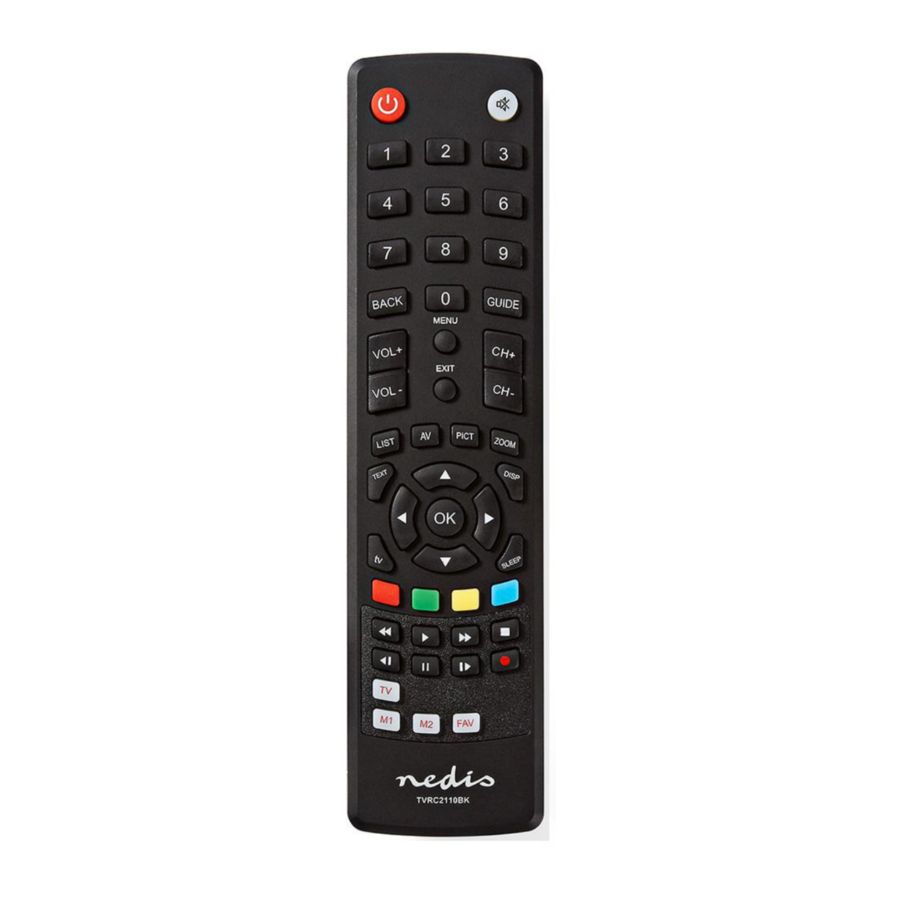
Maelezo

| Washa au zima kifaa |
| Nyamazisha au ondoa sauti |
| Chagua vituo vilivyohifadhiwa |
| Rudi nyuma |
| Mwongozo wa programu ya kielektroniki (EPG) |
| Ongeza au punguza sauti |
| Chaneli inayofuata au iliyotangulia |
| Onyesha menyu |
| Ondoka |
| Kitendaji cha orodha |
| Sauti/Video (Audio/Video) |
| Picha-ndani-ya-picha (PiP) (Picture-in-picture (PiP)) |
| Kitendaji cha kukuza |
| Usogezaji (Navigation) |
| Thibitisha (Confirm) |
| Teletext |
| Kitendaji cha kuonyesha |
| Kitendaji cha TV |
| Hali ya kulala (Sleep mode) |
| Usanidi wa vitufe vya kibinafsi (Individual button configurations) |
| Rekodi (Record) |
| Anza uchezaji (Start playback) |
| Sitisha uchezaji (Pause playback) |
| Simamisha uchezaji (Stop playback) |
| Sogeza mbele haraka uchezaji (Fast-forward playback) |
| Rudisha nyuma uchezaji (Rewind playback) |
| Chaneli au kipengee cha menyu kinachofuata (Next channel or menu item) |
| Chaneli au kipengee cha menyu kilichotangulia (Previous channel or menu item) |
| Uteuzi wa media ya TV (TV media selection) |
| Uteuzi wa media ya M1/M2 (M1/M2 media selection) |
| Vipendwa (Favourites) |
| Ingiza betri (2x AAA) kwenye sehemu ya betri. (Insert the batteries (2x AAA) into the battery compartment.) |
Kupanga kidhibiti cha mbali kwenye kifaa
- Washa kifaa kitakachopangwa. (Switch on the device to be programmed.)
- Tafuta chapa sahihi ya kifaa kwenye orodha ya msimbo. Andika msimbo wa kwanza kwenye orodha ya msimbo. (Find the correct brand of the device in the code list. Make a note of the first code in the code list.)
- Bonyeza na ushikilie kitufe cha kifaa kinachohitajika (TV) hadi kiashiria cha LED kiwashe. (Press and hold the required device button (TV) until the LED indicator comes on.)
- Ingiza msimbo uliotambuliwa hapo awali.
Kumbuka: Ikiwa kiashiria cha LED kinazima, msimbo umekubaliwa. Ikiwa kifaa kimewashwa au kuzimwa, msimbo ni sahihi. Ikiwa kifaa hakijawashwa au kuzimwa, rudia hatua zilizopita kwa kutumia msimbo mwingine. (Enter the previously identified code.
Note: If the LED indicator goes off, the code has been accepted. If the device is switched on or off, the code is correct. If the device is not switched on or off, repeat the previous steps using another code.)
Utafutaji otomatiki
- Washa kifaa kitakachopangwa. (Switch on the device to be programmed.)
- Bonyeza na ushikilie kitufe cha kifaa kinachohitajika (TV) hadi kiashiria cha LED kiwashe. (Press and hold the required device button (TV) until the LED indicator comes on.)
- Elekeza kidhibiti cha mbali kwenye kifaa. Bonyeza na uachilie polepole kitufe cha kuwasha/kuzima. Kumbuka: Ikiwa kifaa kimezimwa, msimbo umepatikana. (Point the remote control to the device. Press and slowly release the on/off button. Note: If the device is switched off, the code has been found.)
- Bonyeza mara moja kitufe cha kifaa kinachohitajika (TV) ili kuthibitisha msimbo.
Kumbuka: Kwa vitufe ambavyo havifanyi kazi kwa usahihi, rudia hatua zilizopita hadi msimbo sahihi upatikane. (Immediately press the required device button (TV) to confirm the code.
Note: For buttons that do not operate correctly, repeat the previous steps until the correct code is found.)
Usalama
Usalama wa jumla
- Soma mwongozo kwa uangalifu kabla ya matumizi. Weka mwongozo kwa marejeleo ya baadaye. (Read the manual carefully before use. Keep the manual for future reference.)
- Mtengenezaji hawajibikiwi kwa uharibifu wa matokeo au uharibifu wa mali au watu unaosababishwa na kutozingatia maagizo ya usalama na matumizi yasiyofaa ya kifaa. (The manufacturer is not liable for consequential damages or for damages to property or persons caused by nonobservance of the safety instructions and improper use of the device.)
- Tumia tu kifaa kwa madhumuni yake yaliyokusudiwa. Usitumie kifaa kwa madhumuni mengine isipokuwa yale yaliyoelezwa kwenye mwongozo. (Only use the device for its intended purposes. Do not use the device for other purposes than described in the manual.)
- Usitumie kifaa ikiwa sehemu yoyote imeharibiwa au ina kasoro. Ikiwa kifaa kimeharibiwa au kina kasoro, badilisha kifaa mara moja. (Do not use the device if any part is damaged or defective. If the device is damaged or defective, replace the device immediately.)
Usalama wa betri
- Tumia tu betri zilizotajwa kwenye mwongozo. (Use only the batteries mentioned in the manual.)
- Usitumie betri za zamani na mpya pamoja. (Do not use old and new batteries together.)
- Usitumie betri za aina au chapa tofauti. (Do not use batteries of different types or brands.)
- Usiweke betri kwa polarity iliyo kinyume. (Do not install batteries in reverse polarity.)
- Usifanye mzunguko mfupi au kutenganisha betri. (Do not short-circuit or disassemble the batteries.)
- Usionyeshe betri kwa maji. (Do not expose the batteries to water.)
- Usionyeshe betri kwa moto au joto kali. (Do not expose the batteries to fire or excessive heat.)
- Betri zina uwezekano wa kuvuja zikiwa zimeisha kabisa. Ili kuepuka uharibifu wa bidhaa, ondoa betri unapoacha bidhaa bila kutunzwa kwa muda mrefu. (Batteries are prone to leakage when fully discharged. To avoid damage to the product, remove the batteries when leaving the product unattended for longer periods of time.)
- Ikiwa kioevu kutoka kwa betri kinagusana na ngozi au nguo, suuza mara moja na maji safi. (If liquid from the batteries comes into contact with skin or clothing, immediately rinse with fresh water.)
Kusafisha na matengenezo

- Usitumie viyeyusho vya kusafisha au abrasives. (Do not use cleaning solvents or abrasives.)
- Usisafishe ndani ya kifaa. (Do not clean the inside of the device.)
- Usijaribu kurekebisha kifaa. Ikiwa kifaa hakifanyi kazi kwa usahihi, kibadilishe na kifaa kipya. (Do not attempt to repair the device. If the device does not operate correctly, replace it with a new device.)
- Usitumbukize kifaa kwenye maji au vimiminika vingine. (Do not immerse the device in water or other liquids.)
- Safisha nje ya kifaa kwa kutumia kitambaa laini, chenye unyevu. Kausha kabisa kifaa kwa kitambaa safi na kikavu. (Clean the outside of the device using a soft, damp cloth. Thoroughly dry the device with a clean, dry cloth.)
Msaada
Ikiwa unahitaji msaada zaidi au una maoni au mapendekezo tafadhali tembelea www.nedis.com/support

Marejeo

Pakua mwongozo
Hapa unaweza kupakua toleo kamili la pdf la mwongozo, linaweza kujumuisha maelekezo ya ziada ya usalama, taarifa za udhamini, sheria za FCC, n.k.
Pakua Nedis TVRC2110BK - Mwongozo wa Haraka wa Kidhibiti cha Mbali cha Universal

