Muse M-270 BT - Wireless Bluetooth Stereo Headphones Manual
- 1 LOCATION AND DESCRIPTION OF CONTROLS
- 2 POWER SUPPLY
- 3 Turning on/off the headphone
- 4 Pairing the headphone with Bluetooth devices
- 5 Play MUSIC from Bluetooth devices
- 6 Adjust volume level
- 7 Changing tracks/songs
- 8 MAKING CALLS AND ANSWERING CALLS
- 9 WEAK BATTERY ALARM
- 10 TROUBLE SHOOTING GUIDE
- 11 SPECIFICATIONS
- 12 Download manual
- 13 In Other Languages
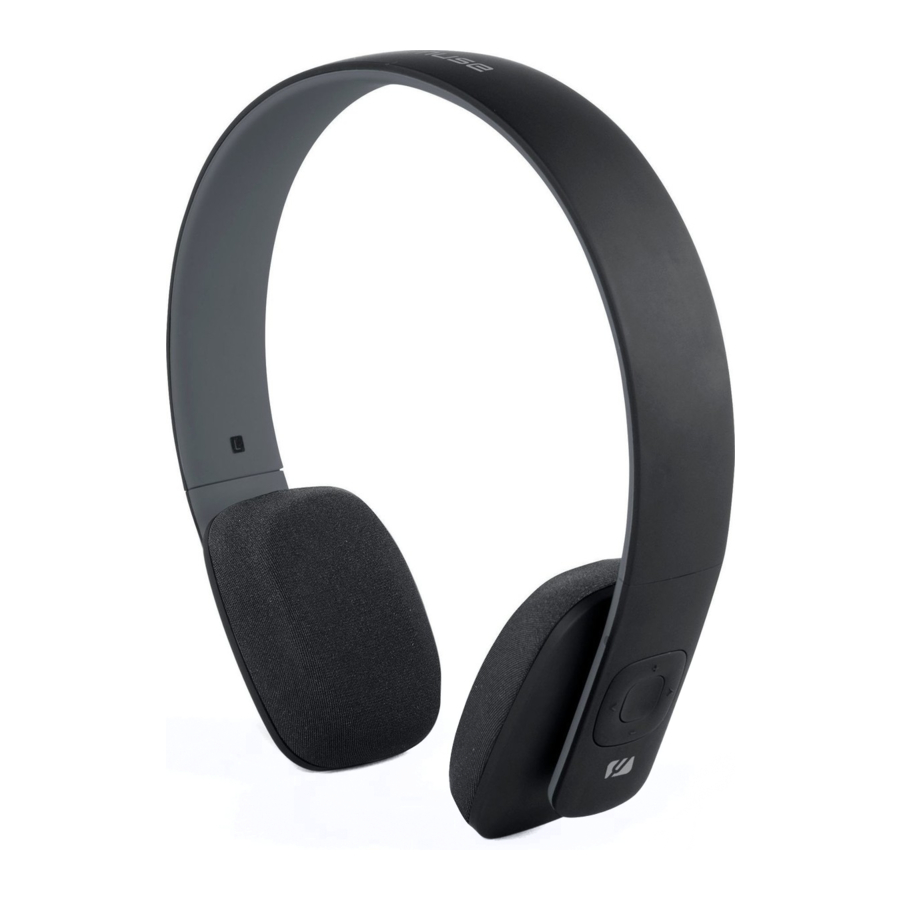
LOCATION AND DESCRIPTION OF CONTROLS

- USB Charging port
- Microphone
- - Volume down
- > Next
- (MFB) Multi-function button (Multi-function button) Turn on/Turn off/Enter the pairing mode/Play (play)/pause/Answer call/End call/Reject call/Transfer call/Last number redial
- + Volume up
- < Previous
- LED indicator
- Speakers
POWER SUPPLY
In a concern of saving energy, when playback has reached to the end or listening volume is set at a very low level and no control is operated on the device for a period of 15 minutes, the unit will automatically switch to Standby mode.
Charging the headphone
This headphone is equipped with a rechargeable lithium polymer battery. Use the provided USB cable. Connect one end to the headphone and the other end to a computer or use an adaptor (sold separately) and connect it to a wall socket.
Red LED on: Charging
Blue LED on: Fully charged
Note: Please note that the USB cable can only be used for charging and not for data transfer.
It is recommended do not to charge the headphone during the music playback.
Using the built-in battery

- Charge the internal battery only when you are ready to re-use the device again.
- When using the device in battery, the ambient temperature must be 5°C (41°F) at 35°C (95°F).
- For a longer service life it is recommended to charge the battery indoor.
- The integrated battery of this device may present a risk of fire or chemical burn if mistreated.
- The headphone must not be exposed to excessive heat such as sunshine, fire or similar heat source.
Note: If you didn't use the headset for a long time, the battery may dry up. At this time, you have to charge the battery at least 3 hours.
Turning on/off the headphone
| Functions | Operation | LED indicator / Tone voice |
| Turning on | Press the MFB button for 2 seconds | Red LED lights and a tone voice beep |
| Turning off | Press the MFB button for 3 seconds | All LED is off and one tone voice beep. |
Pairing the headphone with Bluetooth devices
The Bluetooth® word mark and logos are registered trademarks owned by Bluetooth SIG, Inc. and any use of such marks by New One S.A.S is under license. Other trademarks and trade names are those of their respective owners.
- Turn off the Bluetooth functionality of other devices that were paired with your headphone.
- Ensure the headphone is off, and then press and hold MFB button some seconds (about 5 seconds) until red and blue LED flash alternately with two beep tone voice which will put the headphone in pairing mode.
- Turn on Bluetooth functionality on your Bluetooth device. Typically, Bluetooth controls are found on the device's tools or settings menu (see your user manual). Turn on Bluetooth connectivity and make your device "discoverable".
- Clean out the pairing list on your Bluetooth device.
- Choose "add a new Bluetooth device" or "setup Bluetooth device" on your device. It will start to search. (keep the headphone and your device within 1 metre when pairing).
Once " M-270BT" shows on your device, select it. If your device prompts you for a pass code, please enter 0000. If the pairing attempt fails or times out, please start pairing procedure again (see steps 2-5). - After your device and the "M-270BT" have discovered each other, one beep tone voice can be heard.
Remark:
- After pairing is successful, the headphone and device will remember each other, they will no need to re-pair next time.
- Next time the headphone is powered on, it will automatically try to re-establish a link with the most recently linked Bluetooth device. If you want to pair it with other devices, please turn off the Bluetooth function of last connected devices first and pair the headphone with new device according to step 1~6 mentioned above.
Note: There are many Bluetooth devices on the market, we can not guarantee to support the auto reconnect for all different models.
Play MUSIC from Bluetooth devices
Make sure the Bluetooth connection between the headphone and the device is active.
- To start play, press MFB on headphone.
- To pause/resume play, press MFB again.
Note: Blue LED flashes every 5 seconds when music is playing.
Adjust volume level
During play, press + / - to increase/decrease the volume level.
* Sometimes volume adjustment made on your device will also affect volume output from the speaker.
Changing tracks/songs
To skip to the previous/next songs, press the < or > button to change.
MAKING CALLS AND ANSWERING CALLS
Before making a call used with your mobile phone, you need to pair and link your Bluetooth-enabled phone with the headphone.
Answer a Call
- To receive the incoming call, press MFB button.
- To end the call, press the MFB Button.
Transfer the call between mobile phone and the headphone
During the talking mode, double press MFB button to transfer the phone call between the mobile phone and the headphone.
REJECT a call
To reject the call, press and hold the MFB button for 2 seconds to reject call when the call is ringing.
Last number redial
Double press MFB button to redial the latest outgoing call.
NOTE: When you receive an incoming call, music will be temporary suspended, Once the call has been ended, it depends entirely on you mobile phone whether the current track will return to playback or not.
WEAK BATTERY ALARM
If the battery is weak, RED LED flash which it reminds you that the battery life will not last to playing, please recharge the battery of the headphone.
TROUBLE SHOOTING GUIDE
| Problem | Solution |
The headphone turns off automatically |
Recharge the battery |
No connection |
|
Not functioning correctly |
charging the headphone so that to reset products. |
Cannot stream music |
Make sure your device must support the A2DP Bluetooth profile. |

- This unit will not operate or may operate improperly with some Bluetooth mobile phones / audio players.
- There are many mobile phones in the market. We cannot guarantee the compatibility of all mobile phones together with the headphone.
- If you found the conversation is not clear, try to move closer to the microphone.
- Never expose the product to fire as this could result in personal injury.
- Do not store the product in extremely cold or warm environments.
- Never dismantle the product.
- Never let children play with the product.
- Do not expose the product to dampness or moisture
- The apparatus shall not be exposed to dripping or splashing and no objects filled with liquids, such as vases, shall be placed on the apparatus.
SPECIFICATIONS
| Weight | 117 g |
| Bluetooth version | V4.0 |
| Operating time | Up to 8 hours at 60% volume |
| Charging time | 3 hours |
| Charging voltage | 5.0V  500mA 500mA |
| Working distance | Up to 10 metres measured in open space. (Wall and structures may affect range of device). |

If at any time in the future you should need to dispose of this product please note that Waste electrical products should not be disposed of with household waste. Please recycle where facilities exist. Check with your Local Authority or retailer for recycling advice. (Waste Electrical and Electronic Equipment Directive.)
Hereby, NEW ONE S.A.S, declares that this MUSE M-270 BT is in compliance with the essential requirements and other relevant provisions of Directive 1999/5/EC. The declaration of conformity may be consulted at http://www.muse-europe.com/conformity/M-270BT.pdf

Download manual
Here you can download full pdf version of manual, it may contain additional safety instructions, warranty information, FCC rules, etc.
Download Muse M-270 BT - Wireless Bluetooth Stereo Headphones Manual


