Oregon Scientific RM832 - Digital Travel Radio-Frequency Controlled Clock Manual
- 1 INTRODUCTION
- 2 DESCRIPTION OF PARTS
- 3 BATTERY INSTALLATION
- 4 ABOUT RADIO RECEPTION
- 5 CALENDAR CLOCK DISPLAY MODES
- 6 HOW TO SET THE CALENDAR CLOCK MANUALLY
- 7 ABOUT THE ALARM TIME
- 8 SETTING AN ALARM TIME
- 9 ABOUT ALARM SOUND
- 10 HOW TO USE THE SNOOZE
- 11 LITE TOUCH HiGloTM BACKLIGHT
- 12 LOCK THE UNIT
- 13 HOW TO RESET THE UNIT
- 14 THE TABLE STAND
- 15 SPECIFICATION
- 16 Download manual
- 17 In Other Languages
INTRODUCTION
Congratulations on your purchase of the Travel RF controlled Clock (RM832).
The RM832 is a multifunction (RF) controlled clock. It can automatically synchronise its current time and date when brought within an approximate 1500 km radius of the radio signal DCF77 generated from Frankfurt, Germany.
Other features of the RM832 include:
- Back light for easy reading in the dark
- Displays time, date and day of the week in 4 languages (E/D/F/I)
- Alarm time with 8-minute snooze function
- 2-minute crescendo alarm that increase in volume & low battery indication.
DESCRIPTION OF PARTS
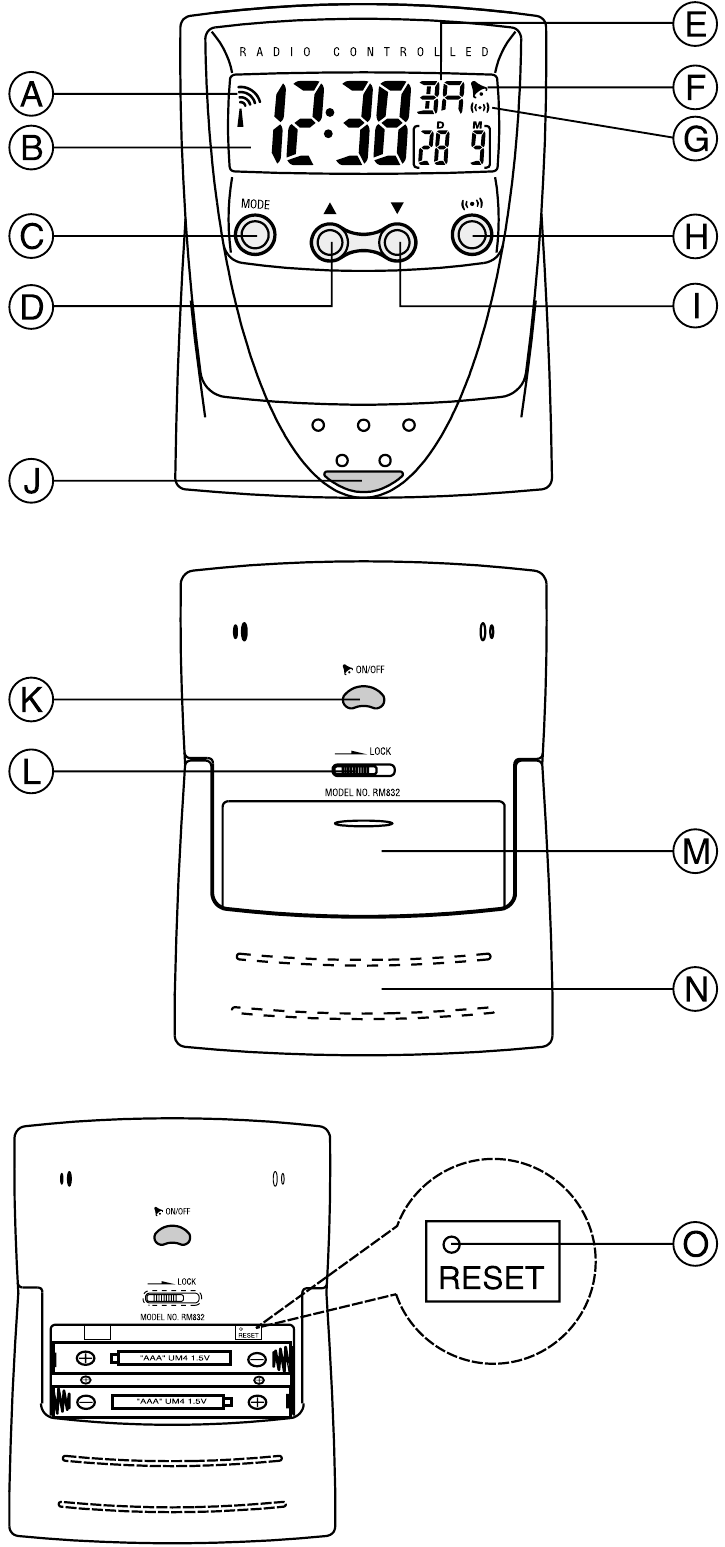
FIG. A
- [
![]() ] Radio reception signal
] Radio reception signal
Indicates the condition of radio reception - LCD
- [MODE] button
Toggles between display modes and activates the calendar clock setting mode - UP [
![]() ] button
] button
Increases the value of a setting
Initiates radio reception (Press and hold for rapids settings) - [
![]() ] Battery-low indicator
] Battery-low indicator
Lights up when batteries are running dry - [
![]() ] Alarm-on icon
] Alarm-on icon
Appears when the alarm is activated - [
![]() ] Alarm icon
] Alarm icon
Appears when the alarm time is displayed - [
![]() ] button
] button
Toggles between calendar and alarm-time displays
Displays the alarm time or sets the alarm status - DOWN [
![]() ] button
] button
Decreases the value of a setting
Stops radio reception (Press and hold for rapids settings) - SNOOZE button
Activates the snooze function when an alarm activates or turns on the back light for 5-seconds - [
![]() ON/OFF ] button
ON/OFF ] button
Activates or deactivates alarm - [
![]() ] button
] button
To lock all the key of the unit - Battery compartment
Accommodates two UM-4 or "AAA" size batteries - Table stand
- [RESET] button
Resets the unit to its original factory settings
 ] Radio reception signal
 ] button
 ] Alarm-on icon
 ] Alarm icon
 ] button
 ] button
BATTERY INSTALLATION
The unit uses two (2) UM-4 or "AAA" size 1.5V batteries.
To insert batteries:
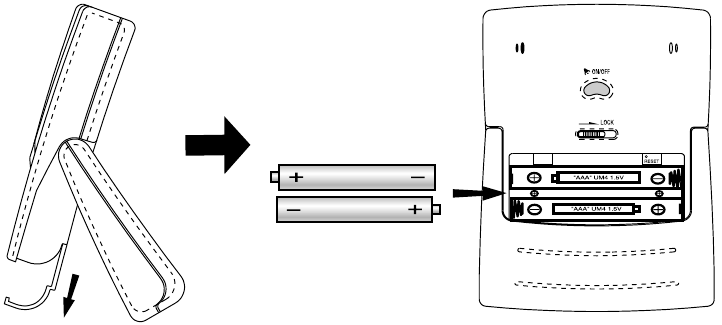
- Slide the battery door in the direction of the arrow. [FIG. B]

FIG. B - Insert the batteries strictly according to the polarities shown therein.[FIG. B]
- Replace the battery compartment door.
 If not disposed of properly batteries can be harmful. Protect the environment by taking exhausted batteries to authorised disposal stations.
 Note: Battery-low indicator "
 "
"
Replace the batteries when the battery-low indicator lights up.
Note: After replacing the batteries, the entire display will activate for about 1 second, then LCD will show as in.
ABOUT RADIO RECEPTION
The RM832 is a radio frequency (RF) controlled clock. When located within a 1500km radius of radio signal (DCF77) at Frankfurt, Germany, the clock time will automatically synchronise with DCF77 time-signal transmission. The benefit of a RF controlled clock is that highly-accurate time is maintained and manual adjustments to the time and date are not be required.
When the batteries are first installed, the RM832 will automatically search for a radio signal.
When in search mode, the antenna icon [  ] will blink. This process takes between two (2) and ten (10) minutes. After initial search, short periodic receptionsignal scans will commence several times a day.
The antenna icon indicates the quality of reception.
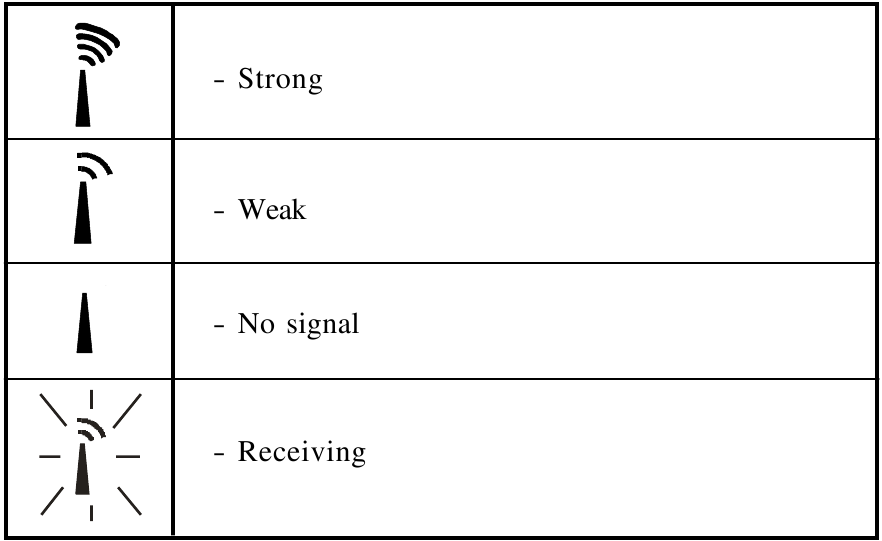
To disable the RF function:
Press and hold the [ ] button for 3-seconds. The radio-reception signal will disappear.
To enable the RF funciton:
Press [ ] and hold for 3-seconds. The radio-reception signal will appear and a
signal search will automatically commence.
Interference
Reception can be affected by a number of factors. For best reception, place the device away from metal objects and electrical appliances.
Note: Interference from sources such as TV sets can affect the signal. If, after batteries have been inserted for ten minutes, the signal is not received, then set the time manually (see section: How To Set The Calendar Clock Manually).
CALENDAR CLOCK DISPLAY MODES
The RM832 supports four display modes in the sequence of
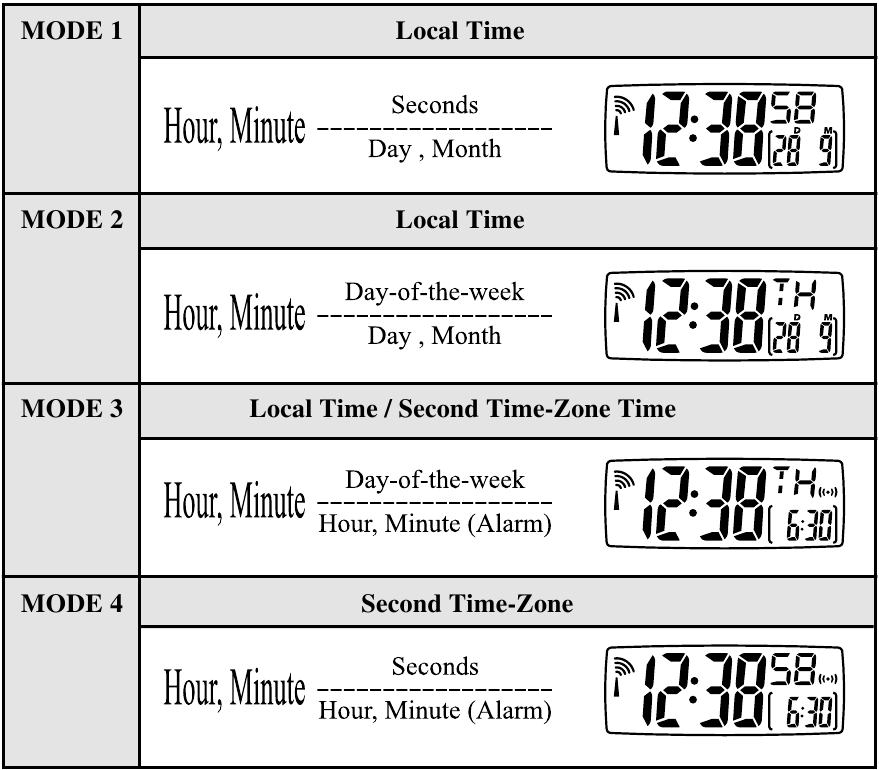
Display description for each time / date
To select a different time-display mode:
- Press [MODE]. The display will advance in the order as MODE 1 and MODE 2 mentioned above.
- Press [
![]() ] . The display will advance to MODE 3 or MODE 4 as mentioned above.
] . The display will advance to MODE 3 or MODE 4 as mentioned above.
 ] . The display will advance to MODE 3 or MODE 4 as mentioned above.
HOW TO SET THE CALENDAR CLOCK MANUALLY
When the unit is outside of the 1500km radius of the radio signal generated from DCF77 Frankfurt, Germany, the unit may require manual setting.
To manually set the clock:
Press [MODE] hold for 3 seconds.
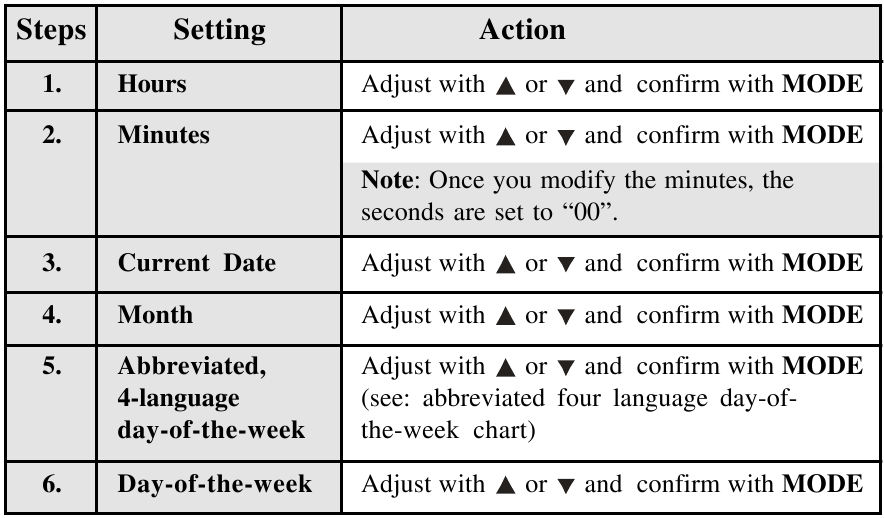
Note: Adjusting the time may conflict with radio signal. In this case, the received signal takes priority and will override the manual setting.
The day-of-the-week is displayed as an abbreviation in four languages.
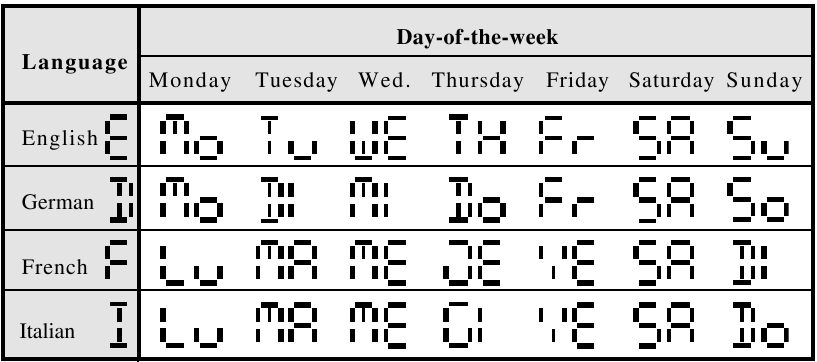
Abbreviated Four Language Day-Of-The-Week Chart
ABOUT THE ALARM TIME
Press [  ON / OFF ], alarm-time is displayed and indicated by [].
SETTING AN ALARM TIME
To set an alarm time:
- Press [
![]() ] to select alarm. Press again and hold 3-seconds.
] to select alarm. Press again and hold 3-seconds. - Set the alarm time

- Press [
![]() ] to confirm. Press a final time to exit alarm set mode.
] to confirm. Press a final time to exit alarm set mode.
 ] to select alarm. Press again and hold 3-seconds.
ABOUT ALARM SOUND
The four-step crescendo function allows the alarm to start off gently and step up its intensity four times every 20 seconds. Without interruption, the alarm will activate for a total of two minutes. If a second alarm activates when the first alarm is sounding, the first alarm will be automatically disabled.
To stop an alarm sound:
- To stop the alarm, press [
![]() ], the alarm will stop and will activate at the same time the following day.
], the alarm will stop and will activate at the same time the following day. - To disable the alarm, press [
![]() ON/OFF ], the alarm will stop and it is not active, it will not activate the following day.
ON/OFF ], the alarm will stop and it is not active, it will not activate the following day.
 ], the alarm will stop and will activate at the same time the following day.
HOW TO USE THE SNOOZE
The Lite Touch feature enables you to activate the 8 minute snooze by gently rocking the RF clock backwards on its stand with the touch of your fingers or simply pass the SNOOZE button. [see FIG. C]
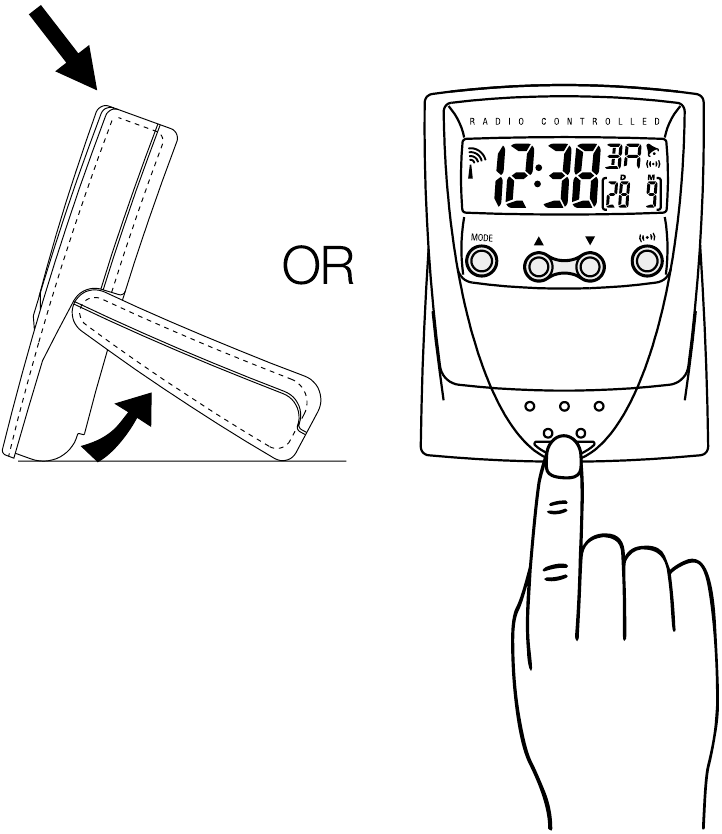
FIG. C
LITE TOUCH HiGloTM BACKLIGHT
Using the Lite Touch feature, the display will activate for five seconds so you can see the display in the dark. The light then automatically turns off. You may also turn the backlight on by simply pass the LIGHT button. [see FIG. C]
LOCK THE UNIT
The RM832 has a special locking feature that locks all the keys to prevent accidental operation of the unit. To unlock the unit, slide the [  ] switch to the unlocked position.
HOW TO RESET THE UNIT
The RESET button allows you to return all settings to its factory values, which are, 1-1 (1st of January) for date, 00:00 for time and 0:00 for alarm, which will be deactivated.
The button is required only when the unit is not operating in a favourable way, such as in the rare case of a malfunction.
THE TABLE STAND
To use the cover as a stand, rotate the hinges cover over the back of the clock.
SPECIFICATION
| 24-h display | hh: mm: ss | |
| Day-of-the-week | abbreviations in 4 languages (E, D, F, I) | |
| Alarm time | Two (2) minute crescendo | |
| Power | Two (2) UM4 or "AAA" size batteries | |
| Size | 87 X 67 X 19 mm ( H x W x D ) | |
| Weight | 69.7 g (without battery) | |

- The content of this manual is subject to change without further notice.
- Due to printing limitation, the displays shown in this manual may differ from the actual display.
- The manufacturer and its suppliers held no responsibility to you or any other person for any damage expenses, lost profits, or any other claim arise by using this product.
- The contents of this manual may not be reproduced without the permission of the manufacturer.

Download manual
Here you can download full pdf version of manual, it may contain additional safety instructions, warranty information, FCC rules, etc.
Download Oregon Scientific RM832 - Digital Travel Radio-Frequency Controlled Clock Manual


