Oregon Scientific BAR208HG - Advanced Weather Station Manual
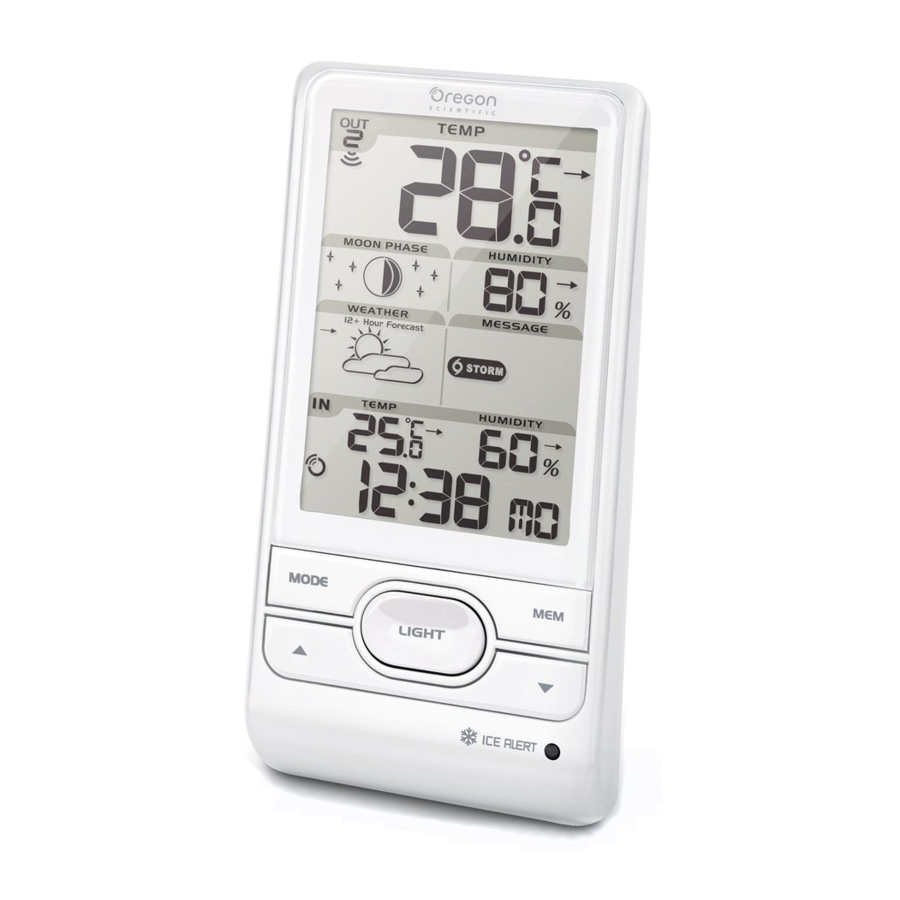
OVERVIEW
FRONT VIEW

FIG.1
- Remote sensor reception indicator
- Moon phase reading
- Weather forecast
- Indoor temperature with temperature trend
- Clock signal reception indicator
- MODE: Change settings / display
![]() : Increase / decrease settings; activate / deactivate clock reception signal
: Increase / decrease settings; activate / deactivate clock reception signal- Outdoor temperature with temperature trend
- Outdoor humidity with humidity trend
- Weather warning message
- Indoor humidity with humidity trend
- Clock with weekday
- MEM: View current, maximum and minimum temperature / humidity
- LIGHT: Activate backlight for 5 seconds
- Ice alert LED indicator
 : Increase / decrease settings; activate / deactivate clock reception signal
BACK VIEW

FIG.2
- °C / °F: Select temperature unit
- EU / UK: Select the nearest radio signal
- RESET: Reset unit to default settings
REMOTE SENSOR

FIG.3
- LED status indicator
- Wall mount hole
- Battery compartment
- RESET hole
- CHANNEL switch
GETTING STARTED
INSERT BATTERIES
- Remove the battery compartment.
- Insert the batteries, matching the polarities (see FIG 2).
- Press RESET after each battery change.
 LOCATION LOCATION | MEANING |
| Clock / alarm and Indoor temperature area | Main unit batteries low |
| Outdoor temperature area | Sensor batteries low |
REMOTE SENSOR
The main unit can collect data from up to 3 sensors.
To set up the sensor:
- Open the battery compartment (see FIG 3).
- Select a channel then press RESET.
- Close the battery door.
- Place the sensor within 30 m (98 ft) of the main unit using the table stand or wall mount.
TIP
Ideal placements for the sensor would be in any location on the exterior of the home at a height of not more than 1.5 m (5 ft) and which can shield it from direct sunlight or wet conditions for an accurate reading.

NOTE
Use alkaline batteries for longer usage and consumer grade lithium batteries in temperatures below freezing.
SENSOR DATA TRANSMISSION
To search for a sensor:
Press and hold  + MODE.
The sensor reception icon in the remote sensor area shows the status:
| ICON | DESCRIPTION |
 | Main unit is searching for sensor(s). |
 | A channel has been found. |
 | The sensor cannot be found. |
TIP
The transmission range may vary depending on many factors. You may need to experiment with various locations to get the best results.
CLOCK
CLOCK RECEPTION
This product is designed to synchronise its clock automatically with a clock signal.
Slide EU / UK to select the signal received.
- EU: DCF-77 signal: within 1500 km (932 miles) of Frankfurt, Germany.
- UK: MSF-60 signal: within 1500 km (932 miles) of Anthorn, England.
To enable / disable signal reception:
Press and hold to enable or  to disable signal reception.
NOTE
Reception takes 2-10 minutes. If the signal is weak, it can take up to 24 hours to get a valid signal. If signal reception is unsuccessful, place your unit next to a window, press and hold to force another signal search.
Clock signal reception indicator:
| STRONG SIGNAL | WEAK SIGNAL | NO SIGNAL |
 |  |  |
MANUALLY SET CLOCK
To set the clock manually, disable the signal reception first.
- Press and hold MODE.
- Press
![]() or
or![]() to change the settings.
to change the settings. - Press MODE to confirm.
- The settings order is: time zone, 12/24 hr format, hour, minute, year, calendar mode (day – month / month – day), month, day and language.
Time zone offset sets the clock +/- 23 hours from the received clock signal time.
NOTE
The language options are English (E), German (D), French (F), Italian (I), and Spanish (S).
To select display mode:
Press MODE to choose between clock with seconds / weekday / calendar / moon phase.
WEATHER FORECAST
This product forecasts the next 12 to 24 hours of weather within a 30-50 km (19-31 mile) radius with a 75% accuracy.
 | Sunny |
 | Partially Cloudy |
 | Cloudy |
 | Rainy |
 | Snowy |
WEATHER WARNING MESSAGE
The weather warning messages provide indications of probable circumstances that may arise based on the weather station's calculations. The meanings for the warnings are illustrated below:
 | Meaning |
 | Risk of high temperatures |
 | Risk of fast wind speeds |
 | Risk of a storm |
 | Risk of foggy conditions |
 | Risk of icy conditions |
TEMPERATURE AND HUMIDITY
To toggle temperature unit:
Press °C / °F.
To auto-scan between sensors:
Press and hold + MEM to display each sensor's data for 3 seconds.
To end press .
To toggle between current, minimum and maximum records for the selected sensor:
Press MEM repeatedly.
To clear the records: Press and hold MEM.
ICE WARNING
If the channel 1 sensor falls between 3°C to -2°C (37°F to 28°F), LED indicator will flash, and will stop flashing once the temperature is out of this range.
WEATHER TRENDS
The temperature, humidity and pressure trend icons are based on recent sensor readings.
| RISE | STEADY | FALL |
 |  |  |
MOON PHASE
In moon phase mode, press or to scan through the years (2001 to 2099).
 | New Moon |  | Full Moon |
 | Waxing Crescent |  | Waning Gibbous |
 | First quarter |  | Last quarter |
 | Waxing Gibbous |  | Waning Crescent |
NOTE
Star icons around the moon phase will be displayed from 6 o'clock in the evening to 6 o'clock the next morning.
BACKLIGHT
Press LIGHT to activate backlight for 5 seconds.
RESET
Press RESET to return to the default settings.
PRECAUTIONS
- Do not subject the unit to excessive force, shock, dust, temperature or humidity.
- Do not cover the ventilation holes with any items such as newspapers, curtains etc.
- Do not immerse the unit in water. If you spill liquid over it, dry it immediately with a soft, lint-free cloth.
- Do not clean the unit with abrasive or corrosive materials.
- Do not tamper with the unit's internal components. This invalidates the warranty.
- Only use fresh batteries. Do not mix new and old batteries.
- Images shown in this manual may differ from the actual display.
- When disposing of this product, ensure it is collected separately for special treatment.
- Placement of this product on certain types of wood may result in damage to its finish for which Oregon Scientific will not be responsible. Consult the furniture manufacturer's care instructions for information.
- The contents of this manual may not be reproduced without the permission of the manufacturer.
- Do not dispose old batteries as unsorted municipal waste. Collection of such waste separately for special treatment is necessary.
- Please note that some units are equipped with a battery safety strip. Remove the strip from the battery compartment before first use.
NOTE
The technical specifications for this product and the contents of the user manual are subject to change without notice.
SPECIFICATIONS
| TYPE | DESCRIPTION |
| MAIN UNIT | |
| L x W x H | 94 x 51 x 182.5 mm (3.70 x 2.01 x 7.19 in) |
| Weight | 241 g (8.5 oz) without battery |
| Temperature range | -5°C to 50°C (23°F to 122°F) |
| Resolution | 0.1°C (0.2°F) |
| Signal frequency | 433 MHz |
| Humidity range | 25% - 95% |
| Humidity resolution | 1% |
| Power | 3 x UM-3 (AA) 1.5 V batteries |
| REMOTE UNIT (THGN132N) | |
| L x W x H | 50 x 22 x 96 mm (1.97 x 0.87 x 3.78 in) |
| Weight | 62 g (2.22 ounces) without battery |
| Transmission range | 30 m (98 ft) unobstructed |
| Temperature range | -20°C to 60°C (-4°F to 140°F) |
| Humidity range | 25% - 95% |
| Power | 1 x UM-3 (AA) 1.5 V battery |
ABOUT OREGON SCIENTIFIC
Visit our website (www.oregonscientific.com) to learn more about Oregon Scientific products. If you're in the US and would like to contact our Customer Care department directly, please visit: www2.oregonscientific.com/service/support
OR
Call 1-800-853-8883.
For international inquiries, please visit: www2.oregonscientific.com/about/international
EU-DECLARATION OF CONFORMITY
Hereby, Oregon Scientific, declares that this Advanced Weather Station with Atomic Time (Model: BAR208HG) is in compliance with the essential requirements and other relevant provisions of Directive 1999/5/EC. A copy of the signed and dated Declaration of Conformity is available on request via our Oregon Scientific Customer Service.

COUNTRIES RTTE APPROVAL COMPLIED
All EC countries, Switzerland CH and Norway N

Download manual
Here you can download full pdf version of manual, it may contain additional safety instructions, warranty information, FCC rules, etc.
Download Oregon Scientific BAR208HG - Advanced Weather Station Manual


