Oregon Scientific BARM688 - Weather Station with FM PLL Radio Manual
- 1 INTRODUCTION
- 2 OVERVIEW
- 3 GETTING STARTED
- 4 REMOTE SENSOR
- 5 LIGHT TOUCH KEY-LOCK
- 6 CLOCK
- 7 ALARM
- 8 WEATHER FORECAST
- 9 TEMPERATURE
- 10 RADIO
- 11 SLEEP TIMER
- 12 BACKLIGHT
- 13 RESET
- 14 PRECAUTIONS
- 15 SPECIFICATIONS
- 16 ABOUT OREGON SCIENTIFIC
- 17 EU-DECLARATION OF CONFORMITY
- 18 Download manual
- 19 In Other Languages
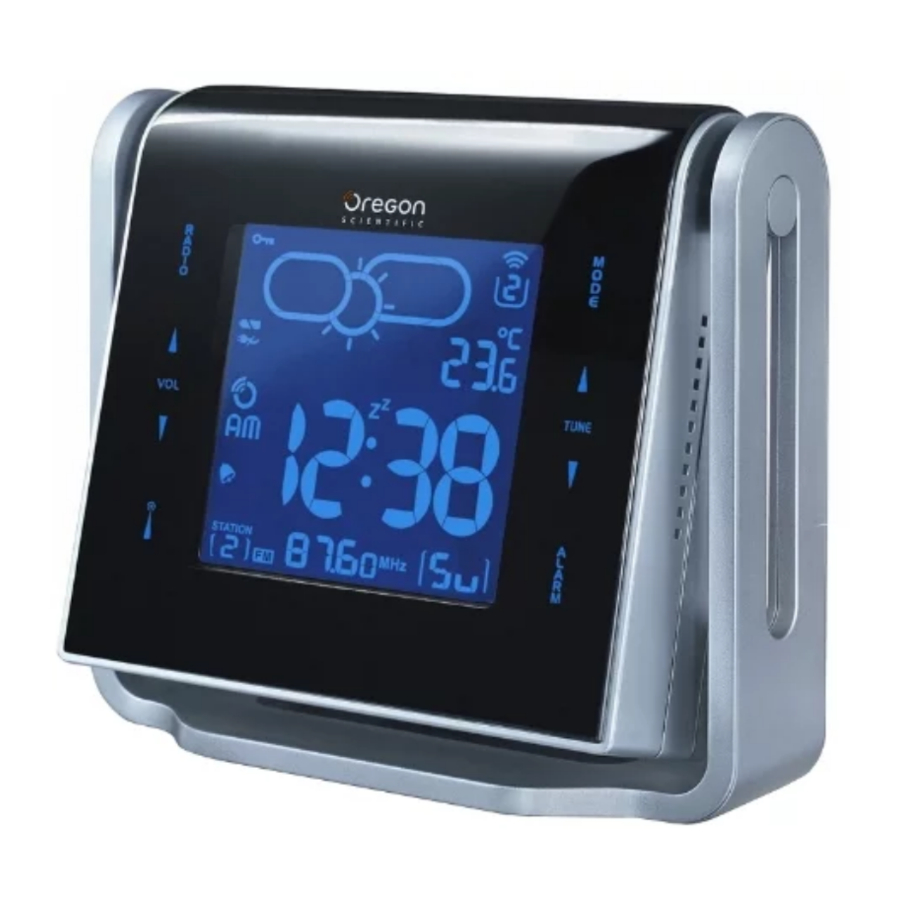
INTRODUCTION
Please keep this manual for instructions and information you should know about.
OVERVIEW
FRONT VIEW
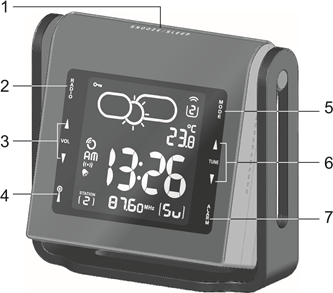
- SNOOZE: Activate snooze; set sleep-timer when Radio is ON
- RADIO: Turn radio ON / OFF
- VOL
![]() : Increase / decrease volume
: Increase / decrease volume ![]() (STATION): Toggle between 8 preset radio channels; save a channel
(STATION): Toggle between 8 preset radio channels; save a channel- MODE: Change setting / display
- TUNE
![]() : Increase / decrease setting; activate / deactivate clock reception signal; change radio frequency
: Increase / decrease setting; activate / deactivate clock reception signal; change radio frequency - ALARM: View alarm status; set alarm
 : Increase / decrease volume
 (STATION): Toggle between 8 preset radio channels; save a channel
BACK VIEW
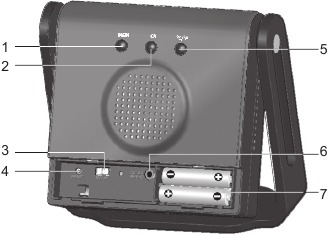
- MEM: View current, maximum and minimum temperature
- CH: Switch remote sensor display
- EU / UK: Select clock signal
- RESET: Reset unit to default settings
- °C / °F: Select temperature unit
- Adapter socket
- Battery compartment
LCD
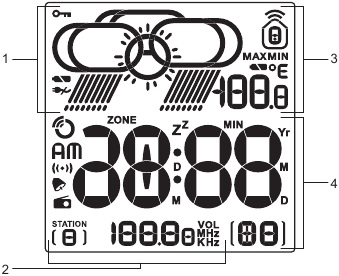
- Weather forecast area
- Radio area
- Temperature area
- Clock / alarm area
REMOTE SENSOR
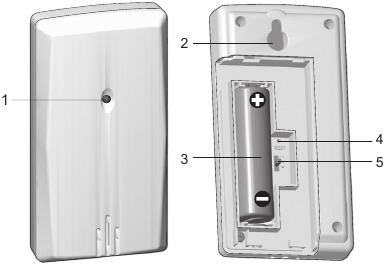
- LED transmission indicator
- Wall mount
- Battery compartment
- RESET switch
- CHANNEL switch
BATTERIES
GETTING STARTED
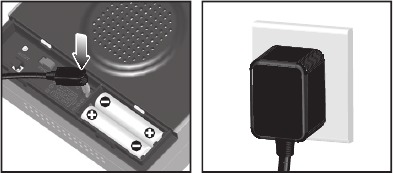
ADAPTER
Plug adapter into main unit. Make sure the adapter socket is easily accessible to the unit.
 shows when the adapter is not connected.
NOTE This product may malfunction when radio interference appears on the AC power line. The unit will revert to normal operation when interference stops.
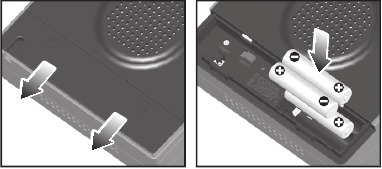
BATTERIES
Insert the batteries, matching the polarities (+/-) as shown.
 shows when the battery is low.
| UNIT | LOCATION |
| Main | Weather forecast area |
| Remote | Temperature area |
REMOTE SENSOR
The main unit can collect data from up to 3 sensors.
To set up the sensor:
- Open the battery compartment.
- Insert battery, matching the polarity (+ / -).
- Select a channel, then press RESET.
- Close the battery door.
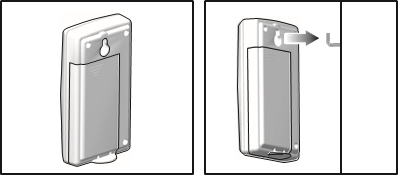
- Place the sensor within 30 m (98 ft) of the main unit using the table stand or wall mount.

The transmission range may vary depending on many factors. You may need to experiment with various locations to get the best results.
NOTE We recommended that you use alkaline batteries with this product for longer usage and consumer grade lithium batteries in temperatures below freezing.
SENSOR DATA TRANSMISSION
To search for a sensor:
Simultaneously, press and hold MEM and CH for 2 seconds.
The reception icon shown in the outdoor temperature area shows the status.
| ICON | DESCRIPTION |
 | Main unit is searching for the sensor(s) |
 | Sensor 1 data received |
 and "- -" and "- -" | The sensor cannot be found |
NOTE If the sensor is not found, check the batteries, obstructions, and remote unit location.
For best results:
- Place the sensor out of direct sunlight and moisture.
- Position the sensor facing main unit, minimising obstructions.
- Place the sensor in a location with a clear view to the sky, away from metallic or electronic objects.
- Position the sensor close to the main unit during cold winter months.
LIGHT TOUCH KEY-LOCK
When no key has been pressed for 1 minute,  appears to indicate key-lock is activated. Press any key to disable.
CLOCK
CLOCK RECEPTION
This product is designed to synchronise its clock automatically with a clock signal.
To select clock signal:
Slide EU / UK to select the signal received.
- EU: DCF-77 signal: within 1500 km (932 miles) of Frankfurt, Germany.
- UK: MSF-60 signal: within 1500 km (932 miles) of Anthorn, England.
To enable / disable signal reception:
Press and hold TUNE  to enable or TUNE
  to disable signal reception.
NOTE Reception takes 2-10 minutes. If the signal is weak, it can take up to 24 hours to get a valid signal.
Clock signal reception indicator:
| STRONG SIGNAL | WEAK SIGNAL | NO SIGNAL |
 |  |  |
MANUALLY SET CLOCK
- Press and hold MODE for 2 seconds.
- Press TUNE
![]() to change the settings.
to change the settings. - Press MODE to confirm.
- The setting sequence is: time zone offset, 12 / 24 hour format, hour, minute, year, day / month format, month, day, and display language.
TIPS Time zone offset sets the clock +/- 23 hours from the received clock signal time. The language options are (E) English, (F) French, (D) German, (I) Italian, and (S) Spanish.
To select clock display mode:
Press MODE to toggle between:
- Clock with seconds
- Clock with weekday
- Calendar
ALARM
To set the alarm:
- Press ALARM to view the alarm.
![]() will show on the display.
will show on the display. - Press and hold ALARM for 2 seconds.
- Press TUNE
![]() to change the hour, minute, beep (
to change the hour, minute, beep (![]() ) or radio (
) or radio (![]() ) alarm. If you select the radio alarm, press
) alarm. If you select the radio alarm, press ![]() to select the radio station to be played and VOL
to select the radio station to be played and VOL ![]() to set the volume.
to set the volume. - Press ALARM to confirm.
 will show on the display.
To activate or deactivate the alarm:
Press ALARM when in alarm display.  or
or  appears when the alarm is set.
To silence the alarm:
- Press SNOOZE to silence it for 8 minutes.
OR - Press any key except SNOOZE to turn the alarm off and activate it again after 24 hours.
WEATHER FORECAST
This product forecasts the weather for the next 12 to 24 hours within a 19-31 mile (30-50 km) radius, with 70 to 75 percent accuracy.
| SUNNY | PARTLY CLOUDY | CLOUDY | RAINY |
 |  |  |  |
TEMPERATURE
To select temperature unit:
Press °C / °F.
To view outdoor sensor(s) temperature readings:
Press CH.  shows which remote sensor's data you are viewing.
To auto-scan between sensors:
Press and hold CH for 2 seconds. Each sensor's data is displayed for 3 seconds.
To end, press CH or MEM.
To toggle between current, minimum and maximum records for the selected sensor:
Press MEM repeatedly.
To clear the records:
Select the channel to clear the memory, then press and hold MEM for 2 seconds. The indoor memory record will also be cleared.
RADIO
You can save up to 8 radio stations.
To turn the Radio ON / OFF:
Press RADIO.
NOTE Plug in the adapter when using the radio.
To save a station:
- Press RADIO to turn the radio ON.
- Press TUNE
![]() to manually fine-tune or press and hold TUNE
to manually fine-tune or press and hold TUNE ![]() to activate auto-search.
to activate auto-search. - Press and hold
![]() to save the station.
to save the station.
SLEEP TIMER
To turn the sleep timer ON:
- Press SLEEP once to activate the last setting used.
- Press SLEEP to set radio sleep timer duration (120, 90, 60, 30, 15 or 0 minutes). Select "0" to disable the sleep timer.
- Press VOL
![]() to change the volume.
to change the volume.
NOTE "ZZ" flashes when the sleep timer is activated.
BACKLIGHT
To activate the backlight for 8 seconds:
Press any key.
To activate / deactivate continuous backlight:
Press and hold SNOOZE for 2 seconds.
RESET
Press RESET to return to the default settings.
PRECAUTIONS
- Do not subject the unit to excessive force, shock, dust, temperature or humidity.
- Do not cover the ventilation holes with any items such as newspapers, curtains etc.
- Do not immerse the unit in water. If you spill liquid over it, dry it immediately with a soft, lint-free cloth.
- Do not clean the unit with abrasive or corrosive materials.
- Do not tamper with the unit 's internal components. This invalidates the warranty.
- Only use fresh batteries. Do not mix new and old batteries.
- Images shown in this manual may differ from the actual display.
- When disposing of this product, ensure it is collected separately for special treatment.
- Placement of this product on certain types of wood may result in damage to its finish for which Oregon Scientific will not be responsible. Consult the furniture manufacturer's care instructions for information.
- The contents of this manual may not be reproduced without the permission of the manufacturer.
- Do not dispose old batteries as unsorted municipal waste. Collection of such waste separately for special treatment is necessary.
- Please note that some units are equipped with a battery safety strip. Remove the strip from the battery compartment before first use.
NOTE The technical specifications for this product and the contents of the user manual are subject to change without notice.
SPECIFICATIONS
| TYPE | DESCRIPTION |
| Main unit | |
| Dimensions (L x W x D) | 145 x 134.5 x 55 mm (5.7 x 5.3 x 2.2 in) |
| Weight | 300g (10.6 ounces) without battery |
| Indoor range | -5°C to 50°C (23°F to 122°F) |
| Resolution | 0.1°C (0.2°F) |
| Synchronization | Auto or disabled |
| Power | 6V adapter and/or 3 x UM-4 (AAA) batteries |
| Remote unit (THN132N) | |
| Dimensions (L x W x D) | 92 x 22 x 50 mm (3.6 x 0.9 x 2.0 in) |
| Weight | 46 g (1.62 lbs) without battery |
| Temperature range | -30°C to 60°C (-22°F to 140°F) |
| Channel no. | 1, 2 or 3 |
| Power | 1 x UM-3 (AA) 1.5V battery |
ABOUT OREGON SCIENTIFIC
Visit our website (www.oregonscientific.com) to learn more about Oregon Scientific products. If you're in the US and would like to contact our Customer Care department directly, please visit: http://www2.oregonscientific.com/service/default.asp OR Call 1-800-853-8883.
For international inquiries, please visit: www2.oregonscientific.com/about/international.asp
EU-DECLARATION OF CONFORMITY
Hereby, Oregon Scientific, declares that this Weather Station (model: BARM668) is in compliance with the essential requirements and other relevant provisions of Directive 1999/5/EC. A copy of the signed and dated Declaration of Conformity is available on request via our Oregon Scientific Customer Service.

COUNTRIES RTTE APPROVAL COMPLIED
All EU countries, Switzerland  and Norway
Download manual
Here you can download full pdf version of manual, it may contain additional safety instructions, warranty information, FCC rules, etc.
Download Oregon Scientific BARM688 - Weather Station with FM PLL Radio Manual


