MOMAN H3 - Headset Helmet Intercom Single Pack Manual (MOMAN H3 - Headset Sisak Intercom Egyedi Csomag Kézikönyv)
- 1 Caring For Your MOMAN Product (A MOMAN Termék Gondozása)
- 2 Package List (Csomaglista)
- 3 Product Introduction (Termékbemutató)
-
4
Operation (Működés)
- 4.1 Power On/Off (Be/Ki)
- 4.2 Pairing (Párosítás)
- 4.3 Music Sharing (Zenei Megosztás)
- 4.4 Phone Control (Telefonvezérlés)
- 4.5 Volume Adjustment (Hangerő Szabályozás)
- 4.6 FM Radio (FM Rádió)
- 4.7 Function Priority (Funkció Prioritás)
- 4.8 Language (Nyelv)
- 4.9 Voice Wake up (Hangfelébresztés)
- 4.10 Restore Factory Settings (Gyári Beállítások Visszaállítása)
- 4.11 Battery Announcement (Akkumulátor Állapot Jelentése)
- 5 Installation (Telepítés)
- 6 Kézikönyv letöltése
- 7 Más nyelveken
Caring For Your MOMAN Product (A MOMAN Termék Gondozása)
- Please keep the product in a dry, clean, dust-free environment. (Kérjük, tartsa a terméket száraz, tiszta, pormentes környezetben.)
- Keep corrosive chemicals, liquids and heat source away from the product to prevent mechanics damage. (Tartsa távol a korrozív vegyszereket, folyadékokat és hőforrásokat a terméktől a mechanikai sérülések elkerülése érdekében.)
- Use only a soft and dry cloth for cleaning the product. (A termék tisztításához csak puha és száraz ruhát használjon.)
- Malfunction may be caused by dropping, impact of external force. (A meghibásodást okozhatja leejtés, külső erő hatása.)
- Do not attempt to disassemble the product. Doing so voids warranty. (Ne kísérelje meg a termék szétszerelését. Ez a garancia elvesztésével jár.)
- Please have the product checked or repaired by authorized technicians if any malfunctions happened. (Kérjük, vizsgáltassa meg vagy javíttassa meg a terméket felhatalmazott szakemberekkel, ha bármilyen meghibásodás történik.)
- Failure to follow all the instructions may result in mechanics damage. (Az összes utasítás be nem tartása mechanikai sérülést okozhat.)
- Warranty does not apply to human errors. (A garancia nem vonatkozik az emberi hibákra.)
Package List (Csomaglista)

- Intercom x1 (Intercom x1)
- Velcro Clip x1 (Tépőzáras csipesz x1)
- Back Clip x1 (Hátsó csipesz x1)
- Hook and Loop Fasteners x1 (Kampós és hurkos rögzítők x1)
- 1 Pair of Speakers with Microphone x1 (1 pár hangszóró mikrofonnal x1)
- Manual x1 (Kézikönyv x1)
- USB Cable x1 (USB kábel x1)
- Screw Driver x1 (Csavarhúzó x1)
- Headphone Velcro x4 (Fejhallgató tépőzár x4)
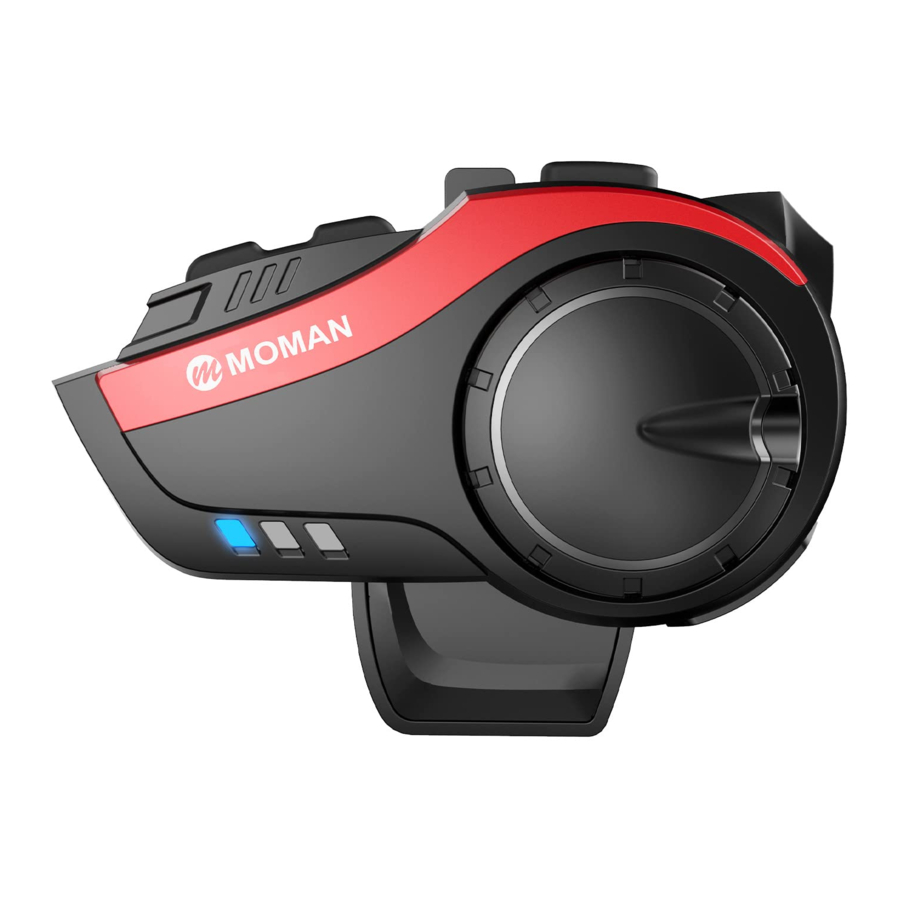
Product Introduction (Termékbemutató)

- BT Key (BT gomb)
- M Key (M gomb)
- On/Off Key (Be/Ki gomb)
- Knob (Gomb)
- Function Key (Funkciógomb)
- Charging Interface (Töltőfelület)
- Headset Interface (Fejhallgató felület)
- Indicator Light (Jelzőfény)
- Speaker (Hangszóró)
- Headset Plug (Fejhallgató csatlakozó)
- Butterfly Sticker (Pillangó matrica)
- Hard Microphone (Kemény mikrofon)
- Soft Microphone (Lágy mikrofon)
Operation (Működés)
Power On/Off (Be/Ki)

ON (BE): Press the On/Off Key (Be/Ki gomb) for 4 seconds. When you hear voice prompt, the blue indicator flashes twice. (Amikor hangjelzést hall, a kék jelzőfény kétszer felvillan.)
OFF (KI): Press the On/Off Key (Be/Ki gomb) for 4 seconds. When you hear voice prompt, the red indicator flashes twice. (Amikor hangjelzést hall, a piros jelzőfény kétszer felvillan.)
Pairing (Párosítás)
Pairing with Mobile Phone (Párosítás Mobiltelefonnal)
Method 1 (1. módszer)

- In power-off state, long press the On/Off Key (Be/Ki gomb) for 6 seconds until the red and blue indicator flashes alternatively. (Kikapcsolt állapotban tartsa nyomva a Be/Ki gombot 6 másodpercig, amíg a piros és kék jelzőfény felváltva villog.)
- Turn on Bluetooth function in the phone and search the signal. Choose "MOMAN H3" and connect. The voice prompts when it is connected successfully. (Kapcsolja be a Bluetooth funkciót a telefonon, és keresse meg a jelet. Válassza a "MOMAN H3" lehetőséget, és csatlakozzon. A hangjelzés jelzi, ha sikeresen csatlakozott.)
- The distance between intercom and mobile phone should be within 1 meter. (Az intercom és a mobiltelefon közötti távolság 1 méteren belül legyen.)
- If the intercom has pairing record with the mobile phone, they will be connected after power on, provided that the Bluetooth is turned on. (Ha az intercom rendelkezik párosítási rekorddal a mobiltelefonnal, akkor a bekapcsolás után csatlakoznak, feltéve, hogy a Bluetooth be van kapcsolva.)
Method 2 (2. módszer)

After power on, long press the Function Key (Funkciógomb) and On/Off Key (Be/Ki gomb) at the same time for 4 seconds until the red and blue indicator flashes alternatively. Search Bluetooth signal in the phone and choose to connect. (Bekapcsolás után tartsa hosszan lenyomva a Funkciógombot és a Be/Ki gombot egyszerre 4 másodpercig, amíg a piros és kék jelzőfény felváltva villog. Keresse meg a Bluetooth jelet a telefonon, és válassza a csatlakozást.)
- Method 2 works for group intercom connection or music sharing. (A 2. módszer csoportos intercom kapcsolathoz vagy zenei megosztáshoz használható.)
Pairing Between Two or More Intercoms (Párosítás Két Vagy Több Intercom Között)
Between two intercoms (within 1 meter): (Két intercom között (1 méteren belül):)

- Long press the On/Off Keys (Be/Ki gombok) of intercom A & B for 4 seconds and the blue indicators flash slowly. Long press the BT Keys (BT gombok) of intercom A & B for 4 seconds until the blue indicators flash quickly. (Tartsa hosszan lenyomva az A és B intercom Be/Ki gombjait 4 másodpercig, és a kék jelzőfények lassan villognak. Tartsa hosszan lenyomva az A és B intercom BT gombjait 4 másodpercig, amíg a kék jelzőfények gyorsan villognak.)
- Short press the BT Key (BT gomb) of intercom A. When intercom A searches B signal, the blue indicators flash slowly and you hear "Du" ("Du" hangot hall). After one second, the blue indicator of intercom B flashes quickly to search the next device, and flashes slowly to stop searching. Short press the BT Key (BT gomb) of intercom to send the order and build the network. When your hear "Du" ("Du" hangot hall), it means the network is built. Press the BT Key (BT gomb) to start intercom. (When intercom B is searching the next device, pressing the BT Key (BT gomb) of intercom A can stop searching.) (Röviden nyomja meg az A intercom BT gombját. Amikor az A intercom B jelet keres, a kék jelzőfények lassan villognak, és "Du" hangot hall. Egy másodperc elteltével a B intercom kék jelzőfénye gyorsan villog, hogy megkeresse a következő eszközt, és lassan villog, hogy leállítsa a keresést. Röviden nyomja meg az intercom BT gombját a parancs elküldéséhez és a hálózat kiépítéséhez. Amikor "Du" hangot hall, az azt jelenti, hogy a hálózat kiépült. Nyomja meg a BT gombot az intercom elindításához. (Amikor a B intercom a következő eszközt keresi, az A intercom BT gombjának megnyomásával leállíthatja a keresést.))
- When two intercoms are connected successfully, no need to pair repeatedly. After poweron, pressing BT Key (BT gomb) can enter intercom mode. (Ha két intercom sikeresen csatlakozott, nem kell ismételten párosítani. Bekapcsolás után a BT gomb megnyomásával beléphet az intercom módba.)
- When two intercoms are connected successfully, pressing the Function Key (Funkciógomb) and On/Off Key (Be/Ki gomb) can connect phone by Bluetooth. Press the BT Key (BT gomb) of any intercom to intercom. (Ha két intercom sikeresen csatlakozott, a Funkciógomb és a Be/Ki gomb megnyomásával csatlakoztathatja a telefont Bluetooth-on keresztül. Nyomja meg bármelyik intercom BT gombját az intercomhoz.)
- During intercom, there is automatic reconnect within 10 minutes after disconnection. Also you can short press the BT Key (BT gomb) to manually connect. (Intercom használata közben a kapcsolat megszakadása után 10 percen belül automatikus újracsatlakozás történik. A BT gomb rövid megnyomásával manuálisan is csatlakozhat.)
- During intercom, press the BT Key (BT gomb) to disconnect. (Intercom használata közben nyomja meg a BT gombot a kapcsolat bontásához.)
Between More Intercoms (within 1 meter): (Több Intercom Között (1 méteren belül):)
- Long press the On/Off Keys (Be/Ki gombok) of all intercoms for 4 seconds and the blue indicators flash slowly. Long press the BT Keys (BT gombok) of all intercoms for 4 seconds until the blue indicators flash quickly. (Tartsa hosszan lenyomva az összes intercom Be/Ki gombját 4 másodpercig, és a kék jelzőfények lassan villognak. Tartsa hosszan lenyomva az összes intercom BT gombját 4 másodpercig, amíg a kék jelzőfények gyorsan villognak.)
- Short press the BT Key (BT gomb) of one intercom (define as NO. 1). NO.1 enters auto-pairing mode. When it is connected with the other intercom (define as NO. 2), the blue indicators of NO. 1 and NO. 2 flash slowly, which means the connection are successful. After one second, the blue indicator of NO. 2 flashes quickly, searching the next intercom. When it connects to NO. 3 intercom, the blue indicators of NO. 2 and NO. 3 flash slowly, which means the connection are successful. (Röviden nyomja meg az egyik intercom BT gombját (nevezzük 1. SZÁMÚ-nak). Az 1. SZÁMÚ automatikus párosítási módba lép. Amikor csatlakozik a másik intercomhoz (nevezzük 2. SZÁMÚ-nak), az 1. SZÁMÚ és a 2. SZÁMÚ kék jelzőfényei lassan villognak, ami azt jelenti, hogy a kapcsolat sikeres. Egy másodperc elteltével a 2. SZÁMÚ kék jelzőfénye gyorsan villog, és megkeresi a következő intercomot. Amikor csatlakozik a 3. SZÁMÚ intercomhoz, a 2. SZÁMÚ és a 3. SZÁMÚ kék jelzőfényei lassan villognak, ami azt jelenti, hogy a kapcsolat sikeres.)
- Press the BT Keys (BT gombok) of all intercoms (firstly press NO. 1) to create group network. Press the BT Keys (BT gombok) again to begin to intercom. (Nyomja meg az összes intercom BT gombját (először nyomja meg az 1. SZÁMÚ-t) a csoportos hálózat létrehozásához. Nyomja meg újra a BT gombokat az intercom elindításához.)
Notes: After group network is completed, short pressing the On/Off Key (Be/Ki gomb) will report "The equipment is No. ※ ". (Megjegyzések: A csoportos hálózat elkészülte után a Be/Ki gomb rövid megnyomásával a következő üzenet jelenik meg: "A berendezés száma: ※ ".)
※ Due to using environment and exterior interference, it is recommended to create intercom group network of 4 users to the most within 1000 meter. (A használati környezet és a külső interferencia miatt ajánlott legfeljebb 4 felhasználóból álló intercom csoportos hálózatot létrehozni 1000 méteren belül.)

End/Restart: (Befejezés/Újraindítás:)
Press the BT Keys (BT gombok) to end the intercom. It's recommended to restore the factory settings for each machine before pairing. Clear method: In the power on state, press and hold the M Key (M gomb) and On/Off Key (Be/Ki gomb) for 6 seconds at the same time. (Nyomja meg a BT gombokat az intercom befejezéséhez. Javasoljuk, hogy a párosítás előtt állítsa vissza az egyes gépek gyári beállításait. Törlési módszer: Bekapcsolt állapotban tartsa lenyomva az M gombot és a Be/Ki gombot egyszerre 6 másodpercig.)
Pairing with Headphone of Other Brands (Párosítás Más Márkájú Fejhallgatóval)
- Long press the On/Off Key (Be/Ki gomb) for 4 seconds and the blue indicator flashes slowly. In standby mode, long press the Function Key (Funkciógomb) and the On/Off Key (Be/Ki gomb) for 4 seconds until the red and blue indicator flashes alternatively. Turn on your headphone and make it enter pairing mode. Short press the Functional Key (Funkciógomb) and On/Off key (Be/Ki gomb) of H3, and connect them until you hear voice prompt. (Tartsa hosszan lenyomva a Be/Ki gombot 4 másodpercig, és a kék jelzőfény lassan villog. Készenléti állapotban tartsa hosszan lenyomva a Funkciógombot és a Be/Ki gombot 4 másodpercig, amíg a piros és kék jelzőfény felváltva villog. Kapcsolja be a fejhallgatót, és állítsa párosítási módba. Röviden nyomja meg a H3 Funkciógombját és Be/Ki gombját, és csatlakoztassa őket, amíg hangjelzést nem hall.)
- When you hear "beep" ("sípolás" hangot hall), the blue indicator flashes slowly, which means the connection is successful. Press the BT Key (BT gomb) again and start to intercom. (Amikor "sípolás" hangot hall, a kék jelzőfény lassan villog, ami azt jelenti, hogy a kapcsolat sikeres. Nyomja meg újra a BT gombot, és kezdje el az intercomot.)
Music Sharing (Zenei Megosztás)
Turn on (Bekapcsolás): Restore factory settings of two intercoms. After pairing intercom A and intercom B successfully, connect intercom A with phone Bluetooth. Short press the BT Key (BT gomb) and play music. Long press the Function Key (Funkciógomb) for 2 seconds to enter music sharing pairing, with blue indicator flashing quickly. The intercom B prompts and means sharing is successful. (Állítsa vissza a két intercom gyári beállításait. Az A és B intercom sikeres párosítása után csatlakoztassa az A intercomot a telefon Bluetooth-jával. Röviden nyomja meg a BT gombot, és játsszon le zenét. Tartsa hosszan lenyomva a Funkciógombot 2 másodpercig a zenei megosztás párosításához, a kék jelzőfény gyorsan villog. A B intercom jelzi, hogy a megosztás sikeres.)
Turn off (Kikapcsolás): Randomly long press the Functional Key (Funkciógomb) of intercom A or B. (Véletlenszerűen tartsa hosszan lenyomva az A vagy B intercom Funkciógombját.)

EQ Audio Mode Switching: (EQ Hangmód Váltás:)
During music playing, press the M Key (M gomb) and switch EQ Audio mode: "Pop" ("Pop"), "Rock" ("Rock"), "Jazz" ("Jazz"), "Classic" ("Klasszikus") and "Country" ("Country").
Music Control (Zenevezérlés)

- Under Bluetooth connection mode, press the Function Key (Funkciógomb) to play/pause music. (Bluetooth kapcsolat módban nyomja meg a Funkciógombot a zene lejátszásához/szüneteltetéséhez.)
- Next Music: turn the Knob (Gomb) clockwise. (Következő zene: forgassa el a gombot az óramutató járásával megegyező irányba.)
- Previous Music: turn the Knob (Gomb) counterclockwise. (Előző zene: forgassa el a gombot az óramutató járásával ellentétes irányba.)
Phone Control (Telefonvezérlés)

Answer the call (Hívás fogadása): press the Function Key (Funkciógomb)
Automatic answer: (Automatikus válasz:) When the phone calls and there is no operation after 8 seconds, it will answer the call automatically. (Ha a telefon hív, és 8 másodperc elteltével nincs művelet, automatikusan fogadja a hívást.)
Reject the call (Hívás elutasítása): press and hole the Function Key (Funkciógomb) for 2 seconds. (tartsa lenyomva a Funkciógombot 2 másodpercig.)
End the call (Hívás befejezése): press the Function Key (Funkciógomb).
Redial (Újrahívás): In standby mode, press the On/Off Key (Be/Ki gomb) twice to dial the last call number. (Készenléti állapotban nyomja meg kétszer a Be/Ki gombot az utolsó hívószám tárcsázásához.)
Volume Adjustment (Hangerő Szabályozás)

- Decrease: continuously turn the Knob (Gomb) clockwise. (Csökkentés: folyamatosan forgassa el a gombot az óramutató járásával megegyező irányba.)
- Increase: continuously turn the Knob (Gomb) counterclockwise. (Növelés: folyamatosan forgassa el a gombot az óramutató járásával ellentétes irányba.)
- There is voice alarm for two high or two low volume. (Hangjelzés van a túl magas vagy túl alacsony hangerőhöz.)
FM Radio (FM Rádió)

- Turn on: under standby mode, press the Function Key (Funkciógomb) twice to switch to the FM radio. (Bekapcsolás: készenléti módban nyomja meg kétszer a Funkciógombot az FM rádióra váltáshoz.)
- Select Channels: quickly rotate the Knob (Gomb) and release to adjust and select channels. Continuously rotate the Knob (Gomb) to select different channels. Rotate the Knob (Gomb) continuously to enter volume adjustment. (Csatornák kiválasztása: gyorsan forgassa el a gombot, és engedje el a csatornák beállításához és kiválasztásához. Folyamatosan forgassa el a gombot a különböző csatornák kiválasztásához. Folyamatosan forgassa el a gombot a hangerő beállításához.)
- Turn off: press the Function Key (Funkciógomb) twice to get back to the previous mode. (Kikapcsolás: nyomja meg kétszer a Funkciógombot az előző módba való visszatéréshez.)
- If the signal is weak indoor, you could try to turn on the FM radio near window or in the open area. (Ha a jel gyenge beltérben, megpróbálhatja bekapcsolni az FM rádiót ablak közelében vagy nyílt területen.)
- When FM radio is turned on and there is a phone calling, the machine will cut off FM radio automatically and connect to the mobile phone. It gets back to the FM radio when the call ends. (Ha az FM rádió be van kapcsolva, és telefonhívás érkezik, a készülék automatikusan kikapcsolja az FM rádiót, és csatlakozik a mobiltelefonhoz. A hívás befejezésekor visszatér az FM rádióhoz.)
Function Priority (Funkció Prioritás)
Level 1: Mobile Phone (1. szint: Mobiltelefon)
Level 2: Intercom (2. szint: Intercom)
Level 3: Music/FM Radio (3. szint: Zene/FM Rádió)
Language (Nyelv)

There are 8 languages for choice. (8 nyelv közül választhat.)
When it is on, press the M Key (M gomb) and rotate the Knob (Gomb) at the same time to change the language of voice prompt. (Amikor be van kapcsolva, nyomja meg az M gombot, és forgassa el a gombot egyszerre a hangjelzés nyelvének megváltoztatásához.)
Voice Wake up (Hangfelébresztés)
In standby state, long press the M Key (M gomb) for 4 seconds to enter Voice Wake up Function. (Készenléti állapotban tartsa hosszan lenyomva az M gombot 4 másodpercig a Hangfelébresztés funkcióba való belépéshez.)
Restore Factory Settings (Gyári Beállítások Visszaállítása)
In power-on state, long press the On/Off key (Be/Ki gomb) + M Key (M gomb) for 6 seconds until the red indicator is on. Power off and the memory is clear. (Bekapcsolt állapotban tartsa hosszan lenyomva a Be/Ki gombot + M gombot 6 másodpercig, amíg a piros jelzőfény világít. Kapcsolja ki, és a memória törlődik.)
Battery Announcement (Akkumulátor Állapot Jelentése)
In standby state, long press the M Key (M gomb) for 6 seconds and the voice announces battery, divided into 3 levels. (Készenléti állapotban tartsa hosszan lenyomva az M gombot 6 másodpercig, és a hang bejelenti az akkumulátort, 3 szintre osztva.)
Installation (Telepítés)
Method 1: Install with Back Clip (1. módszer: Telepítés Hátsó Csipesszel)
- Use the screwdriver to loosen the screws of the back clip so that it can open to a proper extent. (A csavarhúzóval lazítsa meg a hátsó csipesz csavarjait, hogy megfelelő mértékben kinyíljon.)

- Open the helmet liner, insert the clip into the right position on the left side of the helmet and tighten the screw. (Nyissa ki a sisak bélését, helyezze be a csipeszt a sisak bal oldalán lévő megfelelő helyzetbe, és húzza meg a csavart.)

- Slide the intercom into the back clip slot to make sure it locks firmly. (Csúsztassa az intercomot a hátsó csipesz nyílásába, hogy biztosan rögzüljön.)

- Open the helmet liner (ear position), clean the EPS surface of the helmet, and stick a piece of horn Velcro on the left and right sides of the helmet. (Nyissa ki a sisak bélését (fül pozíció), tisztítsa meg a sisak EPS felületét, és ragasszon egy darab szarv tépőzárat a sisak bal és jobb oldalára.)

- Stick the speaker on the fixed Velcro surface and the speaker with short line should be installed close to the machine. Fix the microphone and arrange the helmet lining and cable. (Ragassza a hangszórót a rögzített tépőzáras felületre, és a rövid vonalú hangszórót a gép közelébe kell felszerelni. Rögzítse a mikrofont, és rendezze el a sisak bélését és a kábelt.)

- Insert the headset into the jack of the intercom and tie up the headset cable. (Dugja be a headsetet az intercom aljzatába, és kösse össze a headset kábelét.)


Method 2: Install with Velcro Clip (2. módszer: Telepítés Tépőzáras Csipesszel)

Separate the hook and loop fasteners. First stick the hook onto the Velcro clip; choose the right installation position on the helmet and stick the loop to the position. Install the intercom onto the Velcro clip. (Válassza szét a kampós és hurkos rögzítőket. Először ragassza a kampót a tépőzáras csipeszre; válassza ki a megfelelő telepítési pozíciót a sisakon, és ragassza a hurkot a pozícióba. Szerelje fel az intercomot a tépőzáras csipeszre.)
The installation of speakers can refer to the description above. (A hangszórók telepítéséhez lásd a fenti leírást.)
How to Remove the Intercom from Helmet (Az Intercom Eltávolítása a Sisakról)

Kézikönyv letöltése
Itt letöltheti a kézikönyv teljes pdf verzióját, amely további biztonsági utasításokat, garanciális információkat, FCC szabályokat stb. tartalmazhat.