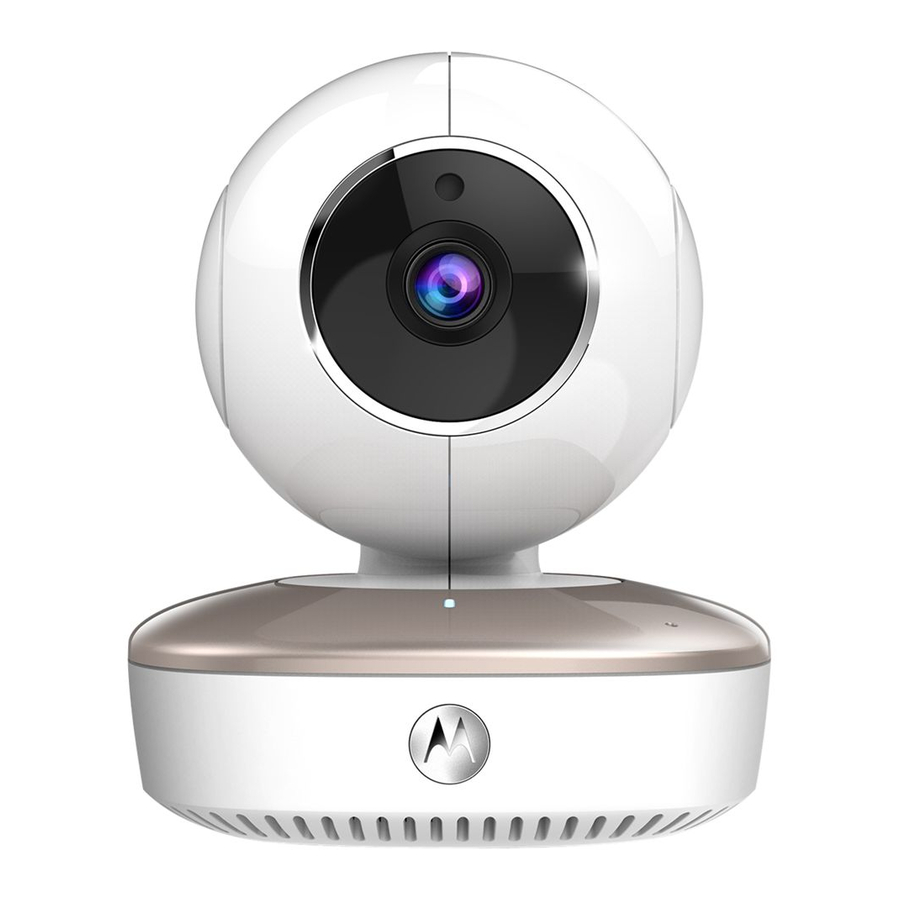
Mwongozo wa Haraka wa Kamera ya Motorola Smart Nursery

KUNYONGA HATARI:
Watoto wamenyongwa kwenye kamba. Weka kamba hii mbali na watoto (zaidi ya mita 1). Kamwe usitumie kamba za ziada na Adapta za AC. Tumia tu Adapta za AC zilizotolewa.
Kuanzisha Kamera yako ya Smart Nursery
- Unganisha Kamera na Ugavi wa Nishati. (Connect the Camera to the Power Supply.)

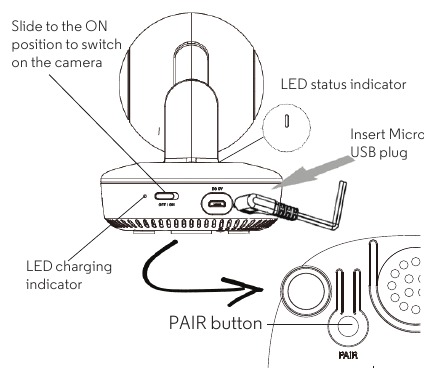
- Unganisha plagi ya Micro USB ya adapta ya nishati kwenye Kamera na ncha nyingine kwenye soketi inayofaa ya umeme. Kiashiria cha kuchaji cha LED karibu na swichi ya ON/OFF huwaka nyekundu.
- Telezesha swichi ya ON/OFF hadi kwenye nafasi ya ON. Kiashiria cha hali ya LED huwaka bluu mwanzoni, kisha hubadilika na kuwaka nyekundu.
- Sakinisha App ya Hubble for Motorola Monitors kwenye Vifaa vyako vya Mkononi. (Install the Hubble for Motorola Monitors App on your Mobile Devices.)


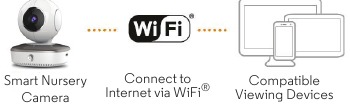
- Tazama kwenye Simu mahiri, Kompyuta Kibao na Kompyuta Zinazooana. (View on Compatible Smartphones, Tablets and Computers.)
![]()
- Endesha app ya Hubble kwenye simu yako mahiri au kompyuta kibao inayooana. (Run the Hubble app on your compatible smartphone or tablet.)
- Fuata maagizo ya ndani ya app ili kuunda akaunti yako ya Hubble. (Follow the in-app instructions to create your Hubble account.)
- Ingia kwenye akaunti yako kwenye simu yako mahiri inayooana, kompyuta kibao au kupitia https://app.hubbleconnected.com/#login kwenye PC yako ili kufikia mtiririko wa moja kwa moja wa kamera yako. (Log in to your account on your compatible smartphone, tablet or via https://app.hubbleconnected.com/#login on your PC to access your live camera stream.)
Tafadhali zingatia mahitaji yafuatayo ya chini ya mfumo:
Simu mahiri/Kompyuta Kibao: iOS 7, Android™ 4.2
PC (ya kutazama tu – SIYO usanidi): Windows® 7, Mac OS® 10.7, Chrome™ 24, Internet Explorer® 9, Safari® 6, Firefox® 18, Adobe® Flash® 15, Java™ 7
Mahitaji ya Wi-Fi®:
Angalau bandwidth ya kupakia ya 0.6Mbps kwa kila kamera. Jaribu kasi yako ya mtandao kwa:
http://www.speedtest.net/
Taarifa za Jumla
Ikiwa bidhaa yako haifanyi kazi vizuri, soma Mwongozo huu wa Haraka au Mwongozo wa Mtumiaji wa modeli. (If your product is not working properly, read this Quick Start Guide or the User's Guide of the model.)
Wasiliana na Huduma kwa Wateja:
+491805 938 802 (Ulaya)
Barua pepe: motorola-mbp@tdm.de
Udhamini Mdogo wa Bidhaa za Watumiaji na Vifaa ("Udhamini")
Asante kwa kununua bidhaa hii ya chapa ya Motorola iliyotengenezwa chini ya leseni na Binatone Electronics (Thank you for purchasing this Motorola branded product manufactured under license by Binatone Electronics)
| Bidhaa Zilizofunikwa (Products Covered) | Urefu wa Ufunikaji (Length of Coverage) |
| Bidhaa za Watumiaji (Consumer Products) | Miaka miwili (2) kutoka tarehe ya ununuzi wa asili wa bidhaa na mnunuzi wa kwanza wa bidhaa. (Two (2) years from the date of the products original purchase by the first consumer purchaser of the product.) |
| Vifaa vya Watumiaji (Consumer Accessories) | Siku tisini (90) kutoka tarehe ya ununuzi wa asili wa vifaa na mnunuzi wa kwanza wa bidhaa. (Ninety (90) days from the date of the accessories original purchase by the first consumer purchaser of the product.) |
| Bidhaa za Watumiaji na Vifaa ambavyo vimetengenezwa au Kubadilishwa (Consumer Products and Accessories that are Repaired or Replaced) | Salio la udhamini wa asili au kwa Siku tisini (90) kutoka tarehe ya kurudishwa kwa mtumiaji, chochote ni kirefu. (The balance of the original warranty or for Ninety (90) days from the date returned to the consumer, whichever is longer.) |
Jinsi ya Kupata Huduma ya Udhamini au Taarifa Nyingine?
Ili kupata huduma au taarifa, tafadhali piga simu:
+491805 938 802 (Ulaya)
Barua pepe: motorola-mbp@tdm.de
Utupaji wa Kifaa (mazingira)

Mwishoni mwa mzunguko wa maisha ya bidhaa, haupaswi kutupa bidhaa hii na taka za kawaida za nyumbani. Peleka bidhaa hii kwenye eneo la kukusanya kwa ajili ya kuchakata tena vifaa vya umeme na elektroniki. Alama kwenye bidhaa, mwongozo wa mtumiaji na/au sanduku inaonyesha hili. (At the end of the product life cycle, you should not dispose of this product with normal household waste. Take this product to a collection point for the recycling of electrical and electronic equipment. The symbol on the product, user's guide and/or box indicates this.)
Baadhi ya vifaa vya bidhaa vinaweza kutumika tena ikiwa utavipeleka kwenye eneo la kuchakata tena. Kwa kutumia tena baadhi ya sehemu au malighafi kutoka kwa bidhaa zilizotumika, unatoa mchango muhimu kwa ulinzi wa mazingira. (Some of the product materials can be re-used if you take them to a recycling point. By reusing some parts or raw materials from used products you make an important contribution to the protection of the environment.)
Tafadhali wasiliana na mamlaka za eneo lako ikiwa unahitaji maelezo zaidi kuhusu maeneo ya kukusanya katika eneo lako. (Please contact your local authorities in case you need more information on the collection points in your area.)
TAMKO LA CE 
Bidhaa hii inatii mahitaji muhimu na masharti mengine muhimu ya maagizo ya R&TTE 1999/5/EC. (This product is in compliance with the essential requirements and other relevant provisions of the R&TTE directive 1999/5/EC.)
Imetengenezwa, kusambazwa au kuuzwa na Binatone Electronics International LTD., mwenye leseni rasmi kwa bidhaa hii. MOTOROLA na nembo ya Stylised M ni alama za biashara au alama za biashara zilizosajiliwa za Motorola Trademark Holdings, LLC. na zinatumika chini ya leseni. Nembo ya Apple na Safari ni alama za biashara za Apple Inc., iliyosajiliwa Marekani na nchi nyinginezo. App Store ni alama ya huduma ya Apple Inc. Google Play, Android, na Chrome ni alama za biashara za Google Inc. Wi-Fi ni alama ya biashara ya Wi-Fi Alliance. Internet Explorer na Windows ni alama za biashara za kundi la makampuni ya Microsoft. Firefox ni alama ya biashara iliyosajiliwa ya Mozilla Foundation. Adobe na Flash ni alama za biashara zilizosajiliwa au alama za biashara za Adobe Systems Incorporated. Java ni alama ya biashara iliyosajiliwa ya Oracle na/au Imechapishwa nchini China washirika wake. Alama zingine zote za biashara ni mali ya wamiliki husika. © 2016 Motorola Mobility LLC. Haki zote zimehifadhiwa. (Manufactured, distributed or sold by Binatone Electronics International LTD., official licensee for this product. MOTOROLA and the Stylised M logo are trademarks or registered trademarks of Motorola Trademark Holdings, LLC. and are used under license. Apple logo and Safari are trademarks of Apple Inc., registered in the U.S. and other countries. App Store is a service mark of Apple Inc. Google Play, Android, and Chrome are trademarks of Google Inc. Wi-Fi is a trademark of the Wi-Fi Alliance. Internet Explorer and Windows are trademarks of the Microsoft group of companies. Firefox is a registered trademark of the Mozilla Foundation. Adobe and Flash are either registered trademarks or trademarks of Adobe Systems Incorporated. Java is a registered trademark of Oracle and/or its Printed in China affiliates. All other trademarks are the property of their respective owners. © 2016 Motorola Mobility LLC. All rights reserved.)

Marejeleo
Hubble Connected for Motorola kwenye App Store
![play.google.com]() Google Play
Google Play![app.hubbleconnected.com]() Hubble App
Hubble App![www.speedtest.net]() Speedtest by Ookla - The Global Broadband Speed Test
Speedtest by Ookla - The Global Broadband Speed Test


Pakua mwongozo
Hapa unaweza kupakua toleo kamili la pdf la mwongozo, linaweza kujumuisha maelekezo ya ziada ya usalama, taarifa za udhamini, sheria za FCC, n.k.
Pakua Mwongozo wa Haraka wa Kamera ya Motorola Smart Nursery


