Alcatel C300, C350 - Cordless Phone Start Up Guide
BEFORE 1st USE
Connecting your phone
- Connect plugs in corresponding sockets in the base station. Plug the telephone line into telephone socket and insert power plug in an electrical outlet.
- Insert batteries in Handset
Before you start to use your telephone, charge batteries continuously for 15 hours.
 only use plug adapter supplied with the unit and rechargeable batteries with your phone.

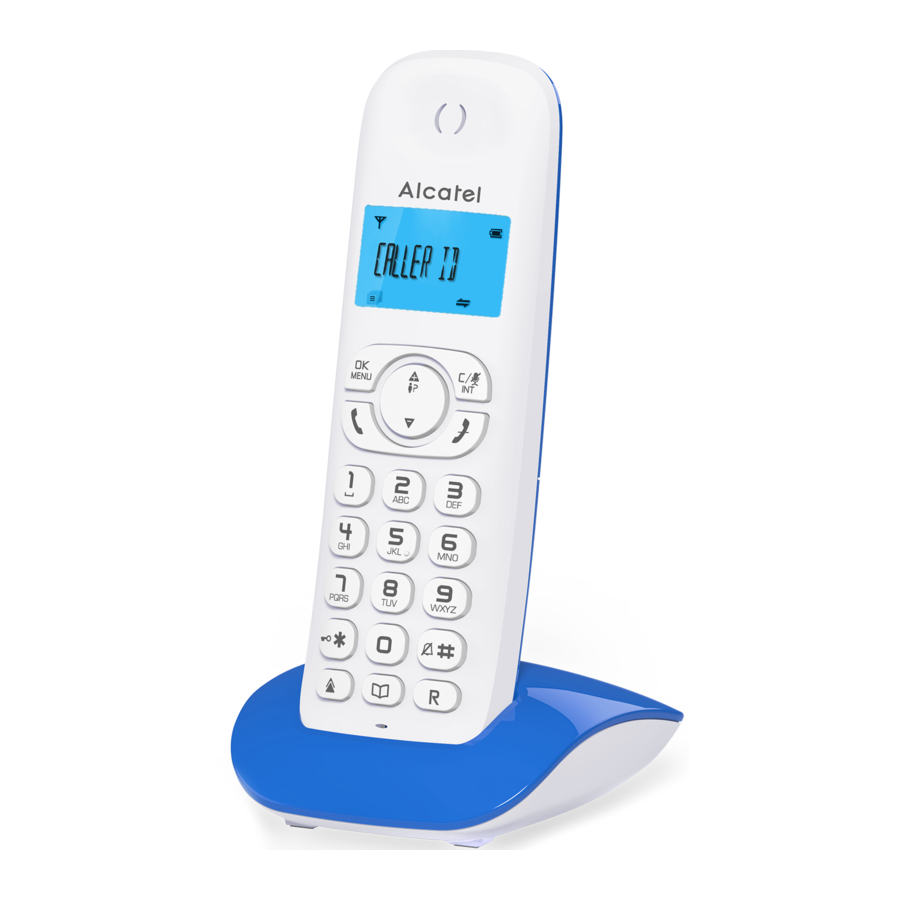
- OK/Menu key
- Back/Mute/Intercom key
- Navigation key
- Navigation key
- Hang-up/Exit key
- Recall (Flash) key - To access to operator services*
- Phonebook key
- Loudspeaker key (C350) / Redial key (C300)
- Star key - To lock / unlock keypad; toggle between the external and internal calls
- Talk key
- Paging key - To locate handset / to start registration procedure.
*Subject to subscription and availability of the service from the fixed line operator.
Display icons
 | Indicates battery is fully charged. |
 | Indicate battery is fully discharged |
 | Indicates that an external call is connected or held. Icon blinks when receiving an incoming call. |
 | Indicates you have a new voice mail message*. |
 | Blinks when you have new missed calls*. |
 | Displays when the alarm clock is activated. |
 | Displays when handsfree is activated (C350). |
 | Displays when ringer volume is turned off. |
 | Indicates that the handset is registered and within range of the base station. Icon blinks when the handset is out of range or is searching for a base. |
Set language and flashtime to operate correctly on your network:
![]() /
/ ![]() or
or ![]() select HS SETTINGS/
select HS SETTINGS/ ![]() /
/ ![]() or
or ![]() select LANGUAGE/
select LANGUAGE/ ![]() /
/ ![]() or
or ![]() select your desired language /
select your desired language / ![]() .
.![]() /
/ ![]() or
or ![]() select BS SETTINGS /
select BS SETTINGS / ![]() /
/ ![]() or
or ![]() select FLASH TIME/
select FLASH TIME/ ![]() /
/ ![]() or
or ![]() select SHORT / MEDIUM or LONG/
select SHORT / MEDIUM or LONG/ ![]() .
.
Using the phone
Receive and end a call -  /
/ 
Make a call
![]() either before or after dialling your number.
either before or after dialling your number.- From redial list:
![]() or
or ![]() (C300) /
(C300) / ![]() or
or ![]() /
/ ![]() .
. - From call log list*:
![]() /
/ ![]() or
or ![]() /
/ ![]() .
. - From direct memories: long press on KEY 1 or KEY 2 or KEY 3 in idle mode.
- From phonebook:
![]() /
/ ![]() or
or ![]() /
/ ![]() .
. - To activate/dsactivate handsfree:
![]() (C350 only).
(C350 only).
 or
or  (C300) /
  /
/  /
/  (C350 only).
To make an internal call
- If only 2 registered handsets:
![]() .
. - If more than 2 registered handsets:
![]() / enter the handset number.
/ enter the handset number. - To ring all handsets to intercom: 9.
 .
.To make a three-party conference call: during call  / INTERCOM / /
  or
or  to select handset number or all handset /
  on the called handset to answer / long press
  .
.
Phonebook settings: 50 entries
To register in phonebook
/ or to select PHONEBOOK / / or / select ADD /  / enter name of contact / / enter number of contact / / select melody / .
To register the direct memories in keys 1, 2 & 3
/ or select HS SETTINGS / / or / select DIRECT MEM /  or select KEY 1 or KEY 3 / / edit or enter the number / .
General settings
This phone can be customised according to your preferences, to access the different possibilities press: .
- To customise handset (name, melody, language,...):
![]() or
or ![]() select HS SETTINGS/
select HS SETTINGS/ ![]() .
.
TROUBLESHOOTING
As a general rule, if a problem occurs, remove the batteries from all handsets for about 1 minute, then disconnect and reconnect the power supply to the base and reinstall the handset batteries. For more information, you can download full user guide or get on-line assistance www.alcatel-home.com
SAFETY
This telephone is not designed for Emergency calls when the main power fails.
Do not use your telephone to notify a gas leak or other potential explosion hazard.
Do not open your device or its power supply to avoid risk of electrical shock. Do not attempt to open the batteries, as they contain hazardous chemical substances.
Your telephone must be located in a dry place away from hot, humid and direct sunlight condition.
To avoid radio signal interference, place the phone at least 1 metre away from other electrical appliances or other phones.
ENVIRONMENT

This symbol means that your inoperative electronic appliance must be collected separately and not mixed with the household waste. The European Union has implemented a specific collection and recycling system for which producers are responsible.
Help us protect the environment in which we live!
CONFORMITY
Hereby, ATLINKS EUROPE declares that the radio equipment type DECT is in compliance with Directive 2014/53/EU. The full text of the EU declaration of conformity is available at the following internet address: www.alcatel-home.com
Maximum Output Power (NTP): 24dBm; Frequency Range: 1880-1900MHz
ATLINKS Europe
147 avenue Paul Doumer
92500 RUEIL-MALMAISON
France
www.alcatel-home.com
Alcatel is a trademark of Nokia, used under license by ATLINKS.

References

Download manual
Here you can download full pdf version of manual, it may contain additional safety instructions, warranty information, FCC rules, etc.
Download Alcatel C300, C350 - Cordless Phone Start Up Guide


