Cherry KC 1068 - Corded Keyboard With IP68 Protection Manual
- 1 Overview
- 2 Before you begin...
- 3 For your safety
- 4 Avoiding damage
- 5 Connecting keyboard
- 6 Protective film for the keyboard
- 7 Cleaning the protective film
- 8 Disinfecting the protective film
- 9 If the keyboard is not working
- 10 Device disposal
- 11 Technical data
- 12 References
- 13 Download manual
- 14 In Other Languages
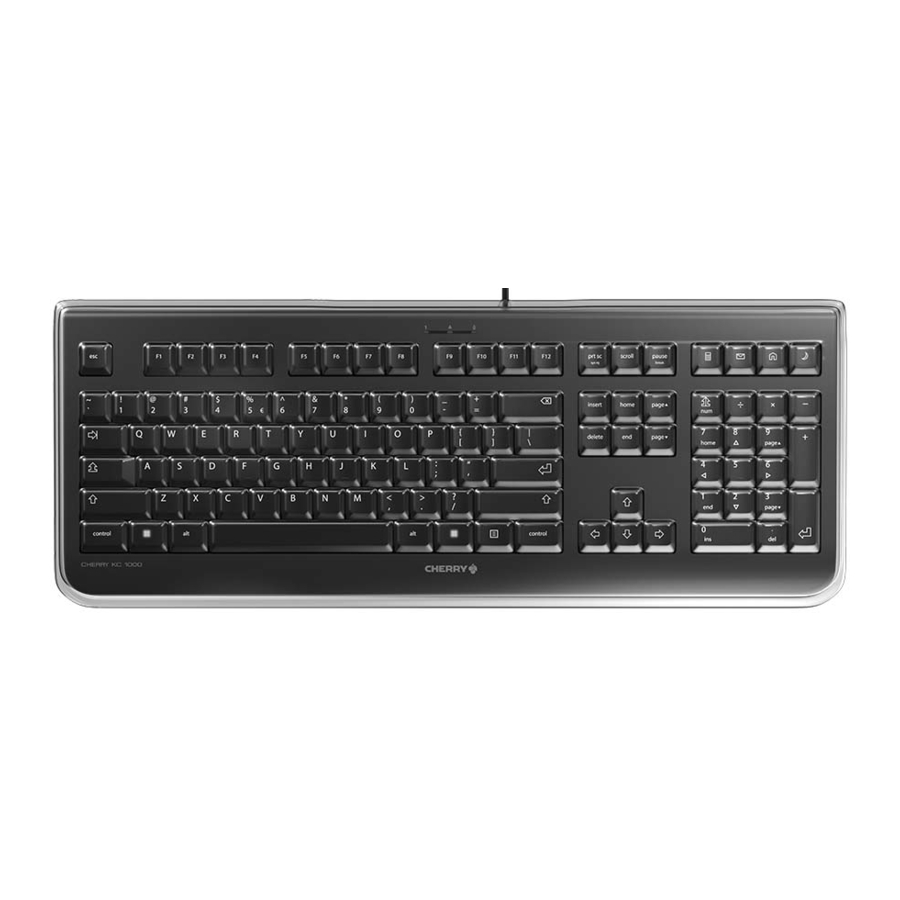
Overview

- Calculator
- E-Mail program
- Browser, home
- Standby
Before you begin...
|
The operating instructions contain information on effective and reliable use.
|

The CHERRY KC 1068 is a keyboard for operating computers.
For information on other products, downloads and much more, visit us at www.cherry.de.
For your safety
RSI stands for "Repetitive Strain Injury".
RSI arises due to small movements continuously repeated over a long period of time.
- Set up your workspace ergonomically.
- Position the keyboard and mouse in such a manner that your upper arms and wrists are outstretched and to the sides of your body.
- Take several short breaks, with stretching exercises if necessary.
- Change your posture often.
Avoiding damage
Damage to the film from sharp objects
- Avoid the film being pierced or cut by sharp objects.
- Do not fold out the keyboard's adjustable feet.
Connecting keyboard
- Connect the keyboard to the USB port of the PC/ laptop.
The keyboard is ready to use without installing any software.
Protective film for the keyboard
The film protects the keyboard against dust, dirt and water (up to a depth of 1m) (IP68 tested).
The USB plug is not protected to IP68 even with the supplied cap.
The keyboard film is resistant to water, detergent, isopropyl alcohol and diesel.
The protective film does not contain polybrominated diphenyl ether and is free from halogens and latex.
When you remove the protective film you can only use the keyboard in the same way as a normal keyboard, without protection against environmental influences.
Cleaning the protective film
- Switch off the PC/laptop or pull out the keyboard plug.
NOTE! Aggressive cleaning agents or liquid in the plug may cause damage- Do not remove the keyboard's protective film.
- Do not use any abrasive cleaners or scourers when cleaning.
- Prevent any liquid from getting inside the plug.
- Do not clean the keyboard in the dishwasher.
- Clean the protective film with a slightly damp cloth and some mild detergent (such as washing-up liquid) or isopropyl alcohol.
- Dry the protective film with a soft, lint-free cloth.
Disinfecting the protective film
Disinfectability is tested by spraying on various disinfectants and letting them act for 5 minutes.
|
These deformations do not damage the structure of the foil or impair its disinfectability, and they disappear after several hours.
| ||||
| Disinfectant | Bacteria | Yeasts | ||
| Isopropyl alcohol 70% | ✓ | ✓ | ||
| Dentavon liquid | ✓ | ✓ | ||
| Incidin liquid | ✓ | ✓ | ||
| Kohrsolin FF | ✓ | ✓ | ||
| Sterillium | ✓ | ✓ | ||
| Desomed Rapid AF | ✓ | x | ||
| Dismozon | ✓ | x | ||
You can find further information on cleaning and disinfection at: www.cherry.de > Service > Downloads > CHERRY KC 1068.
If the keyboard is not working
- Use another USB port on the PC/laptop.
- To make sure that the keyboard is not defective, test it if possible with another PC/laptop.
- Set the option "USB Keyboard Support" or "USB Legacy Mode" to "enabled" in the BIOS of the PC.
Device disposal
- Do not dispose of devices with this symbol in household waste.
![]()
- Dispose of the devices in accordance with statutory regulations – at your local dealer or at municipal recycling centres.

Disposing of the protective film does not produce polybrominated dibenzodioxin or dibenzofuran.
Technical data
| Designation | Value |
| Supply voltage | 5.0 V/DC ±5% SELV |
| Current consumption | 50 mA |
| Storage temperature | -25°C... +65°C |
| Operating temperature | 0°C... +50°C |

References

Download manual
Here you can download full pdf version of manual, it may contain additional safety instructions, warranty information, FCC rules, etc.
Download Cherry KC 1068 - Corded Keyboard With IP68 Protection Manual


