BIGTREETECH SKR Mini E3 V3.0 Motherboard Manual.
Instruction
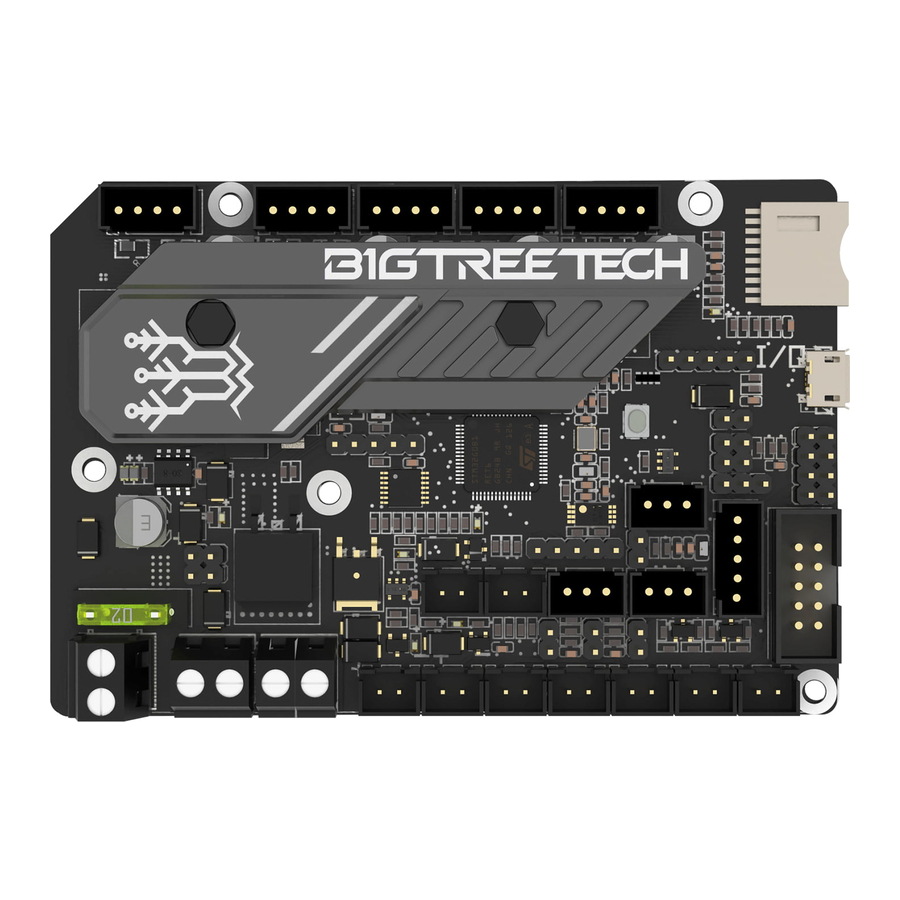
BTT SKR MINI E3 V3.0 is a motherboard designed for Ender3, which launched by the 3D printing team of Shenzhen Big Tree Technology Co., Ltd. It is the perfect replacement of the original motherboard of Ender3.
Features
- Redesigned motherboard ID (Industrial Design) make it good-looking
- Adopts STMicroelectronics G0 series MCU STM32G0B1RET6
- Upgraded heat sink improves heat dissipation
- Thermistor inputs are protected from short circuit to Vin
- Added a third PWM controlled cooling fan output
- Adopt MicroUSB instead of MiniUSB interface
- Added +3.3V power supply for SPI output header
Parameters
| Product size: 103.75*70.25mm | Mounting size: Please refer to BTT SKR MINI E3 V3.0-SIZE.pdf for more |
| Board layer: 4 | MCU: ARM Cortex-M0+ STM32G0B1RET6 |
| Power input: DC 12/24V | Logic voltage: 3.3V |
| Motor driver: UART mode of on-board TMC2209 | Interfaces of motor driver: XM, YM, ZAM, ZBM, EM |
| Interface of temperature sensor: TH0, THB, 2-way 100K NTC (RTD) | Display screen: 2.4-inch TFT, 3.5-inch TFT, Ender3 original LCD12864 screen, etc. |
| PC communication interface: USB Micro B type, easy to plug, communication baud rate 115200 | File format: G-code |
| Recommended software: Cura, Simplify3D, Pronterface, Repetier-host, Makerware | |
Motherboard LED meanings
- When the motherboard is powered on:
- Power LED = Red. Solid on = Normal power supply
- Status LED = Red. Blinking during a firmware update. Controlled by firmware otherwise
- D8 green light for the hot bed HB status indicator: always on when heating, off when not heating;
- D6 green light for the heating rod E0 status indicator: always on when D6 green light for the heating rod E0 status indicator: heating, off when not heating; always on when heating, off when not heating;
- D10 green light for the CNC fan FAN0 status indicator: on when open, D6 green light for the heating rod E0 status indicator: off when closed.always on when heating, off when not heating;
- D7 green light for the CNC fan FAN1 status indicator: on when open, off when closed.
- D3 green light for the CNC fan FAN2 status indicator: on when open, off when closed.
- D9 green light for the SD card status indicator: light up when inserted into the SD, off when pulled out.
Communication of Motherboard and PC
- The motherboard can communicate with a PC using the USB interface. The same USB interface can be used to communicate with a Raspberry pi or any other host device.


Motherboard Interfaces
Size Diagram

Wiring Diagram

Sensorless homing function

As shown, connect the corresponding axes with the jump caps to choose Sensorless homing function
NOTE: If you choose this function, you cannot use external ENDSTOP!
5V power supply for BLtouch, TFT, RGB interfaces
- To use the onboard 5V PSU, short the pins shown in the below image using a jumper.

- To use an external BIGTREETECH DCDC5V V1.0 module, short the pins shown in the below image using a jumper.


Connection of cooling fan

Connect the fan by FAN2 to realise the whole machine cooling.
Please note that the operating voltage is the same with the input power supply voltage to avoid damage.
Connection to BIGTREETECH Relay V1.2

Connection to BTT UPS 24V V1.0

Connection to Neopixel light

Connection to BL touch

Firmware of motherboard
The package contains the firmware for testing (Ender3), which can be used directly or changed according to your needs.
- How to get the firmware
Contact our customer service or technical support;
Login to our website to download: https://github.com/bigtreetech - Motherboard firmware update
Copy firmware.bin file to the root directory of SD card
NOTE: Do not change file name!
Insert the SD card into the slot, re-power on or reset, the update will complete after 10S, And you should see the status LED blinking red during the update. - Please refer to the BTT SKR MINI E3 V3.0-PIN.pdf for motherboard firmware DIY.

- The text form and file name of firmware in the SD card cannot be changed from" firmware.bin".
- The wiring must be done before powering on.
- The LCD screen only supports the LCD12864 screen with CR10_STOCKDISPLAY interface.
References

Download manual
Here you can download full pdf version of manual, it may contain additional safety instructions, warranty information, FCC rules, etc.
Download BIGTREETECH SKR Mini E3 V3.0 Motherboard Manual.
