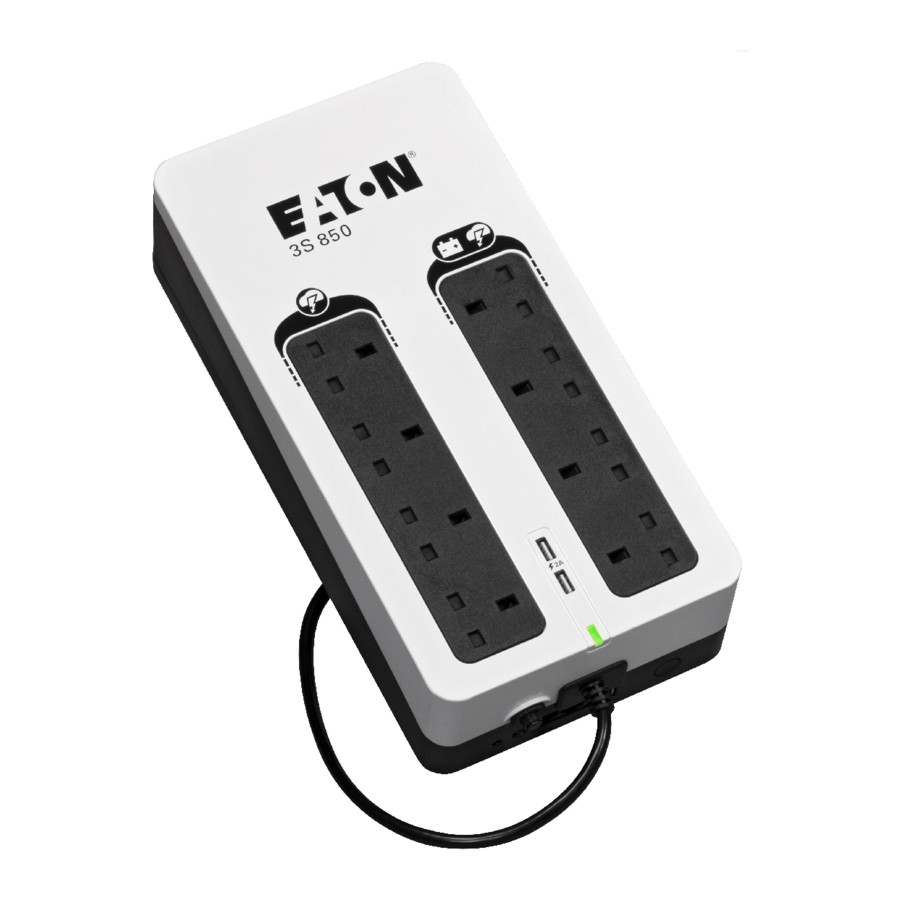
Eaton 3S UPS - 3S600, 3S850 Manual
Special symbols
The following are examples of symbols used on the UPS or accessories to alert you to important information:
 DANGEROUS VOLTAGE - Observe the warning associated with the risk of electric shock symbol.
 Important instructions that must always be followed.
 Information, advice, help.
 Read the documentation provided.
 Disconnect input plug.
 This equipment should only be used in a dry indoor environment.
 Operating range of temperature.
 Operating range of humidity.
 The UPS and their batteries must be kept in a ventilated place.
Introduction
We recommend that you take the time to read this advanced user guide and documentations provided to take full advantage of the many features of your UPS (Uninterruptible Power System).
Before installing your Eaton 3S, please read the information and safety instructions provided. Follow the instructions in the quick start guide and if necessary, refer to this advance user guide.
To discover the entire range of Eaton products, we invite you to visit our web site at eaton.com or contact your Eaton representative.
The Eaton 3S Uninterruptible Power System (UPS) is designed for computers and their peripherals, NAS, televisions, internet gateways, etc... It must not be used to supply other electrical equipment (lighting, heating, household appliances, etc.). It prevents your critical equipment from power problems such as power failures and power surges.
Presentation


- Protected outlets
- Backup & Protected outlets
- UPS status LED
- USB charging port (optional)
- Power supply cord
- Protection circuit breaker
- Tel / xDSL surge protection (optional)
- USB COM port
- ON/OFF button
Installation
Package contents

Eaton 3S UPS

Quick start

Information and safety instruction

USB cable


Recommended positions
Eaton 3S can be wall-mounted, horizontal or vertical position, the distance between screws are 230 mm for 3S600 models and 240 mm for 3S850 models.


For 3S600 only do not dispose the product on the side as shown below.

Connection
Power supply cord
Connect the UPS to the AC-power source through a wall outlet equipped with an earth connector, using the cord.

Protected outlets / Backup & Protected outlets
Plug critical equipment (computer, monitor, modem, etc.) to the backup & protected outlets  providing battery backup power and surge protection, taking care not to exceed the rated current indicated in amperes. Other devices (printer, scanner, fax, etc.) can be connected to the protected outlets
  that provide surge protection only. The protected outlets are not backed up by battery power in the event of a power outage. Equipment connected to these outlets is supplied as soon as the AC cord is plugged in. These are not affected by ON/OFF button
  .
.

Tel / xDSL surge protection (optional)
Protect your Tel / xDSL line using a RJ11 cable (not provided) from the wall phone plug to the Eaton 3S "In" port  then connect your device to the Eaton 3S "Out" port .

USB COM port
Connect the UPS to the computer using the USB cable  supplied.

 Enhance your purchase by downloading the configuration tool software using URL: http://powerquality.eaton.com/Australia/Support/Software-Drivers/default.asp?cx=22
USB charging port (optional)
Connect your device to the USB charging port  (2A maximum).

ON/OFF button
Switch on the UPS by pressing ON/OFF button during 1.5 second.

Register warranty
Australia: http://powerquality.eaton.com/Australia/Product-Registration-Australia/?cx=22
New-Zealand: http://powerquality.eaton.com/New-Zealand/Product-Registration-NZ/?cx=6
Operation
Battery charge
The UPS charges the battery as soon as it is connected to the AC outlet, whether ON/OFF button is pressed or not. When used for the first time, the battery will only provide its maximum autonomy after it has been charged for 8 hours. It is recommended that the UPS be permanently connected to the AC power supply to ensure the best possible autonomy.
AC-power disturbance
If AC power is disturbed or fails, the UPS continues to operate on battery power. UPS status LED  flashes green. In normal mode, the audio alarm beeps every five seconds, then every two seconds when the end of battery backup time is near.
If the power outage lasts longer than the battery backup time, the UPS shuts down and automatically restarts when power is restored. Following a complete discharge, 10 hours are required to recharge the battery back to full backup time.
To save battery power, it is possible to press ON/OFF button to cut the supply of power to the devices connected to the battery backup outlets.
Protected outlets
All protected outlets provide surge protection, whatever the position of ON/OFF button .
Equipment Care
For full battery life, keep the equipment at an ambient temperature of 25°C (77°F). Battery service life is reduced by 50% for every ten degrees above 25°C.
If the UPS requires any type of transportation, verify that the UPS is turned off.
Battery replacement
For battery replacement follow Eaton instructions provided on: http://powerquality.eaton.com/Australia/Products-services/Services/AU-batteries.asp?cx=22
The following precautions should be observed when working on batteries:
- shut down the UPS (ON/OFF button (on/off button)),
![]() disconnect the source prior to connecting or disconnecting battery terminals,
disconnect the source prior to connecting or disconnecting battery terminals,- do not wear any metal objects including watches and rings,
- do not lay tools or metal parts on top of batteries,
- it is imperative to use the same battery type and number.

Batteries present a risk of electrical shock or burn from high short circuit current. Observe proper precaution. Batteries may contain HIGH VOLTAGE and CORROSIVE, TOXIC and EXPLOSIVE substances. Because of the battery the output receptacles may carry high voltages even when the AC supply is not connected to the UPS. Do not dispose of batteries in a fire. When exposed to flame, batteries may explode. Do not open or mutilate the battery or batteries. Released electrolyte is harmful to the skin and eyes and may be extremely toxic.
Battery change:


take care not to reverse the polarity + (red) and - (black) when connecting the batteries as this will destroy the device.
Troubleshooting
The Eaton 3S is designed for durable, automatic operation and alerts you whenever a potential operating problem may occur.
The following table describes typical conditions:
| Problem | Possible cause | Action |
|
The battery backup outlets are not supplied with power.
|
ON/OFF Button is not pressed.
|
Press ON/OFF button for 1.5 seconds and check that LED turns to green.
|
| The connected devices are not supplied when AC power fails. |
The devices are not connected to the battery backup outlets .
|
Connect the devices to the battery backup outlets .
|
| AC power is available, but the UPS operates on battery power. |
Circuit breaker  has been tripped by an overload on the UPS output. has been tripped by an overload on the UPS output.
|
Disconnect excess equipment and reset the circuit breaker by pressing the corresponding button.
|
|
The filtered outlets and are not supplied.
|
The wall outlet is not supplied. Circuit breaker has been tripped by an overload on the UPS output.
|
Supply power from the wall outlet. Disconnect excess equipment and reset the circuit breaker by pressing the corresponding button.
|
|
Green LED flashes every 1 second and audio alarm beeps every 5 seconds.
|
The UPS frequently operates on battery power because the AC power source is of poor quality. | Have the electrical installation checked by a professional or use another wall outlet. |
|
Green LED flashes every 1 second and audio alarm beeps every 1 second.
|
The UPS battery backup outlets are overloaded.
|
Disconnect excess equipment connected to the battery backup outlets. |
|
Red LED is on and the audio alarm beeps continuous.
|
A fault has occurred on the UPS. The battery backup outlets are no longer supplied.
|
Contact Eaton service and support. |
| The telephone line is disturbed or modem access is not possible. | Surge protection on the telephone line is no longer provided. |
Disconnect the telephone line from the wall outlet. Contact Eaton service and support. |
| USB communication fails. | Cable connection may be defective. |
Re-connect the USB cable , if still not available Contact Eaton service and support.
|
|
USB charger ports are not supplied.
|
The battery voltage is too low. | Recharge the battery, if still not available contact Eaton service and support. |
Service and support
If you have any question or problem with the UPS, call Eaton or your local service representative in your country / region. Please have the following information ready when you call for service:
- model number,
- serial number,
- date of failure or problem,
- symptoms of failure or problem,
- customer return address and contact information,
- description of the installation.
Specification and technical characteristics
| Eaton 3S | 600 | 850 |
| UPS power | 600 VA / 360 W | 850 VA / 510 W |
| Input mains voltage | 220 - 240 V~; Ph + N + PE | |
| Input voltage range | 192 - 276 V, adjustable to 168 - 295 V | |
| Input frequency | 50 / 60 Hz (46 - 65 Hz working range) | |
| Input protection | 10 A (thermal breaker) | |
| Output Voltage for backup outlets | 220 V / 230 V / 240 V ~ | |
| Output Current for backup outlets | 2.5 A | 3.6 A |
| Total output current for all outlets | 9 A maximum | |
| Performance Classification | VFD SY 333 | |
| Battery | 12 V; 5 Ah | 12 V; 9 Ah |
| Communication interface | USB port (cable included) | |
| USB Charge | _ | 2 USB ports 2 A maximum |
| Telephone surge protection | _ |
 Uoc = 6 kV; Up < 1.5 kV; In = 3 kA Uoc = 6 kV; Up < 1.5 kV; In = 3 kA
|
| Power surge protection |
Uoc = 6 kV; Up < 1.5 kV; In = 3 kA
|
|
| Operating temperature | 0 to 40°C | |
| Storage temperature | -25°C to +55°C | |
| Operating relative humidity | Operating relative humidity 0 to 85% | |
| Operating elevation | 0 to 3000 m | |
| Compliances |
IEC 62040-1; IEC 62040-2 C2; AS 62040-2 C2; IEC 62040-11
|
|
| Conformity | CE / RCM | |
| Warranty | 2 years | |
| Weight | 3.2 kg | 4.3 kg |
| Dimensions | 325 x 140 x 86 mm | 335 x 170 x 86 mm |
*Note: The Eaton 3S is a AS 62040-2 cat C2 UPS product. In a residential environment, this product may cause radio interference, in which case the user may be required to take additional measures. Output cables should not exceed 10 m length.
Glossary
| Backup time | Time during which the load can be supplied by the UPS operating on battery power. |
| UPS | Uninterruptible Power Supply. |
Copyright © 2019 EATON
All rights reserved.
614-09406-00 - 3S ANZ_EN

Download manual
Here you can download full pdf version of manual, it may contain additional safety instructions, warranty information, FCC rules, etc.
Download Eaton 3S UPS - 3S600, 3S850 Manual


