Honeywell HPA250 Series - Air Purifier Manual
- 1 YOUR AIR PURIFIER
- 2 HOW YOUR AIR PURIFIER WORKS
- 3 SET-UP
- 4 INSTALL TRUE HEPA FILTERS AND ODOR REDUCING PRE-FILTER
- 5 OPERATION
- 6 Using the Timer Option
- 7 ELECTRONIC FILTER CHANGE REMINDER
- 8 REPLACING THE TRUE-HEPA FILTERS
- 9 ODOR REDUCING PRE-FILTER MAINTENANCE
- 10 CLEANING AND STORAGE
- 11 ACCESSORIES AND REPLACEMENT FILTERS
- 12 CONSUMER RELATIONS
- 13 IMPORTANT SAFETY INSTRUCTIONS
- 14 References
- 15 Download manual
- 16 In Other Languages
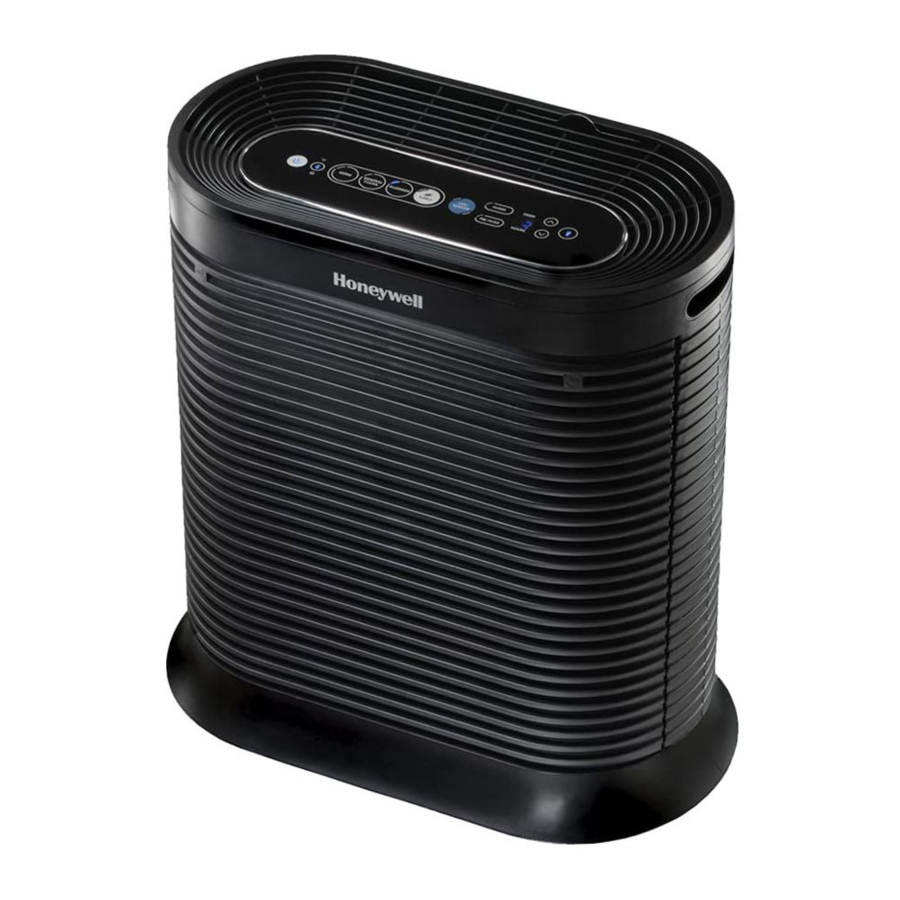
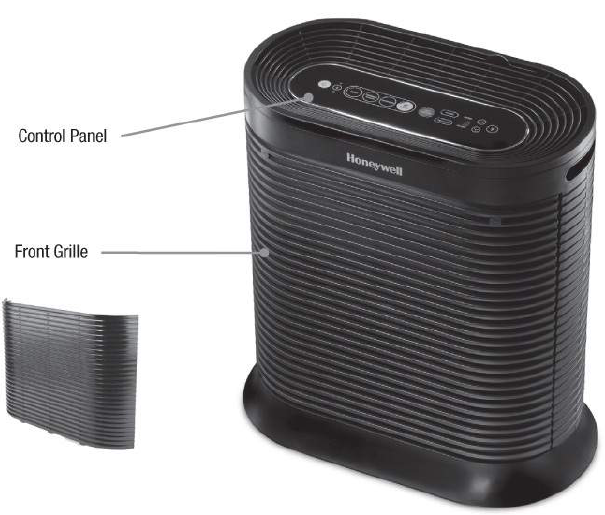
YOUR AIR PURIFIER
HPA250 series
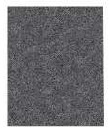
Type  Odor Reducing Pre-FiIter
or  Household Gas & OdourReducing Pre-filter
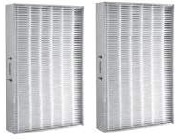
Type  True HEPA Filters
HOW YOUR AIR PURIFIER WORKS
This model air purifier incorporates a 2-stage cleaning system to help clean the air that passes through the filter in the unit (Fig. 1).
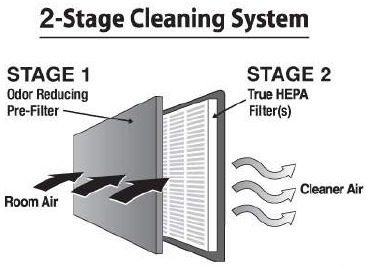
Fig. 1
Stage 1: Odor Reducing Pre-Filter
Stage 2: True HEPA Filter that captures particles as small as 0.3 microns or larger
SET-UP
- Select a firm, level and flat location.
- When operating, large volumes of air are drawn to ward the air purifier. Surrounding areas should be cleaned and/or vacuumed frequently to prevent build-up of dust and other contaminants. This may also help prolong the life of the filter. If the unit is placed on a light colored carpet, a small mat or rug should be used underneath to prevent permanent staining. This is especially important in homes with contamination from smoking, fireplaces, or where candles are burned.
- Ensure the front of the unit faces away from the closest wall or furniture.
- Ensure no grilles are blocked.
INSTALL TRUE HEPA FILTERS AND ODOR REDUCING PRE-FILTER
The True HEPA Filters and Odor Reducing Pre-FiIter are supplied within the air purifier. New air purifiers have their filters wrapped to ensure purity, and are labelled to help identify the proper replacement filter. (Type  True HEPA Filter; Type
  Odor Reducing Pre-Filter or
  Household Gas & Odor Reducing Pre-Filter)
- Before using your new air purifier you must remove the wrappers covering the filters and Pre-Filter. Make sure the air purifier is OFF and unplugged. Press the two hand symbols (
![]() ) on the front grille to release it from the unit and pull the grille toward you to remove it (see Fig. 2).
) on the front grille to release it from the unit and pull the grille toward you to remove it (see Fig. 2).
![]()
Grasp the sides of the filter frame near its top end and pull outward. Repeat for the second filter. - Remove protective wrap from the filters (including the Pre-Filter) that have been supplied with your air purifier,
- Place the HEPA filters into the air purifier housing. Ensure that the removal "pull" tabs are facing outward (this will facilitate filter removal later). Place the Pre-FiIter on top of the HEPA filters. Tuck the edges of the Pre-filter into the tabs that are located around the edges of where the HEPA filters are inserted. This will hold the Pre-filter securely in place.
- Replace the front grille by placing the tabs on the bottom of the grille into the slot(s) on the unit. Gently push the top of the grille into place by pressing on the hand symbols (
![]() ) to secure in place.
) to secure in place.
 ) on the front grille to release it from the unit and pull the grille toward you to remove it (see Fig. 2).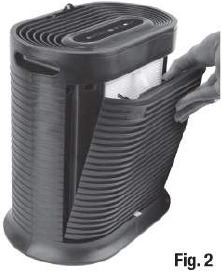
OPERATION
 NOTE: This air purifier is an app enabled device. These instructions cover the operation of the air purifier device only. For additional features available via the Honeywell Portable Air Purifier App, please reference the instructions that are printed as a stand alone insert to this booklet.

This product earned the ENERGY STAR rating by meeting strict energy efficiency guidelines set by the U.S. EPA. The U.S. EPA does not endorse any manufacturer claims of healthier indoor air from ENERGY the use of this product.
Portable air purifiers are more effective in rooms where all doors and windows are closed. In general, it is recommended that you run your air purifier while you are at home to clean the air.
Air Purifier Operation
- Once the filters have been unwrapped and replaced in the unit, plug the power cord into a working electrical outlet.
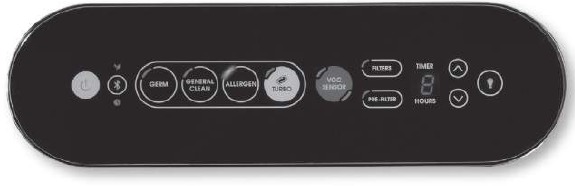
- Select the desired cleaning level by simply TAPPING the desired purification icon. A blue LED light will illuminate the selected setting: Germ, General Cleanor Allergen.
TAP POWER![]() for on/off and then select your cleaning level.
for on/off and then select your cleaning level.
ALLERGEN optimises allergen capturing performance during allergen season.
GENERAL CLEAN for general, everyday air cleaning.
GERM optimises germ capturing performance. Use during cold & flu season.
TAP TURBO![]() for power cleaning or fast odor reduction.
for power cleaning or fast odor reduction. - The Turbo setting operates the unit at the highest speed. This setting will maximise the unit's ability to help reduce odours and will help clean the air quickly. To select the Turbo setting, TAP the Turbo icon
![]() . The Turbo LED will illuminate. TAPPING the Turbo icon
. The Turbo LED will illuminate. TAPPING the Turbo icon ![]() again will return the air purifier to the previous cleaning setting. To shut OFF, tap the Power symbol
again will return the air purifier to the previous cleaning setting. To shut OFF, tap the Power symbol ![]() until the air purifier shuts off.
until the air purifier shuts off.
 for on/off and then select your cleaning level.
 for power cleaning or fast odor reduction.
Using the Timer Option:
The Timer Option allows you to select how long the air purifier will run before it automatically shuts off. The timer can be set in one hour intervals from one to eighteen hours. Do not use this option if you want the unit to run continuously.
- To set the unit for Automatic Shut Off, TAP the up or down arrows.
- Continue to TAP the desired arrow to toggle through to the desired time setting.
- The digital timer will indicate the selected runtime (Fig.5).
![]()
Fig.5 - The LED Display will automatically count down and display the number of hours left on the timer.
- The unit will automatically shut off after the indicated run time.
Using the Dimmer Option
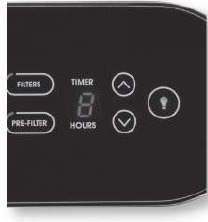
The Dimmer Option ( ) allows you to adjust the brightness of the LED lights on the control panel (Fig.6).
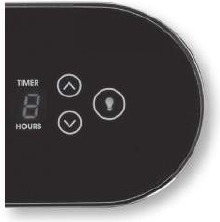
Fig. 6 Dimmer Function
You may wish to adjust the brightness depending on the room where the unit is placed. The unit always turns on with the brightness on HIGH.
To adjust brightness
- TAP the Dimmer icon (
![]() ) once to dim the lights to LOW.
) once to dim the lights to LOW. - TAP the Dimmer icon (
![]() ) twice and it will shut the lights OFF, (the air purifier will not shut off).
) twice and it will shut the lights OFF, (the air purifier will not shut off). - TAPPING the Dimmer icon (
![]() ) a third time will return the brightness to HIGH.
) a third time will return the brightness to HIGH.
NOTE: The Power (symbol) and the Bluetooth (symbol) icon will always remain illuminated.
Using the VOC Function
TAP the blue VOCSensor (Fig. 8) for automatic operation based on VOC (Volatile Organic Compounds) sensed in the air.
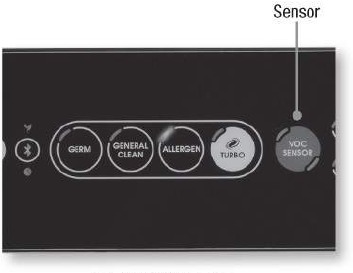
Fig. 8 VOC Function
When the VOC Sensor mode is selected, the upper left indicator light will illuminate blue to indicate that the unit is running in automatic VOC Sensing mode. The lower right Indicator will illuminate green, orange, or red depending on the level of VOCs detected in the room by the sensor.
Green = Low level of VOCs detected, air purifier will operate in the lowest setting, Germ.
Amber = Moderate level of VOCs detected, air purifier will operate in the medium level setting, General Clean.
Red = High level of VOCs detected, air purifier will operate in the Allergen setting. The air purifier will continue to monitor the VOC levels in the room and adjust the cleaning levels as necessary.
ELECTRONIC FILTER CHANGE REMINDER
This air purifier has two electronic filter check lights to remind you when to check and replace the True-HEPA Filters and Odour Reducing Pre Filter. The "Filter" or "Pre-filter" light will illuminate when the True-HEPA filters and/or the Pre-filter needs to be replaced. These indicator lights are based on the number of hours the air purifier has been in use, and depending on the environment and contaminants in the area, the filters may need to be changed before the recommended time. (Fig. 9).
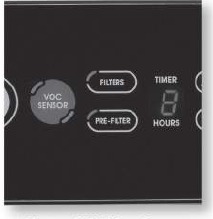
Fig. 9 Will illuminate when it is time to change HEPA filters
You should periodically check these filters. Depending on operating conditions, the True-HEPA filters should be replaced every 12 months, and the Odour Reducing Pre-Filters every 3 months, especially if there have been heavy odours and particles in the home.
To RESET Either Electronic Filter Check
After you have replaced the appropriate filters the "Check Filter or "Check Pre-Filter" light will remain on until it is reset. With the unit powered off, press the lighted button and hold for approximately 3 seconds until the light turns off. The electronic filter check is now reset. Depending on individual usage (environment and hours used), you may need to replace filters more or less frequently.
NOTE: If you change the Pre-filter or HEPA Filter before the Electronic Filter Check lights are illuminated, you should still reset the indicator. With the unit plugged in and powered off, press and hold the appropriate "Filter" or "Pre-filter" button for 5 seconds. The light will flash red twice to signal that the indicator has been reset.
These cleaning intervals are intended as guidelines only. Performance of any filter media is dependent upon the concentration of contaminants going through the system. High concentrations of contaminants such as dust, pet dander and smoking will reduce the useful performance of the filter.
NOTE: None of the filters are washable. Do not immerse them in water.
REPLACING THE TRUE-HEPA FILTERS
See INSTALLATION INSTRUCTIONS of this manual.
You may be able to purchase Honeywell replacement True-HEPA filter  for your air purifier at the store where you purchased your air purifier or they can be ordered directly from Kaz USA, Inc., the licensee of Honeywell air purifiers at www.replacementfilters.com. If you have any questions, contact Kaz Consumer Services at 1-800-477-0457.
ODOR REDUCING PRE-FILTER MAINTENANCE
The odor reducing pre-filter not only helps reduce odors, but also helps capture large airborne particles that enter the grille. This Pre-Filter should be replaced every 3 months, as it will become covered with particles and fibres that will reduce filtration performance.
Use the specially designed Type  Odour Reducing Pre-filter or the Type
  Household Gas & Odour ReducingPre-filter, available where the True HEPA filters are sold and from Kaz at: www.replacementfilters.com or by calling Kaz Consumer Relationsat 1-800-477-0457.
CLEANING AND STORAGE
We recommend that you clean the air purifier at least once every 3 months and before extended storage.
Use only a dry cloth to wipe the external surfaces of the air purifier.
DO NOT USE WATER, WAX POLISH, OR ANY CHEMICAL SOLUTION.
If your Air Purifier will not be used for more than 30 days, we recommend that you:
- Remove the True-HEPA Filters from the unit.
- Wrap the True-HEPA Filters in an air tight plastic bag.
- Remove the Odour Reducing Pre-filter and place it in an air tight plastic bag.
FREQUENTLY ASKED QUESTIONS
My Air Purifier is starting to make noise and the air output is less. What's wrong?
The filters may be dirty. High amounts of contaminates can block the pores in the filter and stop the air from moving through it. Replace the Filters.
How long should I run my Air Purifier?
In general, the unit will be most effective when doors and windows are closed. It is recommended that you run your air purifier while you are at home to clean the air.
Can I wash any of the filters in my Air Cleaner?
No. Washing either filter will ruin it.
What are VOCs?
Volatile Organic Compounds (VOCs) are emitted from various solids and liquids such a paints, cleaning supplies, building materials, and permanent markers. Some of these compounds can have adverse short and long term health effects and consistently have higher concentrations indoors than outside.
(Source: http://www.epa.gov/iaq/voc.html)
Why did my air purifier suddenly turn on a higher setting?
Is the air purifier set to VOC Mode, or Auto-Set mode from the App? If it is, the unit may have sensed a higher level of VOCs or Allergens and have adjusted the fan speed accordingly.
ACCESSORIES AND REPLACEMENT FILTERS
If you would like your air purifier to remain effective at reducing household odours, and/or household gases (VOCs) and to operate most effectively, you should replace the Odour Reducing Pre-filter once every 3 months. This Pre-Filter is available as the Odour Reducing Pre-Filter  model HRF-AP1 or you may use model HRF- APP1
  for Household Gas & Odour Reduction.
To order replacement filters for your air purifier, go to www.replacementfilters.com or call 1-800-477-0457.
- True-HEPA filter
![]() Model HRF-R1 (single pack) o rHRF-R2 (2pack) o rHRF-R3 (3pack)
Model HRF-R1 (single pack) o rHRF-R2 (2pack) o rHRF-R3 (3pack) - Odor Reducing Pre-filter model
![]() HRF-AP1 or Household Gas&Odor Reducing Pre-Filter
HRF-AP1 or Household Gas&Odor Reducing Pre-Filter ![]() model HRF-APP1
model HRF-APP1
 Model HRF-R1 (single pack) o rHRF-R2 (2pack) o rHRF-R3 (3pack)
CONSUMER RELATIONS
Mail questions or comments to:
Kaz USA,Inc.
Consumer Relations Dept.
250 Turnpike Road Southborough, MA 01772
Call us toll-free at: 1-800-477-0457
E-mail: consumerrelations@kaz.com
Or visit our website at: www.kaz.com
Please be sure to specify a model number.
NOTE: IF YOU EXPERIENCE A PROBLEM, PLEASE CONTACT CONSUMER RELATIONS FIRST OR SEE YOUR WARRANTY. DO NOT RETURN TO THE UNIT TO THE ORIGINAL PLACE OF PURCHASE. DO NOT ATTEMPT TO OPEN THE MOTOR HOUSING YOURSELF, DOING SO MAY VOID YOUR WARRANTY AND CAUSE DAMAGE TO THE AIR PURIFIER OR PERSONAL INJURY.
IMPORTANT SAFETY INSTRUCTIONS
READ AND SAVE THESE SAFETY INSTRUCTIONS BEFORE USING THIS AIR PURIFIER
When using electrical appliances, basic precautions should always be followed to reduce the risk of fire, electric shock, and injury to persons, including the following:
- Read all instructions before operating the air purifier.
- Place air purifier where it is not easily knocked over by persons in the household.
- Always turn the air purifier controls OFF and unplug from the wall outlet when not in use.
- To disconnect the air purifier, make sure the unit is powered OFF,then grip the plug and pull it from the wall outlet. Never pull by the cord.
- Do not use any product with a damaged cord or plug, or if product malfunctions, is dropped or damaged in any manner. Keep the cord away from heated surfaces.
- Do not use air purifier outdoors.
- Never use air purifier unless it is fully assembled.
- Do not run power cord under carpets and do not cover with throw rugs. Arrange cord so that it will not be tripped over.
- Do not use air cleaner where combustible gases or vapours are present
- Do not expose the air purifier to rain, or use near water, in a bathroom, laundry area or other damp location.
- The air purifier must be used in its upright position.
- Do not allow foreign objects to enter ventilation or exhaust opening as this may cause electric shock or damage to the air purifier. Do not block air outlets or intakes.
- Locate air purifier near the outlet and avoid using an extension cord.
- This appliance has a polarized plug (one blade is wider than the other).To reduce the risk of shock, this plug is intended to fit only one way in a polarized outlet. If the plug does not fit fully in the outlet, reverse the plug. If it still does not fit, contact a qualified electrician.
DO NOT attempt to defeat this safety feature. - A loose fit between the AC outlet (receptacle) and plug may cause overheating and a distortion of the plug. Contact a qualified electrician to replace loose or worn outlet.
- Do not sit, stand or place heavy objects on the air purifier.
- Disconnect power supply before servicing.
- SAVE THESE INSTRUCTIONS.

To Reduce The Risk of Fire or Electric Shock, Do Not Use This Air Purifier With Any Solid-State Speed Control Device.
References

Download manual
Here you can download full pdf version of manual, it may contain additional safety instructions, warranty information, FCC rules, etc.
Download Honeywell HPA250 Series - Air Purifier Manual


