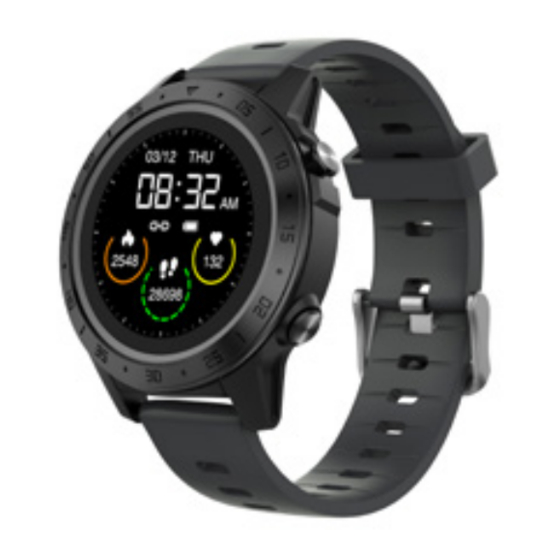
Bauhn AFWGPS-0721 - Fitness Watch with GPS User Guide (Fitneso laikrodis su GPS vartotojo vadovu)
- 1 Parts of the watch (Laikrodžio dalys)
- 2 First Time Use (Pirmas naudojimas)
- 3 SMART-TIME PRO App
- 4 Turn on the Watch (Įjunkite laikrodį)
- 5 Connect to the App (Prisijunkite prie programėlės)
- 6 Disconnect from the App (Atsijunkite nuo programėlės)
- 7 Turn On the Screen (Įjunkite ekraną)
- 8 Functions On the Home Screen (Funkcijos pagrindiniame ekrane)
- 9 Functions On Other Screens (Funkcijos kituose ekranuose)
- 10 GPS Functionality (GPS funkcionalumas)
-
11
Applications (Programos)
- 11.1 Sports (Sportas)
- 11.2 Heart Rate (Širdies ritmas)
- 11.3 Blood Pressure (Kraujo spaudimas)
- 11.4 Notification (Pranešimas)
- 11.5 Weather (Orai)
- 11.6 Alarm Clock (Žadintuvas)
- 11.7 Timer (Laikmatis)
- 11.8 Music (Muzika)
- 11.9 Stopwatch (Chronometras)
- 11.10 Remote Capture (Nuotolinis fotografavimas)
- 11.11 Find Phone (Rasti telefoną)
- 11.12 GPS Location (GPS vieta)
- 11.13 Activity (Aktyvumas)
- 11.14 Sleep Monitor (Miego stebėjimo priemonė)
- 11.15 Settings (Nustatymai)
- 11.16 Brightness (Ryškumas)
- 11.17 Language (Kalba)
- 11.18 Power Off (Išjungti)
- 11.19 Factory Reset (Gamyklinių parametrų atkūrimas)
- 11.20 About (Apie)
- 12 Shortcut Menu (Sparčiųjų nuorodų meniu)
- 13 Specifications (Specifikacijos)
- 14 Atsisiųsti instrukciją
- 15 Kitomis kalbomis
Parts of the watch (Laikrodžio dalys)
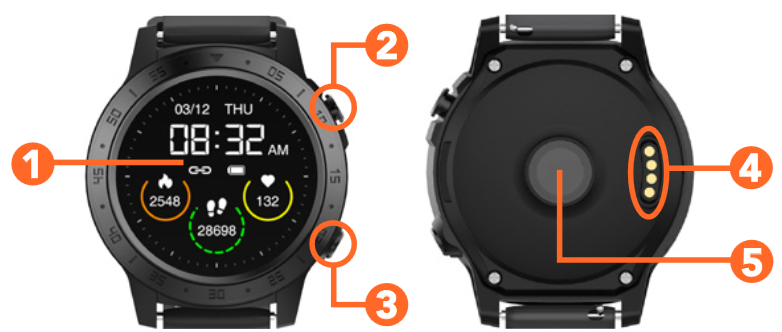
- Touch screen (Jutiklinis ekranas)
- Power button (Įjungimo mygtukas)
- Side button (Šoninis mygtukas)
- Charging points (Įkrovimo taškai)
- Sensor (Jutiklis)
First Time Use (Pirmas naudojimas)
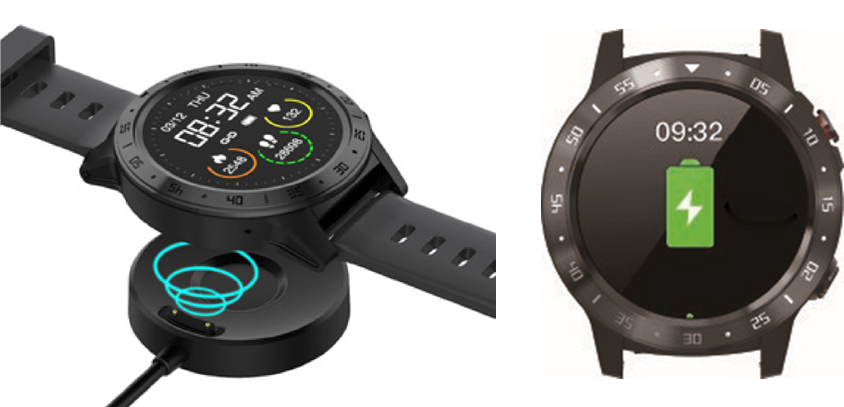
Charge your watch before using for the first time. You will need to charge it for about 3.5 hours. (Prieš naudodami laikrodį pirmą kartą, įkraukite jį. Jums reikės jį įkrauti apie 3,5 valandos.)
Charging steps: (Įkrovimo žingsniai:)
- Place the watch on top of the dock with the charging points on the back of the watch aligned with the charging pins on the charging dock. It will snap into position once correctly aligned. (Padėkite laikrodį ant doko viršaus, kad įkrovimo taškai laikrodžio gale būtų sulygiuoti su įkrovimo doko įkrovimo kaiščiais. Jis užsifiksuos, kai bus tinkamai sulygiuotas.)
")
- Plug the USB charging dock into a USB charging adaptor (not included) or a USB port on your computer. (Įjunkite USB įkrovimo doką į USB įkrovimo adapterį (nepridedamas) arba USB prievadą kompiuteryje.)
- Once fully charged (battery icon is full), unplug the charging dock from the charger. (Kai visiškai įkrautas (baterijos piktograma pilna), atjunkite įkrovimo doką nuo įkroviklio.)
SMART-TIME PRO App

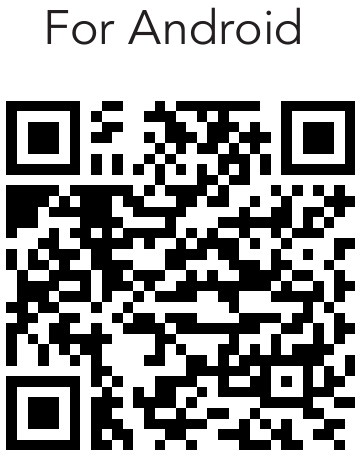
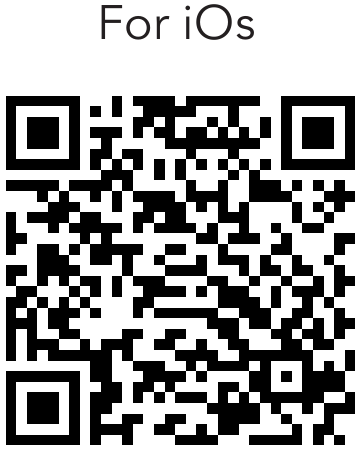
Search for the SMART-TIME PRO app in the app store to download, or scan the QR code below for installation. (Atsisiųskite programėlę SMART-TIME PRO iš programėlių parduotuvės arba nuskaitykite žemiau esantį QR kodą, kad ją įdiegtumėte.)


Google Play and the Google Play logo are trademarks of Google LLC.
Apple, the Apple logo, iPhone, and iPad are trademarks of Apple Inc., registered in the U.S. and other countries and regions. App Store is a service mark of Apple Inc.
Turn on the Watch (Įjunkite laikrodį)
Once the watch is fully charged, press and hold the power button for 5 seconds to turn on the watch. (Kai laikrodis visiškai įkrautas, paspauskite ir palaikykite įjungimo mygtuką 5 sekundes, kad įjungtumėte laikrodį.)
To turn off the watch, press and hold the power button for 5 seconds. (Norėdami išjungti laikrodį, paspauskite ir palaikykite įjungimo mygtuką 5 sekundes.)
Connect to the App (Prisijunkite prie programėlės)
Open the SMART-TIME PRO app on your smart phone. Once the app is open, follow: Device > Add device and select the first "AFWG0721" from the list. (Atidarykite programėlę SMART-TIME PRO savo išmaniajame telefone. Kai programėlė atidaryta, atlikite veiksmus: Device (Įrenginys) > Add device (Pridėti įrenginį) ir iš sąrašo pasirinkite pirmąjį "AFWG0721".)
The watch will display the below screen: (Laikrodyje bus rodomas toliau pateiktas ekranas:)
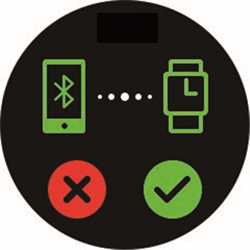
Tap on  to confirm pairing and once connection is successful, the Bluetooth® icon will show
  at the shortcut menu. (Bakstelėkite , kad patvirtintumėte susiejimą, o sėkmingai prisijungus, Bluetooth® piktograma bus rodoma sparčiųjų nuorodų meniu.)
The SMART-TIME PRO app supports Android 5.0+ and iOS 11.0+ devices. The watch can only be paired with one device at a time. To pair to another device, please disconnect the current paired device. (Programėlė SMART-TIME PRO palaiko Android 5.0+ ir iOS 11.0+ įrenginius. Laikrodis vienu metu gali būti susietas tik su vienu įrenginiu. Norėdami susieti su kitu įrenginiu, atjunkite dabartinį susietą įrenginį.)
Disconnect from the App (Atsijunkite nuo programėlės)
Open the SMART-TIME PRO app. Select "Device" (Įrenginys) and select the unpaired device and tap "UNBIND" (Atsieti), to disconnect the watch. On iOS devices, you will also need to open the settings menu on your iPhone. Go to Bluetooth settings, tap on the "i" icon on the right side of "AFWG0721" and then tap 'Forget This Device' (Pamiršti šį įrenginį) to finish disconnecting. (Atidarykite programėlę SMART-TIME PRO. Pasirinkite "Device" (Įrenginys), pasirinkite nesusietą įrenginį ir bakstelėkite "UNBIND" (Atsieti), kad atjungtumėte laikrodį. iOS įrenginiuose taip pat turėsite atidaryti iPhone nustatymų meniu. Eikite į Bluetooth nustatymus, bakstelėkite "i" piktogramą dešinėje "AFWG0721" pusėje, tada bakstelėkite "Forget This Device" (Pamiršti šį įrenginį), kad užbaigtumėte atjungimą.)
Turn On the Screen (Įjunkite ekraną)
To turn on the screen, press the power button or raise your arm if you're wearing the watch. Press the button again to turn off the screen. Raising your arm too quickly/slowly may not turn the screen on. (Norėdami įjungti ekraną, paspauskite įjungimo mygtuką arba pakelkite ranką, jei dėvite laikrodį. Dar kartą paspauskite mygtuką, kad išjungtumėte ekraną. Per greitai/lėtai pakėlus ranką, ekranas gali neįsijungti.)
Note: You will need to turn on the "Wake screen on wrist raise" (Pažadinti ekraną pakėlus riešą) function on the SMARTTIME PRO app for the function to work. (Pastaba: kad funkcija veiktų, programėlėje SMARTTIME PRO turėsite įjungti funkciją "Wake screen on wrist raise" (Pažadinti ekraną pakėlus riešą).)
Functions On the Home Screen (Funkcijos pagrindiniame ekrane)
- Swipe left/right to go to the data menu (heart rate, pedometer, sleep monitor, music player, GPS location, QR code). From here, swipe left/right to navigate to different data menu screens. (Braukite kairėn/dešinėn, kad pereitumėte į duomenų meniu (širdies ritmas, žingsniamatis, miego stebėjimo priemonė, muzikos grotuvas, GPS vieta, QR kodas). Iš čia braukite kairėn/dešinėn, kad pereitumėte į skirtingus duomenų meniu ekranus.)
- Swipe down for the shortcut menu. From here, swipe up to go back to the home screen. (Braukite žemyn, kad pereitumėte į sparčiųjų nuorodų meniu. Iš čia braukite aukštyn, kad grįžtumėte į pagrindinį ekraną.)
- Swipe up to go to the applications menu. From here, swipe up/down to navigate to the different application menu screens. Press and hold the screen for the watch face selection page. Swipe left/right for different options, then tap the screen again to select. (Braukite aukštyn, kad pereitumėte į programų meniu. Iš čia braukite aukštyn/žemyn, kad pereitumėte į skirtingus programų meniu ekranus. Paspauskite ir palaikykite ekraną, kad atidarytumėte laikrodžio ciferblato pasirinkimo puslapį. Braukite kairėn/dešinėn, kad pamatytumėte skirtingas parinktis, tada dar kartą bakstelėkite ekraną, kad pasirinktumėte.)
- Tap "No bluetooth connection" (Nėra Bluetooth ryšio) to exit when not connected to the app (for "find phone" (rasti telefoną) and "remote capture" (nuotolinis fotografavimas))
Note: There are 3 default watch faces available. Please see "Watch Face" (Laikrodžio ciferblatas) function to select more watch faces from the SMART-TIME PRO app (Pastaba: yra 3 numatytieji laikrodžio ciferblatai. Norėdami pasirinkti daugiau laikrodžio ciferblatų iš programėlės SMART-TIME PRO, žr. funkciją "Watch Face" (Laikrodžio ciferblatas))
Functions On Other Screens (Funkcijos kituose ekranuose)
- Press the power button to return to the home screen. (Paspauskite įjungimo mygtuką, kad grįžtumėte į pagrindinį ekraną.)
- Press the side button to go to the next page and/or confirm the selection. (Paspauskite šoninį mygtuką, kad pereitumėte į kitą puslapį ir (arba) patvirtintumėte pasirinkimą.)
GPS Functionality (GPS funkcionalumas)
The watch has built-in GPS functionality allowing you to accurately track your distance and other data including altitude and walking/jogging pace. (Laikrodis turi įmontuotą GPS funkciją, leidžiančią tiksliai sekti atstumą ir kitus duomenis, įskaitant aukštį ir ėjimo/bėgimo tempą.)
When a sport mode is selected (see next page), the watch will automatically search for the GPS location and display distance, pace and altitude data. Select "Skip" (Praleisti) to skip the GPS location tracking. (Kai pasirenkamas sporto režimas (žr. kitą puslapį), laikrodis automatiškai ieškos GPS vietos ir rodys atstumo, tempo ir aukščio duomenis. Pasirinkite "Skip" (Praleisti), kad praleistumėte GPS vietos sekimą.)
Note: tap " AGPS-update" to download the auxiliary GPS data when the GPS signal is weak. GPS function must be turned on mobile and be connected to the mobile network. (Pastaba: bakstelėkite "AGPS-update", kad atsisiųstumėte papildomus GPS duomenis, kai GPS signalas yra silpnas. GPS funkcija turi būti įjungta mobiliajame telefone ir prijungta prie mobiliojo tinklo.)
Applications (Programos)
Sports (Sportas)
 The watch has 10 sports modes: running, walking, cycling, climbing, treadmill, yoga, elliptical, basketball, football and badminton. When an activity has been selected, the watch will display exercise data depending on the mode selected. (Laikrodis turi 10 sporto režimų: bėgimas, ėjimas, važiavimas dviračiu, kopimas, bėgimo takelis, joga, elipsinis treniruoklis, krepšinis, futbolas ir badmintonas. Pasirinkus veiklą, laikrodis rodys pratimų duomenis, priklausomai nuo pasirinkto režimo.)
Press the power button and tap on the stop/pause icon when you wish to end or pause the activity. (Paspauskite įjungimo mygtuką ir bakstelėkite sustabdymo/pristabdymo piktogramą, kai norite baigti arba pristabdyti veiklą.)
Heart Rate (Širdies ritmas)
 Tap on the heart rate icon to measure your heart rate. (Bakstelėkite širdies ritmo piktogramą, kad išmatuotumėte savo širdies ritmą.)
You can also set automated monitoring time intervals on the SMART-TIME PRO app. (Taip pat galite nustatyti automatinius stebėjimo laiko intervalus programėlėje SMART-TIME PRO.)
Blood Pressure (Kraujo spaudimas)
 Tap on the blood pressure icon to measure your blood pressure. (Bakstelėkite kraujo spaudimo piktogramą, kad išmatuotumėte savo kraujo spaudimą.)
NOTE: For accurate measurements for both heart rate and blood pressure functions, ensure the following: (PASTABA: norėdami gauti tikslius širdies ritmo ir kraujo spaudimo funkcijų matavimus, įsitikinkite, kad:)
- The watch has good contact with your wrist. (Laikrodis gerai priglunda prie riešo.)
- Check that the sensor is clean and there is no dirt or debris covering it. (Patikrinkite, ar jutiklis yra švarus ir jo nedengia nešvarumai ar šiukšlės.)
- The results and measurements of heart rate and blood pressure data cannot be used for medical reference and should be used as a guide only. (Širdies ritmo ir kraujo spaudimo duomenų rezultatai ir matavimai negali būti naudojami kaip medicininė nuoroda ir turėtų būti naudojami tik kaip orientaciniai.)
Notification (Pranešimas)
 Tap on the notification icon to view notifications and messages on the watch. It will display up to 10 messages. (Bakstelėkite pranešimo piktogramą, kad peržiūrėtumėte pranešimus ir žinutes laikrodyje. Jis rodys iki 10 žinučių.)
- Allow permission access under "permission settings" (leidimų nustatymai) + messages under "message push" (pranešimų siuntimas) on the SMARTTIME PRO app. (Suteikite leidimą pasiekti "permission settings" (leidimų nustatymai) + žinutes skiltyje "message push" (pranešimų siuntimas) programėlėje SMARTTIME PRO.)
- Allow permission access of SMARTTIME PRO App on your smart phone. (Suteikite leidimą pasiekti programėlę SMARTTIME PRO savo išmaniajame telefone.)
Weather (Orai)
 Tap on the weather icon to view live weather (up to 3 day forecast). You must be connected to the SMART-TIME PRO app. Note: you must have Internet/mobile connection for this function to work. Your phone location/GPS must also be turned on. (Bakstelėkite orų piktogramą, kad peržiūrėtumėte tiesioginius orus (iki 3 dienų prognozės). Turite būti prisijungę prie programėlės SMART-TIME PRO. Pastaba: kad ši funkcija veiktų, turite turėti interneto/mobiliojo ryšio ryšį. Taip pat turi būti įjungta jūsų telefono vieta/GPS.)
Alarm Clock (Žadintuvas)
 Tap on the alarm clock icon to view your alarms. You can set the alarms on the SMART-TIME PRO app and sync it to your watch. (Bakstelėkite žadintuvo piktogramą, kad peržiūrėtumėte savo žadintuvus. Galite nustatyti žadintuvus programėlėje SMART-TIME PRO ir sinchronizuoti juos su savo laikrodžiu.)
Timer (Laikmatis)
 Tap on the timer icon to enter the timer function. Tap +/- to change the time. (Bakstelėkite laikmačio piktogramą, kad įjungtumėte laikmačio funkciją. Bakstelėkite +/-, kad pakeistumėte laiką.)
Tap the play icon to start timing; Tap the pause icon to pause or stop icon to stop. (Bakstelėkite paleidimo piktogramą, kad pradėtumėte laiką; Bakstelėkite pristabdymo piktogramą, kad pristabdytumėte, arba sustabdymo piktogramą, kad sustabdytumėte.)
Music (Muzika)
 After your device is connected to the watch, while your device is playing music, swipe right from the home screen to enter the Music control interface to play/pause/switch songs. Tap the volume + and - icons to control the volume level. (Kai įrenginys prijungtas prie laikrodžio, kol įrenginys groja muziką, braukite dešinėn nuo pagrindinio ekrano, kad įjungtumėte muzikos valdymo sąsają ir paleistumėte/pristabdytumėte/perjungtumėte dainas. Bakstelėkite garsumo + ir - piktogramas, kad valdytumėte garsumo lygį.)
Note: This feature only works for music, not video playback. Some smart phones may not support the volume control feature. (Pastaba: ši funkcija veikia tik su muzika, o ne su vaizdo įrašų atkūrimu. Kai kurie išmanieji telefonai gali nepalaikyti garsumo valdymo funkcijos.)
Stopwatch (Chronometras)
 Tap on the stopwatch icon to record time. (Bakstelėkite chronometro piktogramą, kad įrašytumėte laiką.)
Tap the  icon to start the stopwatch. Tap the
  icon to pause. Tap the
  icon to reset time record. Swipe right to exit the interface. (Bakstelėkite piktogramą, kad paleistumėte chronometrą. Bakstelėkite piktogramą, kad pristabdytumėte. Bakstelėkite piktogramą, kad iš naujo nustatytumėte laiko įrašą. Braukite dešinėn, kad išeitumėte iš sąsajos.)
Remote Capture (Nuotolinis fotografavimas)
 Tap on the remote capture icon to use the watch as a camera remote for your phone and the SMART-TIME PRO app is opened. (Bakstelėkite nuotolinio fotografavimo piktogramą, kad naudotumėte laikrodį kaip fotoaparato nuotolinio valdymo pultą savo telefonui, ir atidaroma programėlė SMART-TIME PRO.)
When the watch is connected with your phone, open the SMART-TIME PRO app and select Device > Camera. (Kai laikrodis prijungtas prie jūsų telefono, atidarykite programėlę SMART-TIME PRO ir pasirinkite Device (Įrenginys) > Camera (Kamera).)
Once SMART-TIME PRO app is opened on your phone, go to camera mode and tap the icon on the watch screen to take a photo with your phone. (Kai programėlė SMART-TIME PRO atidaryta jūsų telefone, eikite į fotoaparato režimą ir bakstelėkite piktogramą laikrodžio ekrane, kad nufotografuotumėte telefonu.)
Find Phone (Rasti telefoną)
 After connected with the SMART-TIME PRO app, tap on "Find Phone" (Rasti telefoną) on the watch; your phone will ring. Tap pause to exit. (Prisijungę prie programėlės SMART-TIME PRO, bakstelėkite "Find Phone" (Rasti telefoną) laikrodyje; jūsų telefonas suskambės. Bakstelėkite pristabdymo piktogramą, kad išeitumėte.)
GPS Location (GPS vieta)
Swipe right from the home screen to view the current latitude and longitude of your current location. If you are inside a building or underground, this function will not work. Tap the play icon to start location. (Braukite dešinėn nuo pagrindinio ekrano, kad peržiūrėtumėte dabartinę savo vietos platumą ir ilgumą. Jei esate pastato viduje arba po žeme, ši funkcija neveiks. Bakstelėkite paleidimo piktogramą, kad pradėtumėte vietos nustatymą.)
Activity (Aktyvumas)
 Track the number of steps taken, distance walked and calories burnt. (Sekite žingsnių skaičių, nueitą atstumą ir sudegintas kalorijas.)
Sleep Monitor (Miego stebėjimo priemonė)
Swipe right from the home screen to view the sleep monitor data. After synchronising with the SMART-TIME PRO app, you can view more detailed records on your smart phone. (Braukite dešinėn nuo pagrindinio ekrano, kad peržiūrėtumėte miego stebėjimo priemonės duomenis. Sinchronizavę su programėle SMART-TIME PRO, galite peržiūrėti išsamesnius įrašus savo išmaniajame telefone.)
Settings (Nustatymai)
 Tap on the settings icon to access and change the following settings: (Bakstelėkite nustatymų piktogramą, kad pasiektumėte ir pakeistumėte šiuos nustatymus:)
Brightness (Ryškumas)
Tap on the + or - icons to adjust screen brightness. (Bakstelėkite + arba - piktogramas, kad reguliuotumėte ekrano ryškumą.)
Language (Kalba)
Set the language. (Nustatykite kalbą.)
Power Off (Išjungti)
Select  to shut down your watch. (Pasirinkite , kad išjungtumėte laikrodį.)
Factory Reset (Gamyklinių parametrų atkūrimas)
Restore all settings to the factory state. (Atkurkite visus nustatymus į gamyklinę būseną.)
About (Apie)
Display the product name, hardware address and software version. (Rodyti produkto pavadinimą, aparatinės įrangos adresą ir programinės įrangos versiją.)
Shortcut Menu (Sparčiųjų nuorodų meniu)
Vibration (Vibracija)
Tap to turn vibration on/off. (Bakstelėkite, kad įjungtumėte/išjungtumėte vibraciją.)
Low Power (Mažas energijos suvartojimas)
Tap to turn on battery saver mode. (Bakstelėkite, kad įjungtumėte akumuliatoriaus taupymo režimą.)
Brightness (Ryškumas)
Adjust display screen brightness. (Reguliuokite ekrano ryškumą.)
Settings (Nustatymai)
Tap to access settings menu. (Bakstelėkite, kad pasiektumėte nustatymų meniu.)
Change The Straps (Pakeiskite dirželius)
Turn the watch over, push the top needle knob to the right to take off the original strap, then fit the new strap. (Apverskite laikrodį, pastumkite viršutinę adatos rankenėlę į dešinę, kad nuimtumėte originalų dirželį, tada pritvirtinkite naują dirželį.)
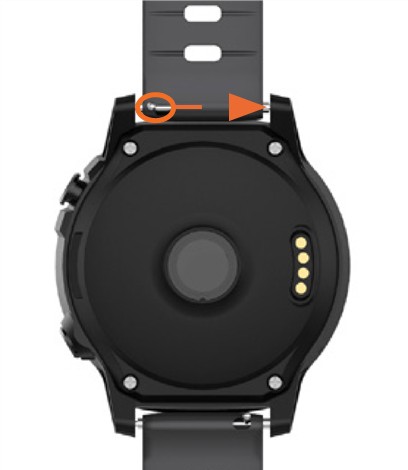
Note: only one strap is included with this product. (Pastaba: su šiuo produktu pateikiamas tik vienas dirželis.)
Watch Face (Laikrodžio ciferblatas)
Select "Watch Face" (Laikrodžio ciferblatas) on the SMART-TIME PRO app and select your desired watch face. It will automatically update on the watch with the new watch face. (Programėlėje SMART-TIME PRO pasirinkite "Watch Face" (Laikrodžio ciferblatas) ir pasirinkite norimą laikrodžio ciferblatą. Jis bus automatiškai atnaujintas laikrodyje su nauju laikrodžio ciferblatu.)
Specifications (Specifikacijos)
| Display (Ekranas) | 1.3", 240 x 240 pixels |
| Ingress protection (Apsauga nuo įsiskverbimo) | IP67 |
| Charging time (Įkrovimo laikas) | 3.5 hrs (approx.) (3,5 val. (apytiksliai)) |
| Charging base input (Įkrovimo bazės įvestis) | 5VDC, 200mA |
| Bluetooth Range (Bluetooth diapazonas) | < 10m |
| Built-In Battery (Įmontuota baterija) | Li-ion 3.7V 360mAh |
| Weight (Svoris) | 42g |
| Dimensions (mm) (Matmenys (mm)) |
Atsisiųsti instrukciją
Čia galite atsisiųsti visą pdf instrukcijos versiją, kurioje gali būti papildomų saugos instrukcijų, garantijos informacijos, FCC taisyklių ir kt.


