Eachine TYRO79 - 40mm 3 Inch DIY Version FPV Drone Manual (Mwongozo wa Ndege Isiyo na Rubani ya Eachine TYRO79 - 40mm 3 Inch DIY Version FPV)
- 1 Package included (Kifurushi kimejumuisha)
- 2 Parts and Features (Sehemu na Vipengele)
- 3 Frame kit (seti ya fremu)
- 4 Motor (Motari)
- 5 ESC
- 6 Flight controller (Kidhibiti cha ndege)
- 7 Switchable VTX (VTX Inayoweza Kubadilishwa)
- 8 Camera (Kamera)
- 9 Screws (Parafujo)
- 10 Adjusting parameter (Kurekebisha parameta)
- 11 Motor Unlock/lock (Fungua/funga motari)
- 12 Pakua mwongozo
- 13 Katika Lugha Nyingine
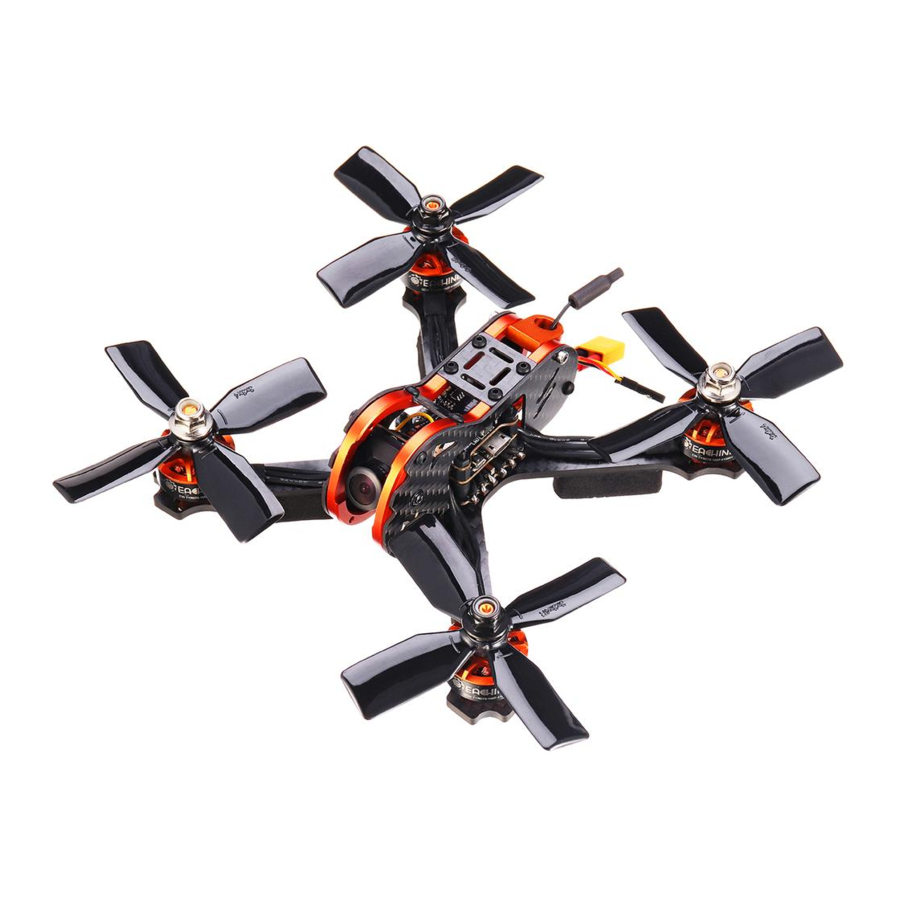
Package included (Kifurushi kimejumuisha)
- 1 x 140mm racing frame kit (seti ya fremu ya mbio 1 x 140mm)
- 2 x 1607 2800KV brushless motor CW (motari isiyo na brashi 2 x 1607 2800KV CW)
- 2 x 1607 2800KV brushless motor CCW (motari isiyo na brashi 2 x 1607 2800KV CCW)
- 1 x 4 IN 1 20A BLHeli_S ESC
- 1 x Customized F4 flight controller (kidhibiti cha ndege cha F4 kilichobinafsishwa 1 x)
- 1 x 700TVL CMOS camera (kamera ya 700TVL CMOS 1 x)
- 1 x 5.8G 40CH 0mw/25mw/200mw switchable VTX (VTX inayoweza kubadilishwa 1 x 5.8G 40CH 0mw/25mw/200mw)
- 2 x 3030 4-blade propeller CW (propela ya vile 4 ya 3030 2 x CW)
- 2 x 3030 4-blade propeller CCW (propela ya vile 4 ya 3030 2 x CCW)
Parts and Features (Sehemu na Vipengele)

Frame kit (seti ya fremu)
- Wheel base: 140mm (Msingi wa gurudumu: 140mm)
- Bottom plate thickness: 3mm (Unene wa bamba la chini: 3mm)
- Side plate thickness: 1mm (Unene wa bamba la pembeni: 1mm)
- Frame kit material: 3K carbon fiber & 6065 aluminium (Nyenzo ya seti ya fremu: 3K carbon fiber & 6065 aluminium)

Motor (Motari)
KV: 2800KV
Lipo cell: 2-4S
Weight: 17.8g (includes wires) (Uzito: 17.8g (inajumuisha waya))
Output shaft length: 14mm (Urefu wa shimiti ya pato: 14mm)
Maximum pull: signal 630g (4S 3030 4-blade propeller) (Uvutaji wa juu: ishara 630g (propela ya vile 4 ya 4S 3030))
Maximum power: 350W (Nguvu ya juu: 350W
Configuration: 9N/12P (Usanidi: 9N/12P)
Mounting holes distance: 12*12mm (Umbali wa mashimo ya kupachika: 12*12mm)
Mounting holes: φM2 (Mashimo ya kupachika: φM2)
Bearing: NSK (Beringi: NSK)
N52 Strong NdFeB Magnet (Sumaku kali ya N52 NdFeB) Recommend propeller: 3 inch (Pendekeza propela: inchi 3)

ESC
Continuous current: 20A (Mkondo endelevu: 20A)
Peak current: 25A (10S) (Mkondo wa kilele: 25A (10S))
BEC output: no (Pato la BEC: hapana)
Input voltage: 2-4S (Volteji ya ingizo: 2-4S)
Main control chip: 48mhz EFM8BB2 (Chipu kuu ya udhibiti: 48mhz EFM8BB2)
Firmware upgrade: Supports Dshot600/BLHeli_S/Oneshot125 (Uboreshaji wa programu dhibiti: Inasaidia Dshot600/BLHeli_S/Oneshot125)
MOS: 3*3
MOS type: vs3610ae 30v64a (Aina ya MOS: vs3610ae 30v64a)

Flight controller (Kidhibiti cha ndege)
Main control chip: STM32F411 (Chipu kuu ya udhibiti: STM32F411)
Sensor: ICM20602 6-axis (Sensor: ICM20602 6-axis)
Integrated OSD PPM/DSM/IBUS/UAR share: UART1-RX (Shiriki ya OSD PPM/DSM/IBUS/UAR iliyounganishwa: UART1-RX)
Mounting holes distance: 20*20mm (Umbali wa mashimo ya kupachika: 20*20mm)
Weight: 24g (Uzito: 24g)
PID circulation rate and refresh rate can up to 32kHz (Kiwango cha mzunguko wa PID na kiwango cha kuonyesha upya kinaweza kufikia 32kHz)
Supports Betaflight/cleanflight/inav firmware (Inasaidia programu dhibiti ya Betaflight/cleanflight/inav)

Switchable VTX (VTX Inayoweza Kubadilishwa)
Supports TBS SmartAudio (Inasaidia TBS SmartAudio)
Transmitting power: 0mW/25mW/100mW/200mW switchable (Nguvu ya kusambaza: 0mW/25mW/100mW/200mW inayoweza kubadilishwa)
Channel: 40CH (Kituo: 40CH)
Full video format: NTSC/PAL (Umbizo kamili la video: NTSC/PAL)
Input voltage: 7V~24V (Volteji ya ingizo: 7V~24V)
Power dissipation: +12V/600MW (Mtawanyiko wa nguvu: +12V/600MW)
Size: 25×20×6mm (Ukubwa: 25×20×6mm)
Weight: ≤3.2g (except antenna) (Uzito: ≤3.2g (bila kujumuisha antena))
There are two ways to control the frequency and power of the launches: (Kuna njia mbili za kudhibiti marudio na nguvu ya uzinduzi:)
Enter the release: FEATURES->VTX SA can enter the following interface. (Ingiza toleo: FEATURES->VTX SA inaweza kuingia kwenye kiolesura kifuatacho.)
<1> uses remote control to visualize control, as shown in Figure (hutumia kidhibiti cha mbali kuona udhibiti, kama inavyoonyeshwa kwenye Mchoro) 1

Figure 1 (Mchoro 1)
The second row is the status bar, respectively. (Safu ya pili ni upau wa hali, mtawalia.)
F:freestyle modeF5: is now in frequency band F, fifth frequency point. (F: hali ya freestyleF5: sasa iko katika bendi ya marudio F, sehemu ya tano ya marudio.)
5820: now has a frequency of 5820. (5820: sasa ina marudio ya 5820.)
500: now has a transmit power of 500MW Third lines (500: sasa ina nguvu ya kusambaza ya mistari ya tatu ya 500MW)
BAND: indicates frequency band, and BAND can be modified by remote control. (BAND: inaonyesha bendi ya marudio, na BAND inaweza kurekebishwa na kidhibiti cha mbali.)
A (BOSCAM A)
B (BOSCAM B)
E (BOSCAM E)
F (FATSHARK) F (E)
Fourth lines (Mistari ya nne)
CHAN: represents frequency points, and the 1---8 can be modified by remote control. (CHAN: inawakilisha sehemu za marudio, na 1---8 inaweza kurekebishwa na kidhibiti cha mbali.)
Fifth lines (Mistari ya tano)
(FREQ): indicate the corresponding frequency now, changing with the band and Chan above. ((FREQ): onyesha marudio yanayolingana sasa, ikibadilika na bendi na Chan hapo juu.)
Sixth lines (Mistari ya sita)
POWER: indicates the transmission power and can be adjusted. (POWER: inaonyesha nguvu ya usambazaji na inaweza kubadilishwa.)
Seventh lines SET: Enter and select YES to confirm your BADN, CHAN, POWER settings and take effect immediately., as shown in Figure 2 below (Mistari ya saba SET: Ingiza na uchague NDIYO ili kuthibitisha mipangilio yako ya BADN, CHAN, POWER na ichukue hatua mara moja., kama inavyoonyeshwa kwenye Mchoro 2 hapa chini)

Figure 2 (Mchoro 2)
Eighth lines The CONFIG: function is set in, as shown in Figure 3 below. (Mistari ya nane The CONFIG: kazi imewekwa ndani, kama inavyoonyeshwa kwenye Mchoro 3 hapa chini.)

Figure 3 (Mchoro 3)
OP MODEL: mode adjustment, with free mode and race mode, needs reboot to take effect. (OP MODEL: marekebisho ya modi, na modi ya bure na modi ya mbio, inahitaji kuwashwa upya ili ichukue hatua.)
FSEL MODE: regulates frequency setting mode, CHAN and user, user mode is temporarily invalid. (FSEL MODE: inasimamia modi ya kuweka marudio, CHAN na mtumiaji, modi ya mtumiaji haitumiki kwa muda.)
PIT FMODE:PITMODE mode, with PIR and POR mode. (PIT FMODE: modi ya PITMODE, na modi ya PIR na POR.)
In the POR mode, POR FREQ: can enter into any frequency between 5300-5900, as shown in Figure 4. (Katika modi ya POR, POR FREQ: inaweza kuingia katika marudio yoyote kati ya 5300-5900, kama inavyoonyeshwa kwenye Mchoro 4.)

Figure 4 (Mchoro 4)
STATX: status information (STATX: habari ya hali)
<2> XMM-VTX is operated by a button with three LED lights (red (XMM-VTX inaendeshwa na kitufe chenye taa tatu za LED (nyekundu) light CH1-8; blue light BAND1-5; green light power 1-3 <25- 100-200 mW>)and TBS Smart Audio remote control operation. Keyboard operation: Long press 3S (three LED indicators are all on) to open and enter CH switching operation, and the red light will flash, flashing once represents the currentCH1 (2-8 times for CH2-CH8 respectively). At this time, a short press of the key CH plus 1 will flash the corresponding number of times. CH1-8 cycle. Press the button 3S (three LED lights are all on) to open and enter the BANDswitching operation, and the blue light will flash. The flash once represents the current BAND1 (2-5 times for BAND2-BAND5 respectively). At this time, press the button BAND plus 1, and the blue light will flash correspondingly. BAND1-5 cycle. Press the button 3S (three LED lights are all on) again to open the power switching operation, and the green light will flash, one time represents the current power of the first grade (2-3 times for the green light flashing respectively), at this time, press the button power to add one gear, and the green light will flash the corresponding number of times. Power stall 1-3 cycle. Press the button 3S again (3 LED lights are all bright) to release the above settings again. Note that the previous settings will not be saved if the power is off before saving. For example, if CH is only set, it is also necessary to press 3S three times longer to save the settings. Long press button 8S (green light) quit PIT mode. (taa CH1-8; taa ya bluu BAND1-5; nguvu ya taa ya kijani 1-3 <25- 100-200 mW>) na operesheni ya kidhibiti cha mbali cha TBS Smart Audio. Uendeshaji wa kibodi: Bonyeza kwa muda mrefu 3S (viashiria vitatu vya LED vimewashwa) ili kufungua na kuingiza operesheni ya kubadilisha CH, na taa nyekundu itawaka, kuwaka mara moja kunawakilisha CH1 ya sasa (mara 2-8 kwa CH2-CH8 mtawalia). Kwa wakati huu, bonyeza fupi ya kitufe CH pamoja na 1 itawaka idadi inayolingana ya nyakati. Mzunguko wa CH1-8. Bonyeza kitufe 3S (taa tatu za LED zimewashwa) ili kufungua na kuingiza operesheni ya kubadilisha BAND, na taa ya bluu itawaka. Mweko mara moja unawakilisha BAND1 ya sasa (mara 2-5 kwa BAND2-BAND5 mtawalia). Kwa wakati huu, bonyeza kitufe BAND pamoja na 1, na taa ya bluu itawaka ipasavyo. Mzunguko wa BAND1-5. Bonyeza kitufe 3S tena (taa 3 za LED zimewashwa) ili kufungua operesheni ya kubadilisha nguvu, na taa ya kijani itawaka, mara moja inawakilisha nguvu ya sasa ya daraja la kwanza (mara 2-3 kwa taa ya kijani kuwaka mtawalia), kwa wakati huu, bonyeza nguvu ya kitufe ili kuongeza gia moja, na taa ya kijani itawaka idadi inayolingana ya nyakati. Mzunguko wa kusimama kwa nguvu 1-3. Bonyeza kitufe 3S tena (taa 3 za LED zote zinang'aa) ili kutoa mipangilio hapo juu tena. Kumbuka kuwa mipangilio ya awali haitahifadhiwa ikiwa nguvu imezimwa kabla ya kuhifadhi. Kwa mfano, ikiwa CH imewekwa tu, pia ni muhimu kubonyeza 3S mara tatu zaidi ili kuhifadhi mipangilio. Bonyeza kwa muda mrefu kitufe 8S (taa ya kijani) acha modi ya PIT.)

 Note (Kumbuka) : In the remote control, the power of 25 corresponds to the actual 25 mW, 200 corresponds to the actual 100 mW, and 500/800 corresponds to the actual 200 mW. (Katika kidhibiti cha mbali, nguvu ya 25 inalingana na 25 mW halisi, 200 inalingana na 100 mW halisi, na 500/800 inalingana na 200 mW halisi.)
Camera (Kamera)
Case size: 19mm*19mm (Ukubwa wa kipochi: 19mm*19mm)
Weight: 9.5g (Uzito: 9.5g)
Total pixels: PAL: 1020H×596V (0.61MP); (Jumla ya pikseli: PAL: 1020H×596V (0.61MP);)
NTSC: 1020H×508V (0.52MP) (NTSC: 1020H×508V (0.52MP))
Effective pixels: PAL: 976H×582V (0.57MP); (Pikseli zinazofaa: PAL: 976H×582V (0.57MP);)
NTSC: 976H×494V (0.48MP) (NTSC: 976H×494V (0.48MP))
Signal system: PAL/NTSC switchable (Mfumo wa mawimbi: PAL/NTSC inayoweza kubadilishwa)
Resolution ratio(horizontal center): 700TVL (Uwiano wa azimio(kituo cha mlalo): 700TVL)
Video output: 1.0Vp-p/75Ω (Pato la video: 1.0Vp-p/75Ω)
Automatic gain control: 0.25/0.50/0.75/1.00, up to 55dB (Udhibiti wa faida otomatiki: 0.25/0.50/0.75/1.00, hadi 55dB)
White balance: off (Usawa mweupe: zima)
Exposure mode: electron exposure (Modi ya mwangaza: mwangaza wa elektroni)
Electronic shutter: 1/50(1/60) - 1/100000 S ( shutter ya kielektroniki: 1/50(1/60) - 1/100000 S)
Gamma correction: 0.45/1.0 (Usahihishaji wa Gamma: 0.45/1.0)
Synchronization method: inter-sync (Njia ya ulandanishi: inter-sync)
Camera lens: standard 2.1mm (Lenzi ya kamera: kawaida 2.1mm)
Lens operating voltage: DC 5-12V (Volteji ya uendeshaji wa lenzi: DC 5-12V)
Working current: 70mA (low power consumption) (Mkondo wa kufanya kazi: 70mA (matumizi ya chini ya nguvu))
Working temperature: -20℃~-60℃ (Joto la kufanya kazi: -20℃~-60℃)
Humidity: 0%~98% (Unyevu: 0%~98%)
Screws (Parafujo)

Adjusting parameter (Kurekebisha parameta)
- Click connect connection (Bofya unganisho la kuunganisha)

- Click the RX interface under UART2 under the ports option, as shown in the figure. (Bofya kiolesura cha RX chini ya UART2 chini ya chaguo la bandari, kama inavyoonyeshwa kwenye takwimu.)

- Click CONFIGURATIN to change to dshot600. (Bofya CONFIGURATIN ili ubadilishe hadi dshot600.)

- Click CONFIGURATIN; change to SBUs (Bofya CONFIGURATIN; badilisha hadi SBUs)

- Click modes, add arm and angle, drag the slider between 1300 and 1700, and set arm to AUX1 and angle to aux2 (Bofya modi, ongeza mkono na pembe, buruta kitelezi kati ya 1300 na 1700, na uweke mkono kwa AUX1 na pembe kwa aux2)

- Push the slider to test the positive and negative rotation of the motor, such as error, (Sukuma kitelezi ili ujaribu mzunguko chanya na hasi wa motari, kama vile hitilafu,)

- Click font manager, select betaflight, click upload font (Bofya kidhibiti cha fonti, chagua betaflight, bofya pakia fonti)

- Click setup, calibrate accelerometer (Bofya usanidi, rekebisha accelerometer)


Motor Unlock/lock (Fungua/funga motari)
Motor Unlock (Fungua motari)
Put the throttle rocker at the lowest point, move the rudder rocker to the right and keep it for more than 2 seconds. The blue state indicator is always on, that is unlock the motor. (Weka rocker ya throttle kwenye sehemu ya chini kabisa, sogeza rocker ya usukani kulia na uishike kwa zaidi ya sekunde 2. Kiashiria cha hali ya bluu huwashwa kila wakati, ambayo ni kufungua motari.)

Motor lock (Funga motari)
Put the throttle rocker at the lowest point, move the rudder rocker to the leftmost side, and the red state indicator is always turned on to lock the motor. At this time, pushing the throttle rocker motor upward will not rotate. (Weka rocker ya throttle kwenye sehemu ya chini kabisa, sogeza rocker ya usuk
Pakua mwongozo
Hapa unaweza kupakua toleo kamili la pdf la mwongozo, linaweza kujumuisha maelekezo ya ziada ya usalama, taarifa za udhamini, sheria za FCC, n.k.


