Oregon Scientific JM889, JM889U - JUMBO RF Clock with Indoor Thermometer Manual
INTRODUCTION
Thank you for selecting the Oregon ScientificTM Jumbo RF Clock with Indoor Thermometer as your product of choice. This device is designed to give you many years of reliable service, including the following conveniences:
- Radio-Controlled Calendar Clock*
- Indoor Temperature Display
- Daily Alarm
*Automatically synchronizes the current time and date when it is brought within range of the radio signal MSF60 generated from Rugby, England (model JM889U) or DCF77 generated from Frankfurt, Germany for Central Europe (model JM889).
In addition to providing step-by-step instructions for this product, this manual contains important safety and care information. Read the manual thoroughly, and keep it in a safe place in case you need to refer to it.
KEY FEATURES
Front View

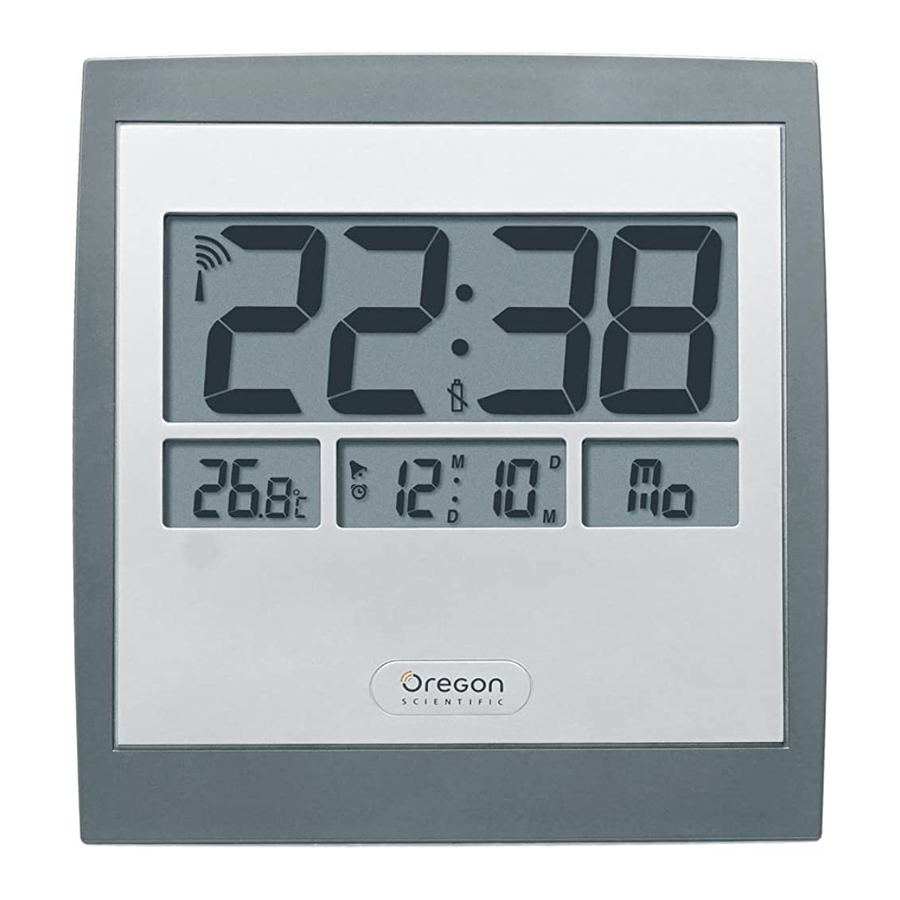
- Main LCD Display
Displays current time and RF signal reception indication - Seconds/Day-of-Week Display
Can select between seconds or day-of-week display - Current Date/Alarm Time Display
Can select between current date or alarm time display - Indoor Temperature Display
Displays currently monitored indoor temperature
Back View

- Wall-Mount Recess Hole
For mounting the unit to a wall - Alarm Button
To display and adjust alarm time - Clock Button
To manually adjust current time and date - Reset Hole
Returns all settings to default values. ![]() button
button
Used to adjust settings down one notch or to enable/disable RF radio reception![]() button
button
Used to adjust settings up one notch or to enable/disable RF radio reception- Battery Compartment
The unit uses 2 AA/UM-3 1.5V batteries for power. - Table Stand
Can be pulled out and used to stand the unit on a flat surface
 button
  button
 LCD Display Symbols

| Icon | Description | Explanation |
 | Radio Reception Signal | Indicates the condition of radio reception. |
 | Low Battery | Appears when power is low. |
 | Alarm-on | Appears when alarm is activated. |
 | Alarm Time Indicator | Appears when alarm time is displayed. |
SAFETY AND CARE INSTRUCTIONS
Safety Precautions
Please observe the following safety precautions when setting up and using this product.
- LCD panel - The LCD panel is made of glass, and may break if the unit is dropped or impacted.
- Heat sources - Keep the product away from heat sources such as radiators, stoves, heaters, and other heat-generating products.
- Water and moisture - Do not use the product in or near water or in high moisture areas such as a bathroom.
Caring for your Product
To ensure you receive the maximum benefit from using this product, please observe the following guidelines.
- Cleaning - Use a damp cloth. Do not use liquid cleaning agents, benzene, thinner, or aerosols.
- Ventilation - The vents and other openings are designed for ventilation, and should not be blocked or covered. Blocking the vents can cause the product to overheat, and can damage the unit.
- Repair - Do not attempt to repair the product or modify the circuitry by yourself. Contact the retailer or a qualified repairman if the product requires servicing. Only use replacement parts that are recommended by the manufacturer.
- Do not scratch hard objects against the LCD display as this may cause damage.
GETTING STARTED
Unpacking the product
When you unpack your clock, make sure to keep all the packing materials in a safe place, in case you need to later transport or return it for servicing.
In the box, you will find:
| Clock unit | Batteries | User manual |
 |  |  |
Batteries
NOTE When using the product for the first time, please note that the batteries have already been installed in the unit. To operate, locate the clear plastic battery tab inside the battery compartment and remove it.
To load the batteries:
| Diagram | Instructions |
 |
|
 |
 Reversing the polarity may damage the product. |
NOTE Replace the batteries whenever the weak battery mark ( ) is shown, the display is dim, or the display does not illuminate when the power is on. Replace all the batteries at the same time - it is dangerous to mix old and new batteries.
Contact your local waste disposal authority for instructions on how to dispose of used batteries. Used batteries can be harmful to the environment, and should not be thrown out with household trash.
Placement of Unit
You can either mount the main unit on a wall or make it stand on a flat surface.
| Method | Instruction | Diagram |
| Table Stand | The unit is already equipped with a Table Stand. Simply pull out the Table Stand and rest the main unit on a flat surface. |  |
| Wall Mount | The main unit can be mounted onto a wall using a No. 6 screw (3.0mm).
|  |
Indoor Temperature Display
Soon after the clear plastic battery tab has been removed, the unit immediately reads and displays the surrounding indoor temperature.
Toggling between Seconds/Day-of-Week Display
To toggle between displaying seconds or day-of-week on the LCD screen, press the CLOCK button.

RADIO RECEPTION
This product is designed to synchronise its calendar clock automatically once it is brought within range of the radio signal. When the unit is receiving the signal, the Radio Reception symbol with start to blink. Generally, complete reception takes around 2 to 10 minutes, depending on the strength of the signal.
Radio Reception Description
| Radio Reception | Description |
 | Strong reception of radio clock signal. |
 | Weak reception of radio clock signal. |
 | No reception of the radio clock signal. |
 | Receiving the radio clock signal. |
| Radio Reception is disabled. |
NOTE Reception can be affected by a number of factors. For best reception, place the device away from metal objects and electrical appliances. Other causes for signal interference include electrical transmission tower, steel reinforced construction, and metal siding. Reception is ideal when placed near a window.
Even though there are areas that may have more difficulty in receiving a signal, the Atomic Clock contains accurate quartz movement and will retain precise timing if the signal is missed on a rare occasion.
Enabling/Disabling Radio Reception
 To manually disable the reception of the RF signal, press and hold the [UP] and [DOWN
  ] buttons simultaneously for 2 seconds until the Radio Reception symbol completely disappears.
To enable the reception again, press and hold [UP ] and [DOWN ] buttons simultaneously for 2 seconds. The Radio Reception symbol will blink and the unit will search for the RF signal automatically.
TO SET THE CLOCK MANUALLY
NOTE To adjust the clock settings manually without automatic RF synchronisation, remember to disable the Radio Reception first. Press once or press and hold the [UP] or [DOWN] buttons to adjust the value of each setting.
| Diagram | Instructions |
 |
|
 |
|
 |
|
 |
|
 |
|
 |
|
 |
|
 |
|
Language Options
The main unit can display the weekday in five different selectable languages.
| Symbol | Language |
 | English |
 | German |
 | French |
 | Italian |
 | Spanish |
ALARM FUNCTIONS
Basic Functions
Your product can also be used as an alarm clock.
- When the alarm goes off, you can turn it off by pressing ALARM.
![]()
- The alarm will automatically stop ringing after 1 minute. But after 8 minutes, the alarm will sound again unless ALARM is pressed.

Displaying Alarm Time
By default, the unit's LCD screen displays the current date and month. To display the alarm time instead:
| Diagram | Instructions |
 |
|
 |
|
 |
|
Adjusting the Alarm Time
To adjust the Alarm Time, make sure that the Alarm Time is currently displayed on the LCD screen.
| Diagram | Instructions |
 |
|
 |
|
 |
|
 |
|
Activating / Deactivating the Alarm
| Diagram | Instructions |
 |
|
 |
|
 is displayed, the alarm is enabled. Otherwise it is disabled.
RESET HOLE
If the clock behaves strangely or stops responding, insert and press a blunt stylus into the clock's Reset Hole. The clock will then be reset to its original factory setting.

TROUBLESHOOTING GUIDE
This section includes a list of frequently asked questions for problems you may encounter. If your device is not operating as you think it should, check here before arranging for servicing.
| Problem | Symptom | Check This | Remedy |
| Radio antenna not displayed on LCD screen. | The RF signal cannot be received. | Obstacles (either electromagnetic interference or objects) are barring the signal from reaching the main unit. | Move the unit away from any sources of interference, including other electronic devices. |
 | Batteries of the unit are low. | Check LCD Display of the unit. | Install new batteries into the unit. |
| Clock time is not correctly set. | No radio signal reception. | Electromagnetic interference or objects are barring reception. Orientation or placement of main unit is not optimum for receiving the RF signal. | Place the main unit far away from PCs, phones, and other electronic equipment. |
| No Alarm | Alarm does not sound. | Alarm is disabled. | Turn on the alarm setting. |
| Operation Not Normal | Certain functions do not perform. | Device requires reset. | Reset the unit with a blunt stylus pressed against the RESET Hole. |
SPECIFICATIONS
| Dimensions: Width x Height x Depth Weight | 234mm x 220mm x 23mm 426g (without batteries) |
| Radio frequency: System | DCF77 (JM889) or MSF60 (JM889U) |
| Display: Time format | 24 Hour (JM889) or 12-Hour AM/PM (JM889U) |
| Date format | DD-MM |
| Day-of-week display | In English, French, German, Spanish, and Italian |
| Clock accuracy | +/-0.5 second per day (when RF is disabled) |
| Alarm: Alarm Duration | 1 minute |
| Power: Power supply | 2 x UM-3 / AA 1.5V batteries |
| Operating environment: Operation temperature | -5.0°C to +50.0°C |
| Temperature resolution | 0.1°C |
| Default temperature unit | °C |
WARNINGS
To ensure you use your product correctly and safely, read these Warnings and the entire user manual before using the product. The warnings given here provide important safety information and should be observed at all times.
- Do not attempt to repair the product yourself. Contact the retailer or our customer service department if it requires servicing.
- Take precautions when handling all battery types. They can cause injuries, burns, or property damage as a result of contact with conducting materials, heat, corrosive materials or explosives. Remove the batteries before storing the product for long periods of time.
- The product is a precision instrument. Never attempt to take this device apart. There is a serious danger of powerful electric shocks.
- Do not immerse the device in water.
- Do not, under any circumstances, touch the exposed electronic circuitry of the device as there is a danger of electric shock should it become exposed.
- Take special care when handling a damaged LCD display, as the liquid crystals can be harmful to your health.
- Do not use or store the device, including the remote sensor, in locations that may adversely affect the product such as rain, snow, desert, and magnetic fields.
Download manual
Here you can download full pdf version of manual, it may contain additional safety instructions, warranty information, FCC rules, etc.
Download Oregon Scientific JM889, JM889U - JUMBO RF Clock with Indoor Thermometer Manual


