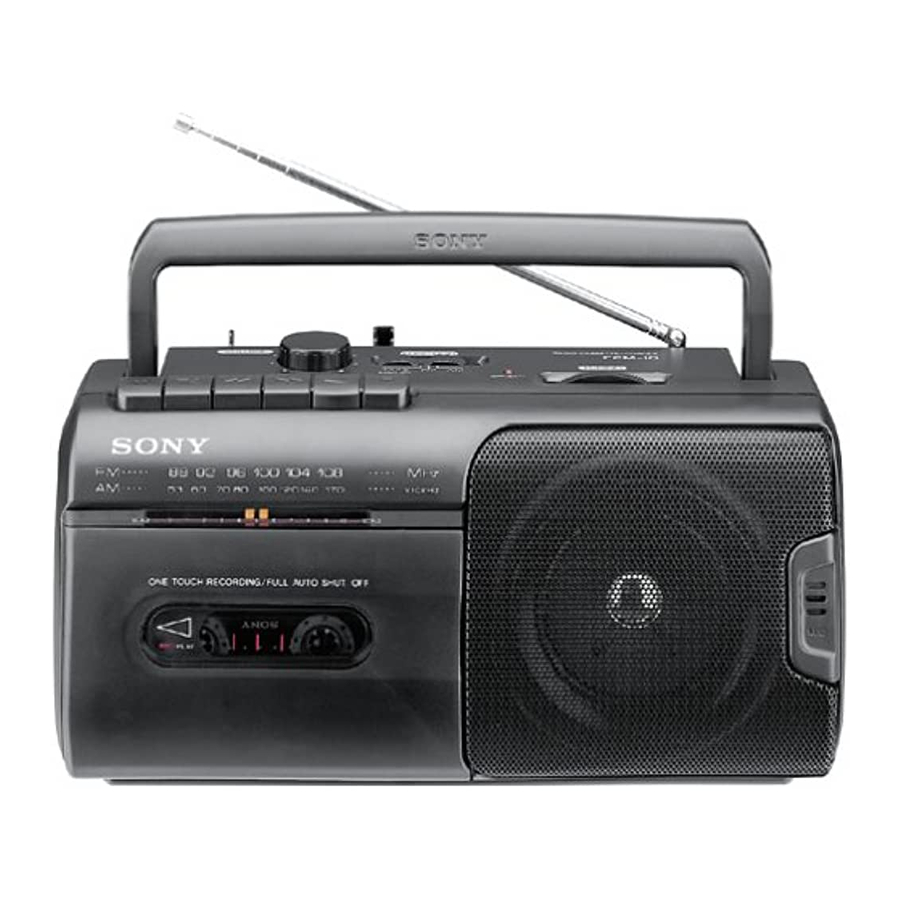
Sony CFM-10 - Radio Cassette-Corder Manual
Choosing Power Sources
House Current
For Australian models

Connect the supplied AC power cord to the AC IN jack.
For other models

Open the battery compartment and take out the AC power cord. An opening in the compartment door permits AC operation with the door in its place. Then, connect the AC power cord to the wall outlet.
For critical recording, operating the player on AC power is recommended.
Batteries

Insert four size D (R20) batteries.
Notes
- The player cannot be operated on batteries when the AC power cord isconnected to the player (for Australian models only).
- When the OPR/BATT indicator glows faintly, replace all the batteries withnew ones.
Playing a Tape

Use only TYPE I (normal) tapes.
- Set FUNCTION to TAPE/RADIO OFF.
![]()
- Insert a cassette.

- Press
![]() PLAY (play).
PLAY (play).

- Adjust VOLUME.
![]()


To stop playing

To pause, press  PAUSE (pause).
To release pause, press PAUSE (pause) again.
To fast forward the tape, press  FF.
FF.
To rewind the tape, press  REW.
REW.
When the tape reaches the end
The depressed button FF, REW or  PLAY (play) is released automatically (Auto shut-off function).
For private listening
Connect an earphone to the  jack (for Australian models only).
When the player is in use
OPR/BATT (operation/battery) indicator lights. Intensity of glow shows battery
Listening to the Radio

- Set FUNCTION to FM or AM.
![]()
- Tune in a desired station.
![]()
- Adjust VOLUME.
![]()


To turn off the radio

Antenna Adjustment

Recording

Use only TYPE I (normal) tapes.
- From the radio

From the built-in microphone

- Insert a blank cassette.

- Press
![]() REC.
REC.
![]() PLAY (play) is depressed automatically.
PLAY (play) is depressed automatically.


To stop recording

When the tape reaches the end,  REC and
  PLAY (play) are released automatically.
When recording from the built-in microphone
You cannot monitor the sound through the earphone while recording from the built-in microphone (for Australian models only).
The recording level is adjusted automatically
Adjusting VOLUME will not affect the recording level.
To prevent accidental erasure
Break off the tab corresponding to the side which has been recorded. The recording on that side will be protected.

Precautions
Notes on pow er sources
- For AC operation, use the supplied AC power cord; do not useany other type (for Australian models only).
- For battery operation, use four size D (R20) batteries.
- When the batteries are not to be used for a long time, removethem to avoid damage that can be caused by battery leakage or corrosion.
- The player is not disconnected from the AC power source (mains)as long as it is connected to the mains, even if the player itself has been turned off.
- Unplug the player from the wall outlet when it is not to be usedfor an extended time.
- The nameplate indicating operating voltage, power consumption, etc. is located at the bottom.
Handling the player
- Do not leave the player in a location near heat sources, or in aplace subject to direct sunlight, excessive dust or mechanical shock.
- Should any solid object or liquid fall into the player, unplug theplayer and have it checked by qualified personnel before operating it any further.
- Do not lift the handle when the telescopic antenna is extended.
- If the player has not been used for a long time, set it in theplayback mode to warm it up for a few minutes before inserting a cassette.
Note on cassette
The use of a cassette with more than 90 minutes of play time is not recommended except for long, continuous recording or playback.
If you have any questions or problems concerning your player, please consult your nearest Sony dealer.
Troubleshooting Guide
The player does not operate.
- No batteries are in the battery compartment.
- Batteries are installed incorrectly (wrong orientation).
- Weak battery. Replace all batteries.
- The AC power cord is not connected.
Noise is heard.
- Someone is using a portable telephone or other equipment thatemits radio waves near the player. Move the portable telephone, etc., away from the player.
Cassette cannot be installed.
- Cassette is being inserted improperly.
![]() PLAY (play) is depressed.
PLAY (play) is depressed.
 PLAY (play) is depressed.
 REC cannot be depressed.
- No cassette.
- The cassette inserted has its tab removed. Use another cassette orcover the slot with adhesive tape.
Tape does not m ove.
![]() PAUSE (pause) is depressed.
PAUSE (pause) is depressed.- Weak battery. Replace all batteries.
 PAUSE (pause) is depressed.
No sound from the speakers.
- The VOLUME control is turned down completely.
- The FUNCTION selector is set incorrectly.
- An earphone is plugged in (for Australian models only).
Sound drop-outs, loss of hig h frequencies, or excessive noise. • Dirty heads.
- Demagnetize the heads and all metal parts in the tape path with acommercially available head demagnetizer.
Specifications
| Frequency range | FM: 87.6-108 MHz AM: 530-1,710 kHz | |
| Antenna | FM: Telescopic antenna AM: Built-in ferrite bar antenna | |
| Recording system | 2-track, mono | |
| Frequency response | 100-8,000 Hz | |
| Speakers | Full range: 7.7 cm (31/ 8 inches) dia. x 1 | |
| Power output | 0.9 W (at 10% harmonic distortion in DC operation) | |
| Output | Earphone jack (mini jack) for 32 ohm impedance earphone (for Australian models only) | |
| Power requirements | 230-240 V AC, 50 Hz (for Australian models) 120 V AC, 60 Hz (for other models) 6 V DC, four size D (R20) batteries | |
| Power consumption | 5 W in AC operation | |
| Battery life | ||
| Batteries | FM recording | Playback |
| Sony R20P | Approx. 24 hours | Approx. 20 hours |
| Sony LR20 alkaline | Approx. 55 hours | Approx. 50 hours |
| Dimensions | Approx. 272 x 130 x 121.5 mm (w/h/d) (10 3/4 x 51/8 x 47/8 inches) including projecting parts | |
| Mass | For Australian models Approx. 1.5 kg (3 lb 5 oz) including batteries for other models Approx. 1.7 kg (3 lb 12 oz) including batteries | |
| Accessory supplied | AC power cord (1) (for Australian models only) | |
Design and specifications subject to change without notice.

Download manual
Here you can download full pdf version of manual, it may contain additional safety instructions, warranty information, FCC rules, etc.
Download Sony CFM-10 - Radio Cassette-Corder Manual


