Paradox NV780MX - Dual Side-View Anti-Mask Outdoor Detector Manual
- 1 General Description
- 2 Installing the NV780MX
- 3 Anti-Mask Calibration
- 4 Wiring
- 5 Dip Switch
- 6 Power-Up Sequence Indication
- 7 Alarm
- 8 Anti-Mask Detection
- 9 Adjusting the Beam Range
- 10 Adjusting the Horizontal Beam
- 11 Beam Range Adjustment
- 12 Horizontal Beam Adjustment
- 13 Technical Specifications
- 14 References
- 15 Download manual
- 16 In Other Languages
General Description
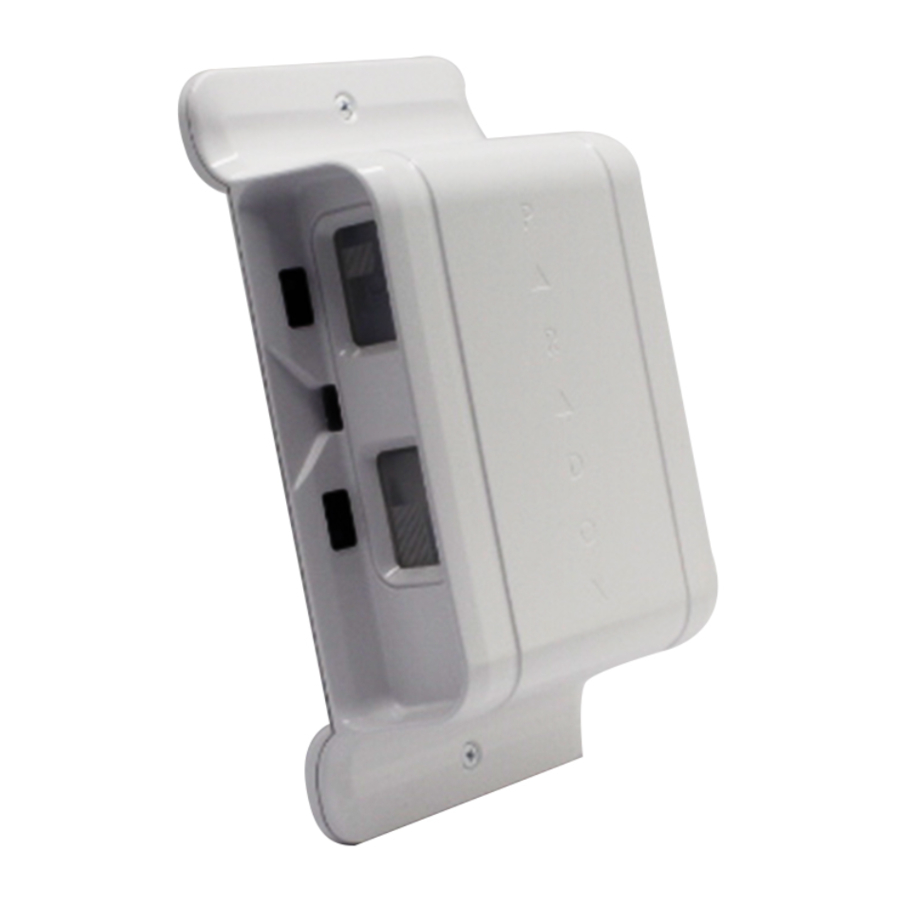
The NV780MX is a dual, independent, side-by-side view Passive Infrared (PIR) motion detector with dual anti-mask in a single housing, providing boundary protection. Covering approximately 24m / 78 ft. (12m / 39 ft. on each side) and configurable to report either as a single unit with two sides reporting as a single zone output or as a dual unit with each side reporting as a separate zone input.
Installing the NV780MX

Figure 1: Front View - Open Cover
Minimum Recommended Installation Distance: At least 40 cm / 15.7 in. from the protected area (door, window, etc.)
Anti-Mask Calibration
The anti-mask will only calibrate after the tamper is closed. The NV780MX performs anti-mask calibration for up to 40 seconds, indicated by flashing red / green LEDs until completed. On completion, the LEDs shut off. If the buzzer is set to ON, three beeps signal that calibration is complete.

During calibration, no objects should be within 2m / 6 ft. of the anti-mask field of view (on both sides of the detector).
Wiring

*In Single mode, both outputs activate from any side.
- Digiplex mode is enabled if bus communication with the control panel exists. In Digiplex mode, the detector's relay output remains active and can be used to activate other devices.
- Upon a loss of communication in Digiplex mode, the left LED flashes rapidly until communication is restored.
- To return to Relay mode, disconnect both the power and the Digiplex bus connection, and then power-up the module.
Dip Switch
| Dip Switch | Functionality |
| 1 | LED: ON / OFF |
| 2 | Buzzer: ON / OFF |
| 3 | Sensitivity ON: (High) OFF: (Low) |
| 4 | Single Mode: ON Dual Mode: OFF |
Power-Up Sequence Indication
- LED: Both left and right LEDs blink red for five seconds.
- Buzzer Switch ON:
- Single Mode: One tone beeping for five seconds.
- Dual mode: Alternate tone beeping for five seconds.
- Anti-mask calibration can take up to 40 seconds, red / green flashing if Buzzer is ON; three beeps indicates completion.
Alarm
- LED: Red LED indication on the relevant side(s) for three seconds.
- Buzzer Switch ON:
- Single Mode: Same tone for either side detection.
- Dual mode: Each side has its own tone.
Anti-Mask Detection
- LED: Flashes orange rapidly (pre-alarm state) and then flashes when in alarm.
- If Buzzer is ON: buzzer beeps for 3 seconds.
 NOTE: The anti-mask relay is open during anti-mask detection.
Adjusting the Beam Range
Adjust the beam range by shifting the lower lens up and down:. Hold the cover in the UP position and slide the plastic tab in the lower lens up or down on the side you wish to adjust, until the module is aligned in the desired position. Align the top of the tab with the required angle of the beam (Figure 2):
0° = 12m
5°= 10.5m
10° = 7.5m
15° = 5.25m
20° = 3m
Once adjusted, lock into place by pushing the tab into the slot.
Adjusting the Horizontal Beam
Beams (on either side of the module) are projected parallel to the wall (default). The beams can be adjusted to project 30 horizontally from the wall, distancing the beam 60 cm / 24 in. from the wall in order to avoid detection of unwanted objects next to the module (Figure 2).
To adjust the beams in relation to the wall, identify the side needing adjustment, and slide the lens tray in or out of the detector to the required position:
0° - Slide the lens tray until it is flush with the top edge of the lens holder.
3° - Slide the lens tray until it is flush with the bottom edge of the lens holder.

Figure 2: Beam Adjustment
Beam Range Adjustment

Horizontal Beam Adjustment

Technical Specifications
| Sensor | 4x dual low noise rectangular elements |
| Lens | 2nd gen., flat, 2x dual beam, 1.7" focal point, narrow beam long-range Fresnel lens |
| Processing | Digital APSP / Digital temperature compensation |
| Startup Time | 25 seconds |
| Detection Speed | 0.2m / sec. – 4m / sec. (0.6 ft / sec. – 13.1 ft / sec.) |
| Power Input | 9 Vdc to 15 Vdc |
| Current Consumption | Typical/Standby: 37mA, Max: 80mA |
| Coverage | Bi-directional, independent, 2 x 3m to 12m (10 ft. to 39 ft.) at 1.5m / 4.9 ft. height |
| PET Immunity | Up to 40 kg (90 lb) - minimum 1.5m / 4.9 ft installation height |
| Anti- Mask | Active IR detection for blocking 10 cm up to 30 cm and sprayed liquid |
| Alarm Indicator | 2x red LED for 3 seconds + buzzer |
| Alarm Output | 2x Solid State, N.C, 150 mA. |
| Anti-Tamper Switch | N.C. 28 Vdc, 0.15A |
| Operating Temperature | -35°C to +50°C / -31°F to +122°F |
| Humidity | 95% max. |
| Dimensions | L 8.2 in. x W 4.3 in. x D 2.7 in. (21 cm x 11 cm x 7 cm) |
| RF Immunity | Complies with EN 50130-4: 10V / m 80 MHz to 2.7 GHz |
| Standards | EN 50131-2-2, Security Grade 2, EN 50130-5 Environmental Class IVA |

Warranty: For complete warranty information on this product please refer to the Limited Warranty Statement found on the website: www.paradox.com/terms or contact your local distributor. © 2016 Paradox Security Systems (Bahamas) Ltd. All rights reserved. Specifications may change without prior notice.
Patents: One or more of the following US patents may apply: 7046142, 6215399, 6111256, 6104319, 5920259, 5886632, 5721542, 5287111, and RE39406 and other pending patents may apply. Canadian and international patents may also apply.

References

Download manual
Here you can download full pdf version of manual, it may contain additional safety instructions, warranty information, FCC rules, etc.
Download Paradox NV780MX - Dual Side-View Anti-Mask Outdoor Detector Manual


