How to Turn On or Off the Camera Mirror Effect on Nothing Phone (3)
Have you ever taken a selfie on your Nothing Phone (3) only to find the resulting image looks "flipped" compared to what you saw in the preview? This is likely due to the camera mirror effect, which simulates a mirror reflection (the reverse of what others see) but often saves the photo as you saw it. Many prefer the image to be saved as others see them. Fortunately, changing this setting is quick and easy within the Camera app. Follow this simple guide to enable or disable the mirrored front camera option for more natural-looking selfies.
Steps to Change the Front Camera Mirror Effect
Follow these steps to access and toggle the mirror effect setting on your Nothing Phone (3).
1. Open the Camera App
First of all, you're to open up the Camera app on your Nothing Phone (3).

2. Access the Quick Settings
Next, you're to tap on the arrow at the top row of the screen to expand the quick settings menu.

3. Go to More Settings
After that, you're to go to More Settings (usually represented by an icon like a gear or three dots) within the expanded quick settings.

4. Locate and Toggle the Setting
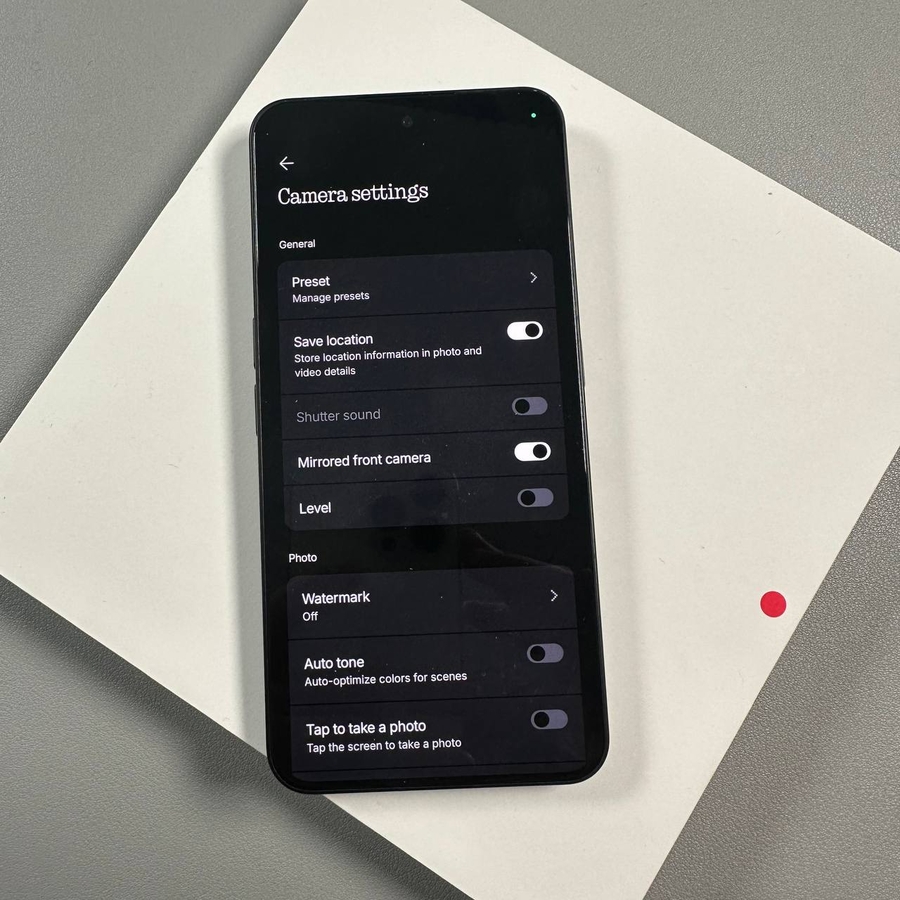
Now, you are to find the Mirrored front camera option. Simply toggle the switch next to it to either enable or disable the mirror effect on the front camera.

When the switch is On, your selfies will be saved as a mirror image (flipped horizontally). When the switch is Off, your selfies will be saved as a true representation, similar to how others see you (not flipped).
Thank you so much for reading this article. Now you can capture selfies that look exactly the way you want!