Creative Sound Blaster Katana V2X - Gaming Soundbar with Subwoofer Manual
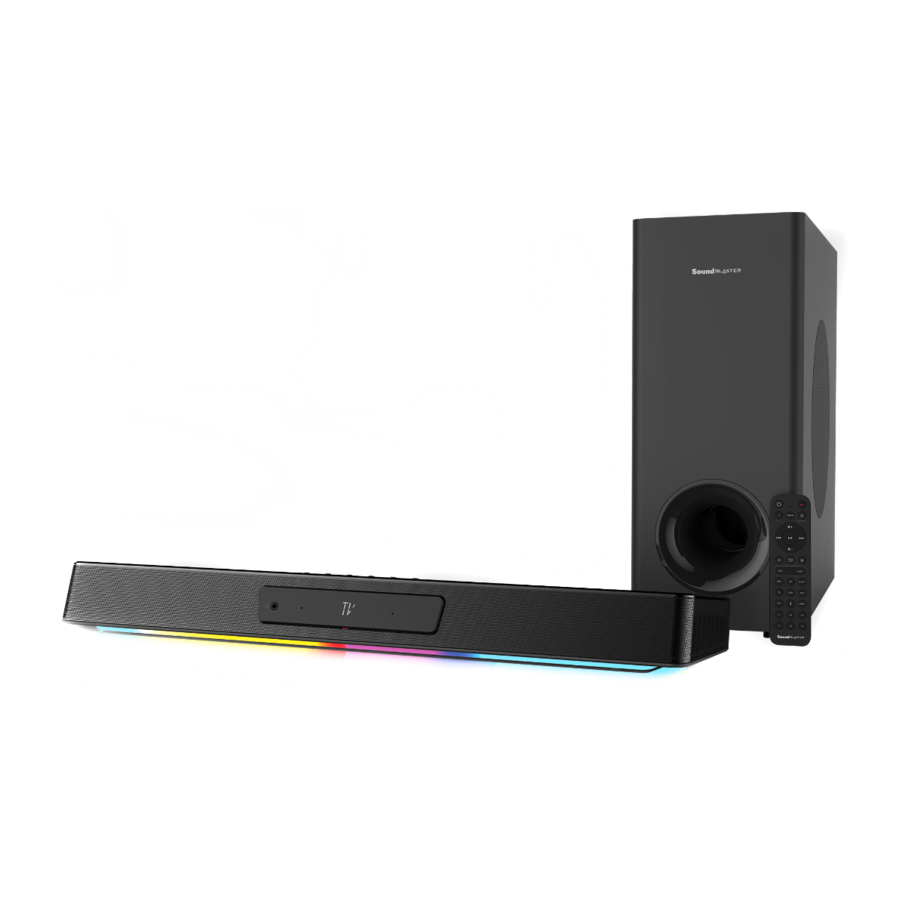
OVERVIEW
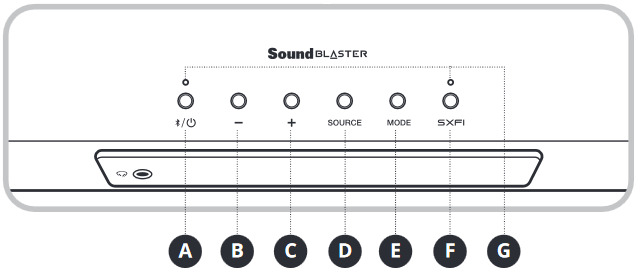
- Power / Bluetooth ® Button
- Volume - Button
- Volume + Button
- Source Button
- Mode Button
- Super X-Fi Button
- LED Indicators
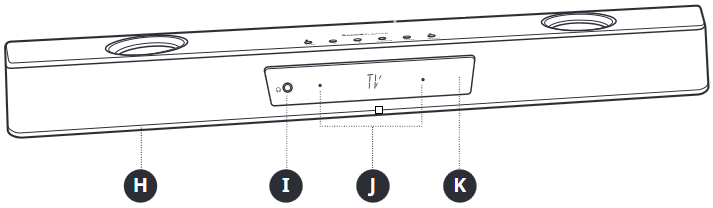
- RGB Lighting
- Headset Port
- Microphones
- LED Display
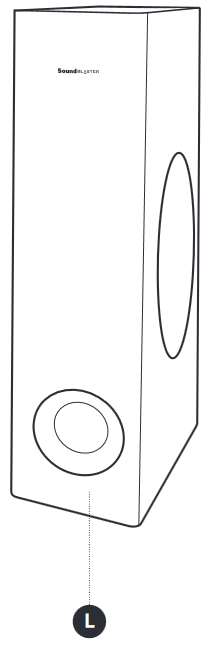
- Subwoofer
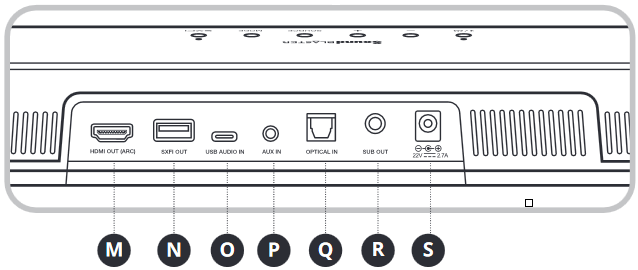
- HDMI ARC Port
- SXFI-out Port
- USB-C Port
- 3.5 mm AUX-in Port
- Optical-in Port
- Output to Subwoofer
- DC Power Port
| i) Button / Action | ii) Function | |
 | x1 | Power On / Power Off |
| 2s | Enter Bluetooth Pairing Mode | |
| x1 (While in Bluetooth Pairing Mode) | Exit Bluetooth Pairing Mode | |
 | x1 | Decrease Volume |
 | x1 | Increase Volume |
 | x1 |  |
 | x1 |  |
 | x1 |  |
| iii) LED Indicator | iv) Status | ||
 |  | Solid White | Power On |
 | Solid Red | Power Off | |
 | Solid Yellow | Network Standby | |
 | Solid Blue | Bluetooth Connected | |
 | Blinking Blue | Bluetooth Pairing Mode | |
 | Blinking White | Waiting for BLE Connection | |
 |  | Solid Orange | Super X-Fi Off |
 | Solid Green | Super X-Fi On | |
 | Solid Dark Blue | SXFI BATTLE Mode On | |
 | Blinking Red | Loading Super X-Fi Profile | |
 | LED Off | Super X-Fi is unavailable (Speaker mode) | |
| v) LED Display | vi) Source / Function |
 | HDMI ARC Mode |
 | USB Audio Mode |
 | Optical-in |
 | AUX-in |
 | Bluetooth Pairing mode |
 | Bluetooth Mode |
IR REMOTE CONTROL
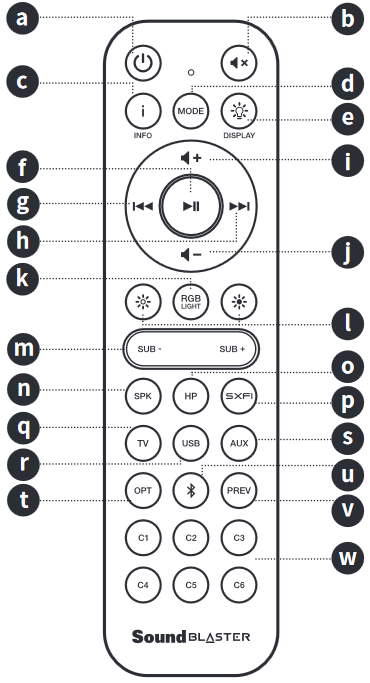

AAA batteries not included
- Power Button
Press once to turn on the soundbar.
Press once again to turn it off. - Mute Button
Press once to mute the soundbar.
Press once again to unmute. - Info Button
Press once to display Audio Format (Dolby encoded / PCM), Volume, Sound Mode, and Source information. - Mode Button
Press to cycle through sound modes on Sound Blaster Katana V2X (customizable via the Creative app). - Display Button
Press to cycle through LED display brightness. (Bright / Dark / Off) - Play / Pause Button
Press once to play / pause audio playback. - Previous Track Button
Press once to return to previous track. - Next Track Button
Press once to skip to next track. - Volume + Button
Press once to increase volume.
Press and hold to continuously increase the volume. - Volume – Button
Press once to decrease volume.
Press and hold to continuously decrease the volume. - RGB Lighting Button
Press to cycle through RGB Lighting presets on Sound Blaster Katana V2X (customizable via the Creative app). - LED Brightness - / + Buttons
Press to decrease / increase LED brightness - Sub - / Sub + Buttons
Press to decrease / increase subwoofer's volume - Speaker Button
Press once to switch to speaker output. - Headphones Button
Press once to switch to headphones / headset output. - Super X-Fi Button
Press once cycle through Super X-Fi modes.
(Super X-Fi On / SXFI BATTLE Mode / Super X-Fi Off) - TV Source Button
Press once to switch to TV input. - USB Source Button
Press once to switch to USB input. - AUX Source Button
Press once to switch to AUX input. - Optical Source Button
Press once to switch to Optical input. - Bluetooth Button
Press once to switch to Bluetooth input.
Press and hold to enter Bluetooth pairing mode. - Previous Source Button
Press once to switch to last used input source. - C1-C6 Customizable Buttons
Buttons are customizable through the Creative app.
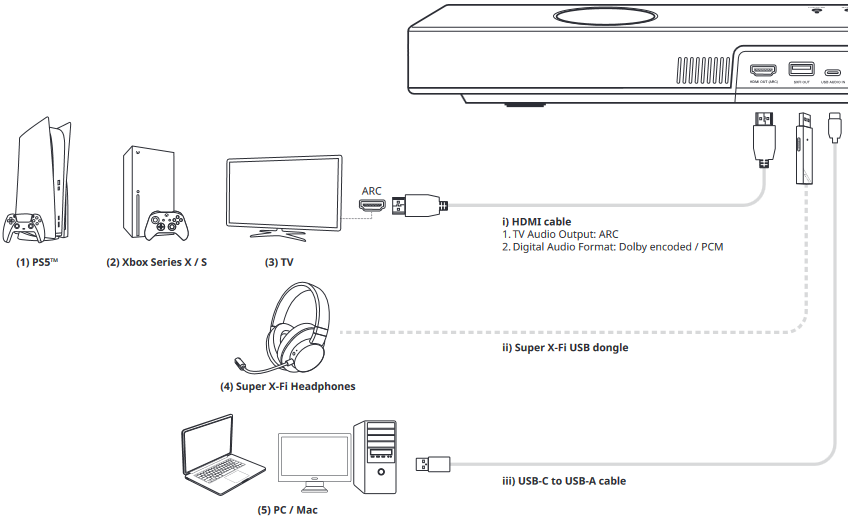
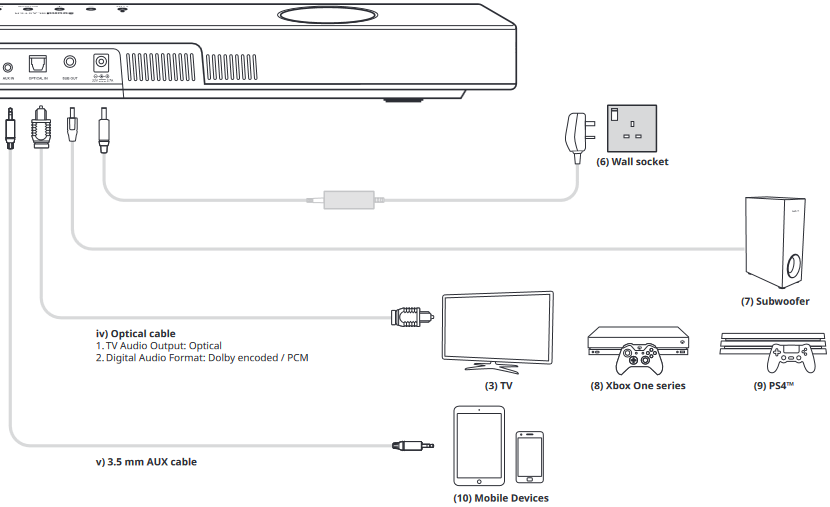
CONNECTIVITY
WALL MOUNTING SOUND BLASTER KATANA V2X (OPTIONAL)
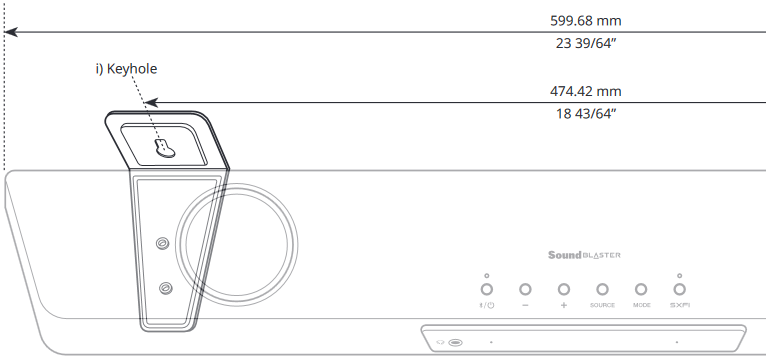
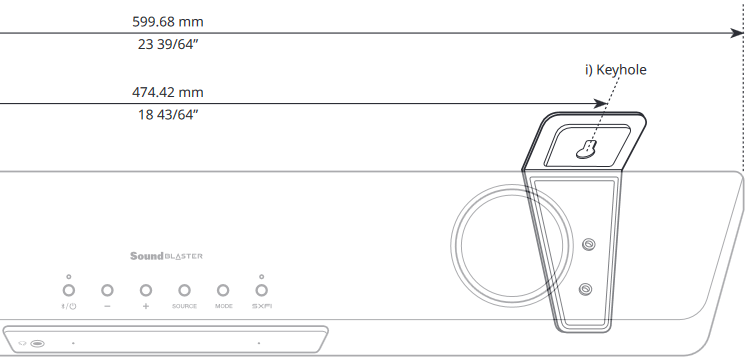
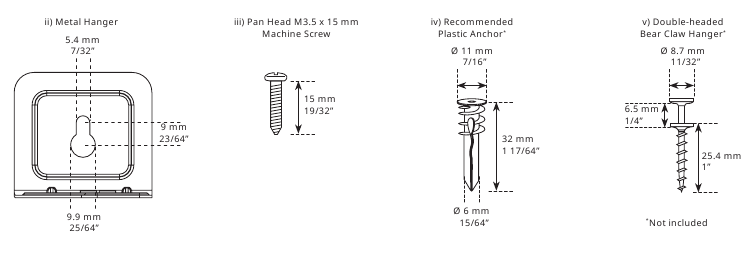
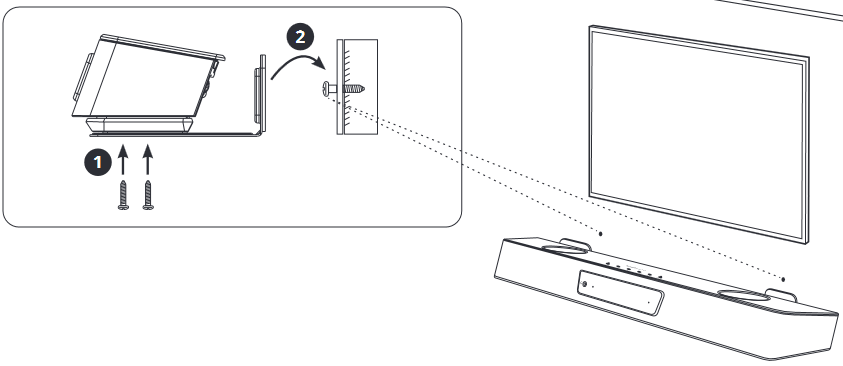

To prevent injury, this apparatus must be securely attached to the wall in accordance with the installation instructions
- Determine the mounting position of the soundbar. Ensure that it is properly centered relative to the TV and leveled horizontally.
- Note and mark out your desired location for the wall mount bracket. Ensure that they do not intersect with buried pipes, conduits, or cabling within the wall.
- Ensure to mount the plastic anchors into the wall before screwing in the Double-headed Bear Claw Hangers. Tap the the plastic anchors into the wall using a hammer until it is flushed against it.
- Place the soundbar on the wall mount bracket, then tighten the screws as illustrated to secure it.
- With the soundbar in position, screw the Double-headed Bear Claw Hangers through the wall mount bracket's keyholes and into the plastic anchors. The flange of the hangers should be flushed against the plastic anchors.
SUPER X-FI PERSONALIZATION

Unleash the performance of Super X-Fi with SXFI App. The app allows you to personalize your Super X-Fi profile through an advanced Head & Ear-Mapping process for a complete Super X-Fi experience.
Download SXFI App from:
 iOS App Store
 Google Play Store
CREATIVE APP

Available on Windows, Mac, as well as Android and iOS devices, set up your product, personalize audio settings, enhance your product's performance, and more with the Creative app:
- Personalize your audio experience with Super X-Fi, Scout Mode, Dolby Digital Decoder, and Audio Mixer
- Enjoy Acoustic Engine features such as Surround, Crystalizer, Bass, Smart Volume, and Dialog+
- Customize RGB Lighting, graphic EQs, and custom buttons
- Perform software, product registration, and more
- Download the Creative app from creative.com/support/katanaV2X
TECHNICAL SPECIFICATIONS
Power Adapter Model: GM60-220270-D
Input: 100–240V, 50 / 60 Hz 2.0A
Output: 22V  2.7A
2.7A
Soundbar's Power Output: 50W RMS (Tweeter 5W RMS x 2 / Midbass 20W RMS x 2)
Subwoofer's Power Output: 40W RMS
Frequency Response: 50–20,000 Hz
Bluetooth Version: Bluetooth 5.0
Operating Frequency: 2402–2480 MHz
Operating Range: Up to 10m / 33 ft, measured in open space. Walls and structures may affect range of device Maximum RF Output Power: 4 dBm
Supported Bluetooth Profiles:
- A2DP (Advanced Audio Distribution Profile)
- AVRCP (Audio / Video Remote Control Profile)
Supported Codec: SBC
Soundbar Input Rating: 22V 2.7A
Maximum Temperature Range: 40ºC
NOTE:
Compliance marking are located at the bottom of this product.
OTHER INFORMATION
Please visit creative.com/compliance/katanaV2X for the user guide, safety and regulatory information, and ErP information where applicable.
Please visit creative.com/support/katanaV2X for all other support related to your product.
PRODUCT REGISTRATION
Registering your product ensures you receive the most appropriate service and product support available. You can register your product at www.creative.com/register. Please note that your warranty rights are not dependent on registration.
| Warranty | Warranty information is supplied with your product in a separate document. Please keep your Proof of Purchase for the duration of the Warranty period. |
| Keep this document for future reference. | |

References
Creative Worldwide Support -
Creative Worldwide Support
Creative Technology - Online Product Registration


Download manual
Here you can download full pdf version of manual, it may contain additional safety instructions, warranty information, FCC rules, etc.
Download Creative Sound Blaster Katana V2X - Gaming Soundbar with Subwoofer Manual


