Philips 7400 Series, GC7440, GC7423, GC7422 Manual
introduction
Congratulations on your purchase and welcome to Philips! To fully benefit from the support that Philips offers, register your product at www.philips.com/welcome.
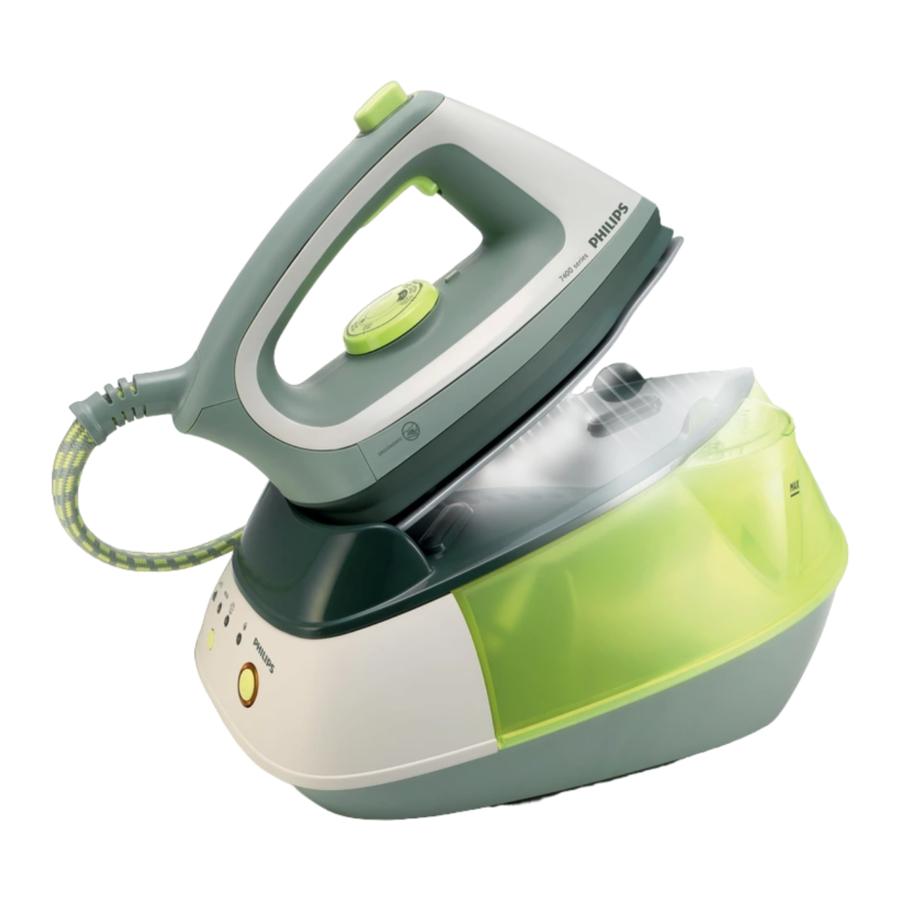
General description (Fig. 1)

- Supply hose
- Handle
- Temperature dial
- Steam trigger
- Temperature light
- Temperature indicator
- Steam boost button
- Soleplate
- Filling funnel lid
- Filling funnel
- Iron platform
- Water tank
- Steam tank
- Heat-resistant iron resting mat
- Control panel (GC7423/GC7422)
- On/off switch
- Control panel (GC7440)
- On/off button with power-on light
- 'Water tank empty' light
- Steam setting selector
- Steam lights
- Mains cord
- Calc-clean tablet holder
- Cord storage hook
- Calc-Clean rinsing cap
Important
Read this user manual carefully before you use the appliance and save it for future reference.

- Never immerse the iron or the steam tank in water.

- Check if the voltage indicated on the appliance corresponds to the local mains voltage before you connect the appliance.
- Do not use the appliance if the plug, the mains cord, the supply hose or the appliance itself shows visible damage, or if the appliance has been dropped or leaks.
- If the mains cord or the supply hose is damaged, you must have it replaced by Philips, a service centre authorised by Philips or similarly qualified persons in order to avoid a hazard.
- Never leave the appliance unattended when it is connected to the mains.
- This appliance is not intended for use by persons (including children) with reduced physical, sensory or mental capabilities, or lack of experience and knowledge, unless they have been given supervision or instruction concerning use of the appliance by a person responsible for their safety.
- Children should be supervised to ensure that they do not play with the appliance.
- Do not let the mains cord and supply hose come into contact with the hot soleplate of the iron.
- If steam escapes from under the Calc-Clean rinsing cap when the appliance heats up, switch off the appliance and tighten the Calc-Clean rinsing cap. If steam continues to escape when the appliance heats up, switch off the appliance and contact a service centre authorised by Philips.
- Never remove the Calc-Clean rinsing cap when the steam tank is hot.
- Do not use any other cap on the steam tank than the Calc-Clean rinsing cap that has been supplied with the appliance, as this cap also functions as a safety valve.

- Check the mains cord and the supply hose regularly for possible damage.
- Always place and use the iron and the steam tank on a stable, level and horizontal surface.
- The iron platform and the soleplate of the iron can become extremely hot and may cause burns if touched. If you want to move the steam tank, do not touch the platform.
- When you have finished ironing, when you clean the appliance and also when you leave the iron even for a short while: put the iron on the iron platform, switch off the appliance and remove the mains plug from the wall socket.
- Rinse the steam tank regularly according to the instructions in the chapter 'Cleaning and maintenance'.
- This appliance is intended for household use only.
Electromagnetic fields (EMF)
This Philips appliance complies with all standards regarding electromagnetic fields (EMF). If handled properly and according to the instructions in this user manual, the appliance is safe to use based on scientific evidence available today.
Preparing for use
Filling the water tank
Never immerse the steam tank in water.
Do not put hot water, perfume, vinegar, starch, descaling agents, ironing aids or other chemicals in the water tank.
- GC7440: Fill the water tank when the 'water tank empty' light flashes.
- GC7423/GC7422: Fill the water tank when the water in the water tank has reached the MIN level.
- You can refill the water tank at any time during ironing.
- Open the filling funnel lid. (Fig. 2)
![]()
- Fill the water tank with tap water up to the maximum level (Fig. 3).
![]()
Note: You can use normal tap water. If the tap water in your area is very hard, we advise you to mix it with an equal amount of distilled water. - Properly close the filling funnel lid ('click').
Do not tilt or shake the steam tank when the water tank is full. Otherwise water may spill out of the filling funnel.


Using the appliance
Note: Some smoke and particles may come out of the iron when you use it for the first time. This is normal and stops after a short while.
Note: When you switch on the appliance, the steam tank produces a pumping sound. This sound is normal and indicates that water is being pumped into the steam tank.
Steam ironing
Never direct the steam at people.
Steam ironing is only possible at higher ironing temperatures (temperature settings  to MaX).
- Make sure that there is enough water in the water tank.
- Place the heat-resistant iron resting mat on the ironing board and put the iron on the mat. (Fig. 4)
![]()
- To set the required ironing temperature, turn the temperature dial to the appropriate position. (Fig. 5)
Note: steam ironing is only possible at higher ironing temperatures (temperature settings![]() to MaX).
to MaX).
![]()
- Put the mains plug in a wall socket and set the on/off switch to on (GC7423/GC7422) or press the on/off button (GC7440) (Fig. 6).
Note: When you switch on the appliance, the steam tank produces a pumping sound. This sound is normal and indicates that water is being pumped into the steam tank.

 to MaX).
- The power-on light on the steam tank and the iron temperature light go on to indicate that the steam tank and the iron start to heat up.
- GC7440: The high steam setting light flashes to indicate that the steam tank is heating up.
- After approx. 2 minutes, the steam light stays on continuously, to indicate that the water in the steam tank is hot enough for steam ironing.
![]()

- GC7440: Press the steam setting selector to set a steam setting suitable for the selected ironing temperature: (Fig. 7)
- Select the ECO setting for optimum ironing performance at temperature settings
![]() to MAX.
to MAX. - Select the high steam setting for temperature settings
![]() to MAX.
to MAX.
Note: During ironing, the temperature light goes on from time to time. This indicates that the iron is heating up to the set temperature.
![]()
- Select the ECO setting for optimum ironing performance at temperature settings
- Keep the steam trigger pressed while you steam iron. (Fig. 8)
Note: You can safely put the hot iron on the iron resting mat during ironing. Do not place the mat with the hot iron on a surface that can be scorched by heat.
Note: Do not touch the iron resting mat for some time after you have removed the hot iron from it, as the mat is hot.
![]()
 to MAX.
 to MAX.

ironing without steam (GC7440 only)
Do not press the steam trigger while you iron.
- Set the required ironing temperature (see chapter 'Preparing for use', section 'Setting the temperature'). (Fig. 5)
- Put the mains plug in a wall socket and press the on/off button (Fig. 9).
- The soleplate starts to heat up.
![]()
- The soleplate starts to heat up.
- Press the steam selector and select 'no steam'. (Fig. 7),
- The 'no-steam' light goes on.
- Iron without pressing the steam trigger.
- If the steam tank is empty or has not heated up yet, you hear a clicking sound inside the tank.
This sound is caused by the opening of the steam valve and is perfectly harmless.
- If the steam tank is empty or has not heated up yet, you hear a clicking sound inside the tank.

After ironing
- Switch off the appliance.
- Remove the mains plug from the wall socket.
- Put the iron on the iron platform and let the appliance cool down before you start to clean it.
Features
Vertical steam ironing
Never direct the steam at people.
- To steam iron hanging curtains and clothes (jackets, suits, coats), hold the iron in vertical position (Fig. 10).
![]()
- Press the steam trigger.

Steam boost function
Never direct the steam at people.
During steam ironing, you can use the steam boost function to remove stubborn creases.
- Set the temperature dial to a position between
![]() and MAX.
and MAX. - Press the steam boost button (Fig. 11).
Note: Some water droplets may appear when you use the steam boost function for the first time. The water droplets disappear after you have used the steam boost function for some time.
![]()
 and MAX.
'Water tank empty' light (GC7440 only)
- When the water in the water tank runs low during use, the 'water tank empty' light goes on (Fig. 12).
![]()

- Refill the water tank (see chapter 'Preparing for use').
Cleaning and maintenance
Never immerse the iron and the steam tank in water or any other liquid, nor rinse them under the tap.
Let the iron and the steam tank cool down sufficiently before you clean them.
- Clean the iron and the steam tank with a damp cloth.
- Wipe scale and any other deposits off the soleplate with a damp cloth and a non-abrasive (liquid) cleaner.
Rinsing the steam tank
Let the appliance cool down sufficiently before you remove the Calc-Clean rinsing cap.
Rinse the steam tank once a month or after you have refilled the water tank 10 times.
- Empty the water tank by pouring the water into the sink (Fig. 13).
![]()
- Turn the cord storage hook anticlockwise (1) and remove it (2) (Fig. 14).
![]()
- Turn the Calc-Clean rinsing cap anticlockwise (1) and remove it (2) (Fig. 15).
![]()
- Shake the steam tank well over the sink.
- Empty the steam tank by pouring the water into the sink.
- Pour fresh water through the Calc-Clean hole with the filling cup. (Fig. 16)
![]()
- Shake the steam tank well over the sink (Fig. 17)
![]()
- Pour the water into the sink again. (Fig. 18)
![]()
- Repeat steps 6 and 7 if there are still impurities in the water.
- Firmly screw the Calc-Clean rinsing cap clockwise onto the steam tank.
- Reattach the cord storage hook by turning it clockwise.


Storage
Make sure the appliance has cooled down sufficiently before you put it away.
- Remove the mains plug from the wall socket and let the appliance cool down.
- Empty the water tank (Fig. 13).
- Place the iron on the iron platform.
- Fix the supply hose and mains cord in the cord storage hook. (Fig. 19)
Regularly check if the mains cord and the supply hose are still undamaged and safe.
![]()

References

Download manual
Here you can download full pdf version of manual, it may contain additional safety instructions, warranty information, FCC rules, etc.
Download Philips 7400 Series, GC7440, GC7423, GC7422 Manual


