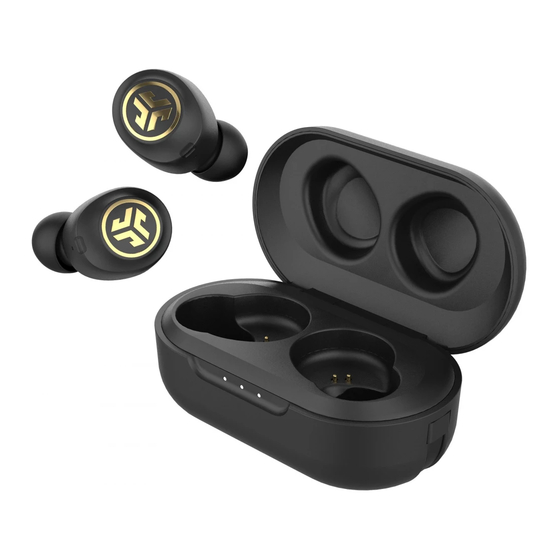
Jlab Jbuds Air ICON Earbuds Manual

YOUR SATISFACTION IS GUARANTEED (YOUR SATISFACTION IS GUARANTEED)
You may exchange or return merchandise within 30 days of the purchase date. Please return the item to the location you purchased it. If your item has been opened or used, restrictions may apply.

YOUR WARRANTY (YOUR WARRANTY)
You may register your product at jlabaudio.com/register. All warranty claims are subject to JLab Audio authorisation and at our sole discretion. Retain your proof of purchase to ensure warranty coverage.

CONTACT US (CONTACT US)
Reach out to us at support@jlabaudio.com or visit jlabaudio.com/contact.
FIRST TIME SETUP
AUTO-CONNECTING EARBUDS
Press and hold both touch sensors 3+ seconds to power ON.
The Left and Right earbud blinks blue/white indicating ready to pair to your device.

CONNECTING BLUETOOTH
Select "JLab JBuds Air Icon" in your device settings.
Voice prompt "Bluetooth connected" followed by solid white lights will indicate you are connected.


ADDING NEW / ADDITIONAL BLUETOOTH DEVICES:
Turn OFF Bluetooth from any previously connected device. Turn ON Bluetooth from new device.
Earbuds will automatically enter Bluetooth Pairing. Select "JLab JBuds Air Icon" in new device settings to connect.
ACCESSORIES

3 GEL TIP SIZES

1 CLOUD FOAM™ TIP SIZE

2 CUSH FINS™

INTEGRATED USB CABLE

CHARGING CASE
BUTTON FUNCTIONS

VOLUME DOWN: Single tap
SIRI (iOS) or "OK GOOGLE" (ANDROID): Double tap
ANSWER: Single tap
HANGUP: Double tap
REJECT INCOMING CALLS: Press & hold 1+ sec
TRACK BACK: Press & hold 1+ sec
TURN ON: Press & hold 3+ sec
CHANGE EQ: Triple tap (JBuds Air Icon will cycle 3 EQ settings)

VOLUME UP: Single tap
ANSWER: Single tap
HANGUP: Double tap
REJECT INCOMING CALLS: Press & hold 1+ sec
PLAY / PAUSE: Double tap
TRACK FORWARD: Press & hold 1+ sec
TURN ON: Press & hold 3+ sec
CHANGE EQ: Triple tap (JBuds Air Icon will cycle 3 EQ settings)
VOICE PROMPTS
"Ready to Pair" ("Ready to Pair"): JBuds Air Icon is ready to pair to Bluetooth device
"Bluetooth Connected" ("Bluetooth Connected"): Earbud is connected to device
"Battery Full" ("Battery Full"): 100-75%
"Battery Medium" ("Battery Medium"): 75-25%
"Low Battery" ("Low Battery"): Less than 25%
When power decreases to 10%, "Low Battery" ("Low Battery") will play
TURN OFF EARBUDS WITHOUT CHARGING CASE:
Enter your Bluetooth device settings and disconnect the JBuds Air Icon. Earbuds will power OFF after 3 minutes.
EQUALIZER MODES
Tap either the right or left earbud 3 times for different EQ settings. Voice prompts will indicate EQ settings. (JBuds Air Icon will cycle 3 EQ settings)


JLab SIGNATURE
JLab C3™ signature sound with amplified bass and vocals

BALANCED
Even sound with no additional enhancements

BASS BOOST
Amplified bass and sub-bass
CHARGING EARBUDS
Match the corresponding L and R letters on the charging case for proper charging.
The earbuds will auto power OFF and start charging.

Blue lights will indicate earbuds are charging and will turn OFF when fully charged.

Earbuds will auto power ON and reconnect to your device once charging case is opened.
CHARGING CASE
Connect the JBuds Air Icon to computer or USB 5V output device.
LEDs pulse white when charging and turn solid white when fully charged.

FITTING

Try all the optional Cush Fins and ear tips for best fit and proper seal.

The Cush Fin should be aligned by positioning the contour around the microphone hole.
TROUBLESHOOTING
NO AUDIO IN ONE EARBUD (MANUAL RESET)
1.Enter your Bluetooth device settings and forget the JBuds Air Icon.

2.Open the charging case and keep the earbuds inside.

3.Quickly tap 3x on each earbud touch sensor. They will each blink blue then power off (power off). Once both are off, close the charging case.

4.Wait 10 seconds and open the charging case. Wait for Left and Right to blink blue/white. You are now ready to pair to your Bluetooth device.

BLUETOOTH DEVICE DOES NOT CONNECT / RECONNECT
1.Enter your Bluetooth device settings and forget the JBuds Air Icon.

2.Turn OFF then ON Bluetooth.

3.Open the charging case and wait for Left and Right earbuds to blink blue/white.

4.Select "JLab JBuds Air Icon" in device settings to reconnect.

Instructional videos at: JLABAUDIO.COM
ECHOES ON CALLS
If you experience microphone echo/call quality with the JBuds Air Icon, make sure the Cush Fin is not blocking the microphone port.

Microphone covered

Microphone open
QUICK TIPS
-
Fully dry off the earbuds before putting in the charging case to avoid any damage to the case. The earbuds are sweat/water resistant but the case is not.
-
Either earbud can connect to your device and be used independently. Simply take out the earbud from charging case and it will auto connect.
-
Choosing the correct ear tip makes a significant improvement in audio quality due to proper seal for the driver. Try all ear tips for best results.

Fully dry off the earbuds before putting in the charging case to avoid any damage to the case.

The earbuds are sweat/water resistant but the case is not.
WARM-UP YOUR HEADPHONES
Optional: Burn-in is the process for exercising new audio equipment. We recommend 40 hours of burn-in time for most headphones to reach optimal performance. The main purpose of the process is to loosen the diaphragm of a newly crafted headphone and to stress the headphone driver. Normal, everyday use can also burn-in the headphones though JLab's proprietary burn-in provides an ideal mix of sounds and frequency sweeps to achieve this.

Burn-in your audio equipment with the JLab Audio app available on the App Store and Google Play. Or access the burn-in method at: jlabaudio.com/burnin
CAUTIONS
- Avoid extreme heat, cold, and humidity.
- Avoid dropping or crushing the earbuds.
- Wax may build up in the earbud tips, lowering the sound quality. Carefully remove the wax with a cotton swab or other small tool to improve the sound quality.
- If you experience discomfort or pain, try lowering the volume or discontinuing use temporarily.
- If you experience regular discomfort while using this product, discontinue use and consult your physician.
- We recommend you treat your earbuds as you would a nice pair of sunglasses and keep them in safe location when not in use.

References
![jlabaudio.com]() Register Your Product - JLab
Register Your Product - JLab![jlabaudio.com]() Contact Us - JLab
Contact Us - JLab![http://jlabaudio.com]() JLab: True Wireless Headphones, Earbuds, Microphones, personal Audio
JLab: True Wireless Headphones, Earbuds, Microphones, personal Audio![jlabaudio.com]() Audio Burn-in - JLab
Audio Burn-in - JLab

Download manual
Here you can download full pdf version of manual, it may contain additional safety instructions, warranty information, FCC rules, etc.
Download Jlab Jbuds Air ICON Earbuds Manual


