Plantronics K100 - Bluetooth In-car Speakerphone Manual
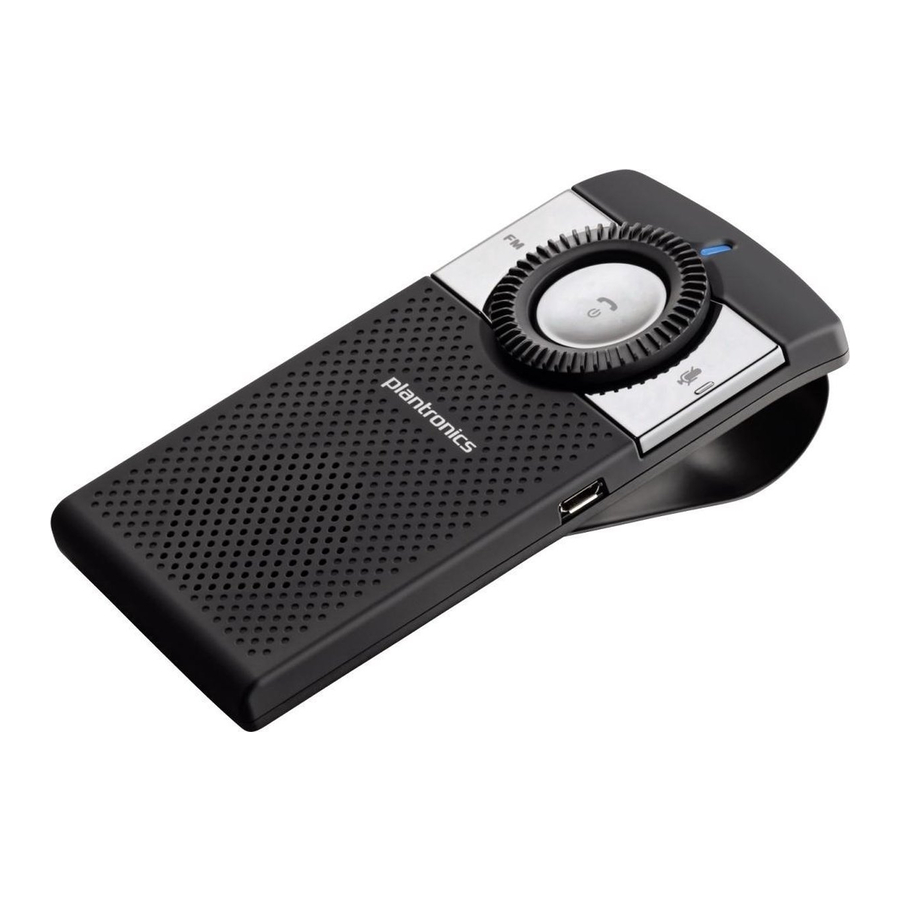
TAKE A GOOD LOOK

MULTI-FUNCTION BUTTON
- Power on or off (3- to 4-second press)
- Take a call or end it (1 tap)
- Redial (2 taps)
- Transfer audio to or from phone during call (3-second press)
- Reject a call (press and hold until you hear a single tone)
- Initiate phone's voice-dialing (2-second press until second tone is heard)
- Activate manual pairing (with power off, press and hold until LED flashes red/blue)
- Reconnect (1 tap)
- Enable/Disable Missed Call Indicator (1 tap)
FM BUTTON
- FM transmit on or off (1 tap)
- Find FM channel (press and hold until station option is announced)
LED
- Charging (solid red)
- Powering on or off (2 blue or red flashes)
- FM transmission (2 purple flashes)
- Missed call (1 purple flash)
- Pairing mode (red/blue flashes)
VOLUME WHEEL
- Increase volume (rotate clockwise)
- Decrease volume (rotate counterclockwise)
MUTE BUTTON
- Mute on or off (1 tap)
- Night mode: LED on or off (2-second press until tone is heard)
MICRO USB CHARGING PORT
- With micro USB or car charger: 2.5 hours (100% charge)
- Best performance when fully charged
Be safe! Please read the safety guide before using your new speakerphone.
CONNECT TO YOUR PHONE
"Pairing" is the process that connects the speakerphone to your phone. You can pair more phones but can have only one active connection at a time.
- READY
![]()
Activate the Bluetooth feature on your phone, then use the phone's settings to add/search/discover new Bluetooth devices.
iPhone: Settings > General > Bluetooth > On (starts the search for devices)
BlackBerry® smartphone:
Settings/options > Bluetooth: On > Search for devices
VIDEO TUTORIAL FOR USA: www.plantronics.com/pairing - SET
![]()
First Time:
With speakerphone turned off, activate Bluetooth pairing mode by pressing and holding the Multifunction button to turn on speakerphone. The LED flashes red/blue to indicate pairing mode.
![]()
- CONNECT
![]()
Select "PLT_K100" from the list of Bluetooth devices shown on your phone.
If the phone asks for a passcode, enter four zeros (0000). You may see **** on screen.
Some phones also ask to confirm the connection after pairing.
The speakerphone LED will stop flashing red/blue once your phone is successfully paired/connected.


HEAR CALLS THROUGH YOUR CAR STEREO
You can listen to calls through your car stereo speakers by transferring the audio from the speakerphone to one of five FM channel options:
88.3MHz
88.7MHz
89.1MHz
89.5MHz
89.9MHz
If your phone is A2DP-enabled you can also hear streaming audio like GPS instructions and music through your car speakers.
We recommend that you transfer audio to an FM channel before you start driving, and that you make a routinely clear channel a preset on your stereo.
- READY
Ensure that your phone and speakerphone are powered on and connected.
![]()
Suggested placement - SET
Press the FM button to enter FM transmit mode. The FM transmit channel will be announced.
![]()
- CONNECT
Manually set your radio to the announced FM channel. You are now ready to transmit calls and streaming audio like GPS directions from your phone to your car stereo.
If a radio station suddenly takes over the FM channel, tap the FM button to quickly redirect the audio back through the speakerphone.
To find another FM channel, while FM is turned on, press and hold the FM button until another channel option is announced, then tune your radio to the new channel.


LISTEN TO THE VOICE
This speakerphone announces various status alerts when you power on/off, run low on talk time, or lose/reconnect the Bluetooth connection to your phone.
| WHAT YOU'LL HEAR | WHEN YOU'LL HEAR IT |
| Power On | After pressing the Multi-Function button for 3 to 4 seconds |
| Power Off | After pressing the Multi-Function button for 3 to 4 seconds |
| Battery Low | When you have less than an hour left before the battery must be recharged |
| Pairing | While the speakerphone and phone are trying to pair/connect |
| Pairing Incomplete | After the speakerphone and phone tried to pair but failed |
| Lost Connection | When the phone and speakerphone lose the Bluetooth connection |
| Call Terminated | After ending a call or when using the call back feature through visual voice mail |
| Volume Maximum | After reaching the highest volume setting |
| Connected | After turning the speakerphone on or reconnecting a dropped Bluetooth signal |
| Mute On | After tapping the Mute button |
| Mute Off | From muted, after tapping the Mute button |
| FM ON Channel XX.X | After tapping the FM button, FM transmission turns on and the voice announces the current station it is using |
| FM Channel XX.X | After pressing and holding the FM button, the voice announces the channel it now uses |
| FM Off | From on, after tapping the FM button to turn transmission off |
TIPS
Keep Your Eyes on the Road:
The controls are easy to find with your fingertips without looking for them.
Before driving, reach up and familiarise yourself with the controls so you can keep your eyes on the road when a call comes in.
- The notched Volume wheel is easy to feel.
- The Multi-function button is inside the wheel.
- The Mute button has a raised notch.
Avoid a Dead Battery:
Remember to power off the speakerphone when you exit your car. If you forget, the speakerphone will automatically turn off after 90 minutes of not having an active connection.
Protect Your Hearing:
You can adjust the volume faster by turning the volume wheel faster. To adjust the volume a small amount, turn the wheel slowly.
Learn to Share:
When powering on, the speakerphone searches for the last connected phone.
If the last connected phone is not within range, or the Bluetooth feature is turned off on the phone, then another phone within range that has been previously paired with the speakerphone can be connected by tapping the Multi-function button.
Turn the LED On or Off:
For comfortable night driving, you can turn the lights on or off by pressing and holding the Mute button for 2 seconds until you hear a tone.
Listen to the Voice:
This speakerphone says various status alerts when you power on/off, lose/ reconnect the Bluetooth connection to your phone, or change FM channels.
Sound Your Best:
Clip the speakerphone to your visor where the two microphones, located on the top of the unit, can be closest to your face so you can speak in a normal tone of voice and be heard.
SPECIFICATIONS
| Talk Time | Up to 17 hours |
| Standby Time | Up to 15 days |
| Operating Distance (Range) | Up to 33 feet from phone |
| Speakerphone Weight | 92 grams |
| Speakerphone Dimensions | 120 x 60 x 16.5mm (without clip) |
| Charge Connector | Micro USB connector |
| Battery Type | Rechargeable, non-replaceable Lithium-ion polymer |
| Charge Time (Maximum) | 2.5 hours to full charge |
| Power Requirements | 5V DC - 500mA |
| Bluetooth Version | 2.1 with EDR and eSCO |
| Bluetooth Profiles | Hands-Free (HFP) 1.5, Headset (HSP) 1.1 and Advanced Audio Distribution (A2DP) |
| Operating, Storage and Charging Temperature | 14°F - 122°F (-10°C - 50°C) |
NEED MORE HELP?
24-hour support in USA:
1-866-363-BLUE (2583)
1-year limited warranty details:
www.plantronics.com/warranty
© 2010 Plantronics, Inc. All Rights Reserved. Plantronics and K100 are trademarks or registered trademarks of Plantronics, Inc. The Bluetooth word mark and logos are owned by the Bluetooth SIG, Inc. and any use of such marks by Plantronics, Inc. is under license. iPhone is a trademark of Apple Inc. registered in the U.S. and other countries. Blackberry is owned by Research In Motion Limited and is registered in the United States and may be pending or registered in other countries. Plantronics, Inc is not endorsed, sponsored, affiliated with or otherwise authorized by Research In Motion Limited. AM84444-01 (08/10)

References
Bluetooth Pairing Guide | Poly, formerly Plantronics & Polycom
Headset Warranty Service | Poly, formerly Plantronics & Polycom

Download manual
Here you can download full pdf version of manual, it may contain additional safety instructions, warranty information, FCC rules, etc.
Download Plantronics K100 - Bluetooth In-car Speakerphone Manual


