Fluke 715 Manual
- 1 Introduction
- 2 International Symbols
- 3 Turning the Calibrator On
- 4 HARTTM Resistor Mode
- 5 Span Check Feature
- 6 Measuring dc Volts
- 7 Sourcing dc Volts
- 8 Measuring dc mA
- 9 Measuring dc mA with Loop Power
- 10 Using the Current Output Modes
- 11 Maintenance
- 12 Replacement Parts and Accessories
- 13 Specifications
- 14 Safety Information
- 15 References
- 16 Download manual
- 17 In Other Languages
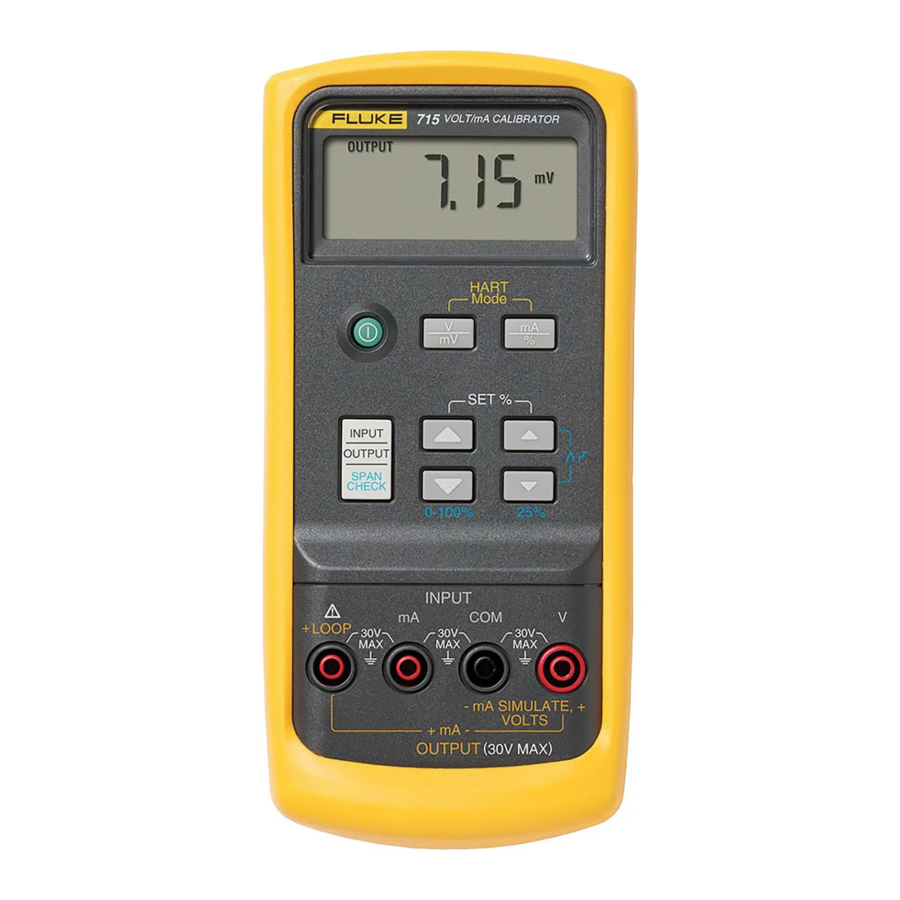
Introduction
The Fluke 715 Volt/mA Calibrator is a source and measurement tool for 0 to 24 mA current loop testing and dc voltage from 0 to 20/25 V. The calibrator does not source and measure simultaneously.
Your calibrator is supplied with a holster, a set of test leads, an installed 9 V alkaline battery, and this instruction sheet.
Summary of Calibrator Capabilities
| Function | Range | Resolution |
| dc mV input | 0 to 200 mV | 0.01 mV |
| dc mV output | ||
| dc V input | 0 to 25 V | 0.001 V |
| dc V output | 0 to 20 V | |
| dc mA input | 0 to 24 mA | 0.001 mA |
| dc mA output | ||
| Loop power output | 24 V dc output | N/A |
International Symbols
| Symbol | Meaning |
 | Earth ground |
 | Fuse |
 | Battery |
 | Refer to this instruction sheet for information about this feature. |
 | Double insulated |
 | Conforms to relevant Canadian Standards Association directives. |
 | Conforms to European Union directives |
Turning the Calibrator On
Press the green  pushbutton to turn the calibrator on and off.
For longest battery life:
- For mA output, use current simulate mode instead of source mode when an external 24 to 30 V loop power supply is available. (See Simulating a Transmitter.)
- Turn off the calibrator when not in use.
The Calibrator automatically turns off after 30 minutes of inactivity. To reduce this time or disable this feature:
- With the Calibrator OFF, press the
![]() key. P.S.xx is displayed, where xx is the turn-off time in minutes. OFF means the power saver is disabled.
key. P.S.xx is displayed, where xx is the turn-off time in minutes. OFF means the power saver is disabled. - Press
![]() and/or
and/or ![]() to increase or decrease the turn-off time in minutes.
to increase or decrease the turn-off time in minutes. - To disable, press
![]() until the display shows OFF.
until the display shows OFF.
 and/or
  to increase or decrease the turn-off time in minutes.
HARTTM Resistor Mode
The calibrator has a user selectable 250 ohm HARTTM resistor to facilitate use with HARTTM communication devices. The resistor can be switched in/out at any time by simultaneously pressing the  and
and  keys. Use a HARTTM communicator when measuring dc mA with loop power or sourcing mA.
Span Check Feature
The calibrator allows the users to store 0% and 100% setpoints for each output function. Once setpoints are stored, the span check feature allows the user to quickly toggle back and forth from 0% to 100% or to step in 25% increments.
Automatic step and ramp modes can be enabled while in the span check mode by simultaneously pressing the  keys. First select the desired output mode (V,mV or mA) then preceed to store the setpoints:
- Storing 0% and 100% Setpoints
- Using the
![]() controls set the output to the desired output value for 0%.
controls set the output to the desired output value for 0%. - Press the
![]() scroll keys simultaneously to store the 0% value.
scroll keys simultaneously to store the 0% value. - Now using the
![]() controls set the output to the desired output value for 100%
controls set the output to the desired output value for 100% - Again, press the
![]() scroll keys simultaneously to store the 100% value.
scroll keys simultaneously to store the 100% value.
Measuring dc Volts

Sourcing dc Volts

Measuring dc mA

Measuring dc mA with Loop Power

Using the Current Output Modes
The calibrator provides current output in mA or percent display. Percent is -25.00 to 125.00%, where 0% is 4 mA, and 100% is 20 mA.
In source mode, the calibrator supplies the current. In simulate mode, the calibrator simulates a two-wire transmitter in an externally-powered current loop.
Sourcing mA
Use source mode whenever you need to supply current into a passive circuit such as a current loop with no loop supply. Insert the test leads into the OUTPUT + and − mA jacks as shown below.
Note
A path must exist for current to flow between the OUTPUT + and −mA jacks, otherwise the display will indicate an overload (OL) when you set an output value.

Simulating a Transmitter
Use simulate mode when an external 24 to 30 V loop power supply is available.
Insert the test leads into the mA SIMULATE − and + jacks as shown below.

Maintenance
For maintenance procedures not described in this sheet, contact a Fluke Service Centre.
In Case of Difficulty
- Check the battery and test leads. Replace as necessary.
- Review this sheet to make sure you are using the correct jacks and pushbuttons.
If the calibrator needs repair, contact a Fluke Service Centre. If the calibrator is under warranty, see the warranty statement below for terms. If the warranty has lapsed, the calibrator will be repaired and returned for a fixed fee. Contact a Fluke Service Centre for information and price.
Cleaning
Periodically wipe the case with a damp cloth and detergent; do not use abrasives or solvents.
Calibration
Calibrate your calibrator once a year to ensure that it performs according to its specifications. A calibration manual is available (PN 686540). Call 1-800-526-4731 from the USA and Canada. In other countries, contact a Fluke Service Centre.
Replacing the Battery

To avoid false readings, which could lead to possible electric shock or personal injury, replace the battery as soon as the battery indicator ( ) appears.

Replacement Parts and Accessories
Replacement Parts

| Item | Description | PN or Model no. | Qty. |
| BT1 | 9V battery, ANSI/NEDA 1604A or IEC 6LR61 | 614487 | 1 |
| H80M | Holster, Yellow, hanging | H80M | 1 |
| MP85 | Case top | 620200 | 1 |
| MP86 | Case bottom | 2397526 | 1 |
| H2, 3, 4 | Case screw | 832246 | 3 |
| MP89, 90 | Non-skid foot | 824466 | 2 |
| MP8 | O-ring for input/output receptacle | 831933 | 1 |
| MP92 | Battery door | 619947 | 1 |
| H5, 6 | Battery door fasteners | 948609 | 2 |
| S1 | Keypad | 687100 | 1 |
| TL75 | Test lead set | TL75 | 1 |
| - | Instruction sheet | 650314 | 1 |
| AC72 | Alligator clips | AC72 | 1 |
| TL20 | Industrial test lead set | TL20 | Option |
| - | 71X Calibration Manual | 686540 | Option |
Specifications
Specifications are based on a one year calibration cycle and apply from +18°C to +28°C unless stated otherwise. "Counts" means number of increments or decrements of the least significant digit.
DC V Input and Output
| Range | Resolution | Accuracy, ±(% of Reading + Counts) |
| 200 mV | 0.01 mV | 0.015% + 2 |
| 20 V output | 0.001 V | 0.01% + 2 |
| 25 V input | ||
| Input impedance: 1 MΩ (nominal), < 100 pF Overvoltage protection: Fuseless Voltage drive capability: 1 mA | ||
DC mA Input
| Range | Resolution | Accuracy, ±(% of Reading + Counts) |
| 24 mA | 0.001 mA | 0.01% + 2 |
| Overload protection: Fuseless | ||
DC mA Output
Range: 0 mA to 24 mA
Percent display: 0% = 4 mA, 100% = 20 mA
Accuracy: ±(0.01% of reading + 2 counts)
Source mode:
Compliance: 1000 Ω at 20 mA for battery voltage ≥6.8 V (700 Ω at 20 mA for battery voltage 5.8 to 6.8 V)
Simulate mode:
External loop voltage requirement: 24 V nominal, 30 V maximum, 12 V minimum
Loop Power
24 V ±10%
General Specifications
Maximum voltage applied between any jack and earth ground or between any two jacks: 30 V
Storage temperature: -40°C to 60°C
Operating temperature: -10°C to 55°C
Operating altitude: 3000 meters maximum
Temperature coefficient: ±0.005% of range per °C for the temperature ranges -10 to 18°C and 28 to 55°C
Relative humidity: 95% up to 30°C, 75% up to 40°C, 45% up to 50°C, and 35% up to 55°C
Vibration: Random 2 g, 5 to 500 Hz
Shock: 1 meter drop test
Safety: Certified as compliant to CAN/CSA C22.2 No. 1010.1:1992. Complies with ANSI/ISA S82.01-1994.
Power requirements: Single 9 V battery (ANSI/NEDA 1604A or IEC 6LR61)
Size: 32 mm H x 87 mm W x 187 mm L (1.25 in H x 3.41 in W x 7.35 in L);
With holster: 52 mm H x 98 mm W x 201 mm L (2.06 in H x 3.86 in W x 7.93 in L)
Weight: 349 g (12.3 oz);
With holster: 601 g (21.2 oz)
Safety Information
Use the calibrator only as specified in this sheet, otherwise the protection provided by the calibrator may be impaired.
A Warning identifies conditions and actions that pose hazard(s) to the user; a Caution identifies conditions and actions that may damage the calibrator or the equipment under test.
To avoid possible electric shock or personal injury:
- Never apply more than 30 V between any two jacks (terminals), or between any jack and earth ground.
- Make sure the battery door is closed and latched before you operate the calibrator.
- Remove test leads from the calibrator before you open the battery door.
- Do not operate calibrator if it is damaged.
- Do not operate the calibrator around explosive gas, vapour, or dust.
- When servicing the calibrator, use only specified replacement parts.

Use the proper jacks, function, and range for your measurement or output application.
Shop for Fluke products online at:
www.MyFlukeStore.ca
1.877.766.5412
If the calibrator is damaged or something is missing, contact the place of purchase immediately. Contact your Fluke distributor for information about accessories. To order replacement parts or spares, see "Replacement Parts."
To contact Fluke, call one of the following telephone numbers:
USA and Canada: 1-888-99-FLUKE (1-888-993-5853)
Europe: +31 402-675-200
Japan: +81-3-3434-0181
Singapore: +65-*-276-6196
Anywhere in the world: +1-425-356-5500
Address correspondence to:
Fluke Corporation
P.O. Box 9090,
Everett, WA 98206-9090
U.S.A.
Fluke Europe B.V.
P.O. Box 1186,
5602 BD Eindhoven
The Netherlands
Visit us on the World Wide Web at: www.fluke.com
References


Download manual
Here you can download full pdf version of manual, it may contain additional safety instructions, warranty information, FCC rules, etc.


