How to Add a Fingerprint on Xiaomi 15T Pro
Welcome to our step-by-step guide on setting up fingerprint unlocking for your Xiaomi 15T Pro. Adding a fingerprint to your device not only enhances security but also makes it convenient to unlock your phone with just a touch. Let's get started!
Step 1: Open the Settings App
To begin, access the main Settings app. Look for the gear-shaped icon on the home screen or locate it in your app drawer.

Step 2: Navigate to the Security Settings
Once in the Settings app, scroll through the options and select 'Fingerprints, Face Data & Screen Lock'. This section is where you can manage your biometric and security settings.

Step 3: Access Fingerprint Setup
In the 'Fingerprints, Face Data & Screen Lock' menu, tap on 'Fingerprint'. This will open the setup interface for adding a new fingerprint.

Step 4: Set Up a Screen Lock Password
Before adding a fingerprint, you need to ensure that your device has a screen lock password. This can be a PIN, pattern, or another form of password. If you haven't set this up yet, you'll be prompted to do so now. Follow the instructions to set or confirm your screen lock password.
Step 5: Add Your Fingerprint
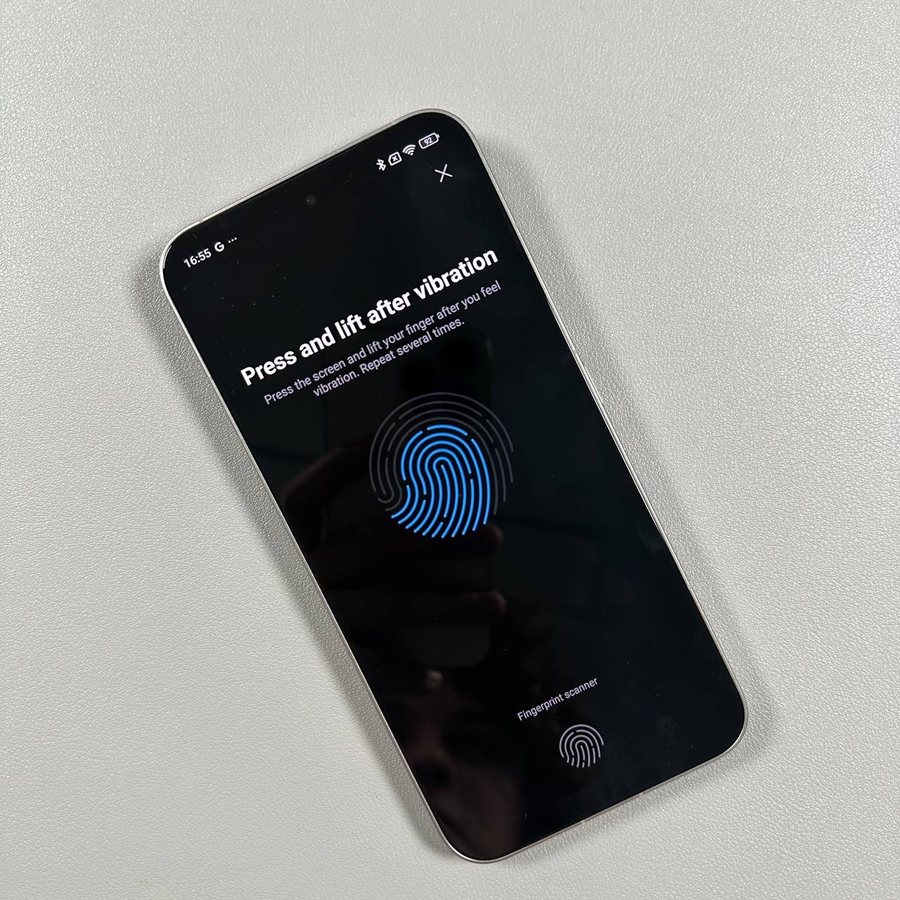
Now, you're ready to add your fingerprint. Place your finger firmly on the fingerprint sensor. You'll need to press and lift your finger several times to capture all the necessary data. Follow any on-screen prompts to adjust the position of your finger as needed. This process ensures a complete and accurate reading.


Step 6: Complete the Setup
Once you have completed the fingerprint setup, the device will display a confirmation message. Tap 'Done' (done) to finalise the process. Now, test the setup by locking and unlocking your phone with your fingerprint to ensure it works smoothly.