LG GB100, GB101, GB105, GB107 User Guide
- 1 Turning Your Phone On and Off
- 2 How to set the tone
- 3 Installing the SIM Card and Charging the Battery
- 4 Entering Text
- 5 Menu tree
- 6 Phone Components
- 7 FM Radio (GB105/GB107)
- 8 Quick feature reference
- 9 Display Information
- 10 Anti-theft Mobile Tracker (ATMT)
- 11 Guidelines for safe and efficient use
- 12 Download manual
- 13 In Other Languages
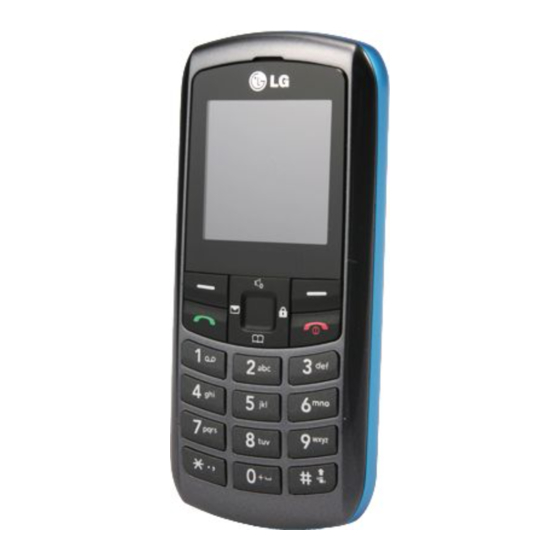
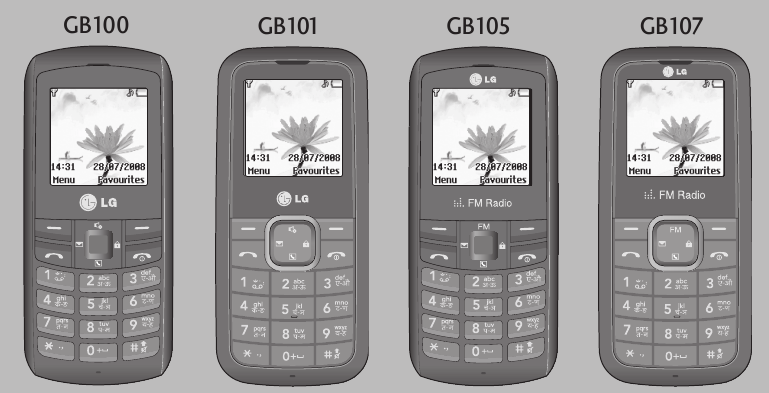
Turning Your Phone On and Off
- Hold down the
![]() END] key until the phone switches on.
END] key until the phone switches on. - To switch the phone off, hold down the
![]() [END] key until the power-off image displays.
[END] key until the power-off image displays.

Making a call
- Enter a phone number including the area code.
- Press the
![]() [SEND] key to call the number.
[SEND] key to call the number. - When finished, press the
![]() [END] key.
[END] key.
Answering a call
- When the phone rings and the phone icon flashes on the screen, press the
![]() [SEND] key or the left soft key to answer.
[SEND] key or the left soft key to answer. - If the Any Key menu option (Menu 5.5.2.1), has been set, any key press will answer a call except for the
![]() [END] key or the right soft key.
[END] key or the right soft key. - End the call by pressing the
![]() [END] key.
[END] key.
Note: After the call ends, the phone will go back to standby mode.
Making an international call
- Press and hold the
![]() key for the international prefix. The '+' character automatically selects the international access code.
key for the international prefix. The '+' character automatically selects the international access code. - Enter the country code, area code, and the phone number.
- Press
![]() [SEND] key to call the number.
[SEND] key to call the number.
 key for the international prefix. The '+' character automatically selects the international access code.
How to set the tone
Ringtone
- Press the left soft key [Menu] and select [Settings - Profiles] using the up/down navigation keys.
- Select [General - Personalise] and choose Ringtones menu.
- Press the left soft key [OK] and then you can set the desired ringtone.
Tip
- If you want to change your ringer to vibrate, select Vibrate mode or press and hold the # key.
Call alert type, Ring tones, Ring volume, Message alert type, Message tones, Message volume, Keypad tones, Keypad volume, Effect sound volume, Power on/off volume
You can select Call alert type, Ring tones, Ring volume, Message alert type, Message tones, Message volume, Keypad tones, Keypad volume, Effect sound volume, Power on/off volume.
You can change the sound that will occur when a key is pressed, or volume level.
[Menu - Settings - Profiles - General - Personalise]
Installing the SIM Card and Charging the Battery
Installing the SIM Card
When you subscribe to a cellular network, you are provided with a plug-in SIM card loaded with your subscription details, such as your PIN, any optional services available and many others.

- The plug-in SIM card and its contacts can be easily damaged by scratches or bending, so be careful when handling, inserting or removing the card. Keep all SIM cards out of the reach of small children.
- USIM is not supported in this phone.
- If the battery is removed for about 1 minute, the clock returns to its default setting. You will then need to reset the time.
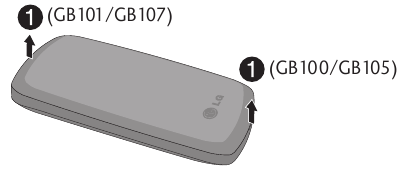
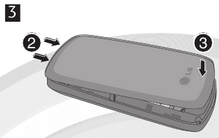
- Open battery cover
![]()
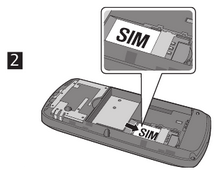
- Insert your SIM
![]()
- Close battery cover
![]()
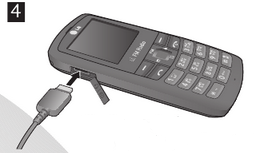
- Charge your battery
![]()
Fully charge the battery before using it for the first time.
Entering Text
You can enter alphanumeric characters by using the phone's keypad. To change modes, press the  key.
key.
T9 Mode
This mode allows you to enter words with only one keystroke per letter. Each key on the keypad has more than one letter. The T9 mode automatically compares your keystrokes with an internal linguistic dictionary to determine the correct word, thus requiring far fewer keystrokes than the traditional ABC mode.
ABC Mode
This mode allows you to enter letters by pressing the key labeled with the required letter once, twice, three or four times until the letter is displayed.
123 Mode (Numbers Mode)
Type numbers using one keystroke per number.
Symbol Mode
This mode allows you to enter special characters by short pressing  key.
key.
Menu tree
- Contacts
- Search
- New contact
- Speed dials
- Copy all
- Delete all
- Memory status
- Information
- Messaging
- New message
- Inbox
- Drafts
- Outbox
- Sent
- Listen voice mail
- Info messages
- Templates
- Settings
- Call history
- All calls
- Missed calls
- Dialled calls
- Received calls
- Call duration
- Tools
- Games
- FM radio* (GB105/GB107)
- Calculator
- Stopwatch
- Unit Converter
- World clock
- Settings
- Profiles
- Date & Time
- Language
- Display
- Call
- Auto keylock
- Security
- Power save
- Network selection
0 Reset settings
5* Memory status
- Organizer
(SIM Services)**- Alarm
- Calendar
- Memo
** In case SIM Services are also provided by the service provider then Menu 6 will be SIM Services and Organiser will be under Menu 4. Tools.
Phone Components
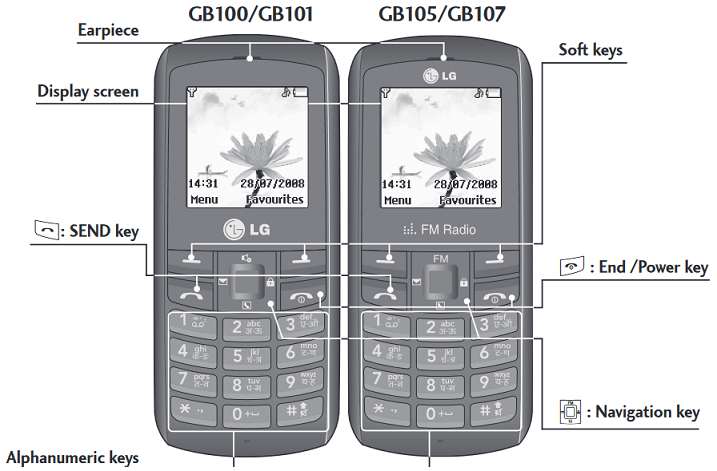
 : SEND key
You can dial a phone number and answer incoming calls.
Soft keys
Each of these keys performs the functions indicated by the text on the display immediately above them
 : End /Power key
Allows you to power the phone on or off, end calls, or return to Standby Mode.
 : Navigation key
Use for quick access to phone functions.
Alphanumeric keys
These keys are used to dial a number in standby mode and to enter numbers or characters in edit mode.
FM Radio (GB105/GB107)
This function may be different in different regions.)
- Press the corresponding number key of a channel to store the selected radio station.
- After presetting radio channels, you can listen to another channel by pressing the coresponding number key.
- You can access the following option menus by pressing the left soft key
![]() [Options].
[Options].
 [Options].
- Edit channel: You can adjust frequency and channel 0.1 MHz at a time using the Left/Right navigation keys and number keys.
- Auto Scan: If you turn "Auto Scan Now?" on, this automatically sets the radio channel.
When "Save this Station?" message pops up and you select Yes, the selected frequency will be stored. - Reset channels: You can delete all channels you saved.
- Listen via speaker: Select this to listen to the radio through the built-in speaker. To turn off the speaker, select "Listen via wired headset" in the [Options].
Quick feature reference
This section provides brief explanations of features on your phone.
Contacts Menu 1
| Search | You can Search for contacts in Phonebook. Note: Instant searching is available by inputting the initial letter of the name you want to search. |
| New contact | You can add phonebook entries by using this menu. |
| Speed dials | Assign contacts to any of keys between  and and . . |
| Copy all | You can copy all entries from SIM card memory to Phone memory and also from Phone memory to SIM card memory. |
| Delete all | You can delete all entries from SIM card memory or Phone memory. |
| Memory status | You can check free space and memory usage. |
| Information |
|
Display Information
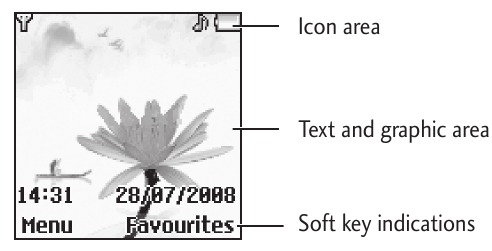
On-Screen Icons
The table below describes various display indicators or icons that appear on the phone's display screen.
 Tells you the strength of the network signal.
 Call is connected.
 Shows that you are using a roaming service.
 The alarm has been set and is on.
 Tells you the status of the battery.
 You have received a text message.
 You have received a voice message.
 Vibrate only menu in profile.
 General menu in profile.
 Outdoor menu in profile.
 Silent menu in profile.
 Headset menu in profile.
 You can view your schedule.
Anti-theft Mobile Tracker (ATMT)
- The ATMT feature of this phone provides you with the ability to have a tracking system in place for your Mobile in case you lose or misplace it.
- The moment an un-authorized user uses your phone, a SMS is triggered from your phone and the Message is sent to your pre-defined number.
- Setting the ATMT ON [Menu - Settings - Security]
- Select Anti-theft Mobile Tracker
- Set ATMT and Select ON
- Press OK and enter default ATMT code
Note
- In case you want to use your phone with some other SIM card, make sure to set the ATMT OFF.
- It is recommended to enter the Number for ATMT with the country code (e.g. for INDIA +91 followed by mobile number)
- Default ATMT code is "0000".
Messaging
Menu 2
This menu includes functions related to SMS (Short Message Services).
| New message | This menu allows you to type a new message. |
| Inbox | You will be alerted when you have received a message. |
| Drafts | This menu shows the saved message. |
| Outbox | This menu allows to view the message which is about to be sent or has failed to be sent. |
| Sent | This menu allows you to view the messages which have already been sent, including time and content. |
| Listen voice mail | This menu provides you with a quick way of accessing your voice mailbox (if provided by your network). |
| Info message | Info service messages are text messages delivered by the network to your handset. |
| Templates | There are pre-defined messages in the list. You can view and edit the template messages or create new messages. |
| Settings | This menu allows you to set features of your network service provider. |
Call history
Menu 3
You can check the record of missed, received, and dialled calls only if the network supports the Calling Line Identification (CLI) within the service area. The number and name (if available) are displayed together with the date and time at which the call was made. You can also view call durations.
| All calls | Displays all the lists of three types (Received/Dialled/Missed calls) by time. |
| Missed calls | This option lets you view the last 20 unanswered calls. |
| Dialled calls | This option lets you view the last 20 outgoing calls (called or attempted). |
| Received calls | This option lets you view the last 20 incoming calls. |
| Call duration | Allows you to view the duration of your incoming and outgoing calls. |
Tools
Menu 4
| Games | Has List of default games available in the phone. |
| FM Radio (GB105/GB107) | You can search radio stations and enjoy listening to the radio. |
| Calculator | This contains the standard functions such as +, -, x, ÷: Addition, Subtraction, Multiplication and Division. |
| Stopwatch | Stopwatch is available just as common stopwatches we see and use in daily life. |
| Unit Converter | This converts any measurement into a unit you want. |
| World clock | Allows you to determine the current time in another time zone or country. |
Settings
Menu 5
You can set the following menus for your convenience and preferences.
| Profiles | You can adjust and customize the phone tones. |
| Date & Time | You can set functions relating to the date and time. |
| Language | You can change the language for the display texts in your phone. This change will also affect the Language Input mode. |
| Display | You can change settings for the phone display. |
| Call | You can set the menu relevant to a call. |
| Auto keylock | When this feature is enabled, the phone keypad is locked. |
| Security | This menu allows you to set the phone safely. |
| PIN code request: You can set the phone to ask for the PIN code of your SIM card when the phone is switched on. | |
| Phone lock: You can use a security code to avoid unauthorized use of the phone. | |
| Call barring: The Call barring service prevents your phone from making or receiving a certain category of calls. This function requires the call barring password. | |
| Fixed dial number (SIM dependent): You can restrict your outgoing calls to selected phone numbers. The numbers are protected by your PIN2 code. The numbers you wish to allow access to once this service has been enabled, must be added to the contacts after enabling Fixed dial number. | |
| Anti-theft Mobile Tracker:The ATMT feature of this phone provides you with the ability to have a tracking system in place for your mobile in case you lose or misplace it. | |
| Change codes: PIN is an abbreviation of Personal Identification Number to prevent use by unauthorized persons. You can change the access codes: Security code, PIN code, PIN2 code, ATMT code. | |
| Power save | If you set this to On, you can save the power when you are not using the phone. |
| Network selection | You can select a network that will be registered either automatically or manually. Usually, the network selection is set to Automatic. |
| Reset settings | You can initialize all setting values as defaults. You need a Security code to activate this function. |
| Memory status | You can check free space and memory usage of each repository. |
Organizer
Menu 6
| Alarm | Allows you to set one of three alarms. The current time is displayed at the top of the screen when you select an alarm to set. At the alarm time, the Alarm icon will be displayed on the LCD screen and the alarm will sound. |
| Calendar | You can check track of daily or monthly schedules. |
| Memo | You can create a list of tasks. |
Guidelines for safe and efficient use
Please read these simple guidelines. Ignoring them may be dangerous or illegal. Further detailed information is given in this manual.

- For your safety, use ONLY specified ORIGINAL batteries and chargers.
- Switch off the phone in any area where required by special regulations, e.g. in a hospital where it may affect medical equipment.
- Batteries should be disposed off in accordance with relevant legislation.
Product care and maintenance
Only use batteries, chargers and accessories approved for use with this particular phone model. The use of any other types may invalidate any approval or warranty applying to the phone, and may be dangerous.
- Do not disassemble this unit. Take it to a qualified service technician when repair work is required.
- The unit should be kept away from heat sources such as radiators or cookers.
- Use a dry cloth to clean the exterior of the unit. (Do not use any solvents.)
- Do not keep the phone next to credit cards or transport tickets; it can affect the information on the magnetic strips.

Download manual
Here you can download full pdf version of manual, it may contain additional safety instructions, warranty information, FCC rules, etc.
Download LG GB100, GB101, GB105, GB107 User Guide


