Klein Tools 93LDM65 - Laser Distance Measurer Manual (Návod na použitie laserového merača vzdialenosti)
- 1 FEATURE DETAILS (DETAILY FUNKCIÍ)
- 2 GENERAL SPECIFICATIONS (VŠEOBECNÉ ŠPECIFIKÁCIE)
- 3 FEATURE DETAILS (DETAILY FUNKCIÍ)
-
4
OPERATING INSTRUCTIONS (NÁVOD NA POUŽITIE)
- 4.1 INSTALLING BATTERIES (INŠTALÁCIA BATÉRIÍ)
- 4.2 POWER ON (ZAPNUTIE)
- 4.3 POWER OFF (VYPNUTIE)
- 4.4 SOUND CONTROL (OVLÁDANIE ZVUKU)
- 4.5 BACKLIGHT (PODSVIETENIE)
- 4.6 UNIT OF MEASURE (JEDNOTKA MERANIA)
- 4.7 ADDITION/SUBTRACTION (SČÍTANIE/ODČÍTANIE)
- 4.8 CANCEL/CLEAR (ZRUŠIŤ/VYMAZAŤ)
- 4.9 MEMORY STORAGE (ULOŽENIE DO PAMÄTE)
- 4.10 REFERENCE POINT (REFERENČNÝ BOD)
- 4.11 VOLUME MEASUREMENT (MERANIE OBJEMU)
- 4.12 INDIRECT MEASUREMENT (PYTHAGORAS) (NEPRIAME MERANIE (PYTAGORAS))
- 4.13 SINGLE DISTANCE MEASUREMENT (MERANIE JEDNEJ VZDIALENOSTI)
- 4.14 CONTINUOUS MEASUREMENT (MIN/MAX) (NEPRETRŽITÉ MERANIE (MIN/MAX))
- 4.15 AREA MEASUREMENT (MERANIE PLOCHY)
- 5 TROUBLESHOOTING (RIEŠENIE PROBLÉMOV)
- 6 CLEANING (ČISTENIE)
- 7 STORAGE (SKLADOVANIE)
- 8 WARRANTY (ZÁRUKA)
- 9 DISPOSAL / RECYCLE (LIKVIDÁCIA / RECYKLÁCIA)
- 10 Stiahnuť návod
- 11 V iných jazykoch
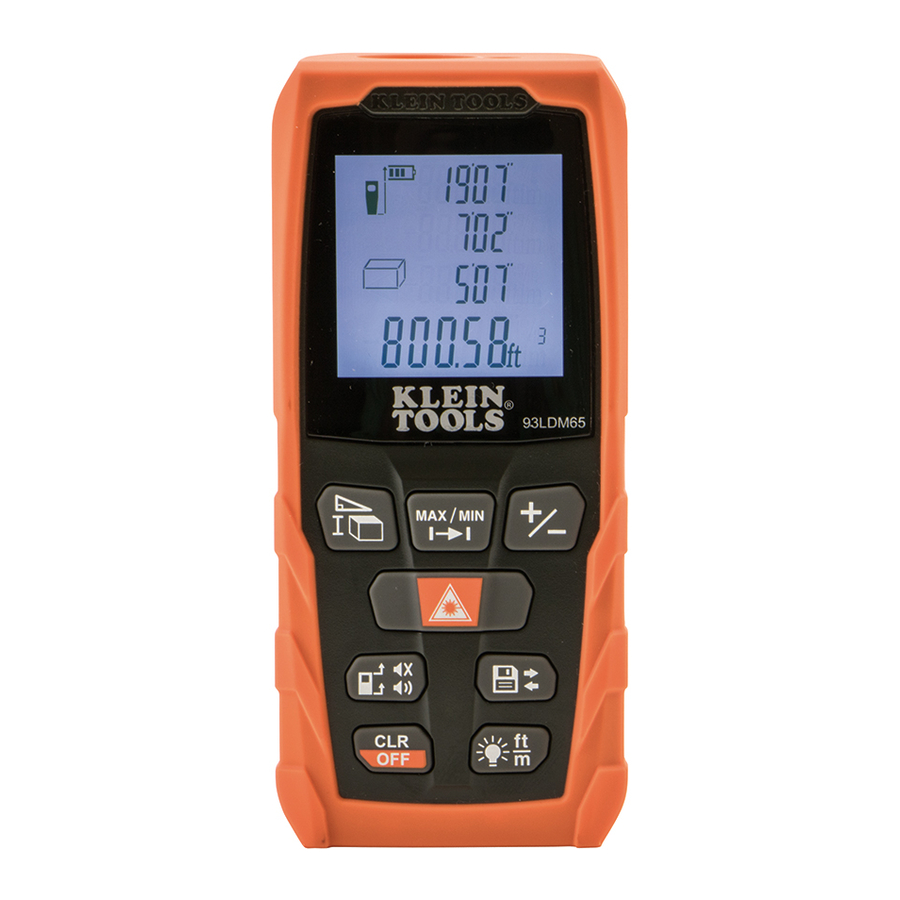
FEATURE DETAILS (DETAILY FUNKCIÍ)
- SINGLE OR CONTINUOUS DISTANCE MEASUREMENT (JEDNO alebo NEPRETRŽITÉ MERANIE VZDIALENOSTI)
- ADD OR SUBTRACT MEASUREMENTS (PRIDAŤ alebo ODPOČÍTAŤ MERANIA)
- AREA (PLOCHA)
- PERIMETER (OBVOD)
- VOLUME (OBJEM)
- DIRECT AND INDIRECT MEASUREMENT (PRIAME A NEPRIAME MERANIE)
- LCD DISPLAY (LCD DISPLEJ)
- BACKLIGHT (PODSVIETENIE)
- AUDIBLE BEEP (ZVUKOVÝ SIGNÁL)

NOTE: (POZNÁMKA:) There are no user-serviceable parts inside. (Vnútri sa nenachádzajú žiadne diely, ktoré by mohol opravovať používateľ.)
DEVICE (ZARIADENIE)
- Power on/Measurement button (tlačidlo zapnutia/merania)
- Measurement options button (tlačidlo možností merania)
- Continuous measurement button (tlačidlo nepretržitého merania)
- Add/subtract measurements button (tlačidlo pridávania/odpočítavania meraní)
- Reference point, Sound on/off button (referenčný bod, tlačidlo zapnutia/vypnutia zvuku)
- Clear/Power Off button (tlačidlo vymazania/vypnutia)
- Memory storage button (tlačidlo uloženia do pamäte)
- Backlight/Unit of measure button (tlačidlo podsvietenia/jednotky merania)
- Backlit LCD screen (see below) (podsvietená LCD obrazovka (pozri nižšie))
- Battery cover (kryt batérie)
- Battery cover screw (skrutka krytu batérie)
- Depth gauge stick (flips out) (hĺbková meracia tyč (vyklápacia))
GENERAL SPECIFICATIONS (VŠEOBECNÉ ŠPECIFIKÁCIE)
Klein Tools 93LDM65 Laser Distance Measurer (Laserový merač vzdialenosti) ľahko vypočíta vzdialenosť, plochu, obvod a objem až do 65' (20 m) pomocou priamych a nepriamych meraní s presnosťou +/- 1/16" (1,6 mm). Poskytuje imperiálne aj metrické hodnoty a vykonáva jednotlivé, nepretržité (Max/Min) a kumulatívne merania.
- Units: (Jednotky:) Feet / Inches / Meters (Stopy / Palce / Metre)
- Laser class: (Trieda lasera:) Class 2 • Laser Type: (Typ lasera:) 635nm. < 1mW
- Range: (Rozsah:) 8" to 65 ft. (0.2 to 20 m) (8" až 65 stôp (0,2 až 20 m))
- Accuracy: (Presnosť:) +/- 1/16" (1.6 mm) (+/- 1/16" (1,6 mm))
- Memory / Storage: (Pamäť / Úložisko:) 20 readings or sets (20 hodnôt alebo sád)
- Auto-Off - Laser: 30 seconds (Automatické vypnutie - Laser: 30 sekúnd)
- Auto-Off - Device: 3 minutes (Automatické vypnutie - Zariadenie: 3 minúty)
- Operating Temp: (Prevádzková teplota:) 32° to 104°F (0° to 40°C)
- Storage Temp: (Skladovacia teplota:) 14° to 140°F (-10° to 60°C)
- Dimensions: (Rozmery:) 4.5" x 2.0" x 1.4" (115 x 52 x 32 mm)
- Weight: (Hmotnosť:) 4.5 oz. (118 g)
- Battery Type: (Typ batérie:) 2 x AAA
- Ingress Protection: (Stupeň krytia:) IP54
- Drop Protection: (Ochrana proti pádu:) 3.3 ft. (1m) (3,3 stopy (1 m))
NOTE: (POZNÁMKA:) Measurement range and accuracy are based on typical conditions and may deteriorate under unfavorable conditions such as bright sunlight or poor reflectivity. (Rozsah merania a presnosť sú založené na typických podmienkach a môžu sa zhoršiť za nepriaznivých podmienok, ako je jasné slnečné svetlo alebo slabá odrazivosť.)
Specifications subject to change (Špecifikácie sa môžu zmeniť).

FEATURE DETAILS (DETAILY FUNKCIÍ)

LCD DISPLAY (LCD DISPLEJ)
- Laser on (Laser zapnutý)
- Reference point (Top) (Referenčný bod (Hore))
- Reference point (Bottom) (Referenčný bod (Dole))
- Reference point (Depth gauge stick) (Referenčný bod (Hĺbková meracia tyč))
- Indicates unit is actively measuring (Označuje, že jednotka aktívne meria)
- Error message (Chybové hlásenie)
![]() Area function icon (ikona funkcie plochy)
Area function icon (ikona funkcie plochy)![]() Volume function icon (ikona funkcie objemu)
Volume function icon (ikona funkcie objemu)![]() Pythagoras 2-Point function icon (ikona funkcie Pytagorovej vety 2-bodovej)
Pythagoras 2-Point function icon (ikona funkcie Pytagorovej vety 2-bodovej)![]() Pythagoras 3-Point function icon (ikona funkcie Pytagorovej vety 3-bodovej)
Pythagoras 3-Point function icon (ikona funkcie Pytagorovej vety 3-bodovej)- Battery status (Stav batérie)
- Memory readings (Hodnoty v pamäti)
- Value 1 / Min value (Hodnota 1 / Min. hodnota)
- Value 2 / Max value (Hodnota 2 / Max. hodnota)
- Value 3 (Hodnota 3)
- Summary Line / Latest Value / Calculation Result (Súhrnný riadok / Posledná hodnota / Výsledok výpočtu)


OPERATING INSTRUCTIONS (NÁVOD NA POUŽITIE)
INSTALLING BATTERIES (INŠTALÁCIA BATÉRIÍ)
Loosen screw (Uvoľnite skrutku)  on battery cover (na kryte batérie)
  (do not remove screw from cover) ((neodstraňujte skrutku z krytu)), extend the depth gauge stick (vysuňte hĺbkovú meraciu tyč)
  , remove cover. (odstráňte kryt). Insert included batteries, replace cover, stow the depth gauge stick and tighten screw. (Vložte priložené batérie, nasaďte kryt, zasuňte hĺbkovú meraciu tyč a utiahnite skrutku.)
POWER ON (ZAPNUTIE)
A long press of the Power on/Measurement button (Dlhé stlačenie tlačidla zapnutia/merania)  will power on the device and go to single distance measurement mode. (zapne zariadenie a prejde do režimu merania jednej vzdialenosti.)
POWER OFF (VYPNUTIE)
Manual Power Off: (Manuálne vypnutie:) A long press of the Power Off button (Dlhé stlačenie tlačidla vypnutia)  will power off the device. (vypne zariadenie.)
Automatic Power Off: (Automatické vypnutie:) The device will automatically power off after 3 minutes of inactivity. (Zariadenie sa automaticky vypne po 3 minútach nečinnosti.)
SOUND CONTROL (OVLÁDANIE ZVUKU)
A long press of the Sound On/Off button (Dlhé stlačenie tlačidla zapnutia/vypnutia zvuku)  will mute or unmute the speaker. (stlmí alebo zapne reproduktor.)
BACKLIGHT (PODSVIETENIE)
Quick-press the Backlight button (Rýchlo stlačte tlačidlo podsvietenia)  to turn backlight on and off. (na zapnutie a vypnutie podsvietenia). Backlight will automatically turn off after 20 seconds of inactivity. (Podsvietenie sa automaticky vypne po 20 sekundách nečinnosti.)
UNIT OF MEASURE (JEDNOTKA MERANIA)
Long-press the Backlight/Units button (Dlho stlačte tlačidlo podsvietenia/jednotiek) to toggle between "ft+in" (feet and inches) (na prepínanie medzi "ft+in" (stopy a palce)), "in" (inches) ( "in" (palce)), "ft" (feet) ( "ft" (stopy)) and "m" (meters) (a "m" (metre)). Unit will power on with last unit of measure selected. (Jednotka sa zapne s poslednou zvolenou jednotkou merania.)
ADDITION/SUBTRACTION (SČÍTANIE/ODČÍTANIE)
Take a measurement, press the Add/Subtract measurement button (Vykonajte meranie, stlačte tlačidlo pridania/odčítania merania)  (quick-press for addition "+" or long-press for subtraction "-") ((rýchlo stlačte pre sčítanie "+" alebo dlho stlačte pre odčítanie "-")), then press the Power on/Measurement button (potom stlačte tlačidlo zapnutia/merania) to take the second measurement. (na vykonanie druhého merania). The second value will automatically be added to/ subtracted from the first value in the displayed result. (Druhá hodnota sa automaticky pripočíta/odčíta od prvej hodnoty vo výsledku.)
CANCEL/CLEAR (ZRUŠIŤ/VYMAZAŤ)
Quick-press Power Off button (Rýchlo stlačte tlačidlo vypnutia) at any time to cancel the last action or clear measured data. (kedykoľvek zrušíte poslednú akciu alebo vymažete namerané údaje.)
MEMORY STORAGE (ULOŽENIE DO PAMÄTE)
Press the Memory Storage button (Stlačte tlačidlo uloženia do pamäte)  to view saved data. (na zobrazenie uložených údajov). The last 20 measurements will be displayed, most recent first. (Zobrazí sa posledných 20 meraní, najnovšie ako prvé.)
REFERENCE POINT (REFERENČNÝ BOD)

Quick-press the Reference Point button (Rýchlo stlačte tlačidlo referenčného bodu)  to toggle the measurement reference point between the top, bottom, and depth gauge stick of the tester. (na prepínanie referenčného bodu merania medzi hornou, dolnou a hĺbkovou meracou tyčou testera). A beep will sound when the reference point is changed. (Pri zmene referenčného bodu zaznie zvukový signál.)
NOTE (POZNÁMKA): When the unit is powered on, the default reference point automatically resets to the bottom. (Keď je jednotka zapnutá, predvolený referenčný bod sa automaticky resetuje na spodný.)
VOLUME MEASUREMENT (MERANIE OBJEMU)
- Press the Measurement Options button (Stlačte tlačidlo možností merania)
![]() twice; the volume icon (dvakrát; na displeji sa zobrazí ikona objemu)
twice; the volume icon (dvakrát; na displeji sa zobrazí ikona objemu) ![]() will appear on the display.
will appear on the display. - Press the Power on/Measurement button (Stlačte tlačidlo zapnutia/merania)
![]() to take the first measurement (e.g. Length). (na vykonanie prvého merania (napr. dĺžka)).
to take the first measurement (e.g. Length). (na vykonanie prvého merania (napr. dĺžka)). - Press the Power on/Measurement button (Stlačte tlačidlo zapnutia/merania)
![]() again to take the second measurement (e.g. Width). (znova na vykonanie druhého merania (napr. šírka)).
again to take the second measurement (e.g. Width). (znova na vykonanie druhého merania (napr. šírka)). - Press the Power on/Measurement button (Stlačte tlačidlo zapnutia/merania)
![]() again to take the third measurement (e.g. Height). (znova na vykonanie tretieho merania (napr. výška)).
again to take the third measurement (e.g. Height). (znova na vykonanie tretieho merania (napr. výška)). - The results of length, width and height will be displayed as volume. (Výsledky dĺžky, šírky a výšky sa zobrazia ako objem.)
 twice; the volume icon (dvakrát; na displeji sa zobrazí ikona objemu)
  will appear on the display.
INDIRECT MEASUREMENT (PYTHAGORAS) (NEPRIAME MERANIE (PYTAGORAS))
This device calculates indirect distance using the Pythagorean Theorem. (Toto zariadenie vypočíta nepriamu vzdialenosť pomocou Pytagorovej vety). NOTE (POZNÁMKA): Target points should be in the same plane, and the second measurement should be taken perpendicular to the surface of the dimension being measured. (Cieľové body by mali byť v rovnakej rovine a druhé meranie by sa malo vykonať kolmo na povrch meraného rozmeru.)
Pythagoras - 2 points (Fig. 2): (Pytagoras - 2 body (obr. 2):)

- Press the Measurement Options button (Stlačte tlačidlo možností merania)
![]() three times; the Pythagoras 2-Point icon (trikrát; na displeji sa zobrazí ikona Pytagorovej vety 2-bodovej)
three times; the Pythagoras 2-Point icon (trikrát; na displeji sa zobrazí ikona Pytagorovej vety 2-bodovej) ![]() will appear on the display.
will appear on the display. - Press the Power on/Measurement button (Stlačte tlačidlo zapnutia/merania)
![]() to take the first measurement (e.g. Length). (na vykonanie prvého merania (napr. dĺžka)).
to take the first measurement (e.g. Length). (na vykonanie prvého merania (napr. dĺžka)). - Press the Power on/Measurement button (Stlačte tlačidlo zapnutia/merania)
![]() again to take the second measurement (e.g. Width). (znova na vykonanie druhého merania (napr. šírka)). The result will show in the display. (Výsledok sa zobrazí na displeji.)
again to take the second measurement (e.g. Width). (znova na vykonanie druhého merania (napr. šírka)). The result will show in the display. (Výsledok sa zobrazí na displeji.)
 will appear on the display.
Pythagoras - 3 points (Fig. 3): (Pytagoras - 3 body (obr. 3):)

- Press the Measurement Options button (Stlačte tlačidlo možností merania)
![]() four times; the Pythagoras 3-Point icon (štyrikrát; na displeji sa zobrazí ikona Pytagorovej vety 3-bodovej)
four times; the Pythagoras 3-Point icon (štyrikrát; na displeji sa zobrazí ikona Pytagorovej vety 3-bodovej) ![]() will appear on the display.
will appear on the display. - Press the Power on/Measurement button (Stlačte tlačidlo zapnutia/merania)
![]() to take the first measurement (e.g. first corner). (na vykonanie prvého merania (napr. prvý roh)).
to take the first measurement (e.g. first corner). (na vykonanie prvého merania (napr. prvý roh)). - Press the Power on/Measurement button (Stlačte tlačidlo zapnutia/merania)
![]() again to take the second measurement (center). (znova na vykonanie druhého merania (stred)).
again to take the second measurement (center). (znova na vykonanie druhého merania (stred)). - Press the Power on/Measurement button (Stlačte tlačidlo zapnutia/merania)
![]() again to take the third measurement (e.g. second corner). (znova na vykonanie tretieho merania (napr. druhý roh)). The result will show in the display. (Výsledok sa zobrazí na displeji.)
again to take the third measurement (e.g. second corner). (znova na vykonanie tretieho merania (napr. druhý roh)). The result will show in the display. (Výsledok sa zobrazí na displeji.)
 will appear on the display.
SINGLE DISTANCE MEASUREMENT (MERANIE JEDNEJ VZDIALENOSTI)
Press the Power on/Measurement button (Stlačte tlačidlo zapnutia/merania) to activate the laser. (na aktiváciu lasera). Press again to take a measurement. (Opätovným stlačením vykonáte meranie). The result is displayed immediately. (Výsledok sa zobrazí okamžite.)
CONTINUOUS MEASUREMENT (MIN/MAX) (NEPRETRŽITÉ MERANIE (MIN/MAX))
Press the Continuous Measurement button (Stlačte tlačidlo nepretržitého merania)  to activate Continuous Measurement mode. (na aktiváciu režimu nepretržitého merania). The display will show the maximum (Na displeji sa zobrazí maximálna)
  and minimum (a minimálna)
  distance values. (hodnota vzdialenosti). The last measured value will display in the Summary Line (Posledná nameraná hodnota sa zobrazí v súhrnnom riadku)
  . Pressing the Power on/Measurement (Stlačením tlačidla zapnutia/merania) or Power Off button (alebo tlačidla vypnutia) will exit this mode. (ukončíte tento režim.)
AREA MEASUREMENT (MERANIE PLOCHY)
- Press the Measurement Options button (Stlačte tlačidlo možností merania)
![]() once; the area icon (raz; na displeji sa zobrazí ikona plochy)
once; the area icon (raz; na displeji sa zobrazí ikona plochy) ![]() will appear on the display.
will appear on the display. - Press the Power on/Measurement button (Stlačte tlačidlo zapnutia/merania)
![]() to take the first measurement (e.g. Length). (na vykonanie prvého merania (napr. dĺžka)).
to take the first measurement (e.g. Length). (na vykonanie prvého merania (napr. dĺžka)). - Press the Power on/Measurement button (Stlačte tlačidlo zapnutia/merania)
![]() again to take the second measurement (e.g. Width). (znova na vykonanie druhého merania (napr. šírka)). The results of length, width and area will show in the display. (Výsledky dĺžky, šírky a plochy sa zobrazia na displeji.)
again to take the second measurement (e.g. Width). (znova na vykonanie druhého merania (napr. šírka)). The results of length, width and area will show in the display. (Výsledky dĺžky, šírky a plochy sa zobrazia na displeji.)
 will appear on the display.
TROUBLESHOOTING (RIEŠENIE PROBLÉMOV)
All errors are displayed as codes, as explained below: (Všetky chyby sa zobrazujú ako kódy, ako je vysvetlené nižšie:)
| Code (Kód) | Cause (Príčina) | Corrective Measure (Nápravné opatrenie) |
| 204 | Calculation error (Chyba výpočtu) | Repeat steps in manual (Zopakujte kroky v návode) |
| 208 | Component failure (Zlyhanie komponentu) | Contact Klein Tools (Kontaktujte Klein Tools) |
| 220 | Low battery (Slabá batéria) | Replace batteries (2 x AAA) (Vymeňte batérie (2 x AAA)) |
| 252 | Temperature too high (Príliš vysoká teplota) | Use only in temperatures 32° to 104°F (0° to 40°C) (Používajte len pri teplotách 32° až 104°F (0° až 40°C)) |
| 253 | Temperature too low (Príliš nízka teplota) | Warm up device (Zahrejte zariadenie) |
| 255 | Signal too weak / takes too long to register (Signál je príliš slabý / registrácia trvá príliš dlho) | Use target plate or change measurement angle (Použite cieľovú platňu alebo zmeňte uhol merania) |
| 256 | Signal too strong (Signál je príliš silný) | Use target plate or change measurement angle (Použite cieľovú platňu alebo zmeňte uhol merania) |
| 261 | Measurement out of range (Meranie mimo rozsahu) | Measure within 65' (20 m) (Merajte v rozsahu 65' (20 m)) |
| 500 | Hardware error (Chyba hardvéru) | Power unit on/off several times. If error persists, contact Klein Tools. (Niekoľkokrát zapnite/vypnite jednotku. Ak chyba pretrváva, kontaktujte Klein Tools.) |
CLEANING (ČISTENIE)
Be sure power is turned off and wipe with a clean, dry lint-free cloth. (Uistite sa, že je vypnuté napájanie a utrite čistou, suchou handričkou, ktorá nepúšťa vlákna). Do not use abrasive cleaners or solvents. (Nepoužívajte abrazívne čistiace prostriedky ani rozpúšťadlá.)
STORAGE (SKLADOVANIE)
Remove the batteries when meter is not in use for a prolonged period of time. (Vyberte batérie, ak merač nebudete dlhší čas používať). Do not expose to high temperatures or humidity. (Nevystavujte vysokým teplotám alebo vlhkosti). After a period of storage in extreme conditions exceeding the limits mentioned in the General Specifications section, allow the meter to return to normal operating conditions before using. (Po období skladovania v extrémnych podmienkach, ktoré presahujú limity uvedené v časti Všeobecné špecifikácie, nechajte merač pred použitím vrátiť do normálnych prevádzkových podmienok.)
WARRANTY (ZÁRUKA)
DISPOSAL / RECYCLE (LIKVIDÁCIA / RECYKLÁCIA)

Do not place equipment and its accessories in the trash. (Nevyhadzujte zariadenie a jeho príslušenstvo do koša). Items must be properly disposed of in accordance with local regulations. (Položky sa musia riadne zlikvidovať v súlade s miestnymi predpismi). Please see (Pozrite si) www.epa.gov or
Stiahnuť návod
Tu si môžete stiahnuť úplnú verziu návodu vo formáte pdf, môže obsahovať ďalšie bezpečnostné pokyny, informácie o záruke, pravidlá FCC atď.


