Bang & Olufsen BeoLab 11 - Subwoofer Manual
Daily use

To reduce the risk of fire or electric shock, do not expose this appliance to rain or moisture. Do not expose this equip ment to dripping or splashing and ensure that no objects filled with liquids, such as vases, are placed on the equipment.
To completely disconnect this equipment from the AC Mains, disconnect the mains plug from the wall socket. The disconnect device shall remain readily operable.
 The lightning flash with arrowhead symbol within an equilateral triangle, is intended to alert the user to the presence of un insulated "dangerous voltage" ("dangerous voltage") within the product's enclosure that may be of sufficient magnitude to constitute a risk of electric shock to persons.
 The exclamation point within an equilateral triangle is intended to alert the user to the presence of important operating and main tenance (servicing) instructions in the literature accompanying the product.
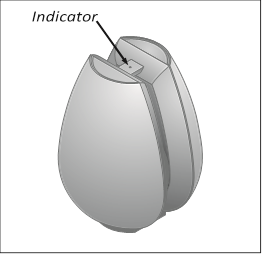
When you have finished setting up the subwoofer as described on the following pages, connect the entire system to the mains supply. The indicator lights up in red, indicating that the subwoofer is in standby, ready to be used. The subwoofer is designed to be left in this standby mode when not in use.
NOTE! The subwoofer is designed to protect itself if the active speaker unit becomes overheated. The subwoofer protection circuit may become active after a period of playing at a high volume level.
NOTE! Prolonged listening at high volume levels may cause hearing damages.
Switching on and off – indicator
When you switch on your Bang & Olufsen system, the subwoofer switches on simultaneously. The red standby indicator light turns green, indicating that the subwoofer is switched on.
When you switch off your system, or mute the sound, the red indicator light appears immediately, indicating that the subwoofer is not in use.
Subwoofer protection
If the active speaker unit becomes over heated, the subwoofer will instantly reduce the sound level. Once the situation has stabilised, the sound level is slowly returned to normal. If the subwoofer is played constantly at a very high volume level, it will eventually mute the sound completely.
Should the subwoofer mute the sound, the indicator light turns orange.
To restore the sound:
- Disconnect the subwoofer from the mains.
- Allow the active speaker unit time to cool off.
- Reconnect the subwoofer to the mains.
Should the problem persist, contact your Bang & Olufsen retailer.
Cleaning the subwoofer
Wipe dust off the surfaces using a dry, soft cloth. If necessary, remove stains or dirt with a soft, damp cloth and a solution of water and mild detergent such as washing-up liquid.
Never use alcohol or other solvents to clean any part of the subwoofer!
Set up the subwoofer
We recommend that you follow this procedure:
- Disconnect your system from the mains supply.
- Place the subwoofer according to the guidelines in 'Adapt the subwoofer to your setup'. For information on how to fasten the subwoofer to the optional accessories, refer to the Guide enclosed with the accessory.
- Set the switches to the correct settings. This is explained in 'Adapt the subwoofer to your setup'.
- Connect your speaker system as described in 'Connect your speaker system'.
- Connect the entire system to the mains again.

- Make sure that the subwoofer is placed and connected in accordance with the instructions in this Guide. To prevent injury, use Bang & Olufsen approved stands and wall brackets only!
- The subwoofer can only be switched off completely by disconnecting it from the wall socket.
- Do not obstruct the gap between the subwoofer units.
- The subwoofer is designed for indoor use in dry, domestic environments only, and for use within a temperature range of 10–40º C (50–105º F).
- Remember that all speakers in a setup must be connected to a mains outlet, and that they are designed to be connected to the mains at all times, as this allows them to switch on automatically.
- Do not attempt to open the subwoofer. Leave such operations to qualified service personnel!
![]()
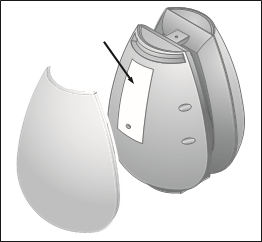
Location of the product identification label. Leave it to qualified personnel to remove the shell as the subwoofer may be damaged in the process.
Cable connections
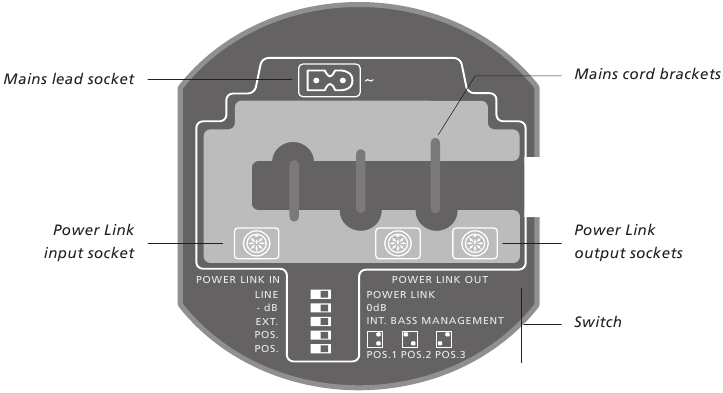
For safety reasons you must fasten the mains lead behind the mains cord bracket.
Mains cord: The supplied mains cord and plug are specially designed for the product. If you change the plug or damage the mains cord, you must buy another from your Bang & Olufsen retailer!
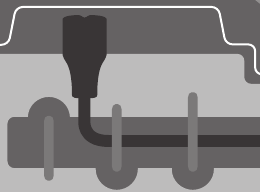
Connect your speaker system
Connect the subwoofer to your system using a Bang & Olufsen Power Link cable.
You get access to the subwoofer connector panel above.
For specific information about the other speakers and units in your Bang & Olufsen system, refer to the Guides enclosed with these products.
Speaker connections
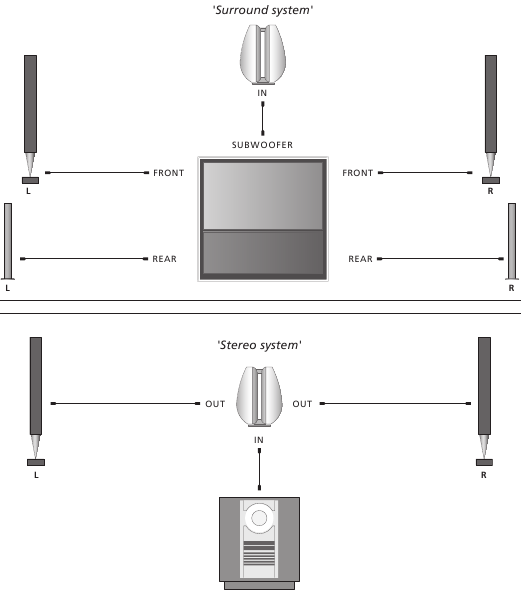
On these two pages you can see examples of two different setups.
Surround system:
The system has a dedicated subwoofer socket, and all speakers are connected directly to your Bang & Olufsen system.
- Connect one end of the cable to the socket marked POWER LINK IN on the subwoofer, and the other end to the subwoofer socket on your Bang & Olufsen system.
- Connect your other speakers to the speaker sockets on your Bang & Olufsen system.
- Select EXT. BASS MANAGEMENT.
Stereo system:
The left and right speakers are connected to the subwoofer, and the subwoofer is connected to your Bang & Olufsen system.
- Connect one end of the cable to the socket marked POWER LINK IN on the subwoofer, and the other end to one of the speaker sockets on your Bang & Olufsen system.
- Connect your other speakers to the sockets marked POWER LINK OUT on the subwoofer
- Select INT. BASS MANAGEMENT.
Connection to the mains
Connect the enclosed mains cord to the socket marked ~.
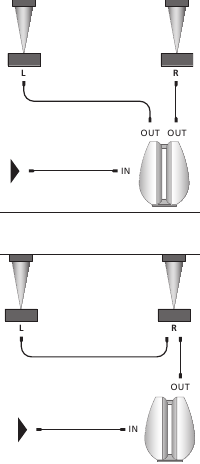
Routing the signals through from speaker to speaker: To avoid cables running from both front speakers to the subwoofer, you may choose to route the signal through from speaker to speaker.
Adapt the subwoofer to your setup
Placement is flexible and easy with the subwoofer. Due to its relative small size it can easily be integrated in most home environments, and may be placed almost anywhere you wish in the room.
To obtain the most natural sound you should place the subwoofer on the floor in the front half of the room – based on your favourite listening position.
Setting the POWER LINK and LINE switch
Use this switch to set up your system.
...To a Bang & Olufsen system:
Use a Bang & Olufsen Power Link cable to connect the subwoofer to your system. Set the switch to POWER LINK.
...To a non-Bang & Olufsen system:
Use a special cable with an ordinary phono/mini jack plug in one end, and a DIN-plug in the other (optional accessory, available from your Bang & Olufsen retailer). Set the switch to LINE.
Setting the -dB/0dB switch
Use the -dB/0dB switch to adapt the output from the subwoofer to the sensitivity levels of the different connected BeoLab speakers.
Only when using the subwoofer with BeoLab 4 PC, set the switch to -dB.
For all other speakers, set the switch to 0dB.
Ideally the subwoofer should be placed at about the same distance from your favourite listening position as the front set of speakers, that is, the left, (centre) and right speakers. If possible, you should choose a placement between the two front speakers.
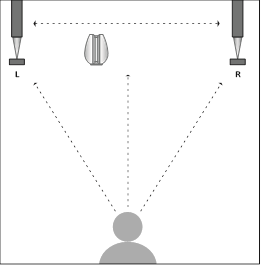
Never place the subwoofer behind your listening position. We recommend that you avoid placing any of your loudspeakers in the area inside the thin dotted line.
Setting the EXT. and INT. BASS MANAGEMENT switch
Depending on your setup, you have to make settings for the bass management.
- Set the switch to 'EXT. BASS MANAGEMENT' if the subwoofer is connected to a subwoofer socket on a product and no speakers are connected to the subwoofer.
- Set the switch to 'INT. BASS MANAGEMENT' if other speakers are connected directly to the subwoofer.
Setting the POS. switch
Use the position switch to filter out the natural bass change obtained if the subwoofer is placed, for example, in a corner, as compared to a more freestanding position.
The setting of the POS. switch is based on the number of surfaces the subwoofer is in close proximity of (within approx. 50 cm).
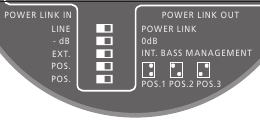
Set the POS. switch depending on your setup.
The POS. switch has three settings:
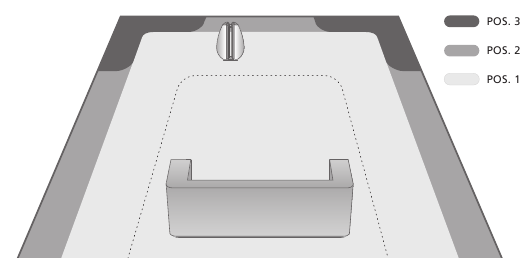
Never place the subwoofer behind your listening position. We recommend that you avoid placing any of your loudspeakers in the area inside the thin dotted line.
POS.1: Use this setting if the subwoofer is close to one surface (freestanding in a room or on a wall). Shown by light grey areas in the illustration.
POS.2: Use this setting if the subwoofer is placed close to two surfaces (placed on the floor close to a wall). Shown by medium grey areas in the illustration.
POS.3: Use this setting if the subwoofer is placed close to three surfaces (in a corner). Shown by the dark grey areas in the illustration.
The positions mentioned are guide lines only. You may set the POS. switch to any of the three positions depending on your sound preference.
When using BeoLab 4 with your subwoofer
When possible use a Power Link cable and set the POWER LINK switch to LEFT or RIGHT. When using a mini jack cable, always set the LINE IN switch to LINE. Do not use the PC setting.
Set the switch on your subwoofer to 0dB.
Note! Do not use the setting -dB on your subwoofer unless you have connected a BeoLab 4 PC.

Download manual
Here you can download full pdf version of manual, it may contain additional safety instructions, warranty information, FCC rules, etc.
Download Bang & Olufsen BeoLab 11 - Subwoofer Manual