NETGEAR GS308P - 8-Port Gigabit Ethernet Switch With 4-Port PoE Installation Guide (Mwongozo wa Usakinishaji wa NETGEAR GS308P - 8-Port Gigabit Ethernet Switch yenye 4-Port PoE)
- 1 Package contents (Yaliyomo kwenye kifurushi)
- 2 Connect the equipment (Unganisha vifaa)
- 3 Connect to power (Unganisha kwa umeme)
- 4 Check the status (Angalia hali)
- 5 PoE Max LED (LED ya Juu ya PoE)
- 6 PoE considerations (Mambo ya kuzingatia ya PoE)
- 7 PoE troubleshooting (Utatuzi wa PoE)
- 8 Specifications (Vipimo)
- 9 Support and Community (Msaada na Jumuiya)
- 10 Regulatory and Legal (Udhibiti na Kisheria)
- 11 References (Marejeleo)
- 12 Pakua mwongozo
- 13 Katika Lugha Nyingine
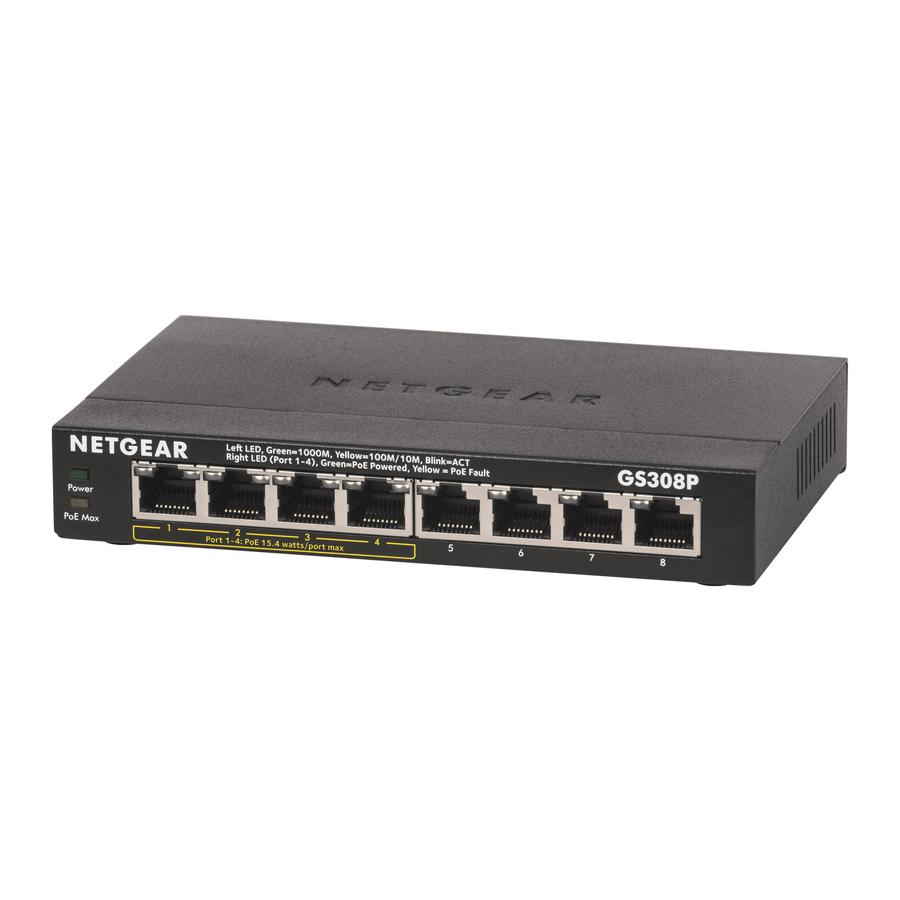
Package contents (Yaliyomo kwenye kifurushi)
- NETGEAR 8-Port Gigabit Ethernet Switch with 4-Port PoE Model GS308P
- Power adapter (Adapta ya umeme)
- Power cord (varies by region) (Kebo ya umeme (inatofautiana kulingana na eneo))
- Wall installation kit (Kifaa cha kufunga ukutani)
- Rubber feet (Miguu ya mpira)
- Installation guide (Mwongozo wa usakinishaji)
Connect the equipment (Unganisha vifaa)
Sample connections (Miunganisho sampuli)

This switch is designed for indoor use only. If you want to connect it to a device located outdoors, the outdoor device must be properly grounded and surge protected, and you must install an Ethernet surge protector inline between the switch and the outdoor device. Failure to do so can damage the switch. (Swichi hii imeundwa kwa matumizi ya ndani tu. Ikiwa unataka kuiunganisha na kifaa kilicho nje, kifaa cha nje lazima kiwe kimefungwa vizuri na kilindwe dhidi ya mawimbi ya umeme, na lazima usakinishe kinga ya mawimbi ya umeme ya Ethernet kati ya swichi na kifaa cha nje. Kukosa kufanya hivyo kunaweza kuharibu swichi.)

Before connecting this switch to outdoor cables or devices, see https://kb.netgear.com/000057103 for safety and warranty information. (Kabla ya kuunganisha swichi hii na nyaya au vifaa vya nje, angalia https://kb.netgear.com/000057103 kwa habari ya usalama na udhamini.)
Connect to power (Unganisha kwa umeme)

Check the status (Angalia hali)

| Power LED (LED ya umeme) | Left Port LEDs (Ports 1–4) (LED za bandari za kushoto (Bandari 1–4)) | Right PoE LEDs (Ports 1–8) (LED za PoE za kulia (Bandari 1–8)) | |||
 | On (Imewashwa) |  | 1000 Mbps link (Kiungo cha 1000 Mbps) | | PoE in use (PoE inatumika) |
 | Off (Imezimwa) |  | 100 or 10 Mbps link (Kiungo cha 100 au 10 Mbps) | | PoE halted (see PoE troubleshooting (angalia utatuzi wa PoE)) |
 | Activity (blinking) (Shughuli (inapepesa)) | | No PoE use (off) (Hakuna matumizi ya PoE (imezimwa)) | ||
| | No link (off) (Hakuna kiungo (imezimwa)) | ||||
PoE Max LED (LED ya Juu ya PoE)
The maximum PoE (802.3af) power that the switch can deliver to all attached powered devices (PDs) is 53 Watts (W) total. Ports 1 through 4 can support PoE power with a maximum power to each port of 15.4W. (For more information, see PoE considerations (mambo ya kuzingatia ya PoE).)
(Upeo wa nguvu ya PoE (802.3af) ambayo swichi inaweza kutoa kwa vifaa vyote vilivyounganishwa (PDs) ni jumla ya Wati 53 (W). Bandari 1 hadi 4 zinaweza kusaidia nguvu ya PoE na nguvu ya juu kwa kila bandari ya 15.4W. (Kwa habari zaidi, angalia mambo ya kuzingatia ya PoE.))
The PoE Max LED indicates the status of the PoE power that the switch can deliver to all attached PDs. (LED ya Juu ya PoE inaonyesha hali ya nguvu ya PoE ambayo swichi inaweza kutoa kwa PDs zote zilizounganishwa.)
 Solid amber (Rangi ya kaharaba iliyo imara): Less than 7W of PoE power is available on the switch (the LED is on). (Chini ya 7W ya nguvu ya PoE inapatikana kwenye swichi (LED imewashwa).)
 Blinking amber (Rangi ya kaharaba inapepesa): The PoE Max LED was active in the previous two minutes (the LED is blinking). (LED ya Juu ya PoE ilikuwa inafanya kazi katika dakika mbili zilizopita (LED inapepesa).)
Off (Imezimwa): Sufficient (more than 7W of) PoE power is available on the switch. (Nguvu ya PoE ya kutosha (zaidi ya 7W) inapatikana kwenye swichi.)
PoE considerations (Mambo ya kuzingatia ya PoE)
The switch prioritizes the PoE (802.3af) power that it supplies in ascending port order (from port 1 to port 4), up to its total power budget (53 Watts). If the power requirements for the attached powered devices (PDs) exceed the total power budget of the switch, the PD on the highest numbered port is disabled to ensure that the PDs that are connected to the higher priority, lower numbered ports are supported first.
(Swichi inapeana kipaumbele nguvu ya PoE (802.3af) ambayo inatoa kwa mpangilio wa bandari unaopanda (kutoka bandari 1 hadi bandari 4), hadi bajeti yake ya jumla ya nguvu (Wati 53). Ikiwa mahitaji ya nguvu kwa vifaa vilivyounganishwa (PDs) yanazidi bajeti ya jumla ya nguvu ya swichi, PD kwenye bandari iliyo na nambari ya juu imezimwa ili kuhakikisha kuwa PDs ambazo zimeunganishwa na kipaumbele cha juu, bandari zilizo na nambari ya chini zinaungwa mkono kwanza.)
Just because a PD is listed as an 802.3af PoE powered device does not necessarily mean that it requires the maximum power limit of the specification. Many PDs require less power, allowing all four PoE ports to be active simultaneously. (Kwa sababu tu PD imeorodheshwa kama kifaa kinachoendeshwa na PoE cha 802.3af haimaanishi kuwa inahitaji kikomo cha juu cha nguvu cha vipimo. PD nyingi zinahitaji nguvu kidogo, kuruhusu bandari zote nne za PoE kufanya kazi wakati huo huo.)
The following table describes the PoE classes and switch allocations. (Jedwali lifuatalo linaelezea madarasa ya PoE na mgao wa swichi.)
| Device Class (Darasa la Kifaa) | Standard (Kiwango) | Class Description (Maelezo ya Darasa) | Minimum Power (Nguvu ya Chini) Allocated to the (Iliyotengwa kwa) Powered Device (Kifaa Kinachoendeshwa) | Range of Power (Kiwango cha Nguvu) Delivered to the (Iliyotolewa kwa) Powered Device (Kifaa Kinachoendeshwa) |
| 0 | PoE and PoE+ | Default power (full) (Nguvu chaguo-msingi (kamili)) | 0.44W | 0.44W–12.95W |
| 1 | PoE and PoE+ | Very low power (Nguvu ndogo sana) | 4.0W | 0.44W–3.84W |
| 2 | PoE and PoE+ | Low power (Nguvu ndogo) | 7.0W | 3.84W–6.49W |
| 3 | PoE and PoE+ | Mid power (Nguvu ya kati) | 15.4W | 6.49W–12.95W |
| 4 | PoE+ only (PoE+ tu) | High power (Nguvu kubwa) | 30.0W | 12.95W–25.5W |
PoE troubleshooting (Utatuzi wa PoE)
Here are some tips for correcting PoE problems that might occur: (Hapa kuna vidokezo vya kurekebisha shida za PoE ambazo zinaweza kutokea:)
- Make sure that the PoE Max LED is off. If the PoE Max LED is solid amber, disconnect one or more PoE devices to prevent PoE oversubscription. Start by disconnecting the device from the highest numbered port. (Hakikisha kuwa LED ya Juu ya PoE imezimwa. Ikiwa LED ya Juu ya PoE ni rangi ya kaharaba iliyo imara, tenganisha kifaa kimoja au zaidi cha PoE ili kuzuia usajili kupita kiasi wa PoE. Anza kwa kukata kifaa kutoka kwa bandari iliyo na nambari ya juu zaidi.)
- Make sure that the Ethernet cables are plugged in correctly. For each powered device (PD) that is connected to the switch, the corresponding right port LED on the switch lights solid green. If the right port LED lights solid amber, a PoE fault occurred and PoE halted because of one of the conditions that are listed in the following table. (Hakikisha kuwa nyaya za Ethernet zimechomekwa kwa usahihi. Kwa kila kifaa kinachoendeshwa (PD) ambacho kimeunganishwa na swichi, LED inayolingana ya bandari ya kulia kwenye swichi huwaka kijani kibichi. Ikiwa LED ya bandari ya kulia inawaka rangi ya kaharaba iliyo imara, hitilafu ya PoE ilitokea na PoE ilisimama kwa sababu ya moja ya hali ambazo zimeorodheshwa kwenye jedwali lifuatalo.)
| PoE Fault Condition (Hali ya Hitilafu ya PoE) | Possible Solution (Suluhisho Linalowezekana) |
| A PoE-related short circuit occurred on the port. (Mzunguko mfupi unaohusiana na PoE ulitokea kwenye bandari.) | The problem is most likely with the attached PD. Check the condition of the PD or restart the PD by disconnecting and reconnecting the PD. (Shida inawezekana zaidi na PD iliyoambatishwa. Angalia hali ya PD au uanzishe tena PD kwa kukata na kuunganisha tena PD.) |
| The PoE power demand of the PD exceeded the maximum level of 16.2W that the switch permits. (Mahitaji ya nguvu ya PoE ya PD yalizidi kiwango cha juu cha 16.2W ambacho swichi inaruhusu.) | |
| The PoE current on the port exceeded the classification limit of the PD. (Sasa ya PoE kwenye bandari ilizidi kikomo cha uainishaji wa PD.) | |
| The PoE voltage of the port is outside the range that the switch permits. (Voltage ya PoE ya bandari iko nje ya kiwango ambacho swichi inaruhusu.) | Restart the switch to see if the condition resolves itself. (Anzisha tena swichi ili kuona ikiwa hali inajitatua yenyewe.) |
Specifications (Vipimo)
| Specification (Vipimo) | Description (Maelezo) |
| Network interface (Kiolesura cha mtandao) | RJ-45 connector for 1000BASE-T, 100BASE-TX, or 10BASE-T (Kiunganishi cha RJ-45 cha 1000BASE-T, 100BASE-TX, au 10BASE-T) |
| Network cable (Kebo ya mtandao) | Category 5 (Cat 5) or higher rated Ethernet cable (Kebo ya Ethernet ya Kitengo cha 5 (Cat 5) au iliyokadiriwa juu zaidi) |
| Ports (Bandari) | 8 |
| Power adapter (Adapta ya umeme) | 48V @ 1.25 A DC input (Ingizo la 48V @ 1.25 A DC) |
| Power consumption (Matumizi ya nguvu) | 7.0W max. (no PoE) (7.0W max. (hakuna PoE)) 60W max (with PoE) (60W max (na PoE)) |
| PoE power budget (Bajeti ya nguvu ya PoE) | Ports 1-4: 15.4W maximum per PoE port, up to 53W total PoE power for the switch. (Bandari 1-4: 15.4W upeo kwa kila bandari ya PoE, hadi 53W jumla ya nguvu ya PoE kwa swichi.) For more information, see PoE considerations (mambo ya kuzingatia ya PoE). (Kwa habari zaidi, angalia mambo ya kuzingatia ya PoE.) |
| Dimensions (W x D x H) (Vipimo (W x D x H)) | 6.2 in. x 4.0 in. x 1.1 in. (6.2 in. x 4.0 in. x 1.1 in.) (158 mm x 101 mm x 29 mm) (158 mm x 101 mm x 29 mm) |
| Weight (Uzito) | 1.02 lb (0.46 kg) (1.02 lb (0.46 kg)) |
| Operating temperature (Joto la uendeshaji) | 32–104°F (0–40°C) |
| Operating humidity (Unyevu wa uendeshaji) | 10%–90% relative humidity, noncondensing (10%–90% unyevu wa jamaa, usiofupisha) |
| Compliance (Uzingatiaji) | FCC Class A, CE Class A, VCCI Class A, RCM Class A, CCC, CB, KC |
Support and Community (Msaada na Jumuiya)
Visit netgear.com/support to get your questions answered and access the latest downloads. (Tembelea netgear.com/support ili kupata majibu ya maswali yako na ufikie vipakuliwa vya hivi karibuni.)
You can also check out our NETGEAR Community for helpful advice at community.netgear.com. (Unaweza pia kuangalia Jumuiya yetu ya NETGEAR kwa ushauri muhimu katika community.netgear.com.)
Regulatory and Legal (Udhibiti na Kisheria)
(If this product is sold in Canada, you can access this document in Canadian French at https://www.netgear.com/support/download/.) (Ikiwa bidhaa hii inauzwa nchini Kanada, unaweza kufikia hati hii kwa Kifaransa cha Kanada katika https://www.netgear.com/support/download/.)
For regulatory compliance information including the EU Declaration of Conformity, visit https://www.netgear.com/about/regulatory/. (Kwa habari ya kufuata kanuni pamoja na Tamko la Umoja wa Ulaya la Kukubaliana, tembelea https://www.netgear.com/about/regulatory/.)
See the regulatory compliance document before connecting the power supply. (Angalia hati ya kufuata kanuni kabla ya kuunganisha usambazaji wa umeme.)
For NETGEAR's Privacy Policy, visit https://www.netgear.com/about/privacy-policy/. (Kwa Sera ya Faragha ya NETGEAR, tembelea https://www.netgear.com/about/privacy-policy/.)
By using this device, you are agreeing to NETGEAR's Terms and Conditions at https://www.netgear.com/about/terms-and-conditions/. If you do not agree, return the device to your place of purchase within your return period. (Kwa kutumia kifaa hiki, unakubali Sheria na Masharti ya NETGEAR katika https://www.netgear.com/about/terms-and-conditions/. Ikiwa haukubali, rudisha kifaa mahali uliponunua ndani ya kipindi chako cha kurudisha.)
Do not use this device outdoors. The PoE source is intended for intra building connection only. (Usitumie kifaa hiki nje. Chanzo cha PoE kimekusudiwa kwa unganisho la ndani ya jengo tu.)
NETGEAR, Inc.
350 East Plumeria Drive
San Jose, CA 95134, USA
NETGEAR INTERNATIONAL LTD
Floor 1, Building 3
University Technology Centre
Curraheen Road, Cork,
T12EF21, Ireland
© NETGEAR, Inc., NETGEAR and the NETGEAR Logo are trademarks of NETGEAR, Inc. Any non-NETGEAR trademarks are used for reference purposes only. (© NETGEAR, Inc., NETGEAR na Nembo ya NETGEAR ni alama za biashara za NETGEAR, Inc. Alama zozote za biashara zisizo za NETGEAR hutumiwa kwa madhumuni ya kumbukumbu tu.)

References (Marejeleo)
Do I need to use a surge protector with my NETGEAR Business device? | Answer | NETGEAR Support
English - NETGEAR Communities
Download Center | Downloads and Documentation | NETGEAR
Regulatory | NETGEAR
NETGEAR Privacy Policy | NETGEAR
NETGEAR Terms and Conditions | NETGEAR

Pakua mwongozo
Hapa unaweza kupakua toleo kamili la pdf la mwongozo, linaweza kujumuisha maelekezo ya ziada ya usalama, taarifa za udhamini, sheria za FCC, n.k.


