Fieldpiece JL3PR - Job Link System Pressure Probe Manual
Quick Start
- Install the Fieldpiece Job Link® system app on your mobile device and sign up for an account if you're a new user.
- Remove the single screw of the yellow battery cover and install 2 x AAA batteries.
- Press for 1 second to power on.
- Open Measurements in the Job Link® app and favourite the probe to the tool manager.
- View live measurements on your mobile device up to 1000 feet away.
What's Included
Job Link® System Pressure Probe
2 x Replacement Gaskets
2 x AAA Batteries
Operator's Manual
1 Year Limited Warranty

Hand turn the female fitting to connect and disconnect. DO NOT use the plastic body to increas leverage. Doing so can cause damage, leaks, and void warranty.
Do not apply more than 800 psig.
Description
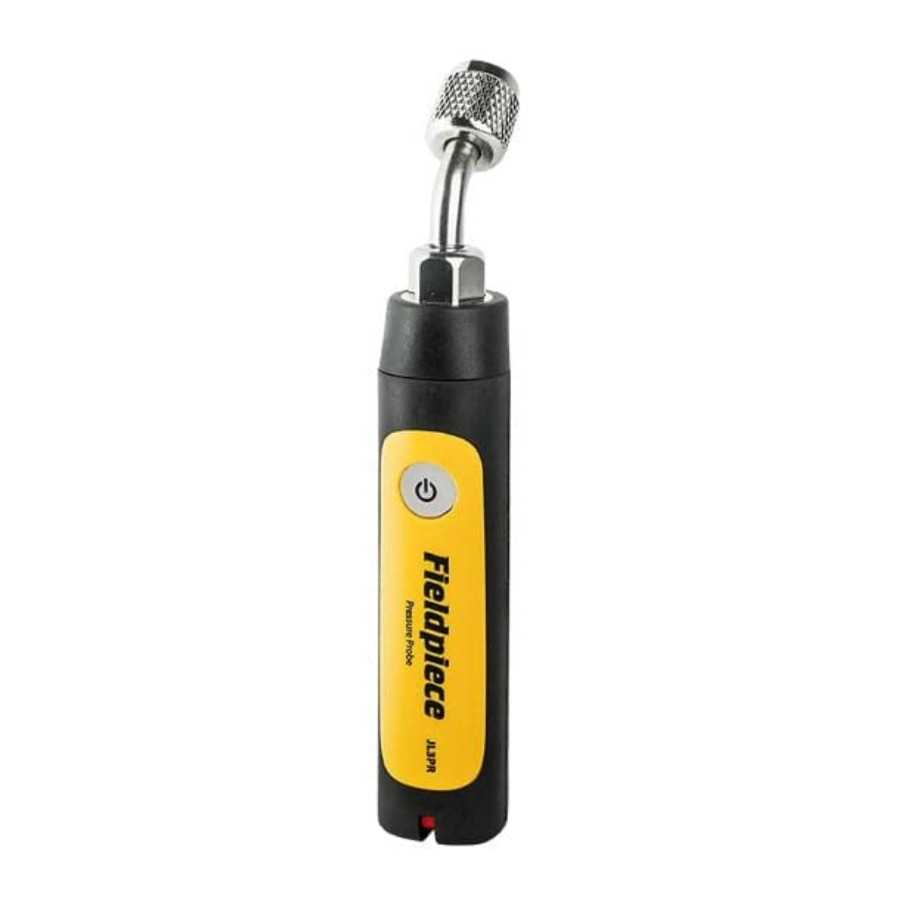
The JL3PR Job Link® System Pressure Probe sends long range wireless pressure measurements directly to the Fieldpiece Job Link® system mobile app.
Easily reach service ports in tight spaces using the angled 1/4" fitting. The rubberised protective housing is both ergonomic and rugged for daily use.
Flip the switch to red or blue and the app immediately knows which side of the system you're going to place your pressure probe.
The perfect balance of size and capability gives you exactly what you need to diagnose systems day in and day out quickly and confidently.
Maintenance
CLEANING: Clean the exterior with a damp cloth. Do not use detergents or solvents.
BATTERIES: When the LED slow blinks Red, the batteries must be replaced. Ensure the power is OFF. Remove the single screw from the yellow battery cover. Install 2 x AAA batteries. You can also monitor battery life in the Job Link® app tool manager.
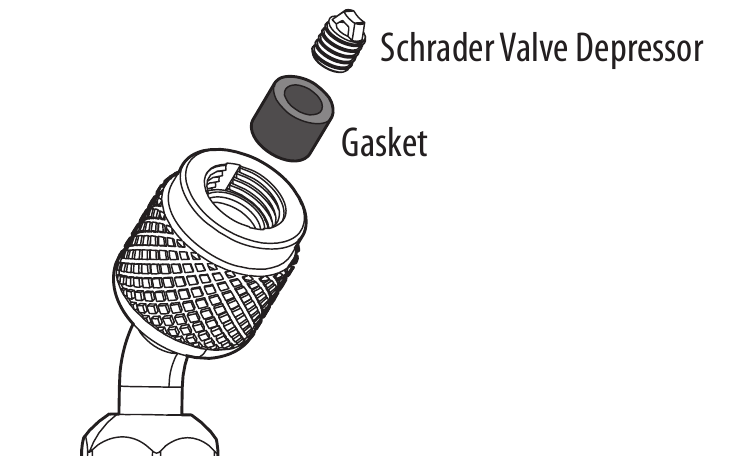
GASKET: The black rubber gasket that seals the pressure probe to the service port may become worn over time potentially causing a leak. This results from overtightening or connecting to damaged service port fittings.
- Use needle nose pliers or a similar tool to unscrew the Schrader valve depressor from the gasket.
- Remove and replace the worn gasket.
- Screw the depressor back into the gasket.

Specifications
Minimum Device Requirement: BLE 4.0 devices running iOS® 7.0 or Android™ 5.0
(Latest compatibility at www.fieldpiece.com)
Sensor Type: Relative pressure
Connector Type: Standard 1/4" NPT female flare fitting (angled)
Measurement Range: 29" HgV to 580 psig, 74 cmHgV to 0 to 4000 kPa
Accuracy:
29" HgV to 0" HgV: ±0.2" HgV; 74 cmHgV to 0 cmHgV: ±1 cmHgV
0 to 200 psig: ±1 psig; 0 to 1378 kPa: ±7 kPa
200 to 580 psig: ±2 psig; 1378 to 4000 kPa: ±14 kPa
Maximum Overload Pressure: 800 psig (5500 kPa)
Battery Type: 2 x AAA, NEDA 24A, IEC LR03
Battery Life: 150 hours typical alkaline. LED blinks red when battery replacement is needed.
Auto Power Off: 2 hours (APO can be disabled)
Wireless Range: 1000 feet (350 meters) line of sight. Obstructions affect distance.
Radio Frequency: 2.4 GHz
Operating Environment: -4°F to 122°F (-20°C to 50°C) at <75% RH
Storage Temperature: -4°F to 140°F (-20°C to 60°C), 0 to 80% RH (with batteries removed)
Temperature Coefficient: 0.1 x (specified accuracy) per 1.8°F
(-4°F to 64°F, 82°F to 122°F), per 1°C (-20°C to 18°C, 28°C to 50°C)
Weight: 0.39 lbs (177 g)
Water Resistant: Designed to IP55
US Patent: www.fieldpiece.com/patents
Operation

Press for 1 second to power ON/OFF.
LED Color Indications
Green slow blink: normal operation
Red slow blink: batteries need to be replaced
High or Low Side Switch
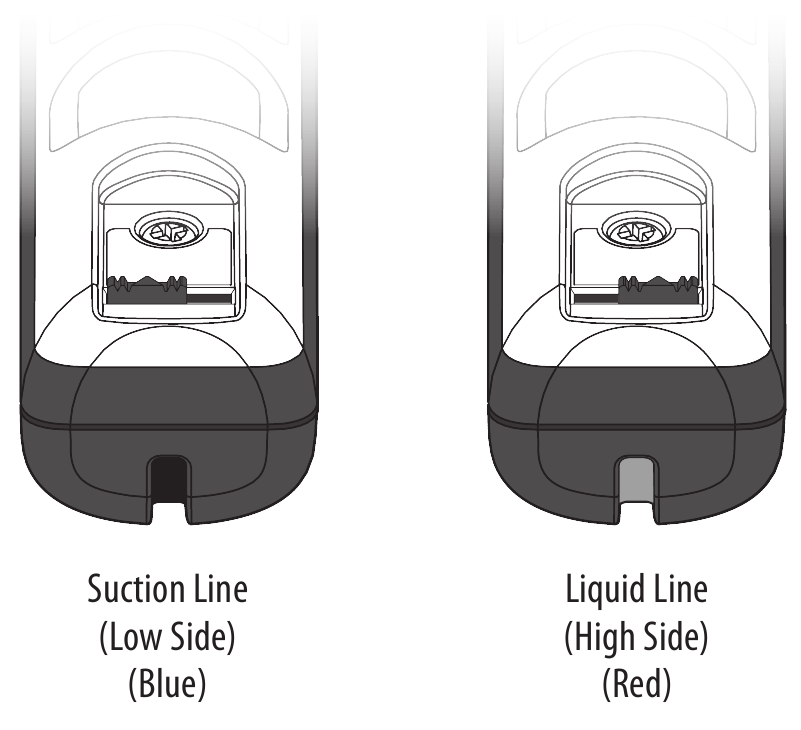
The Job Link® system app knows which side you have selected for each probe. Select Suction line or Liquid line and place it on the system appropriately.
Remote Data Logging
(Data logging will be available shortly after time of printing. Look for updates.)
Use the Job Link® system mobile app to program the JL3PR to log measurements starting at a specific time of day for up to 7 days.
Auto power off disables.
- Make sure JL3PR is powered OFF.
- Open the Job Link® system mobile app.
- Press
![]() for 5 seconds to enter data logging mode. The LED will shine solid green.
for 5 seconds to enter data logging mode. The LED will shine solid green. - Set up the probe's data logging parameters within the app. The LED will blink green while the app is sending setup instructions. The LED will slow blink blue when waiting for programmed start time to occur.
- Place the JL3PR on the system.
- When the programmed start time is reached, the LED will very slowly blink green to indicate data logging has begun.
- When the programmed span has finished, the LED blinks and powers OFF.
- Repeat steps 1-3 and use the app to extract your data log from the JL3PR.
 for 5 seconds to enter data logging mode. The LED will shine solid green.
Auto Power Off (APO)
The pressure probe will automatically power off after 2 hours. To disable APO until powered off, while power is on tap twice. The LED will briefly blink red. To enable APO, while power is on tap twice. The LED will briefly shine red.
Auto Calibration
Automatically calibrate your JL3PR by ensuring the sensor is open to atmosphere when you power ON the probe.

References

Download manual
Here you can download full pdf version of manual, it may contain additional safety instructions, warranty information, FCC rules, etc.
Download Fieldpiece JL3PR - Job Link System Pressure Probe Manual


