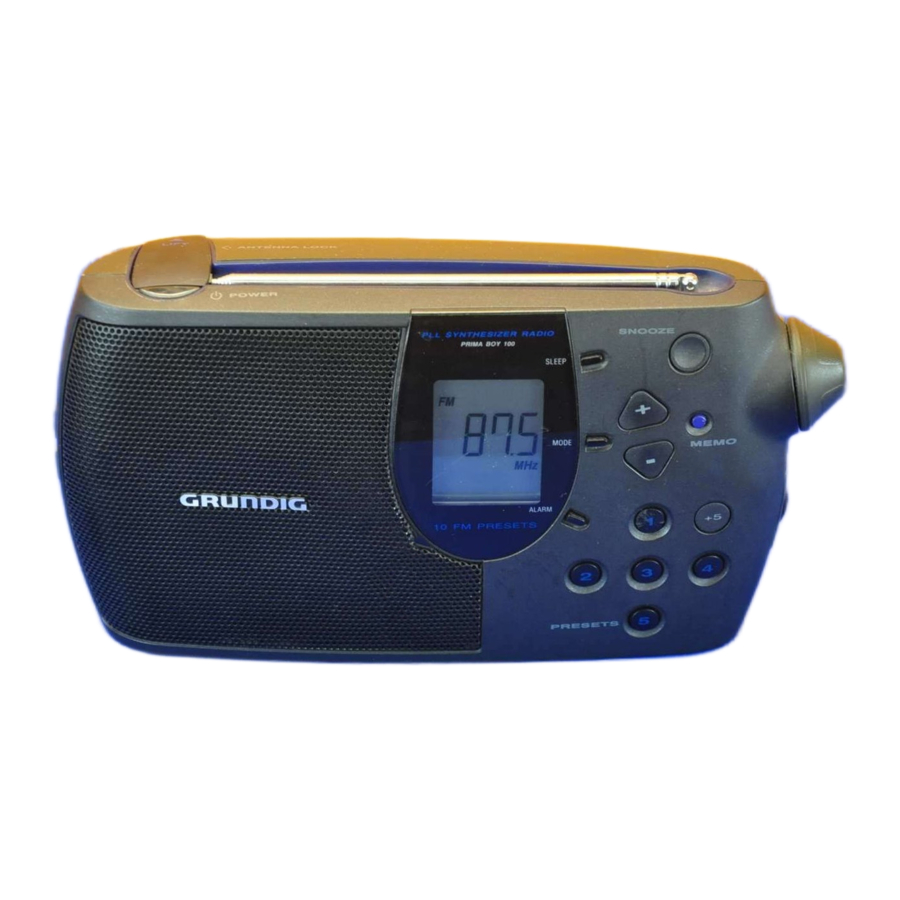
Grundig Prima Boy 100 Portable Radio Manual
NOTES
IMPORTANT NOTES FOR USERS IN THE U.K
Mains plug
This apparatus is fitted with an approved moulded 13 Amp plug. To change a fuse in this type of plug proceed as follows:

- Remove fuse cover and fuse.
- Fix new fuse which should be a BS1362 5 Amp, A.S.T.A. or BSI approved type.
- Refit the fuse cover.
If the fitted plug is not suitable for your socket outlets, it should be cut off and an appropriate plug fitted in its place.
If the mains plug contains a fuse, this should have a value of 5 Amp. If a plug without a fuse is used, the fuse at the distribution board should not be greater than 5 Amp.
Note: The severed plug must be disposed of to avoid a possible shock hazard should it be inserted into a 13 Amp socket elsewhere.
How to connect a plug
The wires in the mains lead are coloured with the following code: blue = neutral (N), brown = live (L).
As these colours may not correspond with the colour markings identifying the terminals in your plug, proceed as follows:
- Connect the blue wire to the terminal marked N or coloured black.
- Connect the brown wire to the terminal marked L or coloured red.
- Do not connect either wire to the earth terminal in the plug, marked E (or e) or coloured green (or green and yellow).
Before replacing the plug cover, make certain that the cord grip is clamped over the sheath of the lead – not simply over the two wires.
CONTROLS

 – you can connect headphones having a 3.5 mm plug to the socket . The loudspeaker is then muted.
 POWER (power) – to switch the radio on and off
– to switch off the alarm tone when alarm function is activated
– to switch off the radio before the preset 'sleep' time has elapsed
Antenna – for FM reception
ALARM (alarm) – to enable/disable the alarm function
MODE (mode) – to enter the time and alarm time setting modes – to change the display information
SLEEP (sleep) – to switch on the radio for max. 90 minutes
SNOOZE (snooze) – to interrupt the alarm for approximately 5 minutes
VOL.  – to adjust the volume
MEMO (memo) – this button is used to store the tuned station in the memory position you choose
+/– – for setting the clock time and alarm time
– when the radio is on, to start the station search (AUTO TUNING (auto tuning)) or to advance the frequency step by step (manual tuning)
TONE (tone) – to adjust the tone
+5 – to select a preset from 6 to 10 (1 = 6, 2 = 7, etc.)
PRESETS 1...5 – station memory presets

Base of the set
Key Lock (key lock) – to lock all buttons and functions
Back of the set
Handle (handle)
AC MAINS (ac mains) – Socket for AC mains cable
Batteries (batteries) compartment
DISPLAY
Display Mode

- Pressing the MODE (mode) button briefly changes the display mode:
- When the radio is off, the display indication toggles between time and alarm time.
- When the radio is on, the display indication toggles between radio frequency, time and alarm time.
- If no button is pressed within 5 seconds, the display returns to the original indication.
POWER SUPPLY
Mains supply

for users in the U.K.:
When fitting a mains plug, follow the instructions in NOTES.
- Check if the mains voltage as shown on the type plate (on the bottom of the set) corresponds to your local mains voltage. If it does not, consult your dealer or service organisation.
- Connect the mains lead to the AC MAINS (ac mains) socket and the wall socket.
![]()
- The mains supply is switched on.
- To disconnect the set from the mains completely, withdraw the mains plug from the wall socket.

Battery supply
- Open the battery compartment and insert as shown 4 batteries, type R14, UM2 or C-cells.
![]()
- Remove the batteries if exhausted or if they will not be used again for a long period.
- The battery supply is switched off when the set is connected to the mains.
- To change over to battery supply, pull out the plug from the AC MAINS (ac mains) socket.

Back-up batteries for preset memory
In order to keep the presets stored in the memory during the time that the unit is switched off, it is necessary to insert two additional back-up batteries.

- Place these batteries size LR 6, AA, alkaline type in the battery compartment.
- These batteries should always be inserted, regardless of the power supply (mains voltage or batteries).
Note on Environmental Protection
Do not throw exhausted batteries in the household refuse.
Hand over the old batteries to your dealer or public collecting points when buying new ones.
CLOCK OPERATION
Setting the clock time
- While the time is being displayed, press the MODE (mode) button and hold it pressed, until the time indication starts flashing.
![]()
- Use the – button to set the hours and the + button to set the minutes.
- A single press of the – or + button advances the setting by 1 hour or 1 minute respectively.
If the button is held pressed, the setting advances rapidly. - The minutes will not be carried over to the hours if, for example, the minutes indication changes from '59' to '00'.
- A single press of the – or + button advances the setting by 1 hour or 1 minute respectively.
- Press the MODE (mode) button once more to store the setting.
- If no button is pressed within 5 seconds, the time setting mode stops and the setting is stored automatically.

Setting the alarm time
- Press the MODE (mode) button briefly until the display shows the current alarm time.
- The alarm indicator '
![]() ' flashes on the display.
' flashes on the display.
![]()
- The alarm indicator '
- While the alarm time is being indicated, press and hold down the MODE (mode) button until the alarm time indication starts flashing.
- Use the – button to set the hours and the + button to set the minutes (in the same way as the clock time).
- Press the MODE (mode) button once more to store the setting.
- If no button is pressed within 5 seconds, the alarm time setting mode stops and the setting is stored automatically.
 ' flashes on the display.
ALARM
Wake-up by sound signal
- Press the ALARM (alarm) button once until the alarm indicator '
![]() ' appears steadily on the display.
' appears steadily on the display.
![]()
- At the preselected alarm time the sound signal will switch on and switch off again automatically 90 minutes later.

Interrupting and repeating the alarm
- The electronic sound alarm can be interrupted with the SNOOZE (snooze) button.
- After about 5 minutes, the alarm comes on again.
- It is possible to interrupt the alarm function several times during the switch-on period.
Switching off the alarm
- The alarm function can be switched off by pressing the
![]() POWER (power) button.
POWER (power) button.
The alarm remains set to operate the next day. - If you wish to switch off the alarm completely, press the ALARM (alarm) button briefly. The alarm indicator '
![]() ' disappears.
' disappears.
Going to sleep while listening to the radio
- Press the SLEEP (sleep) button briefly.
![]()
- The unit switches on the radio and the display will show the previously set 'sleep' period.
- The 'sleep' time can be adjusted from 90 minutes --> 10 minutes by pressing the SLEEP (sleep) button continuously.
- After the preset sleep time has elapsed, the radio will switch off automatically.
- The SLEEP (sleep) function can be terminated prematurely by pressing the
![]() POWER (power) button.
POWER (power) button.

RADIO
Radio reception
- Switch the radio on and off with the
![]() POWER (power) button.
POWER (power) button. - The first time you switch your unit on, the display indicates 87.5 MHz.
![]()
- The first time you switch your unit on, the display indicates 87.5 MHz.
- Adjust the volume with the rotary control VOLUME (volume).
- Pull out the telescopic aerial. To improve FM reception, incline and turn the aerial. Reduce its length if the FM signal is too strong (very close to a transmitter).

Automatic tuning
- To activate automatic station search (AUTO TUNING (auto tuning)), press + or – until the frequency display begins 'to run'; then release the button.
- The search stops as soon as a station is found and tuned to.
![]()
- Stations which are received with a weak field strength may be skipped.
These can be tuned to manually.
- The search stops as soon as a station is found and tuned to.

Manual tuning
- Briefly press the + or – button to tune in the corresponding direction in individual steps.
- The dot in front of the frequency indicates 50 kHz steps (e.g. 100.55).
![]()
- The dot in front of the frequency indicates 50 kHz steps (e.g. 100.55).
- If you keep the button depressed, you can rapidly scan large frequency ranges.
- When you release the button, AUTO TUNING (auto tuning) is automatically switched to.
- If you briefly press one of the + or – buttons, manual tuning is switched to.

Storing stations
There are 10 memory locations available for storing stations.
- Tune to the station you want to store.
- Press MEMO (memo).
- The indication 'M' starts flashing on the display for 5 seconds.
![]()
- The indication 'M' starts flashing on the display for 5 seconds.
- Press the number (PRESETS 1...5) you want to assign the station to.
- If you want to assign the station to memory location numbers 6 to 10, press MEMO (memo), then +5, then the appropriate number button.
- Press MEMO (memo) again to store the station.
- Select and store in this way all desired stations.

Note:
If no station is stored within the 5 seconds that 'M' is flashing, the storing mode is abandoned with no change to the current memory.
Calling up a stored station
- To call up a stored station, simply press the corresponding button.
- If you call up a station which is assigned to memory location numbers 6 to 10, first press +5, then the appropriate number button.
- The unit switches to the station and the display indicates the frequency, 'M' and the memory location number.
![]()

Last Station Memory
Your unit is provided with the function 'LAST STATION MEMORY' (last station memory), which means that the station that was playing when the set was switched off will be selected again when the unit is switched back on.
GENERAL
Key Lock
The Key Lock (key lock) function is used to prevent accidental operation or changes to the settings (e.g. when travelling, etc.).
- Set the Key Lock (key lock) switch to the
![]() position.
position. - The '
![]() ' indication lights up on the display.
' indication lights up on the display.
![]()
- The '
- To disable this function, set the Key Lock (key lock) switch back to the
![]() position.
position. - The '
![]() ' indication disappears from the display.
' indication disappears from the display.
- The '
 position.
 position.
 Further notes
- Only a soft cloth which picks up dust should be used to clean the cabinet.
Do not use aggressive polishes or cleaning agents.
![]()
- Do not expose the unit to moisture (e.g. dripping or splashing).
- The type label is on the bottom of the unit.

Technical specifications
Wavebands: FM 87.5 – 108 MHz
Power output: 750 mW peak power
The unit meets the CEE regulations concerning interference radiation.
This product fulfills European directives 89/336/EEC, 73/23/EEC and 93/68/EEC.
This set complies with the safety regulations according to VDE 0860 / BS 415 and thus with the international safety regulations according to IEC 65.
Subject to technical alterations and alterations in styling. E & O.E.
Download manual
Here you can download full pdf version of manual, it may contain additional safety instructions, warranty information, FCC rules, etc.
Download Grundig Prima Boy 100 Portable Radio Manual


