How to Enable and Use Voice Typing on Samsung Galaxy S25 FE

The Samsung Galaxy S25 FE offers a convenient voice typing feature that can turn your spoken words into written text, providing an efficient and hands-free typing experience. If you've just set up your Galaxy S25 FE and are eager to start using voice typing, follow this simple guide to enable the feature on both the Samsung keyboard and Gboard.
Step 1: Enable Voice Typing on Samsung Keyboard
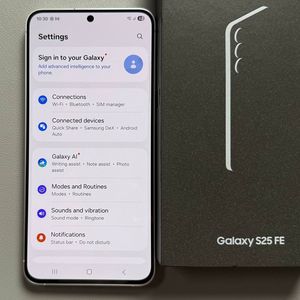
To begin, make sure your Samsung Galaxy S25 FE is unlocked, and you have access to your home screen. Open the main Settings app by finding the gear-shaped icon on your home screen or app drawer. Once inside Settings, scroll down and look for the option labeled "General management." Tap on it to continue. Here, you'll find the option for "Samsung Keyboard settings." Tap on it.


Step 2: Configure Voice Input Options
Inside the Samsung Keyboard settings, scroll until you find the "Voice input" section. You'll have the option to choose between Google Voice typing or Samsung voice input. If you select Samsung voice input, additional options will appear, such as downloading offline language packs. This can be especially useful if you want to use voice typing in various languages without an internet connection. Download the languages you need by selecting them from the available list.


Step 3: Enable Voice Typing on Gboard
If you are using Gboard as your primary keyboard, the process is slightly different. First, open the Gboard app by tapping on its icon from the app drawer or settings. From Gboard's main settings screen, go to "Voice typing".Make sure the toggle switch next to the voice typing option is turned on. Return to your keyboard, and you should now see the microphone icon ready for voice typing.


Step 4: Using Punctuation with Voice Commands
Once you've enabled voice typing on your preferred keyboard, using it is straightforward. Simply tap on the microphone icon and begin speaking. To insert punctuation, such as commas or periods, say the name of the punctuation mark during dictation. For example, saying "Hello comma how are you question mark" will be transcribed as "Hello, how are you?"

With voice typing activated, you're all set to enjoy a seamless hands-free typing experience on your Samsung Galaxy S25 FE.